


















InVideo AI
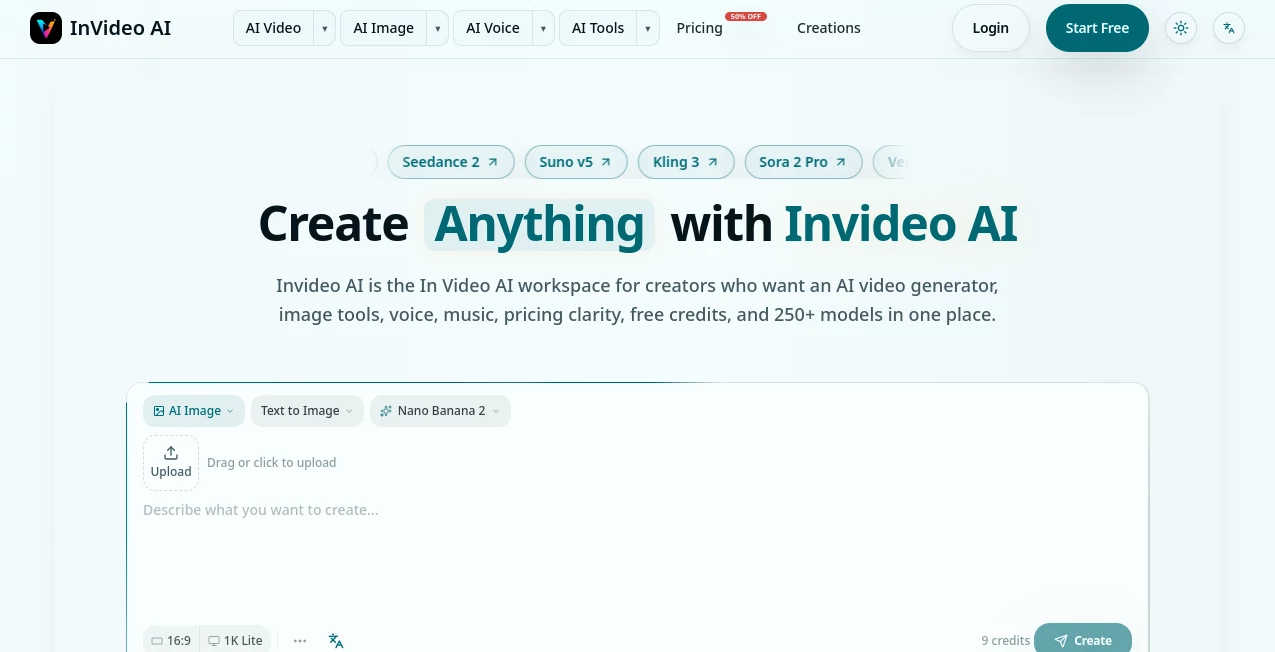
What is InVideo AI?
Creating polished video content often involves far more than writing a script. You need visuals, narration, music, subtitles, editing, and sometimes several different AI models to get the result you actually want. InVideo AI brings many of those steps into a single creative workspace, making it easier to move from an idea to a finished piece of content without constantly switching between different platforms.
The platform is designed for creators, marketers, businesses, educators, and anyone who needs to produce visual content regularly. You can start with a simple prompt, an existing script, or another piece of content and build from there. Instead of treating video creation as a collection of disconnected tasks, the workflow keeps the different stages close together.
One particularly useful aspect is its broad model selection. The current platform provides access to more than 250 AI models covering video, images, voice, music, avatars, and related creative workflows. This makes it appealing to users who want to experiment with different generation models without maintaining multiple subscriptions or learning a completely different interface for every task.
Key Features
- AI-powered text-to-video creation from natural-language prompts
- Image-to-video generation for turning still images into moving content
- Access to a large collection of AI video, image, audio, music, and avatar models
- AI image generation and image editing workflows
- AI voice generation, text-to-speech, speech-to-text, and dialogue tools
- AI music and song generation
- AI avatars and digital presenters
- Video enhancement and upscaling tools
- Background removal and other media cleanup features
- Video face-swap and lip-sync capabilities
- Support for creating content from scripts and detailed prompts
- Commercial licensing for AI-generated content on supported plans
- Credit-based usage that lets users track generation costs
- Free access for testing the platform without entering a credit card
User Interface
The interface is built around a straightforward creative workflow rather than forcing users to understand every available model before starting. A creator can begin with a prompt and then decide what the next step should be. For example, an image can become a video, a video can be enhanced, and additional voice or music can be added as the project develops.
This approach is especially useful for people who are not professional video editors. Someone preparing a product advertisement, YouTube video, social clip, or educational presentation can focus on the desired result instead of spending hours learning a traditional editing timeline.
The platform also separates different creative areas, including video, image, and voice workflows. That makes it relatively easy to move between content types while keeping the overall production process in one place.
Accuracy & Performance
Output quality depends heavily on the model selected, the prompt, the input material, and the type of content being generated. Instead of relying on a single generation engine, the platform gives users access to multiple models, allowing them to choose between different levels of quality, speed, and credit consumption.
For video generation, the available options can range from basic stock-media workflows to more advanced generative models. Higher-quality modes are intended for more realistic movement, acting, environments, and cinematic detail, while lighter options are better suited to testing concepts and producing straightforward content.
This model-based approach is one of the platform's strongest advantages. If the first result does not match the intended style, users have more options than simply rewriting the same prompt repeatedly. They can change the model, adjust the instructions, or approach the project from another creative direction.
Capabilities
The capabilities extend well beyond simple text-to-video generation. A creator can work with text, images, video, audio, music, and avatars as part of a broader production workflow.
For example, a marketer could begin with a product concept, generate supporting visuals, animate selected images, add an AI voice, create background music, and prepare the final video for social media. A YouTube creator could start with a script and then build scenes around it. An educator could turn written material into a visual explanation with narration and supporting footage.
The platform also provides access to a wide selection of recognizable generation models. Depending on availability and plan, users can work with models such as Sora, Veo, Kling, Runway, Midjourney, Flux, and other systems through the same workspace. This makes the service particularly interesting for users who value model choice rather than being tied to one generation engine.
Security & Privacy
Privacy can be important when AI tools are used for client projects, product campaigns, internal materials, or unreleased ideas. The available plans include private project options, while paid usage also provides commercial licensing for generated content according to the applicable plan terms.
Users should still review the platform's current privacy and usage policies before uploading confidential business information, proprietary material, or sensitive personal data. As with any cloud-based creative service, understanding how uploaded content and generated assets are handled is an important part of choosing the right workflow.
Use Cases
Social Media Content: Short videos, promotional clips, visual posts, and campaign assets can be produced without assembling every element manually.
YouTube Production: Creators can start from scripts or prompts and develop narrated videos with supporting visuals, music, and other production elements.
Marketing and Advertising: Businesses can quickly test different creative concepts for advertisements, product launches, promotional campaigns, and branded content.
Product Demonstrations: Product images and descriptions can be transformed into more engaging visual presentations suitable for websites, social channels, or advertising.
Educational Content: Teachers, course creators, and trainers can turn written explanations into visual lessons, narrated clips, and supporting media.
Client Projects: Freelancers and agencies can use the multi-model workflow to explore different visual styles and produce content for multiple clients from one workspace.
Creative Experimentation: Artists and creators can test different image, video, voice, and music models without building separate workflows for each service.
Pros and Cons
Pros
- Large selection of AI models in one workspace
- Supports video, image, voice, music, and avatar creation
- Useful for both beginners and experienced content creators
- Can turn scripts and prompts into complete video projects
- Offers image-to-video and other multi-step creative workflows
- Free access is available without requiring a credit card
- Paid plans include commercial licensing
- Credit usage provides a relatively clear way to measure generation costs
Cons
- Credit consumption can vary significantly between models and generation settings
- Advanced generative models can use considerably more credits than basic workflows
- Results can vary depending on the selected model and prompt quality
- Users producing large volumes of generative video may need a higher-tier plan
- The large number of available models can initially feel overwhelming to new users
Pricing Plans
A free option is available, allowing users to experiment without entering payment details. The current free offering includes a limited credit allocation, daily login bonuses, access to basic AI models, private projects, and the ability to create content without a watermark.
The paid subscription starts at $15 per month for 900 credits on the currently displayed monthly plan. An annual option reduces the effective monthly price to $13 when billed yearly. Paid subscribers receive additional credits, access to a wider range of models, commercial licensing, priority processing, private projects, unlimited downloads, and other benefits.
There are also one-time credit packs for users who need additional generation capacity without changing their regular subscription. For example, the currently displayed credit-pack option provides 1,000 credits for a one-time $20 payment, with purchased credits remaining available for longer-term use according to the current terms.
Credit consumption varies depending on the model, resolution, duration, and generation type. Basic video creation can require substantially fewer credits than advanced generative video, so users who produce content frequently should compare the expected workload with the credit limits of each plan before upgrading.
How to Use It
- Create an account and open the main creative workspace.
- Decide what you want to produce, such as a video, image, voice track, or music asset.
- Write a clear prompt describing the subject, style, audience, format, and desired result.
- Choose an appropriate generation workflow or model.
- Review the estimated credit cost before generating when the option is available.
- Generate the first version and evaluate the result.
- Refine the prompt or switch models if the output needs improvement.
- Continue the project by adding visuals, narration, music, captions, or enhancement tools.
- Preview the final result and export it when it meets your requirements.
A practical approach is to begin with a small test rather than immediately generating a large batch. Once the visual style and workflow are working well, you can scale production and reserve credits for final renders.
Comparison with Similar Tools
Traditional video editors still make sense when you want precise manual control over every frame, transition, layer, and timing decision. Dedicated AI video generators can also be preferable when your priority is a highly specialized generation experience built around one particular model.
The major difference here is breadth. Instead of focusing exclusively on one type of AI generation, this workspace combines video, image, audio, music, voice, avatars, and multiple underlying models. That makes it particularly attractive to creators who regularly move between different types of media.
For a user who only needs conventional timeline editing, a traditional editor may offer more control. For someone who wants to turn an idea into a collection of AI-generated assets and then continue developing those assets into finished content, the broader workflow can be considerably more convenient.
Conclusion
For creators who want to produce more content without assembling a complicated collection of separate AI services, this platform offers a compelling combination of generation tools and model choice. Its biggest strength is not simply the ability to generate a video from text; it is the way video, images, voice, music, avatars, and enhancement tools can fit into one production workflow.
The free option makes it easy to test the experience before spending money, while the paid plans are better suited to people producing content regularly. The credit system is worth understanding, particularly when using high-end video models, but it also gives creators a practical way to manage production costs.
Overall, it is a strong option for marketers, YouTubers, agencies, educators, and independent creators who want a flexible AI-powered production environment and the freedom to experiment with multiple creative models from one place.
Frequently Asked Questions (FAQ)
Can I use the platform for free?
Yes. A free option is available without requiring a credit card. It provides limited credits that can be used to explore supported AI features and create content.
Does it support text-to-video generation?
Yes. Users can describe a desired video with a prompt or provide their own script and generate video content based on those instructions.
Can I use my own script?
Yes. A dedicated script workflow allows users to provide their own text and specify preferences such as media type, background music, subtitle style, language, and other details.
Does it include multiple AI models?
Yes. The platform currently provides access to more than 250 models across video, image, voice, music, and avatar workflows. Available models and usage costs can change over time.
Is AI-generated content commercially usable?
Paid plans currently include commercial licensing for generated content, but users should review the latest licensing terms and any model-specific restrictions before using generated material in commercial projects.
How does the credit system work?
Credits are used for AI generation and other supported features. The amount consumed depends on factors such as the selected model, resolution, duration, and type of generation. More advanced models generally require more credits.
AI Image to Video , AI Video Generator , AI Text to Video , AI Text to Image .
These classifications represent its core capabilities and areas of application. For related tools, explore the linked categories above.

InVideo AI Alternatives Product

Nano Banana …

Leonardo.ai

Seedance 2.0

wan2-6.org

Aura AI

Wan AI

Vidtool AI

Freepik

JoyFlix AI
