Jamdesk
What is Jamdesk?
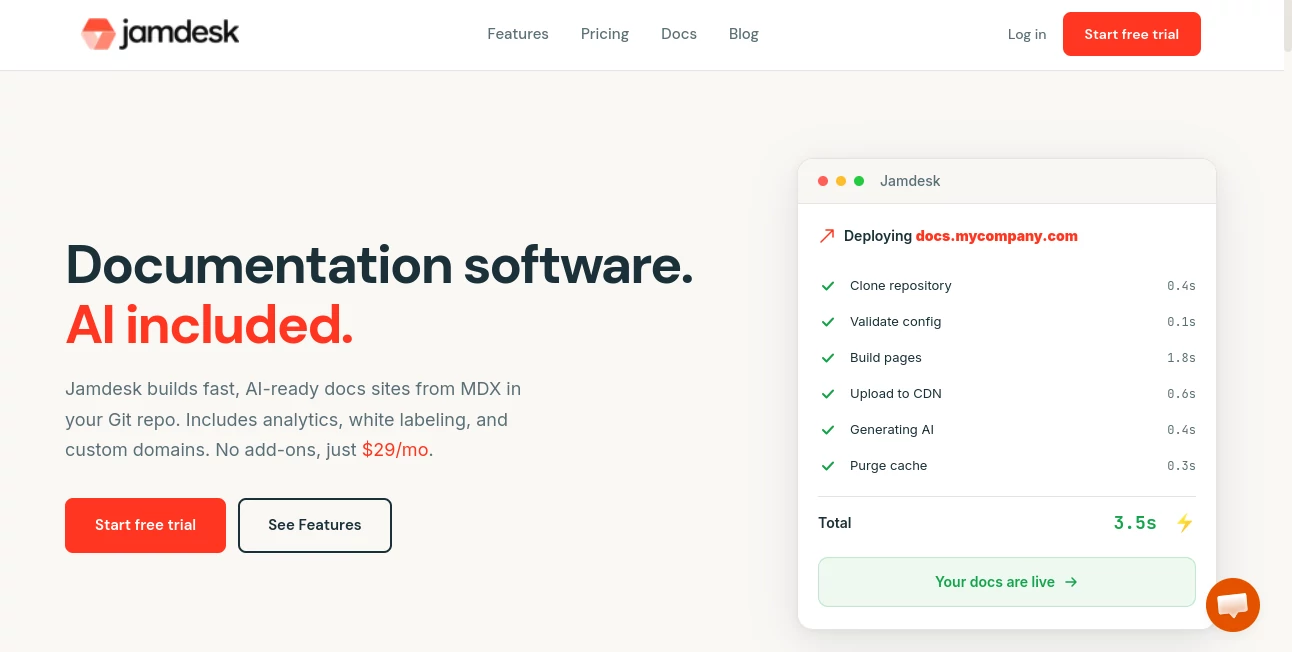
Creating developer documentation often means juggling static site generators, deployment pipelines, search tools, analytics, and multiple third-party services. This platform brings everything together in one place, making it possible to publish modern documentation websites without the usual infrastructure headaches. Teams can write in MDX, connect a GitHub repository, and publish updates automatically with only a few steps. The result is a documentation experience that feels fast, polished, and ready for both human readers and AI assistants.
What makes this solution especially appealing is the balance between developer flexibility and ease of use. Technical writers can work in familiar Markdown-based files, developers can keep documentation alongside code, and businesses can launch professional documentation portals without maintaining complex hosting environments. Built-in AI capabilities, analytics, search, custom domains, and branding options make it suitable for startups as well as larger engineering organizations looking for a streamlined workflow.
Key Features
User Interface
The interface is clean and designed around productivity. Documentation can be edited either directly in the browser with a live preview or inside a preferred code editor using MDX. Navigation is intuitive, multiple professional themes are available, and customization options allow companies to match their own branding without spending hours adjusting layouts or styles.
Accuracy & Performance
Automatic deployment from GitHub helps ensure published content stays synchronized with the latest repository changes. Documentation is distributed through a global CDN for fast loading times, while integrated search helps visitors locate information almost instantly. Build validation, OpenAPI support, and AI-assisted improvements also contribute to maintaining reliable and accurate documentation over time.
Capabilities
- Create documentation directly from MDX files stored in Git repositories.
- Deploy documentation automatically after every GitHub push.
- Generate AI-friendly documentation indexes for modern language models.
- Provide AI-powered chat that answers questions using published documentation.
- Support OpenAPI documentation generation.
- Offer built-in analytics without external services.
- Enable custom domains, SSL, and white-label branding.
- Include command-line tools for development, validation, migration, and deployment.
- Support multilingual documentation structures.
- Migrate content from several popular documentation platforms.
Security & Privacy
Organizations that care about documentation privacy will appreciate the available access controls, password-protected content, enterprise authentication options, and configurable AI features. According to the platform's published policies, customer data is not sold and content used by AI features is not used to train language models. Teams also have the ability to disable AI functionality whenever needed.
Use Cases
- Software companies publishing product documentation.
- API providers creating developer portals.
- SaaS businesses building searchable help centers.
- Engineering teams maintaining internal technical documentation.
- Open-source projects hosting contributor guides.
- Developer relations teams sharing tutorials and SDK documentation.
- Companies migrating away from traditional documentation platforms.
Pros and Cons
- Pros
- Fast deployment directly from GitHub.
- Integrated AI chat and semantic search.
- No complicated hosting or infrastructure management.
- Built-in analytics and SEO features.
- Professional themes with branding support.
- OpenAPI documentation generation.
- Developer-friendly CLI and MDX workflow.
- Custom domains and SSL included.
- Cons
- Best suited for teams already using GitHub workflows.
- Advanced enterprise capabilities may be unnecessary for very small personal projects.
- Some customization still benefits from familiarity with MDX.
Pricing Plans
A free trial is available for new users. Paid plans are offered with a straightforward monthly subscription that includes AI features, analytics, custom domains, branding, and documentation hosting without separate add-ons. Enterprise options are also available for organizations with larger requirements.
How to Use Jamdesk
Start by creating an account and connecting a GitHub repository that contains your documentation files. Write content using MDX, organize pages through the configuration file, and push changes to GitHub. Every update automatically triggers a new build and deployment. Once published, visitors can search documentation, interact with the built-in AI assistant, and browse content served through a fast global delivery network.
Comparison with Similar Tools
Compared with many documentation platforms, this solution focuses on simplicity without sacrificing developer control. Instead of requiring separate hosting providers, search integrations, analytics platforms, or AI plugins, these capabilities are included as part of the core experience. Teams that prefer documentation-as-code workflows can continue using Git while benefiting from managed deployment, modern search, AI-powered assistance, and extensive documentation tooling in one environment.
Conclusion
For software teams that want professional documentation without maintaining complicated infrastructure, this platform offers an impressive combination of speed, flexibility, and modern AI capabilities. Its Git-based workflow fits naturally into existing development processes while reducing operational overhead. Whether the goal is publishing API references, product guides, developer tutorials, or customer help centers, it provides a polished experience for both documentation authors and readers.
Frequently Asked Questions (FAQ)
Does it require coding experience?
No. Basic documentation can be written using simple MDX, while advanced users can take advantage of additional components and developer features.
Can documentation be hosted on a custom domain?
Yes. Custom domains with SSL support are available for professional deployments.
Does it include AI search?
Yes. Visitors can ask questions in natural language and receive answers generated from the published documentation.
Can existing documentation be migrated?
Yes. Migration tools are available for several popular documentation platforms, helping teams move existing content more easily.
Is it suitable for API documentation?
Yes. OpenAPI support and developer-focused features make it a strong choice for publishing API references alongside product documentation.
AI Knowledge Base , AI API Design , AI Developer Docs , AI Developer Tools .
These classifications represent its core capabilities and areas of application. For related tools, explore the linked categories above.

Jamdesk Alternatives Product

ChatFlowchart

Website Audi…

ShipAhead

Where Is Thi…

ModelsLab

DevUtilX

Latency Atlas

Dedoctive

AI Agent Ski…