Keyframe Labs
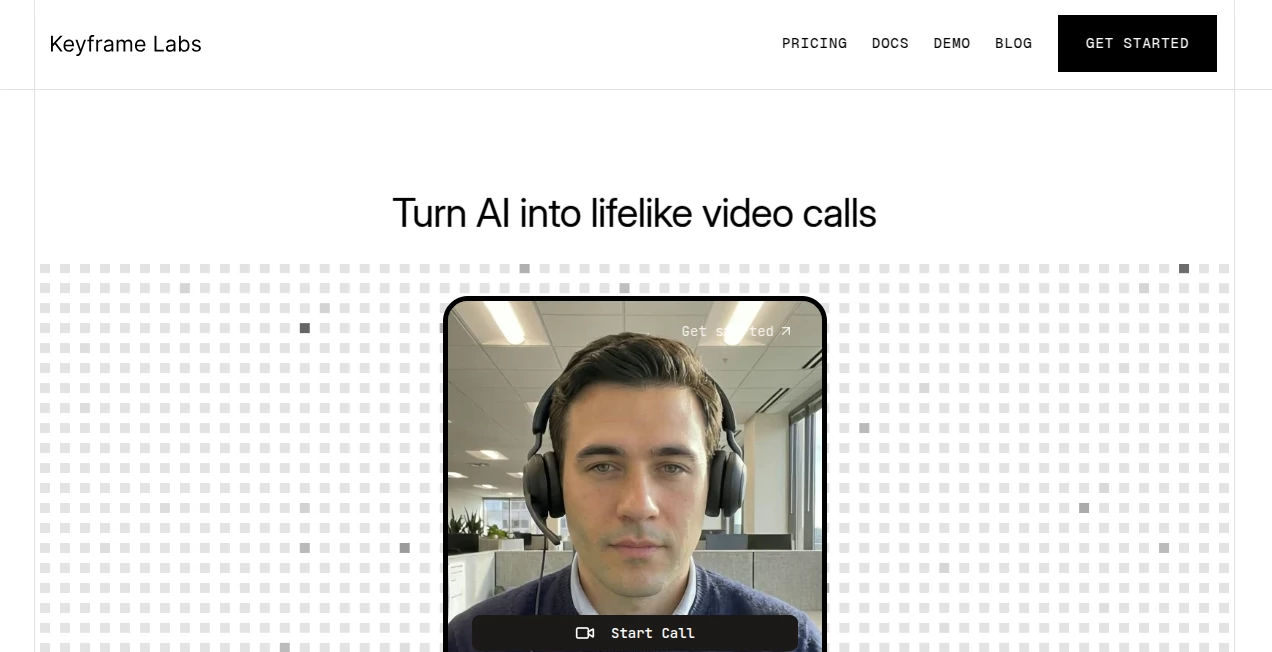
What is Keyframe Labs?
Creating engaging AI conversations is no longer limited to text or voice. This platform introduces a new way to interact with intelligent assistants by transforming them into realistic, face-to-face digital humans. Instead of speaking to a static chatbot, users experience expressive video conversations that feel remarkably natural, making interactions more personal and memorable.
Designed for developers, startups, and enterprises, the platform combines real-time video generation, natural facial expressions, emotional responses, and accurate lip synchronization into a single solution. Integration is straightforward, allowing organizations to embed conversational avatars into existing applications without rebuilding their AI infrastructure from scratch.
Whether the goal is customer support, online education, virtual sales, employee training, or interactive healthcare experiences, the technology provides a polished and scalable foundation for human-like communication. The result is an experience that builds trust while keeping conversations engaging and efficient.
Key Features
User Interface
The platform offers a clean developer-focused experience with documentation, SDKs, APIs, and low-code integration options. Deployment is designed to be simple enough for rapid implementation while still providing flexibility for advanced customization.
- Easy API integration
- Low-code components
- Developer documentation
- Real-time deployment
- Fast onboarding process
Accuracy & Performance
One of the strongest advantages is its impressive responsiveness. Conversations are rendered with very low latency, allowing avatars to react naturally while maintaining synchronized speech, facial expressions, and emotional cues. The realistic movement helps eliminate the robotic feeling often associated with digital assistants.
- Near real-time rendering
- Natural facial expressions
- High-quality lip synchronization
- Smooth conversational flow
- Scalable infrastructure for multiple sessions
Capabilities
The solution goes beyond simple avatar generation by enabling expressive conversational AI for a wide range of business scenarios.
- Photorealistic AI avatars
- Real-time conversational video
- Emotion-aware responses
- Integration with AI agents and LLMs
- Customer support assistants
- Virtual tutors
- Training simulations
- Sales representatives
- Interactive demonstrations
Security & Privacy
Enterprise-ready architecture supports organizations that require reliable deployment and scalable performance. Businesses can integrate their own AI systems while maintaining control over application workflows and user interactions.
- Enterprise-ready APIs
- Scalable cloud infrastructure
- Reliable session management
- Developer-focused architecture
Use Cases
- AI customer support with realistic video conversations.
- Interactive language learning and tutoring.
- Corporate training and role-playing simulations.
- Virtual healthcare consultations.
- Sales representatives powered by conversational AI.
- Financial and consulting assistants.
- Digital receptionists for websites and applications.
- Product demonstrations with expressive AI presenters.
Pros and Cons
Pros
- Highly realistic AI avatars with expressive emotions.
- Very low latency suitable for live conversations.
- Simple integration using APIs and SDKs.
- Supports modern LLM-powered applications.
- Excellent choice for enterprise-scale deployments.
- Suitable for multiple industries and business workflows.
Cons
- Primarily designed for developers and businesses rather than casual users.
- Requires integration into existing applications to unlock its full potential.
- Advanced implementations may require technical expertise.
Pricing Plans
The platform offers usage-based pricing designed for scalable deployments, making it suitable for startups as well as enterprise applications. Businesses can begin with small implementations and expand as demand increases. Enterprise options are available for larger deployments and custom requirements.
How to Use Keyframe Labs
- Create an account.
- Review the API documentation and SDKs.
- Connect your preferred AI model or language model.
- Embed the video components into your application.
- Configure conversational behavior and avatar settings.
- Launch interactive AI video experiences for your users.
Comparison with Similar Tools
Unlike traditional AI chatbot platforms that rely only on text or voice, this solution focuses on photorealistic real-time video conversations. Compared with standard avatar generators, it emphasizes live interaction, emotional expression, and conversational performance rather than producing static videos. Its combination of speed, realism, and developer-friendly integration makes it particularly attractive for organizations building next-generation AI applications.
Conclusion
Organizations looking to create more engaging AI experiences can benefit significantly from conversational video technology. Realistic digital humans help establish stronger connections with users, improve communication, and increase trust in automated interactions. With impressive visual quality, fast response times, and straightforward integration, this platform represents a compelling solution for businesses ready to move beyond traditional chatbots and voice assistants into immersive, face-to-face AI communication.
Frequently Asked Questions (FAQ)
What is this platform designed for?
It enables developers to build real-time AI-powered video conversations using photorealistic digital humans.
Can it work with existing AI models?
Yes. It is designed to integrate with modern language models and conversational AI systems.
Who is the ideal user?
Developers, startups, enterprises, educational platforms, healthcare providers, and customer service teams.
Does it support real-time conversations?
Yes. The platform is optimized for low-latency, interactive video communication.
Is it suitable for enterprise applications?
Yes. It is built to scale and supports enterprise-level deployments with developer-friendly APIs.
AI Video Generator , AI Developer Tools , AI Chatbot , Large Language Models (LLMs) .
These classifications represent its core capabilities and areas of application. For related tools, explore the linked categories above.

Keyframe Labs Alternatives Product

Prelight

Seedance 2.0

Defapi
Veo4AI

Seedance Stu…

PatentFig AI

Sora2 AI Vid…

Pixelfox AI

Lyria 3