


















kikivoice.ai
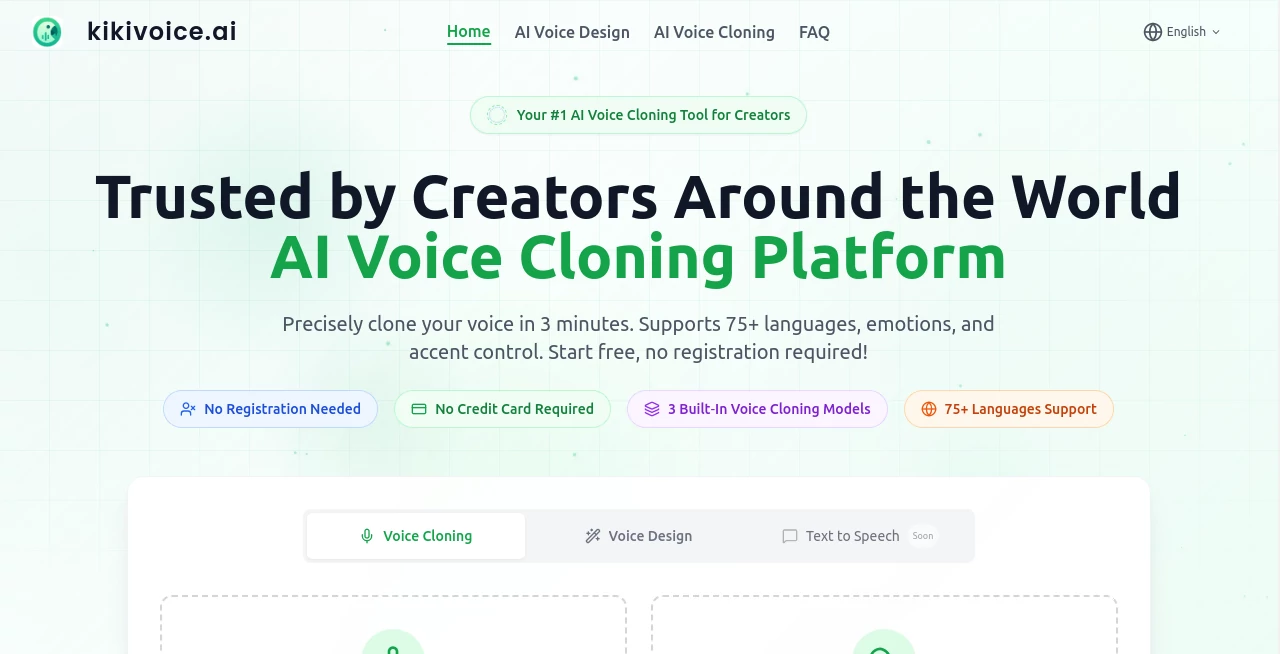
What is kikivoice.ai?
There's a moment every content creator knows well — you've written the perfect script, the visuals are ready, but you still need a voiceover. Booking a studio takes days. Hiring a voice actor costs money. Re-recording yourself for the fifth time is exhausting. That's exactly the gap this platform was built to fill.
KikiVoice is a free, creator-first AI voice cloning and text-to-speech platform that lets you go from a short audio sample to a fully generated voiceover in under three minutes. No account required. No software to install. Just upload a few seconds of clean audio, paste your script, and you're done.
With over 10,000 creators already relying on it for their voice cloning needs, and support for 75+ languages and accents, this tool has quietly become one of the most accessible voice AI platforms available today — and the fact that it's completely free makes it almost impossible to ignore.
Key Features
User Interface
The interface is refreshingly clean. There's no overwhelming dashboard, no long onboarding flow, and no wall of settings to configure before you can do anything useful. You land on the page, upload or record your voice sample, paste your text, pick your model, and generate. That's genuinely it.
Even someone who has never touched a voice AI tool before can get their first result within minutes. The workflow is linear and intuitive, which is rare in a space where most tools seem to compete on complexity rather than simplicity.
Accuracy & Performance
The platform advertises up to 99% similarity to the original voice — and in practice, the results hold up well. The cloned voice retains the natural rhythm, tone, and subtle characteristics of the source audio. It doesn't sound robotic or flat, which has historically been the biggest complaint with AI-generated speech.
Turnaround time is fast. Most generations complete in well under three minutes, which makes it practical for iterative content workflows where you might need to tweak a script and re-generate multiple times.
Capabilities
One of the smartest design choices here is the three-model structure, each built for a different kind of job:
- Kiki Core — Fast and stable. Best for quick drafts, internal content, or any project where speed matters more than expressive nuance.
- Kiki Pro — More expressive, with emotional tone control and advanced audio parameters. This is the one to reach for when the finished product needs to sound genuinely engaging.
- Kiki Multilingual — Designed specifically for global content. Supports 75+ languages and accents, making it possible to localize entire content libraries using a single cloned voice.
This range matters. A YouTuber dubbing their tutorial into Spanish has completely different needs than a podcast producer creating a polished intro. Having purpose-built models instead of one generic option shows real thought went into the product.
Security & Privacy
Privacy is handled responsibly. Uploaded audio data is encrypted and deleted after processing, so your voice samples aren't stored on servers indefinitely. For creators who are cautious about where their biometric data ends up, this is a meaningful detail.
It's also worth noting that commercial usage rights depend on the platform's current terms of service, and users are responsible for ensuring they have proper permissions from any voice owner whose sample they upload. That's a reasonable and legally sound policy.
Use Cases
The range of practical applications is genuinely broad:
- YouTube content creators who want consistent narration without re-recording every time they update a video or expand into a new language.
- TikTok and short-form video producers who need fast, unique voiceovers that stand out from the standard text-to-speech sounds everyone else is using.
- Podcasters who want to produce intros, outros, and sponsorship reads in their own voice even when they're not available to record.
- Online educators and course creators who need to localize training materials into multiple languages at scale — without hiring a different voice actor for each one.
- Marketers who want to maintain a consistent brand voice across campaigns, regions, and formats without going back to the studio every time the copy changes.
- Developers and indie app builders who need a quick way to prototype voice interfaces or add narration to demos.
Imagine running a small e-learning business. You've recorded all your courses in English, but you want to expand into the Spanish market. Traditionally, that means re-recording everything — or hiring someone. With this tool, you upload your original recordings, clone your voice, and generate Spanish versions of every lesson. That's a workflow that used to cost thousands of dollars. Now it's free.
Pros and Cons
- Pro: Completely free to use with no sign-up required — a genuinely rare combination in the AI voice space.
- Pro: Three specialized models give users real control over the output quality and style.
- Pro: 75+ language and accent support makes it one of the most multilingual options available at this price point (which is zero).
- Pro: Fast generation — most outputs ready in under three minutes.
- Pro: Strong privacy practices with encrypted uploads and post-processing deletion.
- Con: The free tier includes watermarked audio; commercial use without watermarks requires a paid plan.
- Con: Audio quality is highly dependent on the quality of the original sample you upload — background noise or low-quality recordings will affect output.
- Con: Commercial usage policies may evolve as the platform grows, so it's worth checking the terms regularly if you're building a production workflow around it.
Pricing Plans
The platform operates on a freemium model:
- Free Plan: Full access to core voice cloning and TTS features, no account required, with watermarked audio output. Ideal for testing, personal projects, and exploring the platform.
- Paid Plans: Starting from approximately $19 per user per month, paid tiers unlock commercial usage rights, remove watermarks, and provide access to higher-quality audio exports and additional features like bulk processing.
The free tier is genuinely functional — not a stripped-down teaser that forces you to upgrade after five minutes. For hobbyists, students, and solo creators just starting out, it covers a lot of ground without spending anything.
How to Use This Tool
Getting started takes less time than it takes to read this section:
- Step 1: Open the platform in your browser — no download or account creation needed.
- Step 2: Upload a clear audio sample of the voice you want to clone, or record directly in the browser. A few seconds of clean audio is enough.
- Step 3: Choose your model — Core for speed, Pro for expression, Multilingual for global content.
- Step 4: Paste or type the text you want the cloned voice to read.
- Step 5: Hit generate. In under three minutes, your audio file is ready to download and use.
For best results, record your voice sample in a quiet environment with minimal background noise. The cleaner the input, the more accurate and natural the output will be.
Comparison with Similar Tools
The AI voice cloning market has several strong players, so it's worth knowing where this one fits:
- ElevenLabs is the premium benchmark — studio-quality emotional voice cloning with a rich API. But it's not free, and it comes with a steeper learning curve. For professional production environments, it's hard to beat. For casual creators or anyone watching their budget, the cost adds up fast.
- Murf AI offers a polished TTS experience with a library of pre-built voices, but voice cloning from custom samples is more limited at lower price points.
- Replica Studios targets the entertainment and gaming industry with enterprise-grade output. Powerful, but not designed for the independent creator market.
Where this platform carves out its own space is the intersection of accessibility and quality. It doesn't require a subscription to get real value. It doesn't demand technical setup. And with three purpose-built models and genuine multilingual support, it punches above its weight class for a free tool.
Conclusion
Voice cloning used to be expensive, complicated, and reserved for studios with real budgets. That's changed. And this platform is one of the clearest examples of how dramatically the barrier to entry has dropped.
Whether you're a solo creator building your channel, a marketer trying to scale content across languages, or a developer prototyping something new — having a fast, free, no-signup voice cloning tool in your workflow is just a smart move. The three-model structure gives you flexibility, the multilingual support opens up global audiences, and the privacy handling means you're not giving up your voice data indefinitely just to use the service.
It's not trying to replace ElevenLabs for professional studio work. But for the vast majority of use cases most creators actually face day to day? It more than holds its own — and it won't cost you a thing to find out.
Frequently Asked Questions (FAQ)
Do I need to create an account to use it?
No. You can start generating voices directly in your browser without signing up for anything. Some advanced features or higher usage limits may require an account as the platform continues to develop.
How long does the voice sample need to be?
Just a few seconds of clear audio is enough to generate a cloned voice. The cleaner and quieter the recording, the better the results.
Can I use the generated audio for commercial projects?
The free tier produces watermarked audio. For commercial use without watermarks, you'll need a paid plan. Always review the current terms of service and make sure you have proper rights to any voice you're cloning.
What languages are supported?
Over 75 languages and accents are supported through the Kiki Multilingual model, covering a wide range of global markets.
Is my uploaded voice data stored permanently?
No. Uploaded audio is encrypted and deleted after processing. Your voice data is not retained on the platform's servers.
What's the difference between the three models?
Kiki Core is optimized for speed and stability. Kiki Pro adds emotional expression and advanced controls for more professional output. Kiki Multilingual is built specifically for generating content in 75+ languages using a single cloned voice.
How long does generation take?
Most voice generations complete in under three minutes, making it practical for iterative workflows where you need to revise and regenerate multiple times.
AI Voice Cloning , AI Celebrity Voice Generator , AI Text to Speech , AI Voice & Audio Editing .
These classifications represent its core capabilities and areas of application. For related tools, explore the linked categories above.

kikivoice.ai Alternatives Product
Sonicker

Fish Voice

Chatterbox T…

ElevenLabs

Qwen3 TTS
vo4 ai

SuperAI

Seed Audio
FluentDictat…
