

















Seed Audio
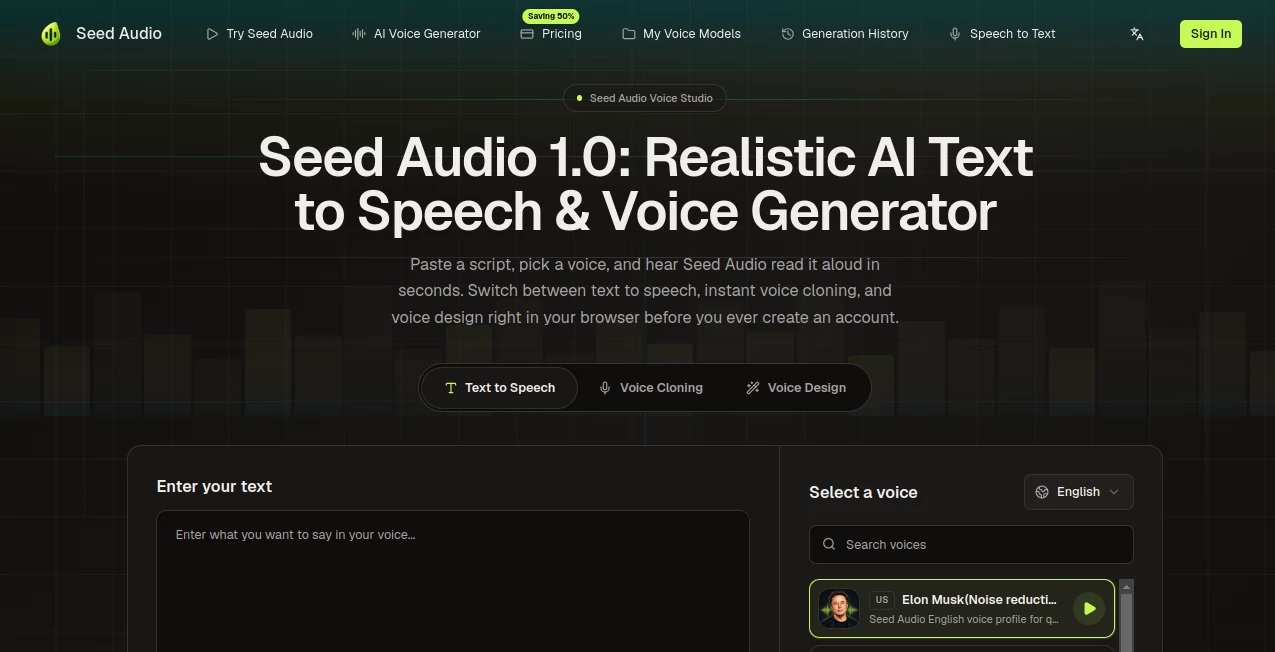
What is Seed Audio?
Creating professional audio content no longer requires expensive recording equipment or long production cycles. This platform brings advanced voice generation, speech synthesis, and audio creation tools into a single browser-based workspace. Whether you need narration for videos, podcasts, audiobooks, training materials, or marketing campaigns, it provides a fast and reliable way to transform text into natural-sounding audio.
What makes this solution particularly appealing is its ability to combine realistic speech generation, voice cloning, multilingual support, and audio customization without overwhelming users with technical complexity. From creators and educators to developers and businesses, it offers a practical approach to modern audio production.
Key Features
User Interface
The interface is clean, intuitive, and designed for quick audio creation. Users can paste text, choose a voice, adjust pacing and emotional tone, preview results, and export files within minutes. The workflow feels straightforward even for beginners.
Accuracy & Performance
Speech output is impressively natural, with smooth pronunciation, realistic rhythm, and expressive delivery. Voice consistency remains strong across longer scripts, making it suitable for audiobooks, educational content, and professional narration.
Capabilities
- AI-powered text-to-speech generation
- Instant voice cloning from consented audio samples
- Multilingual voice support
- Emotion and pacing controls
- Voice design and customization
- Audio generation for podcasts, videos, and courses
- Developer API integration
- Commercial-ready audio exports
Security & Privacy
The platform emphasizes responsible voice creation by requiring consent for voice cloning features. Custom voices remain tied to user accounts, helping organizations maintain greater control over their audio assets and brand voices.
Use Cases
- Video voiceovers and explainers
- Podcast intros and narration
- Audiobook production
- E-learning and training materials
- Marketing and advertising campaigns
- Multilingual content localization
- Customer support and voice applications
- Brand voice creation through cloning technology
Pros and Cons
- Pros
- Natural and expressive speech quality
- Fast voice generation process
- Powerful voice cloning capabilities
- Suitable for commercial projects
- Easy-to-use browser interface
- Supports multiple languages and accents
- Cons
- Advanced features may require paid plans
- Free usage limits are relatively restricted
- Voice cloning requires consented audio samples
Pricing Plans
A free tier is available for testing core functionality with limited character generation. Paid plans unlock higher usage limits, longer script support, additional credits, advanced voice features, and expanded commercial production capabilities.
How to Use Seed Audio
Start by entering or pasting your script into the editor. Select a voice from the available library or create a custom voice using a consented audio sample. Adjust delivery settings such as speed, tone, and emotional style. Preview the generated speech, make refinements if needed, and export the final audio for use in your project.
Comparison with Similar Tools
Many voice generation platforms focus primarily on text-to-speech, while others specialize in voice cloning alone. This solution stands out by combining multiple audio workflows in one environment. Users can generate narration, create cloned voices, customize delivery, and manage multilingual content without switching between separate tools.
For creators who regularly produce podcasts, video content, training materials, or branded audio experiences, the all-in-one approach can significantly reduce production time while maintaining professional quality.
Conclusion
This platform offers an impressive blend of voice generation, speech synthesis, and voice cloning technology in a practical package. Its balance of accessibility and advanced functionality makes it appealing to both individuals and professional teams. For anyone seeking faster audio production with realistic results, it delivers a streamlined experience that can fit a wide range of creative and business workflows.
Frequently Asked Questions (FAQ)
Can I generate audio without recording my own voice?
Yes. You can choose from available AI voices and create audio directly from text.
Does it support voice cloning?
Yes. Users can create custom voice clones using consented audio samples.
Can generated audio be used commercially?
Commercial usage is supported, depending on the selected plan and licensing terms.
Does it support multiple languages?
Yes. The platform includes multilingual voice generation and accent support.
Is there a free plan available?
Yes. New users can access limited free generation before upgrading to higher-capacity plans.