
Kimi
What is Kimi?
I’ve used plenty of chatbots, but few make me feel like I’m actually talking to something that can keep up with long, complex conversations without losing the thread. Kimi does that remarkably well. You can feed it a 200-page document, a full codebase, or a detailed project brief, and it stays coherent, insightful, and surprisingly helpful from start to finish. It’s the kind of AI that doesn’t just answer questions — it reasons alongside you, spots connections, and helps you move forward instead of just giving generic replies.
Introduction
In a sea of AI chat tools that feel similar, Kimi stands out by excelling at the things that matter most for serious work: massive context windows, strong reasoning, fast responses, and practical features like coding assistance and agentic workflows. Built by Moonshot AI, it has earned a loyal following among developers, researchers, students, and professionals who need an AI that can handle real complexity without constantly forgetting earlier parts of the conversation. It’s powerful enough for advanced users but friendly enough that you can jump in and get value immediately. The balance of depth and usability is what keeps people coming back day after day.
Key Features
User Interface
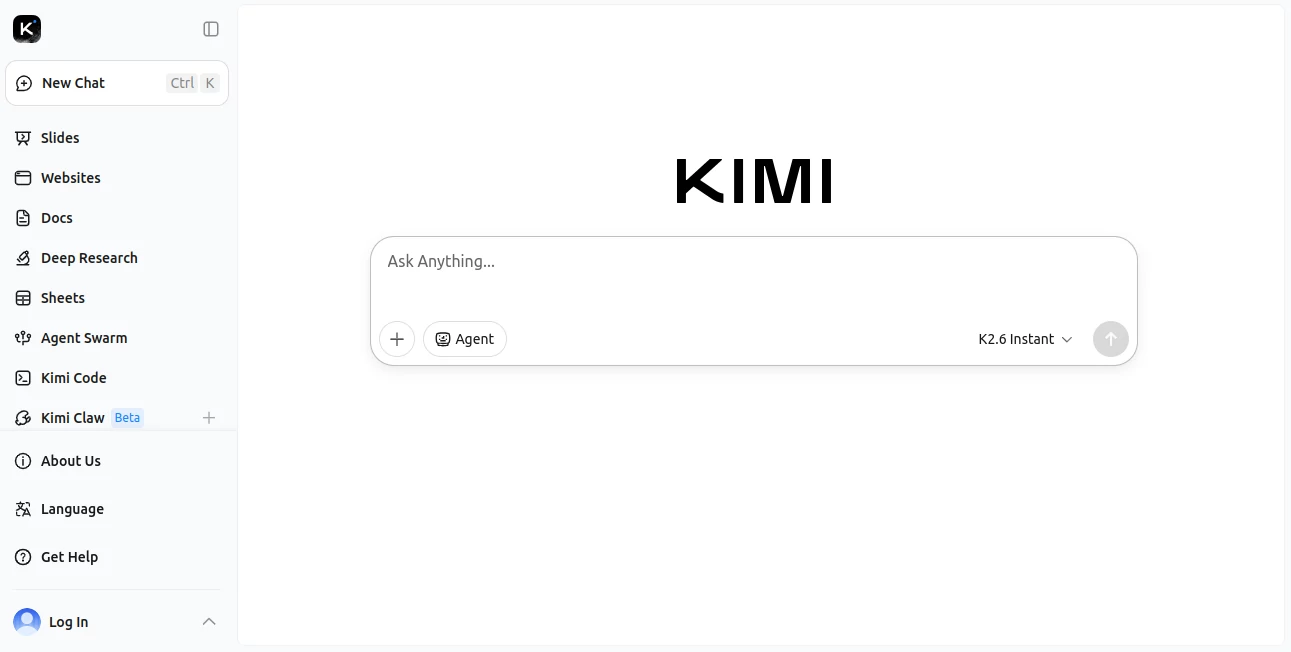
The chat interface is clean and focused. You can upload files, paste long text, or just start typing. Conversations feel natural, with the model maintaining context beautifully even after dozens of exchanges. Features like web search, document analysis, and code execution are integrated smoothly so you don’t have to jump between tools. It’s one of those platforms where the design gets out of your way and lets you focus on the actual work.
Accuracy & Performance
Kimi shines when given complex tasks. It handles long documents with impressive accuracy, reasons step-by-step on difficult problems, and delivers fast responses even on substantial inputs. Developers particularly praise its coding abilities — it understands structure, debugs effectively, and can work with large codebases. The performance feels reliable rather than flashy, which is exactly what you want when you’re depending on it for important work.
Capabilities
Beyond standard chat, it offers strong document analysis, web browsing, code generation and explanation, agent-like task handling, and excellent multilingual support. The long context window means you can maintain detailed projects or research threads over many sessions. It also supports creative tasks, data analysis, and learning — making it a versatile daily companion rather than a one-trick tool.
Security & Privacy
Your conversations and uploaded files are handled with care. The platform provides good privacy controls and doesn’t use your data for training in ways that compromise trust. For professionals handling sensitive information, that thoughtful approach adds confidence when using it for real work.
Use Cases
A software engineer pastes a large codebase and gets clear explanations plus suggestions for improvements. A researcher uploads academic papers and gets comprehensive summaries with key insights connected across documents. A student maintains a long-running study thread with the AI remembering previous discussions and building on them. A content creator brainstorms ideas, outlines articles, and refines drafts all in one flowing conversation. It adapts naturally to deep work sessions where context and continuity matter most.
Pros and Cons
Pros:
- Excellent long-context understanding that keeps conversations coherent.
- Strong reasoning and coding capabilities that feel practical and reliable.
- Fast, responsive performance even with substantial inputs.
- Clean, focused interface that supports deep work.
- Versatile enough for both professional and personal use.
Cons:
- Some advanced agent features may still be expanding.
- Usage limits on free tier encourage upgrading for heavy daily use.
Pricing Plans
It offers a capable free tier for regular use, with paid plans that unlock higher limits, faster responses, and priority access to newer models. The pricing feels reasonable for the depth and reliability it provides — many users find the paid tiers quickly pay for themselves through time saved and better output quality.
How to Use Kimi
Head to the site and start a new conversation. Type your question, paste text, or upload documents. For best results, give clear context upfront and build on the conversation naturally. Use the built-in tools for web search or code execution when needed. Save important threads for later reference. The more you use it, the better it feels as a thinking partner — it truly improves with continued conversation.
Comparison with Similar Tools
While many chatbots excel at short, quick answers, Kimi stands out in its ability to handle long, nuanced discussions without losing coherence. It combines strong reasoning with practical tools in a way that feels more grounded than some flashier alternatives. For users who value depth, context, and reliability over novelty, it often becomes the daily driver of choice.
Conclusion
In a crowded AI landscape, Kimi earns its place by doing the fundamentals exceptionally well: understanding context, reasoning clearly, and delivering consistent value over long interactions. It feels less like a novelty and more like a capable colleague you can rely on. Whether you’re coding, researching, learning, or creating, it helps you think better and move faster. For anyone serious about getting real work done with AI, it’s worth experiencing firsthand.
Frequently Asked Questions (FAQ)
How good is the long-context performance?
Exceptional — it maintains coherence across very long conversations and documents.
Is it good for coding?
Yes, many developers use it daily for explanation, debugging, and generation.
Can I upload files?
Yes — documents, codebases, and images are supported with strong analysis.
How does the free tier compare?
It’s generous for regular use; paid plans add speed and higher limits for heavy users.
Is my data private?
Conversations are handled with good privacy practices suitable for professional work.
AI Chatbot , AI Education Assistant , AI Developer Tools , AI Productivity Tools .
These classifications represent its core capabilities and areas of application. For related tools, explore the linked categories above.

Kimi Alternatives Product

Mexty AI

Astic AI

BootstrapKing

ieltswriting…

SkipBait

InspiroBot

Blushly Chat

SciSpace

ZynfoAI