
Kinovi
What is Kinovi?
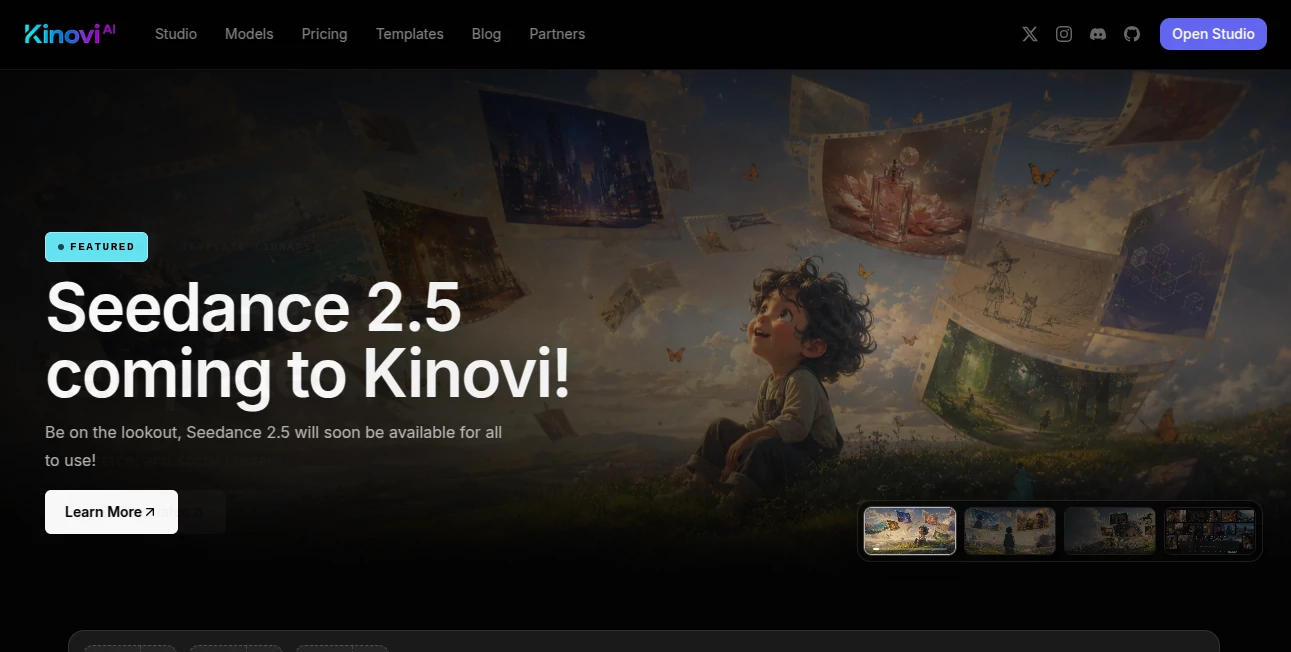
Creating professional AI-generated visuals often means juggling multiple tools, learning different interfaces, and switching between creative and developer workflows. This platform brings everything together in one place, making it possible to generate images, videos, and creative assets while offering seamless API access for automation. Whether you're producing marketing campaigns, social media content, product demonstrations, or creative storytelling, the experience feels organized, modern, and efficient.
Instead of focusing on a single AI model, it provides access to multiple leading-generation models through one unified workspace. Creators can manage assets, experiment with different generation styles, reuse references, and organize projects without unnecessary complexity. Developers benefit from the same ecosystem through a public REST API, allowing generated content to become part of larger applications and production pipelines. This combination makes the platform appealing to both individual creators and growing teams.
Key Features
User Interface
The dashboard is clean and thoughtfully organized. Images, videos, templates, references, and generated assets are easy to locate, making creative projects feel structured instead of overwhelming. Ready-made templates help users begin quickly, while galleries and asset management simplify long-term content production.
Accuracy & Performance
The platform supports several high-quality AI generation models capable of producing detailed images and smooth short-form videos. Users can select different models depending on quality, speed, and production needs, making it suitable for experimentation as well as commercial projects. Fast generation options also reduce waiting time during creative iterations.
Capabilities
- Create AI-generated videos from text prompts.
- Generate videos using existing images as references.
- Produce image-to-image creative transformations.
- Access multiple leading AI models from one interface.
- Organize projects with galleries and reusable assets.
- Use creative templates for marketing, social media, and e-commerce.
- Generate synchronized visual content for various formats.
- Automate content generation through a public REST API.
- Support both creators and software developers in one ecosystem.
- Scale production with flexible credit-based usage.
Security & Privacy
Projects are managed within a dedicated workspace where assets remain organized and accessible. API authentication enables secure integration for developers, while commercial usage options make the platform practical for business environments. Teams can build automated creative workflows without sacrificing organization or control.
Use Cases
- Producing engaging social media videos.
- Creating promotional advertising campaigns.
- Designing e-commerce product content.
- Generating visual concepts for creative agencies.
- Building automated AI content pipelines.
- Creating marketing assets for startups.
- Producing educational and training videos.
- Rapid prototyping for creative ideas.
- Supporting SaaS products with AI media generation.
- Developing custom applications powered by AI-generated visuals.
Pros and Cons
- Pros
- Unified workspace for both images and videos.
- Access to multiple popular AI generation models.
- Built-in API for developers.
- Creative templates accelerate production.
- Flexible pay-as-you-go pricing.
- Asset management improves workflow organization.
- Cons
- Free usage is limited by available credits.
- Advanced features may require some experimentation.
- Heavy production workloads can consume credits quickly.
Pricing Plans
The service follows a pay-as-you-go credit system instead of requiring a recurring subscription. Users purchase credit packages that can be used across both the visual studio and API. Credits do not expire, making the pricing flexible for occasional creators as well as businesses with larger production requirements.
How to Use Kinovi
- Create an account.
- Open the creator workspace.
- Select an image or video generation model.
- Write a prompt or upload reference media.
- Adjust settings such as duration, aspect ratio, or quality.
- Generate the content.
- Review and organize the results.
- Download assets or automate future generations through the API.
Comparison with Similar Tools
Unlike many AI creative platforms that specialize in only image generation or only video generation, this solution combines both inside one workspace while also providing developer-friendly API access. The inclusion of multiple generation models, reusable assets, template libraries, and automation capabilities makes it suitable for individuals, agencies, and software companies looking to centralize their AI creative workflow instead of relying on several disconnected services.
Conclusion
For creators who regularly produce visual content, having a single platform that supports images, videos, templates, asset management, and API automation can significantly simplify daily work. The flexible credit system, modern interface, and broad selection of AI models create an experience that feels practical rather than restrictive. It is an excellent choice for marketers, content creators, developers, and businesses that want professional AI-generated media without maintaining multiple creative platforms.
Frequently Asked Questions (FAQ)
Can beginners use this platform?
Yes. The visual workspace and ready-made templates make it approachable even for users without technical experience.
Is coding required?
No. The visual studio works without programming, while developers can optionally integrate the REST API.
Can generated content be used commercially?
The platform supports commercial usage for generated content according to its published policies.
Does it support both images and videos?
Yes. Users can generate images, videos, and work with multiple AI models from the same workspace.
How does the pricing work?
Users purchase credit packs that can be used across the studio and API without recurring monthly subscriptions.
AI Image to Video , AI Video Editor , AI Video Generator , AI API Design .
These classifications represent its core capabilities and areas of application. For related tools, explore the linked categories above.

Kinovi Alternatives Product

ai seedance …

ViewMax Stud…

happyhorse

Shoorts AI

Visfeng AI F…

AI Motion Co…

Subclip

happyhorsevi…
RightAI