LexDraft AI
What is LexDraft AI?
There's something deeply satisfying about opening Microsoft Word, typing a one-sentence description of what you need, and watching a solid first draft appear — complete with jurisdiction-aware clauses, proper structure, and even verified citations. No switching tabs, no copy-pasting from old documents, no wrestling with generic templates. This tool lives right where lawyers already work, turning the most repetitive parts of drafting into something almost enjoyable. I've seen solo practitioners cut their NDA time from hours to minutes and in-house teams finally stop maintaining massive clause libraries. It doesn't replace legal judgment — it simply removes the drudgery so you can focus on the parts that actually matter.
Introduction
Most lawyers still spend far too much time on routine agreements — tweaking old templates, chasing defined terms, and double-checking cross-references. LexDraft changes that experience by bringing powerful AI directly into Word as a native add-in. Describe what you need in plain English, pick the jurisdiction, and get a professional first draft in under a minute. Then use its surgical editing tools to refine only the clauses that need attention. It's built by people who understand real legal workflows, which shows in every detail — from word-level redlines to attorney-authored playbooks that catch what humans often miss under pressure.
Key Features
User Interface
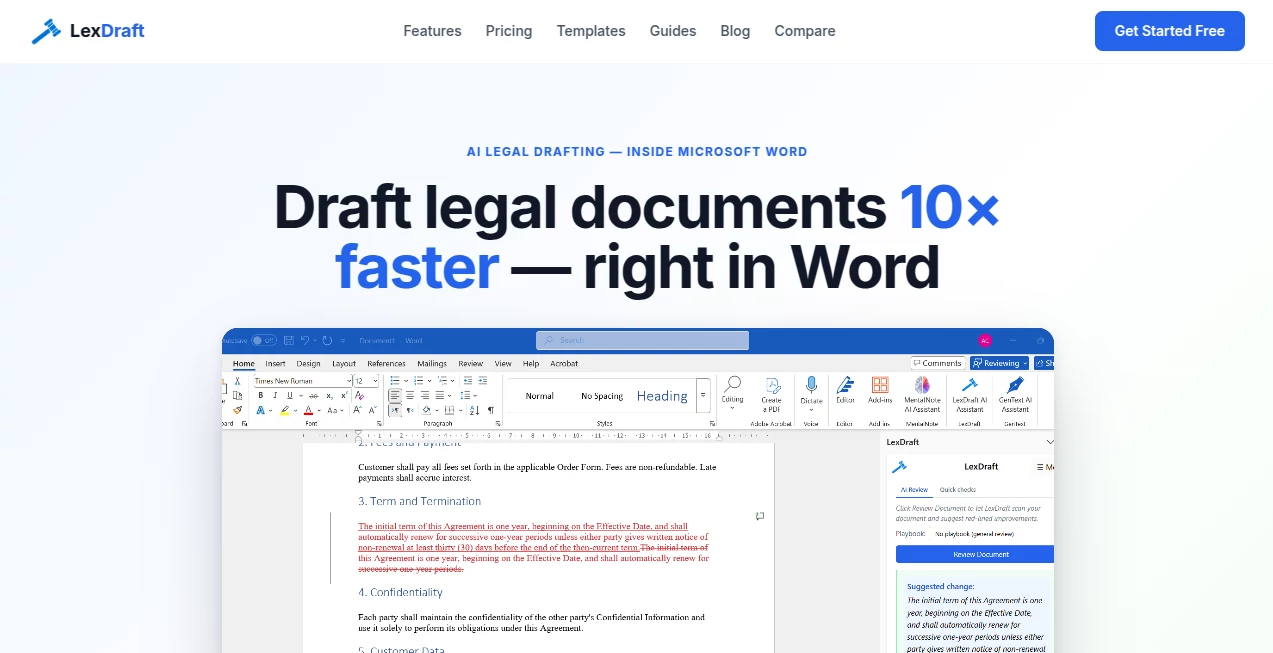
The add-in sits quietly in your Word ribbon until you need it. A clean sidebar appears when you summon it — no overwhelming dashboards or hidden menus. You type your intent, answer a couple quick clarifying questions, and the draft materializes directly in your document. The interface feels like it was designed by someone who actually bills by the hour: fast, focused, and respectful of your existing workflow. No context switching, no new platform to learn — just better drafting inside the tool you already open every morning.
Accuracy & Performance
The drafts are remarkably solid for a first pass. Jurisdiction-specific nuances (California non-competes, EU data clauses, etc.) are handled automatically. Every case citation comes with a verified badge, cross-checked against real court records so you never risk a hallucinated precedent. Edits happen at the word level rather than rewriting entire paragraphs, preserving your formatting and surrounding language. In practice, it feels reliable enough that many users trust it for initial drafts of standard agreements they review manually afterward.
Capabilities
It supports NDAs, employment agreements, consulting contracts, service agreements, and more. Built-in playbooks apply attorney-reviewed rules during review. Quick checks catch defined-term drift and broken cross-references instantly. You can request surgical redlines on third-party contracts, get plain-English summaries in the margin for client explanations, and generate jurisdiction-aware language without manual tweaking. Everything stays inside Word, so your existing styles, numbering, and track-changes habits remain intact.
Security & Privacy
Your documents never leave your control. The tool uses end-to-end encryption in transit, applies strict no-retention policies, and was built with legal-grade confidentiality in mind. No training on user data, no unnecessary storage. For firms and in-house teams handling sensitive client work, that level of care provides genuine peace of mind.
Use Cases
A solo employment lawyer in California generates compliant offer letters and NDAs in minutes instead of pulling from outdated templates. An in-house counsel at a growing SaaS company drafts MSAs with proper data protection language tailored to multiple jurisdictions. A legal ops team reviews vendor contracts by uploading them and getting targeted redlines and missing-clause warnings. Even law students use it to understand structure and common clauses while learning. Wherever routine legal drafting eats time, this tool quietly gives it back.
Pros and Cons
Pros:
- Lives natively inside Word — no new apps or workflow disruption.
- Jurisdiction-aware drafting saves hours of manual adjustment.
- Surgical word-level edits preserve your existing document style.
- Verified citations and quick checks reduce embarrassing mistakes.
- Generous free tier lets you test real value before committing.
Cons:
- Still requires human review — it's a powerful assistant, not a replacement for legal judgment.
- Best for standard agreements; highly bespoke or novel deals need more customization.
- Some advanced enterprise features (SSO, audit logs) are in higher tiers.
Pricing Plans
The free tier includes meaningful usage — enough for 3–5 NDAs or similar documents per month — with no credit card required. Paid plans unlock unlimited drafting, advanced redlining, priority support, and team features. Pricing is positioned as a fraction of the time it saves, making it an easy decision for anyone who drafts regularly. Many users report the tool pays for itself after the first busy week.
How to Use LexDraft
Install the free add-in from Microsoft AppSource. Open Word, describe what you need in plain English (“Mutual NDA between a California SaaS company and a vendor, 24-month term”), select jurisdiction, and let it generate. Review the draft, use surgical edits or playbooks to refine, and accept tracked changes as needed. For incoming contracts, paste them in and request redlines or missing-clause checks. Save, share, or iterate — the entire process stays inside your familiar Word environment.
Comparison with Similar Tools
Many AI legal tools force you into separate platforms with upload/download cycles and generic outputs. This one stays inside Word, respects your formatting, and focuses on surgical precision rather than whole-document rewrites. Where others produce impressive but sometimes risky first drafts, the combination of verified citations, jurisdiction awareness, and clean integration makes it feel like a true professional colleague rather than an experimental assistant.
Conclusion
Good legal drafting has always been about precision, care, and experience. This tool doesn't replace those qualities — it protects them by removing the repetitive, time-consuming work that leads to burnout and errors. It lets lawyers spend more time thinking about strategy and client needs and less time copying clauses. For anyone who drafts contracts regularly, the difference in daily workflow is noticeable from the very first use. Sometimes the best tools are the ones that simply let you do what you do best — faster, cleaner, and with more confidence.
Frequently Asked Questions (FAQ)
Is it safe for client work?
Yes — end-to-end encryption and strict no-retention policy. Many law firms and in-house teams use it daily.
Do I need to leave Word?
No — everything happens inside your existing Word document. No uploads or separate platforms.
How accurate is the jurisdiction handling?
It adjusts for all 50 US states plus major international jurisdictions, including non-compete rules, governing law, and notice periods.
Can I customize the output?
Absolutely — full editing control, surgical redlines, and playbooks that learn your preferences over time.
Is there a free way to try it?
Yes — install the add-in and start with the generous free tier. No credit card needed.
These classifications represent its core capabilities and areas of application. For related tools, explore the linked categories above.

LexDraft AI Alternatives Product

Clearterms

Harvey

TuCanChat

AI Complianc…