
Lexica
What is Lexica?
I still remember the first time I typed a vague idea into an AI image generator and got back something completely different from what I had in my head. Then I found this platform and everything clicked. It’s like having a massive, searchable library of what actually works — millions of real AI-generated images with the exact prompts that created them. No more guessing. No more wasting time on prompts that fall flat. You search, you see what people actually got, and suddenly your own generations improve dramatically. It’s become my secret weapon whenever I need inspiration or want to understand why certain prompts produce magic.
Introduction
Creating great AI art is part vision, part craft. The hardest part is often knowing exactly what words will bring your idea to life. This platform solves that by showing you what’s already working. With millions of images and their original prompts, it turns trial-and-error into smart, informed creation. Whether you’re a complete beginner trying to get your first decent result or an experienced creator looking for fresh techniques, it gives you a clear path forward. The community has grown around it because it respects both the art and the process — helping people move faster while learning along the way.
Key Features
User Interface
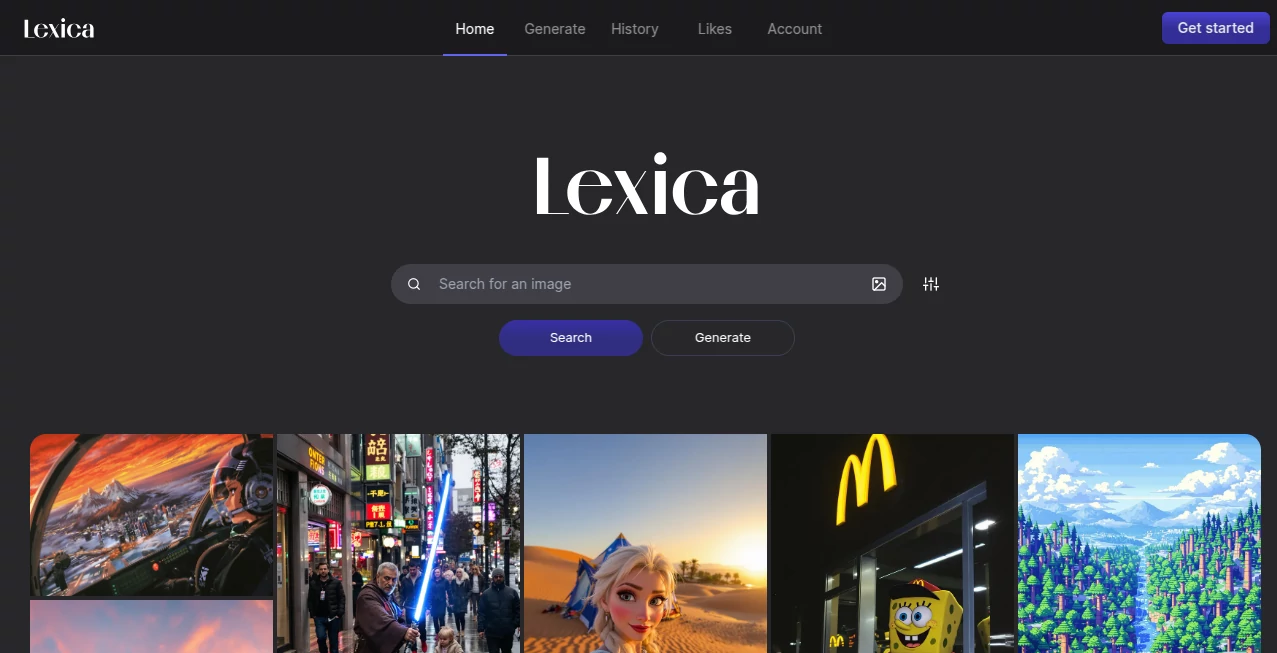
The design is clean and addictive. A big search bar sits at the top, and as soon as you start typing, beautiful results appear instantly. You can click any image to see the full prompt, negative prompt, model used, and parameters. There’s also an image search feature — upload a picture and find similar styles and prompts. Everything loads fast and feels intuitive, like browsing a very well-organized art gallery where every piece comes with its recipe.
Accuracy & Performance
The search is remarkably good at understanding intent. Search for “cyberpunk cat in rain” and you’ll get relevant, high-quality results instead of random noise. Prompts are shown exactly as used, so you can copy, tweak, and experiment with confidence. The library is huge and keeps growing, which means you’re almost always able to find useful references, even for quite specific ideas.
Capabilities
You can search by text, by image, or by combining both. There are filters for style, quality, model, and aspect ratio. You can explore trending prompts, save favorites, and study how small changes in wording create dramatically different results. It’s especially powerful for learning prompt engineering — seeing thousands of examples teaches you patterns and techniques you’d struggle to discover on your own.
Security & Privacy
Your searches and saved collections stay private to your account. The platform focuses on being a helpful creative tool rather than collecting unnecessary data. You can explore freely without feeling watched or pushed toward accounts until you want the extra features.
Use Cases
A digital artist searches for atmospheric forest scenes, studies the best prompts, and creates a whole series in their own style. A product designer looks for UI inspiration and finds beautiful dashboard examples with the exact prompting techniques used. A marketer needs a specific aesthetic for campaign visuals and quickly finds matching references to guide their AI generations. Even hobbyists use it late at night when they have a wild idea and want to see if someone else has already cracked the prompt code. It fits anywhere creativity meets AI imagery.
Pros and Cons
Pros:
- Enormous, high-quality library with real, working prompts.
- Image-to-image search is surprisingly effective.
- Helps you learn prompting naturally through examples.
- Fast, clean interface that makes exploration enjoyable.
- Free to use for most casual and serious exploration.
Cons:
- Some very new or ultra-niche styles have fewer examples.
- Advanced filtering and collections require an account.
Pricing Plans
The core experience is free and already incredibly useful. Paid plans unlock more search credits, advanced filters, priority access during peak times, and larger collections. For most people doing regular creative work, the free tier goes a long way, while serious users appreciate the extra power when they need it. Pricing feels fair for the value it delivers to daily creators.
How to Use Lexica
Go to the homepage and start typing your idea. Browse the results and click any image that catches your eye to see the full prompt. Copy what you like, make small changes, and test in your favorite generator. For even better results, upload a reference image and see similar styles and prompts. Save the best ones to collections so you can build your own reference library over time. The more you use it, the better you get at prompting — it’s a virtuous cycle.
Comparison with Similar Tools
Many AI galleries show pretty pictures but hide the prompts or offer poor search. This platform stands out by making the prompts the star of the show and pairing them with excellent search tools. While other sites feel like random collections, this one feels purposeful and educational. It’s less about passive browsing and more about actively improving your own craft.
Conclusion
Good AI art isn’t just about having the latest model — it’s about knowing how to speak to it. This tool bridges that gap beautifully by showing you what actually works, from thousands of real examples. It turns frustration into flow, random guessing into confident creation, and solo experimentation into a shared learning experience. For anyone serious about AI imagery, it’s quickly becoming one of the most valuable resources available.
Frequently Asked Questions (FAQ)
Is it completely free?
Yes for core searching and browsing. Paid plans add extra features and higher limits.
Can I search using my own image?
Yes — upload any picture and it will find similar styles and prompts.
Are the prompts accurate?
They show exactly what was used to generate that specific image.
Can I use the images commercially?
Check the original creator’s license, but the prompts themselves are great for learning and inspiration.
How big is the library?
Millions of images and growing every day.
AI Art Generator , AI Design Generator , AI Image to Image , AI Text to Image .
These classifications represent its core capabilities and areas of application. For related tools, explore the linked categories above.

Lexica Alternatives Product

Flux 2 Cloud

Nanobanana 2

Square Image

AI Signature…

NB2 Hub

BeYourCover
chibi art

StyleCut
Z-Image Gene…