Lightspeed
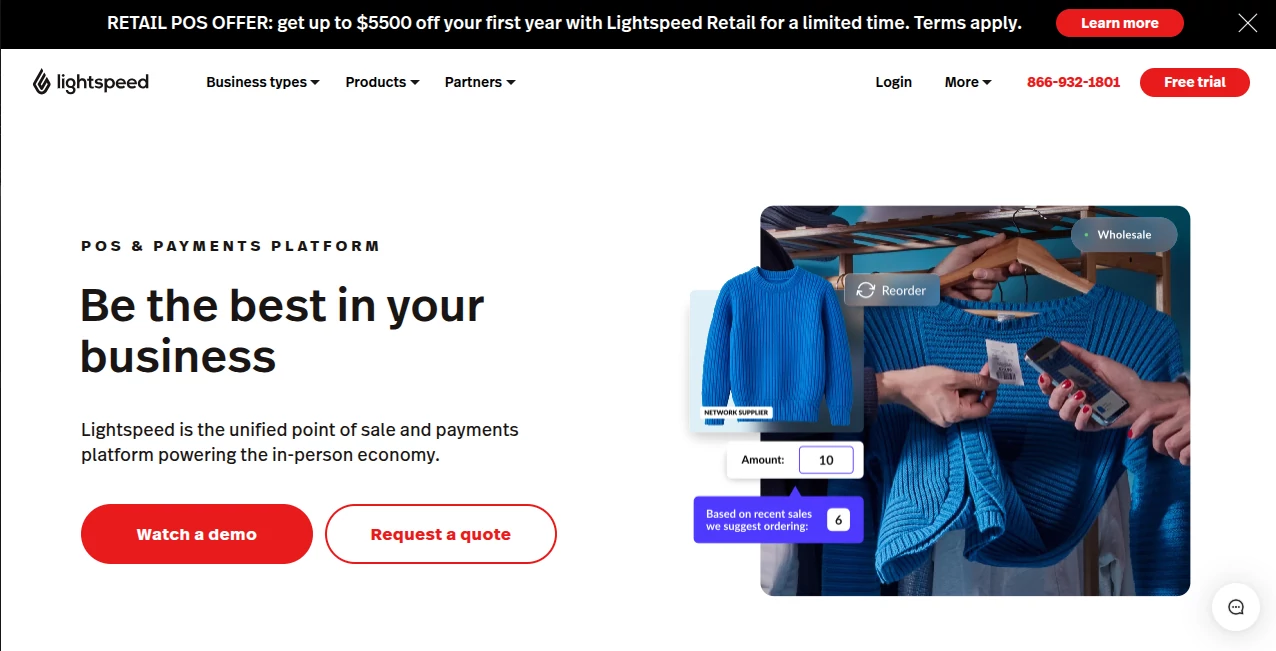
What is Lightspeed?
Running a retail store, restaurant, or golf course today means juggling sales, inventory, staff, and online orders all at once. When things get busy, the last thing you need is a clunky system slowing you down. This platform brings everything together in one modern, reliable place. I’ve seen owners go from stressed about daily operations to confidently scaling their business because the tools actually support growth instead of fighting it. It feels built for real-world use — fast at the counter, smart behind the scenes, and flexible enough to fit how your business actually works.
Introduction
Lightspeed has earned its reputation by focusing on businesses that want to do more than just ring up sales. Whether you run a busy retail shop, a full-service restaurant, or a golf course with complex operations, it combines point-of-sale speed with powerful inventory, reporting, and omnichannel capabilities. The system is highly configurable, so it adapts to your workflows rather than forcing you to change how you work. Many owners mention the same thing after switching: they finally have visibility and control without the daily headaches. It’s the kind of platform that grows with you instead of holding you back.
Key Features
User Interface
The interface is clean and intuitive, even during the busiest hours. Staff can quickly process payments, look up inventory, or issue refunds without hunting through menus. Managers get a clear dashboard with real-time insights they can actually use. It feels fast and responsive on both terminals and mobile devices, which matters when you’re moving between the sales floor and back office. New team members pick it up quickly, reducing training time significantly.
Accuracy & Performance
Transactions fly through smoothly even during rush periods, with reliable inventory updates that prevent overselling. Real-time reporting gives you accurate pictures of what’s selling, what’s not, and where opportunities exist. The system handles complex operations — multi-location inventory, B2B wholesale, or restaurant table management — without slowing down. Users consistently praise how stable it stays under pressure.
Capabilities
It offers robust inventory management with automated purchase orders and low-stock alerts, seamless payments (including contactless), omnichannel selling that connects in-store and online, detailed analytics, staff management tools, and strong integrations with the apps you already use. Retailers love the wholesale and B2B features, restaurants benefit from kitchen display systems and table management, and golf courses get specialized tee sheet and F&B tools. Everything works together so you’re not switching between five different programs.
Security & Privacy
Payment processing is secure and compliant, with data protection built in at every level. You maintain full control over your business information while benefiting from cloud reliability and regular updates. For businesses handling customer payments and sensitive data daily, that peace of mind is invaluable.
Use Cases
A boutique owner manages inventory across multiple locations and sees exactly which items are moving, helping her buy smarter and reduce dead stock. A restaurant manager tracks table turns and menu performance in real time, making quick decisions that boost revenue. A golf course operator runs tee sheets, pro shop sales, and food service from one system, simplifying what used to be chaotic. Independent retailers competing with big chains use the analytics to personalize customer experiences and compete on service rather than price.
Pros and Cons
Pros:
- Truly unified platform — POS, inventory, e-commerce, and payments all work together.
- Excellent real-time reporting that helps you make better daily decisions.
- Highly configurable to match how your specific business operates.
- Strong support and onboarding that actually helps during the switch.
- Scales smoothly as you grow from single location to multiple sites.
Cons:
- Full power shines brightest for growing or multi-location businesses (smaller single shops may not need everything).
- Learning all the advanced features takes some time, though basics are quick to adopt.
Pricing Plans
Pricing is tailored to different business types and sizes, with transparent options for retail, restaurant, and golf solutions. Many businesses find the investment pays for itself through better inventory control, faster operations, and improved customer experiences. They often run promotions and offer clear demos so you can see the return before committing.
How to Use Lightspeed
Start with a personalized demo to see how it fits your operations. During onboarding, their team helps configure the system to match your workflows. Staff learn the POS quickly at the counter, while managers explore reporting and inventory tools. Use mobile features on the sales floor, run reports from anywhere, and connect your online store for true omnichannel selling. The platform becomes more valuable the more you use it, revealing insights you didn’t even know you needed.
Comparison with Similar Tools
Many POS systems feel either too basic or overly complicated. This one stands out by balancing power with usability, offering deeper inventory and omnichannel tools than simpler square-style solutions while remaining more approachable than heavy enterprise systems. The combination of modern design, reliable performance, and genuine support makes it a stronger long-term choice for businesses serious about growth.
Conclusion
Running a successful retail or hospitality business today requires tools that keep up with you, not slow you down. Lightspeed delivers exactly that — a capable, modern platform that simplifies operations while giving you the insights and flexibility to grow. Owners who make the switch often say it’s one of the best decisions they’ve made for their business. If you’re ready to move beyond basic POS and build something that lasts, this platform is worth serious consideration.
Frequently Asked Questions (FAQ)
How long does implementation take?
Most businesses are up and running within days to a couple of weeks, with excellent support throughout.
Is it suitable for small single-location shops?
Yes — it works beautifully for small businesses but has the power to scale as you grow.
Does it include online selling tools?
Yes, strong omnichannel capabilities connect your in-store and online operations seamlessly.
What kind of support is available?
24/7 support from people who understand your industry, plus dedicated onboarding help.
Other .
These classifications represent its core capabilities and areas of application. For related tools, explore the linked categories above.

Lightspeed Alternatives Product

Grow A Garde…

MBTI Compati…

AIForest

AltHunt

Hugging Face

Wafler

BSA calculat…

Sound Level …

Ultimate Too…