


















LipRead AI
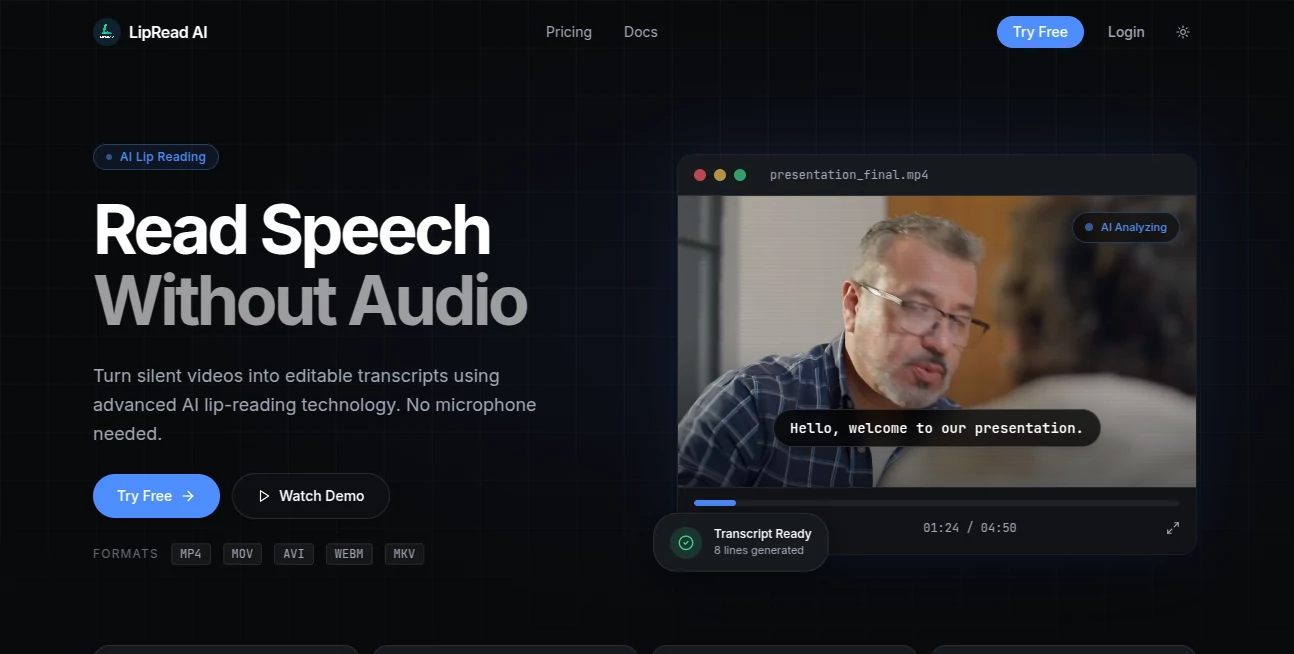
What is LipRead AI?
LipRead AI is built around a fascinating idea: turning speech that has no usable audio into readable text. Instead of depending on a microphone or an audible recording, the platform analyzes facial movements and lip patterns in video to identify spoken words and produce an editable transcript.
This makes it particularly interesting for videos where the sound is missing, damaged, muted, or simply unavailable. A user can upload a video, let the system analyze the speaker's mouth movements, review the generated transcript, and export the result in a format suitable for further editing or captioning.
The service supports MP4, MOV, AVI, WEBM, and MKV files, with uploads of up to 2GB. The workflow is intentionally straightforward, so users can move from video upload to transcript without having to configure complicated speech-processing software.
Key Features
- Visual speech recognition designed to interpret speech without an audio signal.
- Frame-level analysis of facial and lip movements.
- Automatic transcript generation from uploaded videos.
- Editable transcripts that can be reviewed and corrected before export.
- Export options including SRT, VTT, TXT, and JSON.
- Support for several common video formats, including MP4, MOV, AVI, WEBM, and MKV.
- Up to 2GB video uploads according to the website.
- Web-based processing with no microphone required.
User Interface
The interface follows a simple upload-and-process approach. Users can drag a video into the workspace, wait while the visual analysis takes place, and then work with the resulting transcript.
A particularly useful touch is the interactive transcript workspace. Transcript lines can be highlighted as the video plays, making it easier to compare generated text with the corresponding moment in the recording. Users can also edit individual lines before exporting the finished transcript.
Accuracy & Performance
Visual speech recognition is a technically demanding task because the system has to interpret subtle movements of the lips and face rather than relying on sound. The platform says its demonstration can reach 99% accuracy, although this figure should be treated as a website-provided claim rather than an independently verified benchmark.
Real-world performance can naturally vary depending on factors such as video quality, camera angle, lighting, facial visibility, speaking style, and how clearly the speaker's mouth can be seen. Videos with a clear view of the speaker are likely to provide a better basis for visual analysis than heavily obstructed or low-quality footage.
Capabilities
The main strength is the ability to work with speech when conventional audio transcription is not an option. The system detects faces, follows lip movements frame by frame, extracts phoneme-level information, and turns the analysis into editable text.
The export options also make the results more practical. SRT and VTT files can be useful for subtitles, while TXT provides a straightforward text version and JSON can be more convenient when transcript data needs to be processed by another application.
Security & Privacy
Because the service works with uploaded video files, privacy should be considered when processing sensitive recordings. The public website describes the core workflow and processing features, but users handling confidential, private, or legally sensitive footage should review the provider's current privacy terms before uploading such material.
Use Cases
There are several situations where visual speech recognition can be genuinely useful. For example, a production team may have an interview recording in which the audio track was accidentally removed. Instead of abandoning the footage, the visible speech can potentially be analyzed to recover a transcript.
It can also be useful for researchers working with historical or silent video material, accessibility projects, subtitle preparation, video archives, and content teams trying to extract dialogue from footage where conventional speech-to-text systems cannot hear the speaker.
Another practical scenario is reviewing muted video recordings. A marketing team, editor, or researcher can upload the footage and use the generated text as a starting point rather than manually watching every second and typing the dialogue from scratch.
Pros and Cons
- Pros: Can analyze speech without audio, supports several popular video formats, offers editable transcripts, provides multiple export formats, and has a simple browser-based workflow.
- Pros: The frame-level approach is well suited to a task where small changes in mouth movement matter.
- Pros: A free Starter plan lets users test the service without entering payment details.
- Cons: Results depend heavily on how clearly the speaker's face and lips are visible.
- Cons: Visual speech recognition can be more challenging than ordinary audio transcription in difficult footage.
- Cons: The free plan is limited to 10 seconds of lip-reading credits.
Pricing Plans
The service currently offers three main plans. The Starter plan costs $0 per month and includes 10 credits, equivalent to 10 seconds of lip-reading processing. It also includes basic support, standard processing speed, and results through the web interface.
The Basic plan costs $15.99 per month and includes 600 credits, or 600 seconds of lip-reading processing. It adds priority support and faster processing.
The Pro plan costs $29.99 per month and includes 2,000 credits, or 2,000 seconds of processing. It is positioned for professionals and teams that need higher usage and includes the fastest processing speed along with priority support.
The pricing page also lists TTS support and multi-language translation for the paid plans. Subscriptions can be cancelled at any time.
How to Use the Tool
- Open the web application and choose the option to try the service.
- Upload a compatible video file such as MP4, MOV, AVI, WEBM, or MKV.
- Allow the visual analysis process to detect the speaker and examine lip movements.
- Review the generated transcript in the workspace.
- Edit individual lines if corrections or annotations are required.
- Export the finished transcript as SRT, VTT, TXT, or JSON.
Comparison with Similar Tools
Traditional transcription platforms generally depend on an audible speech signal. That works extremely well when the recording has clear audio, but it becomes much less useful when the soundtrack is missing or unusable. The approach here is different because the source of the speech information is visual rather than acoustic.
This distinction makes the platform less of a direct replacement for conventional audio transcription and more of a specialized complement to it. If a video contains clean audio, a standard speech-to-text service may still be the more natural choice. When there is no usable audio but the speaker's mouth is visible, visual speech recognition offers a particularly interesting alternative.
Conclusion
Visual speech recognition is one of those AI applications that sounds futuristic until you see the workflow in practice. By focusing on lip and facial movement rather than sound, the platform addresses a specific problem that conventional transcription software cannot easily solve.
Its straightforward upload process, editable transcripts, and support for SRT, VTT, TXT, and JSON make the results useful beyond a simple demonstration. For researchers, editors, accessibility projects, archivists, and anyone working with silent or unusable-audio footage, it is a specialized tool worth exploring.
Frequently Asked Questions (FAQ)
Can it transcribe a video without audio?
Yes. Its primary purpose is to analyze visible lip movements and extract speech from video without requiring an audio signal.
Which video formats are supported?
The website lists MP4, MOV, AVI, WEBM, and MKV among its supported formats.
Can I edit the generated transcript?
Yes. The transcript can be reviewed and individual lines can be corrected or annotated before exporting.
Which export formats are available?
Transcripts can be exported as SRT, VTT, TXT, or JSON.
Is there a free plan?
Yes. The Starter plan is free and provides 10 seconds of lip-reading credits, allowing users to test the core functionality before upgrading.
How accurate is visual lip reading?
The website displays a 99% accuracy figure in its demonstration. Actual results can vary depending on video quality, lighting, camera angle, visibility of the speaker's mouth, and other recording conditions.
Does it require a microphone?
No. The core lip-reading process is designed to work from the visual information contained in the video rather than microphone audio.
What is the maximum upload size?
The website states that video uploads can be up to 2GB.
AI Speech Recognition , AI Transcription , AI Speech to Text .
These classifications represent its core capabilities and areas of application. For related tools, explore the linked categories above.

LipRead AI Alternatives Product

Zeemo AI

Speech Notes

Whisper Web

NepVox

Maestra

TO MD

Transpocket

Mp3ToMidi

ModelsLab
