

















Speech Notes
What is Speech Notes?
I’ve tried plenty of voice-to-text tools over the years, but most of them left me fixing more errors than I saved time. Then I started using this one and the difference was noticeable right away. You can dictate notes, upload recordings, or even paste a YouTube link, and it turns spoken words into clean, editable text with impressive accuracy. What I like most is how it feels like a real workspace — not just a transcription box. You can search, edit, add speaker labels, and export in the format you actually need. It turned my messy voice memos into proper notes I could actually use.
Introduction
Whether you’re a student transcribing lectures, a journalist capturing interviews, a podcaster creating show notes, or just someone who thinks faster than they type, turning speech into useful text should be simple. This platform makes it feel natural. It supports live dictation, file uploads, and even media links, all inside one clean browser workspace. The AI handles over 100 languages and delivers results that need surprisingly little cleanup. For anyone tired of replaying audio over and over or typing everything manually, it’s a genuine time-saver that respects how people actually work.
Key Features
User Interface
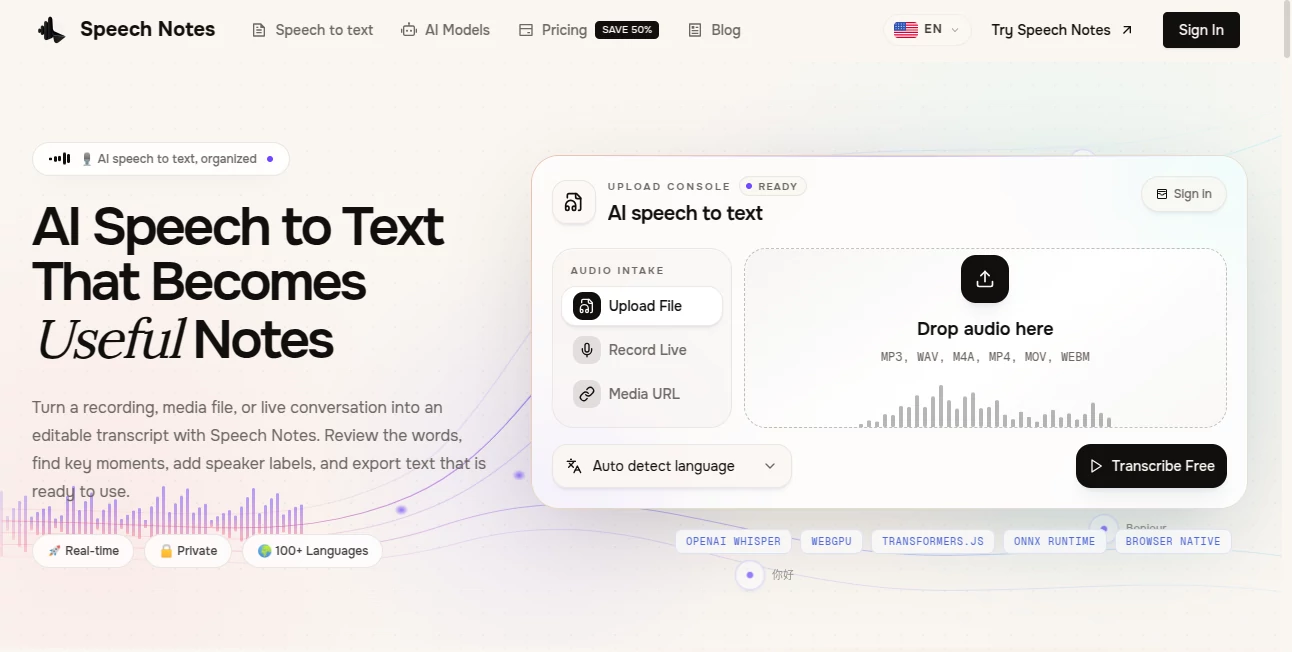
The workspace is straightforward and calming. You have clear options to record live, upload files, or import from a link. Once the transcript appears, you can play the original audio alongside it, highlight sections, correct wording, and add speaker names. Everything stays in one tab so you don’t lose context. I appreciate how the interface stays out of the way — it lets you focus on the content rather than fighting the tool.
Accuracy & Performance
The transcription quality is strong, especially on clear recordings. It handles different accents and speaking styles better than many tools I’ve tried, and the real-time dictation mode keeps up well with normal speech. Processing uploaded files is reasonably fast, and the ability to replay audio while editing makes fixing any mistakes quick and painless. In daily use, it consistently turns messy voice notes into something polished and usable.
Capabilities
You can dictate directly, transcribe existing audio and video files, or import from supported links. It offers speaker identification, timestamping, search within transcripts, and multiple export formats including TXT, SRT for captions, and DOCX. The workspace lets you refine the text, add notes, and prepare it for whatever comes next — whether that’s a meeting summary, article draft, or research archive. It’s versatile enough for both quick voice memos and longer, more serious recordings.
Security & Privacy
Your audio and transcripts are handled with care. The platform emphasizes privacy — recordings aren’t stored longer than necessary, and you can work without creating an account for basic use. For sensitive work like interviews or personal notes, that respectful approach makes a real difference.
Use Cases
A student records lectures and turns them into searchable notes for exam revision. A journalist uploads interview recordings and quickly pulls out key quotes with accurate timestamps. A busy professional dictates thoughts while driving and turns them into ready-to-send meeting summaries. Content creators transcribe podcast episodes or YouTube videos to create show notes and captions. It fits naturally into almost any workflow that involves spoken words turning into written ones.
Pros and Cons
Pros:
- Combines transcription and editing in one smooth workspace.
- Strong accuracy across many languages and speaking styles.
- Supports live dictation, file uploads, and media links.
- Multiple export formats for different needs.
- Privacy-focused design that doesn’t over-collect data.
Cons:
- Heavy background noise or poor audio quality can still reduce accuracy.
- Longer recordings may take time to process on the free tier.
Pricing Plans
You can start with a generous free allowance that covers casual use and testing. For heavier needs, paid plans offer more minutes, priority processing, and additional features like advanced speaker identification. The pricing is straightforward and usage-based, so you only pay for what you actually need. Many users find the free tier sufficient for occasional work, while professionals upgrade for daily transcription volume.
How to Use Speech Notes
Go to the site and choose your starting point: click the microphone for live dictation, drag in an audio file, or paste a supported link. Once the transcript appears, play the audio alongside it to verify sections, correct any wording, and add speaker labels if needed. Search for key moments, refine the text, and export in your preferred format. The whole process stays inside the browser, so you can move from raw audio to polished notes without switching tools.
Comparison with Similar Tools
Many transcription services feel like separate steps — upload somewhere, edit somewhere else, export again. This one keeps everything in one workspace, which saves time and reduces errors. While some tools focus only on raw accuracy, this platform adds practical features like easy editing and multiple export options that make the output actually useful. It strikes a nice balance between power and simplicity that many alternatives miss.
Conclusion
Turning spoken words into useful text shouldn’t be complicated or expensive. This platform makes the process feel natural, accurate, and respectful of your time. Whether you’re a student, professional, content creator, or anyone who works with voice, it quietly removes friction and helps you get more done. In a world full of noisy tools, its clean approach and solid results make it one worth keeping close.
Frequently Asked Questions (FAQ)
How accurate is the transcription?
It performs very well on clear audio, with strong results across many languages and accents. Noisy recordings may need some manual cleanup.
Can I transcribe YouTube videos?
Yes — you can import supported media links directly.
Do I need to create an account?
Basic use works without signing up, though an account unlocks saving work and higher limits.
What file types are supported?
Common audio and video formats like MP3, WAV, M4A, MP4, and more.
Is my data private?
Yes — the platform emphasizes privacy and does not retain audio longer than needed for processing.