
LiveOnAir Studio
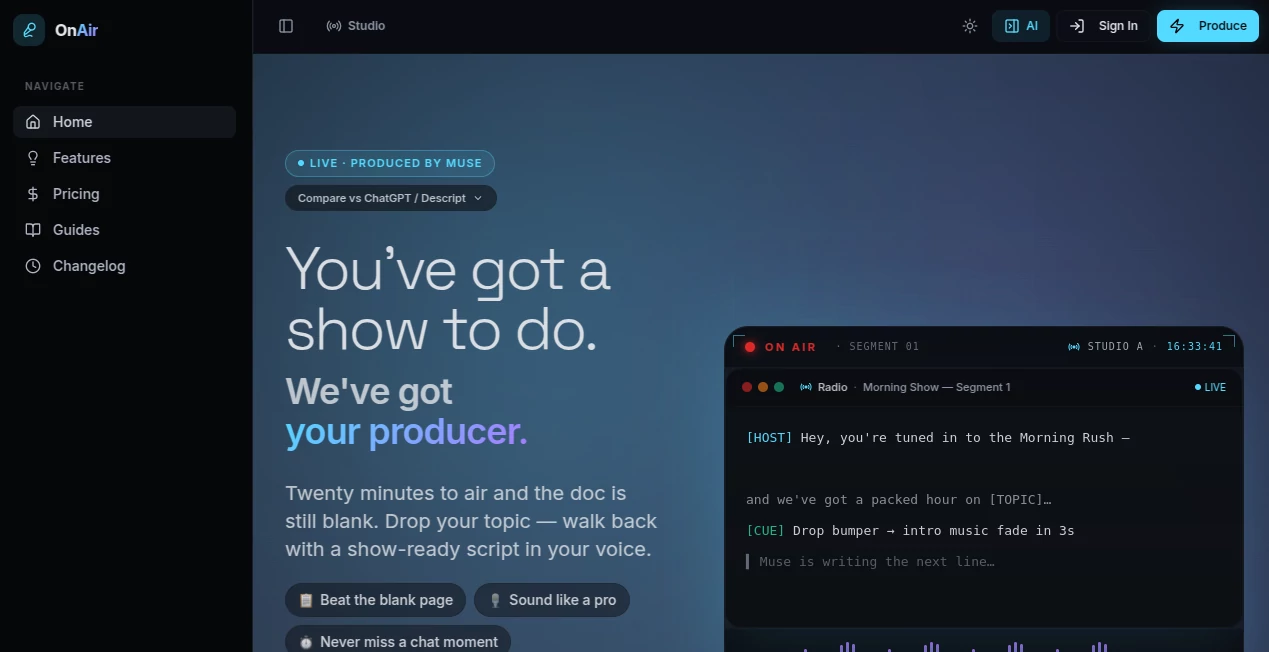
What is LiveOnAir Studio?
Creating engaging shows, podcasts, and live streams often requires more than just a good idea. Creators need planning, structure, timing, and the confidence to know what comes next. LiveOnAir Studio is designed as an AI show producer that helps creators turn simple topics into organized, broadcast-ready content with scripts, segments, prompts, and production guidance.
The platform is built for modern creators who want to spend less time staring at a blank document and more time connecting with their audience. Whether you host a podcast, run a YouTube channel, manage a radio show, or stream live content, this AI assistant helps transform ideas into professional-looking productions while keeping your own style and voice at the center.
Key Features
User Interface
The platform focuses on simplicity. Users can start by entering a topic, choosing a format, and defining the desired style or energy of the show. The workflow feels natural because it follows the same process a human producer would use: planning the structure, creating segments, preparing transitions, and organizing the final flow.
The clean interface makes it accessible for beginners while still providing useful production tools for experienced hosts. Instead of managing complicated settings, creators can focus on their content ideas and audience experience.
Accuracy & Performance
The AI engine is built to create structured scripts that match different types of shows. It helps generate talking points, hooks, transitions, and segment ideas while maintaining a conversational tone instead of producing generic text.
One of the strongest aspects is its focus on creator style. The system is designed to understand pacing, preferred formats, recurring themes, and audience expectations, helping creators produce content that feels more personal and consistent.
Capabilities
This AI production assistant offers a wide range of capabilities for content creators, including:
- AI Script Generation: Create complete show scripts, episode structures, and talking points quickly.
- Podcast Planning: Prepare episodes with organized sections, questions, and discussion flows.
- YouTube Content Support: Generate video hooks, scripts, and ideas for stronger audience retention.
- Live Stream Assistance: Receive prompts and guidance while broadcasting.
- Chat Intelligence: Identify opportunities to engage with viewers during live sessions.
- Show Memory: Maintain continuity by remembering previous content patterns and preferences.
Security & Privacy
The platform takes creator data seriously by storing content and account information securely. Users can manage their own scripts, templates, show profiles, and production materials within their account environment.
For creators who build long-term shows, protecting creative ideas and production history is essential. The platform is designed to provide a private workspace where creators can develop and improve their content over time.
Use Cases
This tool is suitable for many types of digital creators and media professionals. Podcasters can use it to prepare episodes faster, organize interviews, and create smoother conversations. YouTube creators can develop stronger scripts, improve video planning, and avoid running out of ideas.
Radio hosts and DJs can benefit from structured show preparation, including segment planning, transitions, and timing suggestions. Live streamers can use the assistant as a virtual producer that helps maintain energy and audience interaction during broadcasts.
- Podcast episode preparation
- YouTube video scripting
- Radio show production
- Live streaming assistance
- Gaming and creator broadcasts
- Interview preparation
- Audience engagement planning
Pros and Cons
Pros
- Helps creators move from ideas to finished show structures quickly
- Designed specifically for podcasts, radio, and live content workflows
- Creates more natural scripts compared with basic text generators
- Supports consistent branding and creator style
- Useful for both beginners and experienced hosts
Cons
- Best results require creators to provide clear information about their style and goals
- Advanced production teams may still need additional professional editing tools
- AI suggestions should be reviewed before publishing
Pricing Plans
The platform offers a free plan that allows creators to test its core features without requiring a credit card. Users can generate scripts, explore the workflow, and experience how AI-assisted production works.
A professional plan is available for creators who need more frequent production support. The paid option includes expanded script generation, live coaching features, creator memory, and additional tools for regular broadcasting.
How to Use LiveOnAir Studio
Getting started is simple and does not require technical knowledge. Creators can follow a straightforward workflow:
- Choose the type of show or content format you want to create.
- Add your topic, audience, preferred tone, and desired length.
- Let the AI create a structured production plan and script.
- Edit the suggestions to match your personality and publishing goals.
- Use the generated guidance while recording or streaming.
Comparison with Similar Tools
Many AI writing platforms can generate text, but they are not designed around the unique needs of broadcasters and live creators. Traditional writing assistants usually provide paragraphs or ideas, while this platform focuses on complete show production.
Its advantage comes from combining scripting, planning, live guidance, and creator-focused workflows in one environment. Instead of acting as a simple writing tool, it works more like a digital production partner that understands the rhythm of shows and audience engagement.
Conclusion
Producing consistent, engaging content is challenging, especially when creators need fresh ideas every day. LiveOnAir Studio helps remove the pressure of planning by providing a practical AI-powered production workflow for podcasts, YouTube channels, radio programs, and live streams.
With features focused on scripting, audience interaction, and creator personalization, it gives independent creators access to production support that was once available only to larger media teams. For anyone looking to create better shows with less preparation time, this platform offers a valuable creative advantage.
Frequently Asked Questions (FAQ)
What is this AI production tool used for?
It helps creators plan, script, and improve podcasts, YouTube videos, radio shows, and live streams by providing AI-powered production assistance.
Can beginners use it?
Yes. The workflow is designed for beginners while still offering useful features for professional creators who need faster production processes.
Does it help with live streaming?
Yes. It provides real-time guidance, content suggestions, and audience engagement support for live broadcasts.
Can it create podcast scripts?
Yes. It can generate structured podcast plans, discussion points, transitions, and complete episode scripts.
Is there a free version available?
Yes. Users can try the free plan and explore the main features before choosing a premium option.
AI Podcast Assistant , AI Video Recording , AI Script Writing , AI Voice & Audio Editing .
These classifications represent its core capabilities and areas of application. For related tools, explore the linked categories above.
LiveOnAir Studio details
Website unavailable — View Alternatives
Pricing
- Free
Apps
- Web App
Categories

LiveOnAir Studio Alternatives Product

Speech Text

Quso AI

Qwen3 TTS

Seedance 2.0…

Inpodcast AI

Voice Art

Klyra AI

ytzolo

MemoTune