LyricMV
What is LyricMV?
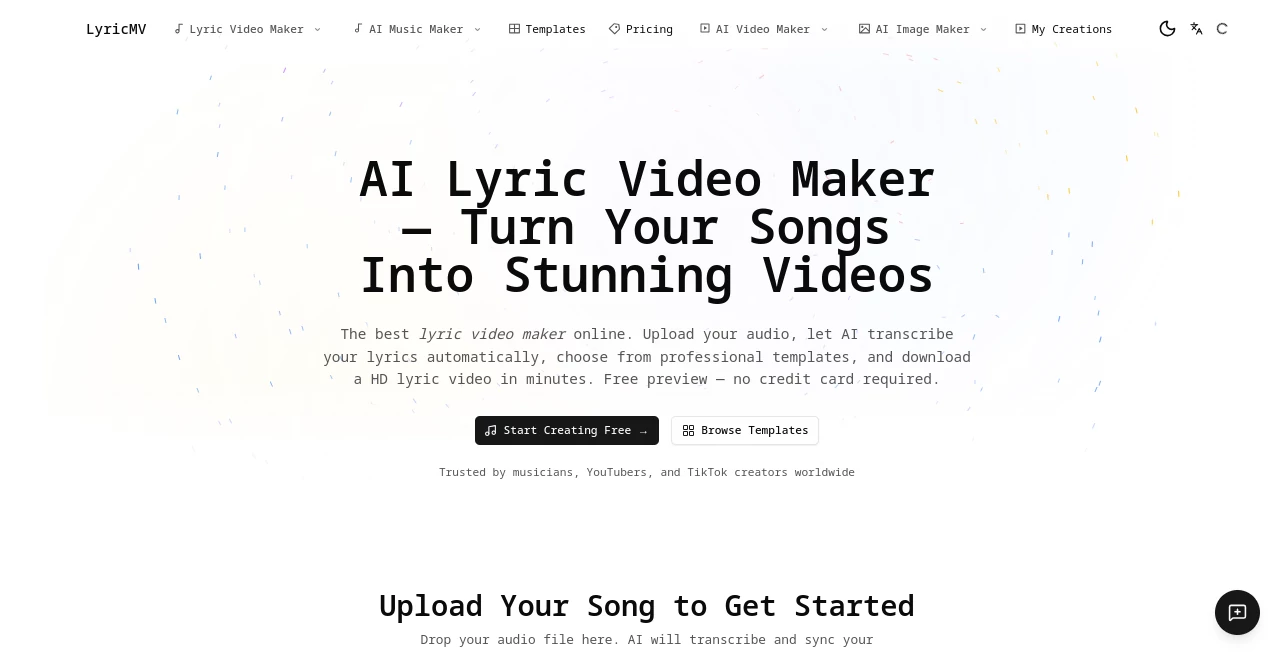
There’s something special about seeing your lyrics come alive on screen — words lighting up at the exact right moment, visuals that match the mood of the track, and a finished video that feels professional without weeks of editing. This platform makes that moment easy. You upload your song, the AI listens and transcribes everything with impressive accuracy, you pick a beautiful template, and a few minutes later you have a ready-to-post lyric video. I’ve watched independent artists go from raw audio to shareable content in one sitting, and the results look like they spent hours in editing software. It’s one of those tools that removes the biggest barriers and lets the music shine.
Introduction
Making a good lyric video used to mean hours in Premiere Pro, manual timing, and endless tweaks. Most musicians and creators simply didn’t have the time or skills. This tool changes the game completely. Powered by strong AI transcription (Whisper), it automatically detects lyrics and timestamps them word by word. Then you choose from polished, ready-made templates — cinematic shadow effects, retro vinyl visuals, classic CD layouts — and it renders everything in high quality. No watermarks on paid exports, full commercial rights, and it works beautifully for original tracks, covers, or even Suno AI songs. It’s built for real creators who want their music to look as good as it sounds.
Key Features
User Interface
The whole process feels straightforward and welcoming. Upload your audio file, watch the AI transcribe while you grab a coffee, then browse clean template previews. A simple timeline editor lets you fine-tune timing if needed. Everything stays visual and intuitive — no steep learning curve. You can preview at 480p for free before committing to full HD render. The flow is designed so you stay focused on creativity rather than fighting technical hurdles.
Accuracy & Performance
The transcription is impressively accurate, even with different accents, genres, and singing styles. Word-level timing means lyrics highlight exactly when they should. Rendering is fast, and the final videos hold up well at 1080p with smooth animations that sync to the beat. In practice, most users only need minor tweaks, which saves enormous time compared to manual methods.
Capabilities
It supports multiple professional templates (Deep Shadow, Classic CD, Pro Vinyl with audio visualizer), word-by-word highlighting, vertical formats for TikTok/Reels, and high-quality 1080p+ exports. You can edit lyrics and timing easily, and the platform handles various audio formats up to 500MB. It works great for solo artists releasing singles, YouTubers building channels, karaoke producers, and labels handling multiple tracks. Commercial rights come with paid plans so you own what you create.
Security & Privacy
Your audio files are processed securely and not stored longer than necessary. The platform takes privacy seriously, especially important when uploading unreleased music. No sneaky data sharing, and you maintain full control over your finished videos.
Use Cases
An independent artist uploads a new single and has a cinematic lyric video ready for YouTube and TikTok the same day. A cover singer creates polished visuals that help their channel grow faster. A producer uses it for client tracks to deliver professional-looking deliverables quickly. Karaoke enthusiasts build libraries of high-quality videos for events or streaming. Even Suno AI users turn their generated songs into shareable content that stands out. The speed and quality open doors for creators who previously couldn’t afford the time or cost.
Pros and Cons
Pros:
- Extremely fast workflow from audio to finished video.
- Strong AI transcription that handles real singing voices well.
- Professional templates that look expensive but are easy to use.
- Great value compared to hiring editors or learning complex software.
- Free preview lets you test quality before paying.
Cons:
- Free tier includes watermarks and lower resolution previews.
- Very complex or heavily layered songs may need some manual timing tweaks.
- Template variety is growing but still focused on a few strong styles.
Pricing Plans
You can start completely free with previews and limited generations to test the quality. Paid plans remove watermarks, unlock full HD exports, higher usage limits, and priority processing. The pricing is creator-friendly — many users say one good video pays for the plan through increased engagement and streams. No long contracts, just flexible credit or subscription options that scale with your output.
How to Use LyricMV
Upload your audio file (MP3, WAV, or similar). The AI transcribes the lyrics automatically with timestamps. Review and edit any lines if needed using the simple timeline. Browse and select a template that fits your song’s vibe. Preview at 480p, then render and download the full HD video. From start to finish, most tracks are complete in under 10–15 minutes. Export and upload directly to YouTube, TikTok, Instagram, or Spotify Canvas.
Comparison with Similar Tools
Many lyric video tools are either too basic (manual everything) or overly complicated and expensive. This one hits a sweet spot: strong AI transcription, beautiful ready-made templates, and fast results without forcing you to learn video editing. It stands out especially for musicians and content creators who want professional output quickly without the usual headaches or high costs.
Conclusion
Your music deserves visuals that match its energy. This platform makes creating great-looking lyric videos accessible, fast, and genuinely enjoyable. Whether you’re releasing your first single or building a consistent content library, it removes the biggest barriers and lets your songs shine visually. The combination of smart AI and thoughtful design templates makes it one of the most practical tools available for musicians and creators right now.
Frequently Asked Questions (FAQ)
How accurate is the transcription?
Very accurate thanks to Whisper AI, even with singing. Minor edits are easy if needed.
Do I need video editing experience?
Not at all — the templates handle the hard work. Just upload and choose a style.
Can I use it for TikTok and Reels?
Yes — vertical templates work great for short-form platforms.
Are the videos watermark-free?
Paid plans export clean videos with full commercial rights.
What audio formats are supported?
Most common formats including MP3 and WAV up to 500MB.
AI Animated Video , AI Music Video Generator , AI Video Generator , AI Text to Video .
These classifications represent its core capabilities and areas of application. For related tools, explore the linked categories above.

LyricMV Alternatives Product
Kling 5.0

Voor AI

OmniVideo

Veo 3.2

seedance 3.0

vei4 ai

Kling 3.0 – …
LipPulse
kling 5.0