
Magic Tellers
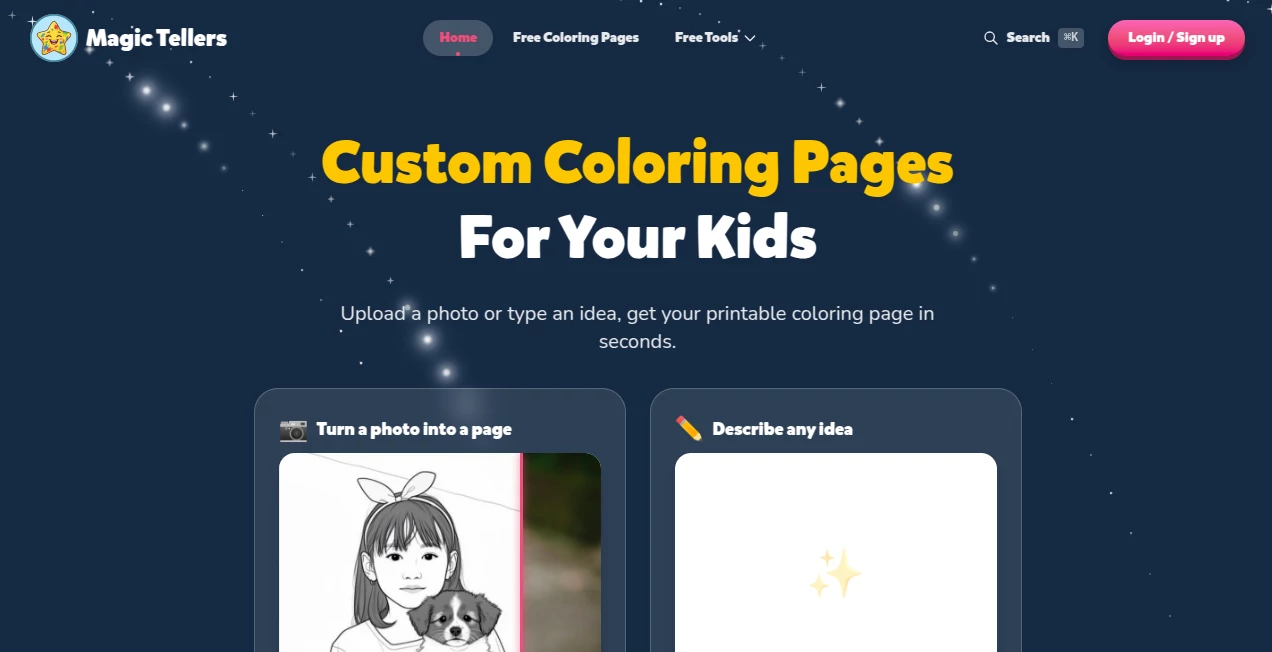
What is Magic Tellers?
MagicTellers is a creative AI platform built for parents, teachers, and anyone looking for a simple way to turn ideas, photos, and everyday moments into printable coloring activities for children. Instead of searching through endless collections of generic worksheets, users can describe an idea or upload a photo and create a personalized coloring page in seconds.
The concept is refreshingly straightforward. A child can become the subject of a coloring page, a family photo can be transformed into line art, or an imaginative idea such as a dinosaur eating pizza can become something ready to print. The platform also provides a large library of free coloring pages covering animals, fantasy themes, vehicles, nature, holidays, household objects, and many other subjects.
Key Features
- AI-powered coloring pages created from written ideas
- Photo-to-coloring-page conversion for children, pets, family photos, and drawings
- Personalized coloring pages featuring a child's name
- Free printable coloring page library
- Caricature and photo-to-drawing tools
- Word search, crossword, and maze generators
- Name tracing worksheets and bubble letter generators
- Random activity ideas based on a photo of the surrounding environment
- Printable PDF and PNG output
- Online coloring for users who prefer coloring directly on a device
User Interface
The experience is designed around a simple three-step process: upload, describe, or choose a starting point; customize the result; then download and color. This makes the platform approachable even for parents who have never used an AI image generator before.
The main experience puts the creative action front and center. Users can upload a photograph, type an idea, or select an existing page from the library. Personalization options can then be used to add names, select fonts, and adjust available settings before producing the final page.
Accuracy & Performance
Speed is one of the more practical advantages here. The website states that photo conversions can be ready in about 20 seconds, while generated pages are designed to arrive quickly enough for spontaneous activities. The resulting artwork focuses on clear black-and-white outlines rather than complicated full-color illustrations, which is exactly what a printable coloring page needs.
AI generation is naturally not perfect every time. Very detailed or unusual prompts can produce unexpected elements, so parents may occasionally want to regenerate or adjust an idea. For ordinary subjects, however, the workflow is remarkably convenient: describe something a child likes and turn that idea into a page that can actually be printed.
Capabilities
The platform goes beyond a single coloring-page generator. Users can transform photographs into coloring sheets, create name-based designs, make caricature pages, convert photos into drawing-style artwork, and produce printable puzzles such as word searches, crosswords, and mazes.
There is also a useful activity generator for parents and teachers. It can analyze a photo of an environment and suggest activities based on what is available around the child. The activity suggestions include memory games, imaginative play, movement-based activities, and creative projects, with the service describing these activities as suitable for children around ages 4 to 9.
For children who enjoy digital activities, an online coloring application is also available. It provides tools such as tap-to-fill coloring and crayon or marker-style tools, allowing finished artwork to be saved and downloaded without necessarily printing first.
Security & Privacy
Privacy is particularly relevant for a service that can involve children's photos and family images. The platform's privacy policy explains that it may collect information such as names, email addresses, authentication data, and automatically collected technical information. Payment information is handled through Stripe.
The service also states that users can request access, correction, or deletion of personal information where applicable. Its privacy documentation says that it has not sold personal information to third parties for business or commercial purposes and does not intend to sell or share such information in the future.
Users should still review the platform's privacy policy before uploading personal photographs, especially when images include children. AI-generated results can also vary, and the service places responsibility on users to review generated material before using it.
Use Cases
For parents, the most obvious use is turning a child's interests into something tangible. A child who loves dinosaurs can have a dinosaur-themed page; another who is fascinated by space can get an astronaut scene. Family photos and pictures of pets can also become memorable coloring activities.
Teachers can use the tools for classroom activities, printable worksheets, creative exercises, and age-appropriate puzzles. A customized worksheet can feel much more engaging than a generic one, particularly for younger students.
The service can also work well for rainy afternoons, birthday activities, travel, quiet-time projects, or simple screen-free entertainment. Someone preparing a small activity pack for children can create several different pages without having to draw everything manually.
For creative entrepreneurs, commercial licensing is available through the Business and Business Pro plans. According to the service terms, content generated while an active commercial plan is in place can be used commercially, including for print-on-demand, Amazon KDP publishing, and resale. Users should carefully check the applicable license before using generated content commercially.
Pros and Cons
- Pros: Easy workflow for parents and teachers
- Pros: Converts personal photos into printable coloring pages
- Pros: AI generation allows highly personalized themes
- Pros: Large collection of ready-made free coloring pages
- Pros: Includes puzzles, worksheets, and additional children's activities
- Pros: Supports PDF and PNG downloads
- Pros: First page can be created for free without signing up
- Cons: AI-generated artwork can occasionally contain unwanted details or inconsistencies
- Cons: Free and personal-use plans do not provide commercial rights to generated content
- Cons: Monthly page credits expire at the end of the billing cycle
Pricing Plans
The platform offers a free entry point, making it possible to try its coloring-page experience before committing to a paid subscription. New users receive a limited number of free page credits, and the first page can be created without an account through the site's main coloring workflow.
Paid subscriptions are based on monthly page credits. The available plan structure includes Lite, Standard, Premium, Business, and Business Pro options, with commercial licensing associated with the Business tiers. Paid plans can also include photo-to-coloring conversions using the same page-credit system.
Extra page packs are available as one-time top-ups for active paid subscribers. Unlike monthly credits, purchased extra pages do not expire. Users should note that the service's terms state that unused monthly credits do not roll over, while purchases are generally non-refundable.
How to Use MagicTellers
Start by choosing the type of creation you want. You can upload a photo, describe an original idea, or select an existing coloring page from the library.
For an AI-generated page, enter a clear description of what you want the child to color. Specific but simple prompts tend to work well. For example, instead of writing only "space," try something like "a friendly astronaut exploring the moon with a small robot."
If you are using a personal photograph, upload the image through the photo conversion tool. The service converts the image into printable line art while retaining recognizable shapes and details.
After generating the page, customize it when available, then download the finished result as a PDF or PNG. You can print it on standard letter-size paper or use the online coloring experience for digital coloring.
Comparison with Similar Tools
Many AI image generators are designed to create visually impressive artwork, but that is not necessarily what a parent needs when looking for a coloring activity. This platform takes a more focused approach by emphasizing bold outlines, simple shapes, printable formats, and child-friendly themes.
Another difference is the combination of generation and ready-made resources. Instead of relying solely on text-to-image creation, users can browse existing coloring pages, personalize names, transform photographs, and create puzzles from the same environment.
This makes it particularly attractive for families and educators who want an activity they can use immediately rather than a general-purpose image-generation workspace.
Conclusion
There is something genuinely useful about turning a child's own world into a creative activity. A photograph of a favorite pet, a child's name, or a completely imaginary scene can become something they can print, color, and keep.
With its combination of AI-generated coloring pages, photo conversion, personalized designs, printable puzzles, activity ideas, and a substantial free library, the platform offers more than a basic coloring-page generator. It feels designed around the actual needs of parents and teachers: quick setup, simple controls, kid-friendly results, and something tangible at the end.
For anyone searching for personalized coloring activities without spending time creating every page from scratch, it is a particularly appealing option to try.
Frequently Asked Questions (FAQ)
What can I create?
You can create AI-generated coloring pages from written ideas, transform photographs into coloring pages, personalize pages with names, and create several types of printable children's activities.
Can I turn a photo into a coloring page?
Yes. The photo conversion feature is designed to transform pictures of children, pets, family moments, or drawings into clean printable line art. The website says the process can take about 20 seconds, and the first page is available without requiring an account.
Are the coloring pages printable?
Yes. Pages can be downloaded as PDF or PNG files and are designed for printing. The platform also provides an online coloring experience for children who prefer to color on a phone, tablet, or computer.
What ages are the pages suitable for?
The library includes designs for different ages, from simpler pages for younger children to more detailed illustrations for older kids. The platform describes its coloring content as kid-safe and age-appropriate.
Is there a free version?
Yes. New users receive limited free page credits, and the first page can be created without signing up. Free credits are a one-time allowance rather than a recurring monthly allocation.
Can I use generated pages commercially?
Commercial use depends on the subscription plan. The service terms state that Business and Business Pro plans provide a commercial license for content generated while the commercial subscription is active. Personal and free plans are limited to non-commercial use.
Can children color online?
Yes. An online coloring application is available with features including tap-to-fill coloring and crayon and marker-style tools. Finished artwork can also be saved and downloaded.
Does the platform offer activities besides coloring?
Yes. It includes word search, crossword, maze, name tracing, bubble letter, caricature, photo-to-drawing, and activity-generation tools. The activity generator can use a photo of the surroundings to suggest games and creative activities.
AI Photo & Image Generator , AI Illustration Generator , AI Fun Tools , Image .
These classifications represent its core capabilities and areas of application. For related tools, explore the linked categories above.
Magic Tellers details
Website unavailable — View Alternatives
Pricing
- Freemium
Apps
- Web App
Categories

Magic Tellers Alternatives Product

Nano Banana 2

bananaai.app

SellerPic

Hairstyle An…

Shutterstock

Photoshoot A…

Flux 2 Cloud

nano banana

chibi art