


















MailSweeper
What is MailSweeper?
A cluttered inbox is more than an inconvenience. It slows down productivity, hides important conversations, consumes valuable cloud storage, and creates unnecessary digital stress. Instead of spending hours searching for newsletters, promotional emails, and forgotten subscriptions, users can rely on intelligent automation to restore order within minutes.
This AI-powered Gmail cleanup solution is designed for people who want a cleaner inbox without manually sorting thousands of emails. It automatically identifies outdated promotions, mailing lists, social notifications, and large storage-consuming messages, allowing users to remove unwanted content in bulk while protecting important conversations. The result is a faster, more organized inbox that remains clean over time through scheduled maintenance.
Beyond organization, the platform also helps reduce storage costs and even highlights the environmental impact of deleting unnecessary emails. By combining smart automation, privacy-first architecture, and an intuitive workflow, it transforms email management into a simple experience that requires very little ongoing effort.
Key Features
User Interface
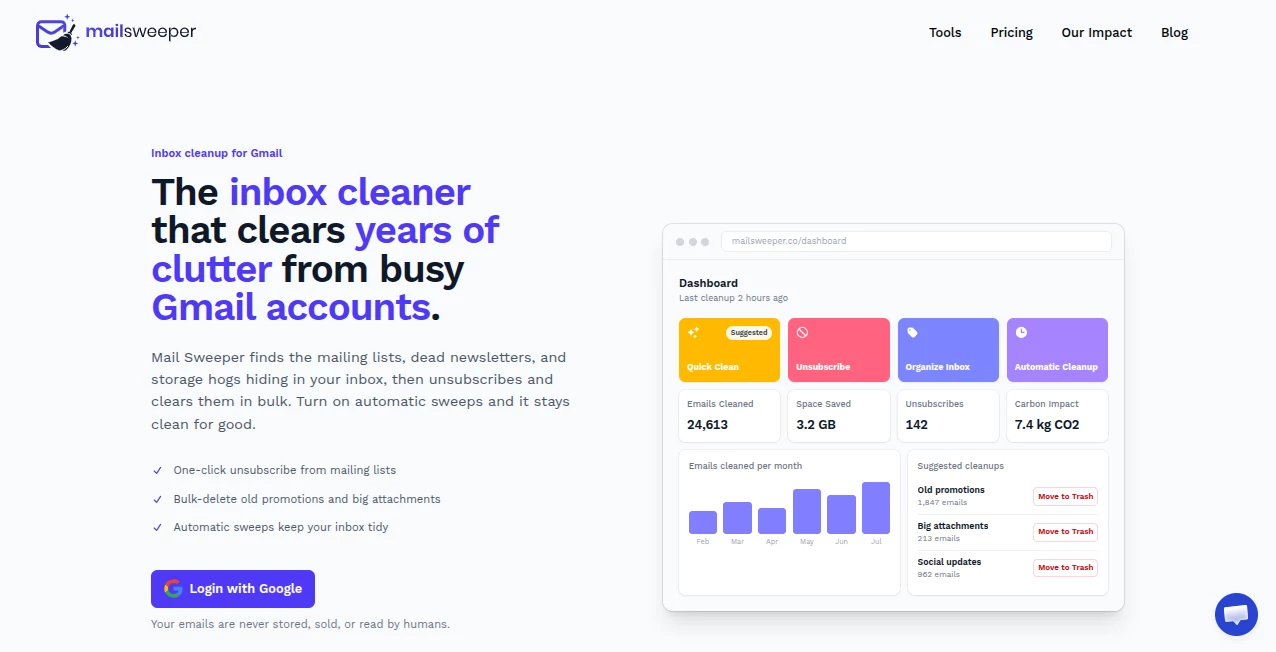
The dashboard is exceptionally easy to navigate. After connecting a Gmail account, users immediately receive suggested cleanup actions, including promotional emails, social updates, mailing lists, and large attachments. Every recommendation is clearly displayed, making it easy to understand exactly what can be removed before taking action.
Visual statistics such as reclaimed storage, deleted emails, unsubscribe counts, and estimated carbon savings provide useful feedback that makes the cleanup process satisfying and transparent.
Accuracy & Performance
The platform intelligently distinguishes between valuable emails and unnecessary clutter. Primary inbox messages, starred emails, and important conversations remain protected while low-priority messages are safely organized for review before deletion. Bulk cleanup processes thousands of emails within minutes, helping users recover gigabytes of storage without tedious manual work.
Capabilities
- Bulk removal of promotional emails
- One-click unsubscribe from mailing lists
- Automatic detection of large attachments
- Scheduled inbox maintenance
- Smart organization using dedicated labels
- Protection for important and starred emails
- Storage usage reporting
- Carbon impact tracking
- Automatic clutter management
- Gmail integration with minimal setup
Security & Privacy
Privacy is treated as a core feature rather than an afterthought. According to the official website, email content is never stored, sold, or read by humans. The service is CASA-certified and focuses on protecting user information while providing secure Gmail integration. Sensitive emails remain under the user's control throughout the cleanup process.
Use Cases
- Cleaning years of accumulated Gmail clutter.
- Recovering storage space before purchasing additional cloud storage.
- Removing unwanted newsletters in bulk.
- Keeping business inboxes organized automatically.
- Reducing distractions caused by promotional emails.
- Maintaining Inbox Zero with scheduled cleanups.
- Managing personal and professional Gmail accounts efficiently.
- Lowering digital carbon footprint through unnecessary email removal.
Pros and Cons
Pros
- Extremely simple setup process.
- Fast bulk cleanup for thousands of emails.
- One-click unsubscribe functionality.
- Automatic recurring cleanup options.
- Protects important Gmail messages.
- Privacy-focused architecture.
- Useful storage and environmental impact reports.
- Lifetime purchase option available.
Cons
- Currently focused on Gmail accounts.
- Advanced organization features depend on Gmail categories.
- Some automation settings may require initial configuration.
Pricing Plans
The platform offers two straightforward pricing options. Users can choose an affordable annual subscription or purchase a one-time lifetime license that unlocks all available features. Both plans include unlimited unsubscribe functionality, bulk deletion tools, and automatic inbox cleanup capabilities.
How to Use MailSweeper
Getting started is refreshingly simple. Connect a Gmail account using secure authentication, allow the platform to analyze inbox content, and review the suggested cleanup categories. Users can unsubscribe from unwanted mailing lists, delete years of promotional emails, remove oversized attachments, and activate automatic cleanup schedules. Once configured, inbox maintenance continues with very little manual intervention.
Comparison with Similar Tools
Many inbox management applications focus on either subscription management or manual organization. This solution combines intelligent email analysis, automated cleanup, storage optimization, and scheduled maintenance within a single interface. Unlike traditional cleanup tools that rely heavily on manual filters, it emphasizes continuous automation while ensuring important messages remain untouched.
Another noteworthy advantage is its focus on measurable results. Users can clearly see reclaimed storage, reduced inbox clutter, and estimated environmental benefits after every cleanup session, making the experience feel rewarding rather than simply administrative.
Conclusion
Email overload affects nearly everyone, but solving it should not require hours of repetitive work. This intelligent Gmail assistant demonstrates how automation can dramatically simplify inbox management while preserving important conversations. From bulk deletion and one-click unsubscribe tools to scheduled maintenance and privacy-first design, it delivers a polished experience for individuals and professionals alike.
Anyone looking to reclaim storage space, improve productivity, and reduce inbox stress will appreciate how quickly the platform delivers noticeable results. Its combination of intelligent automation, ease of use, and transparent privacy practices makes it one of the most practical email management solutions available today.
Frequently Asked Questions (FAQ)
Does it delete important emails?
No. Important, starred, and primary inbox emails remain protected by default, while users control which categories can be cleaned.
Can it unsubscribe from newsletters?
Yes. It identifies mailing lists and allows users to unsubscribe from them with a single click.
Will it help free Gmail storage?
Yes. Removing old promotions, social updates, and large attachments can recover several gigabytes of storage depending on inbox size.
Is user privacy protected?
Yes. The official website states that email content is never read by humans, stored, or sold, and the service follows secure Gmail integration practices.
Does it work automatically after setup?
Yes. Users can enable scheduled cleanup so inbox maintenance continues automatically according to their preferred schedule.
AI Workflow Management , AI Productivity Tools , AI Email Assistant , AI Customer Service Assistant .
These classifications represent its core capabilities and areas of application. For related tools, explore the linked categories above.

MailSweeper Alternatives Product

onuml

Duct Tape AI…

TypingFirst

TrySchedule

EntreDash

Weekly Brief

Lexikon AI

HISAB 360

Vapi
