
Makiverse
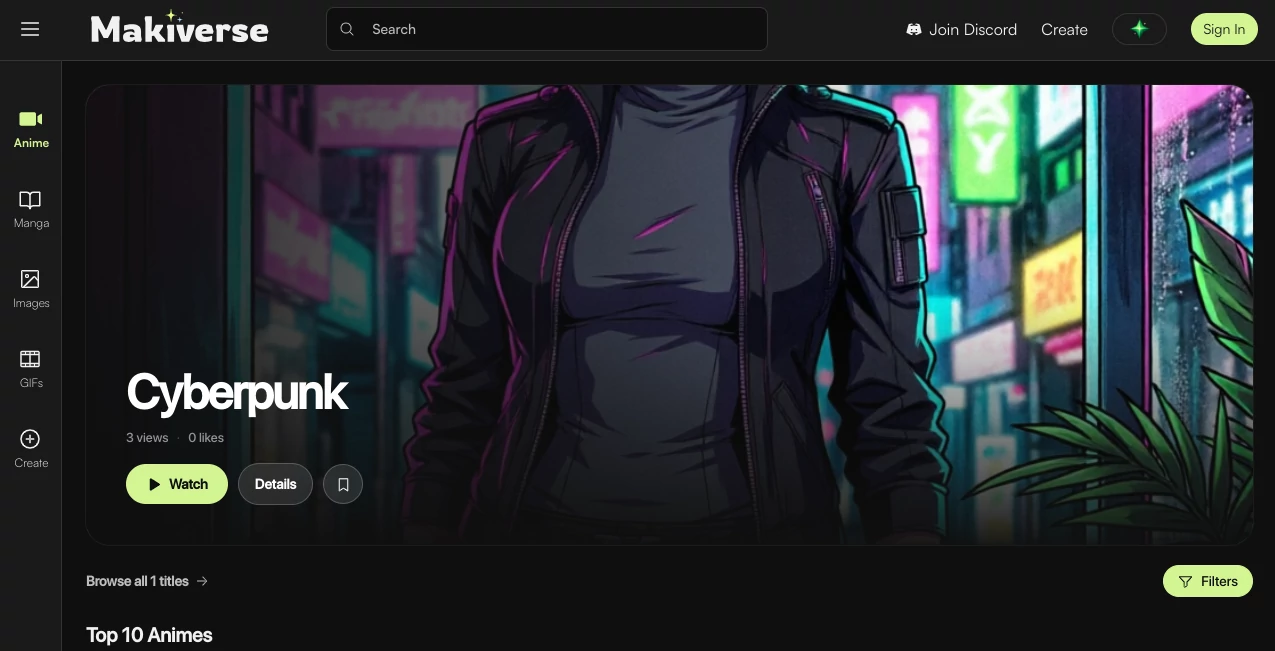
What is Makiverse?
Makiverse is an AI-powered creative platform built for people who want to turn ideas into manga, comics, anime-style artwork, images, and GIFs without having to draw everything by hand. Instead of treating image generation as a single isolated step, the platform brings storytelling, artwork creation, character consistency, and visual editing together in one place.
What makes the experience particularly appealing is its focus on manga creation. A creator can begin with a simple story idea or scene description and gradually develop it into illustrated panels and larger comic projects. This makes the platform useful for hobbyists experimenting with their first manga as well as writers, artists, and content creators who want to visualize stories faster.
Key Features
- AI-assisted manga and comic generation from text descriptions.
- Anime and manga-style image creation with multiple visual directions.
- Consistent character and prop creation for recurring story elements.
- GIF generation for animated visual content.
- Inpainting for correcting or refining specific parts of an image.
- Outpainting for extending an image beyond its original frame.
- Upscaling tools for improving the final visual output.
- Selectable tags that can help users create optimized prompts more quickly.
- A community-oriented environment for exploring and publishing creative work.
User Interface
The interface is designed around creation rather than complicated production settings. The main experience separates manga, images, GIFs, and anime-related content, making it relatively easy to decide what kind of visual you want to produce before starting.
This simplicity is important for beginners. Someone who has never worked with image-generation software can start with an idea instead of learning a long list of technical controls. More experienced creators can then use editing features such as inpainting, outpainting, and upscaling when the first result needs additional work.
Accuracy & Performance
For creative generation, accuracy is less about producing a technically identical image every time and more about preserving the creator's intended characters, objects, atmosphere, and visual direction. The platform addresses one of the most common problems in AI-generated comics by supporting consistent characters and props across a story.
Its workflow is also designed to reduce the amount of manual work between an initial concept and a finished visual. A short description can establish the basic direction, while built-in refinement tools give creators a practical way to correct details instead of starting over whenever something looks slightly off.
Capabilities
The platform goes beyond simple text-to-image generation. Users can create artwork, GIFs, and complete manga editions, while the available creative tools support different stages of visual development.
Character and prop consistency is particularly useful for narrative projects. For example, a creator developing a story about a futuristic detective can establish the protagonist and important objects once, then reuse those elements throughout different scenes. This can make a multi-panel story feel much more coherent than generating every panel independently.
The editing workflow is another strong point. Inpainting can be used to fix smaller mistakes, outpainting can expand a composition, and upscaling can help prepare an image for a cleaner final presentation. These tools make the service feel closer to a creative workspace than a basic prompt-and-download generator.
Security & Privacy
Privacy is addressed through the platform's stated data practices and responsible AI approach. Its FAQ says that personal data is not shared or used for AI training without user consent, while generated content is subject to moderation filters. Users should still review the platform's current privacy and usage terms before uploading sensitive or personally identifiable material.
Use Cases
The platform is especially well suited to manga and webcomic creators who want to move from an idea to visual storytelling without spending hours drawing every panel manually. A writer can use it to visualize characters and scenes before developing a larger project, while an illustrator can use the generation and editing features as part of an existing creative workflow.
It can also work well for rapid story prototyping. Imagine having an idea for a cyberpunk short story but not knowing whether the visual concept will work. Instead of spending days producing concept art, you can quickly experiment with characters, environments, props, and different artistic directions.
Social media creators can also benefit from the image and GIF capabilities. Short manga scenes, character artwork, visual jokes, and animated snippets can be produced without requiring a traditional illustration or animation pipeline.
Pros and Cons
- Pros: Focused on manga and comic creation, easy starting point for beginners, consistent character and prop support, useful image-editing tools, GIF creation, and a workflow designed around storytelling.
- Cons: Creative output can still require refinement, advanced users may want more granular artistic controls, and the credit-based system means heavier usage can require a paid upgrade.
Pricing Plans
The platform currently provides a limited free plan that allows new users to test its AI image-generation capabilities and explore the service. Premium access is available for users who need additional features, faster generations, or higher-quality outputs.
Generation uses a credit-based system, with credits consumed according to the AI function being used. This approach can be convenient for occasional creators because they can experiment before committing to heavier usage. Since available packages and pricing can change, checking the current store before purchasing is the safest way to see the latest options.
How to Use the Tool
Getting started is straightforward. Begin by choosing the type of creation you want to make, then describe the scene, characters, or story you have in mind. The platform can use selectable tags to help optimize prompts, which is useful when you know what you want visually but are not sure how to phrase the request.
Once an image or panel has been generated, review the result and refine it where necessary. Inpainting is useful for correcting small areas, while outpainting can expand the composition. Upscaling can then be used when you want a cleaner final version. For longer projects, creating consistent characters and props early can help maintain a recognizable visual identity across scenes.
When the work is ready, creators can explore the platform's publishing and community features to share their creations and discover work from other users.
Comparison with Similar Tools
Many AI image generators are designed primarily around producing individual pictures. This platform takes a more specialized approach by putting manga and comic storytelling at the center of the experience.
That distinction matters when a project contains recurring characters or multiple panels. A general-purpose image generator may produce attractive individual images but can require considerable manual effort to keep characters and important objects visually consistent. Here, consistency is treated as part of the creation workflow rather than an afterthought.
It is therefore a particularly interesting option for creators whose goal is not simply to make one attractive anime image, but to develop a sequence of connected visuals, comic pages, or a larger manga concept.
Conclusion
For anyone fascinated by manga, anime, and visual storytelling, this platform offers a practical way to turn ideas into illustrated content without requiring traditional drawing skills. Its combination of AI generation, consistent characters and props, editing tools, GIF creation, and manga-focused workflows gives it a clear identity among creative AI platforms.
The strongest reason to try it is its focus. Rather than attempting to be everything for everyone, it concentrates on the challenges that manga and comic creators actually face. If you have a story in your head but lack the time or artistic skills to illustrate every scene yourself, it provides an approachable place to start experimenting.
Frequently Asked Questions (FAQ)
What can I create with the platform?
You can create artwork, manga, comic pages, and GIFs, with tools designed for anime and manga-style visual creation.
Do I need drawing skills?
No. The service is designed to let users create visual content through AI-assisted generation, making it accessible even if you do not have traditional illustration skills.
Can I keep characters consistent?
Yes. Character and prop consistency is one of the platform's key features and is designed to help recurring elements maintain a recognizable appearance throughout a story.
Can I edit generated images?
Yes. Built-in tools include inpainting, outpainting, and upscaling, allowing users to correct details, extend compositions, and improve image quality.
Is there a free plan?
Yes. A limited free plan is available for trying the image-generation features and exploring the platform. Premium options provide access to additional capabilities, faster generation, and higher-quality outputs.
How does the credit system work?
Credits are consumed according to the AI function you use. Different generation and editing actions can therefore consume different amounts of credits.
Can I create GIFs?
Yes. GIF creation is one of the available creative options alongside manga and image generation.
Is my personal data used for AI training?
The platform states that personal data is not shared or used for AI training without user consent. Users should nevertheless review the latest privacy documentation for the most current terms.
Who is this tool best for?
It is a strong fit for manga creators, comic writers, hobbyists, storytellers, artists, and content creators who want to turn ideas into illustrated or animated content more quickly.
AI Illustration Generator , AI Manga & Comic , AI Anime & Cartoon Generator , AI GIF Generator .
These classifications represent its core capabilities and areas of application. For related tools, explore the linked categories above.

Makiverse Alternatives Product
Krea 2 AI

Max Studio AI

Try OC Maker
Ghibli Image…

Krea 2 Turbo

WonderShare …
Picture to L…

Mage
Picsart