


















Makr.im
What is Makr.im?
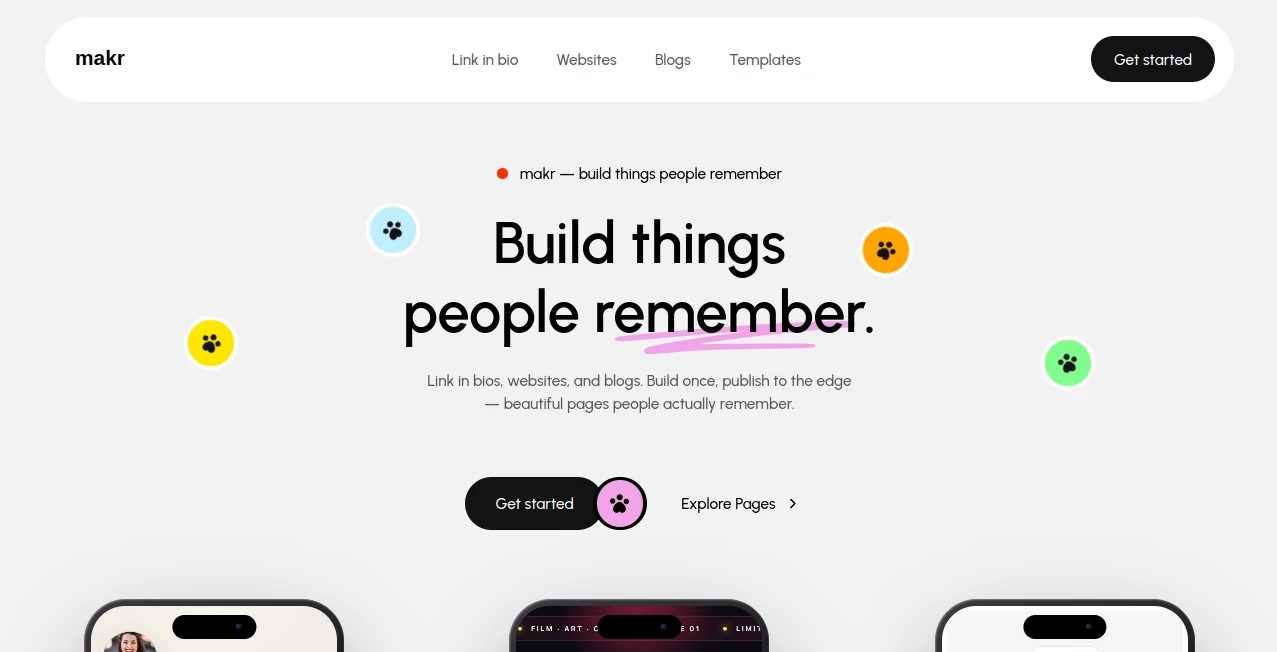
Creating a polished website usually involves more work than expected. You need to choose a platform, deal with hosting, manage updates, and spend time making sure the final result looks good on every screen. makr takes a much simpler approach by bringing websites, blogs, and link-in-bio pages into one streamlined publishing platform.
The platform is designed for creators, freelancers, independent professionals, publishers, and small businesses that want a professional online presence without getting buried in technical details. Users can start with a template, customize their space from a dashboard, and publish without writing code.
One of its strongest ideas is the static-first approach. Instead of relying on traditional servers and plugins, published pages are delivered through a global CDN. That makes the platform particularly appealing to people who care about fast-loading pages but do not want to become responsible for the technical infrastructure behind them.
Key Features
- Website builder for portfolios, landing pages, and personal websites
- Link-in-bio pages for combining social, music, shopping, and other links
- Built-in blogging capabilities
- Zero-code editing experience
- Ready-made templates for different types of pages
- 13 rich content blocks for website creation
- Custom domain publishing
- Global CDN delivery
- Static-first architecture
- AI-ready publishing environment
- No server management or plugin maintenance
- Fast publishing from a central dashboard
User Interface
The interface is built around a straightforward dashboard rather than a complicated development workflow. New users can sign up, choose the type of page they want to create, select a template, and begin editing. This makes the learning curve relatively gentle, especially for people who have never worked with website builders before.
The template collection also gives users a useful starting point. Instead of facing a blank canvas, they can begin with layouts intended for link-in-bio pages, websites, or blogs and then shape the result around their own content.
Accuracy & Performance
Performance is one of the more interesting parts of the platform's design. Published pages are served through a global CDN, while the static-first architecture reduces the need for ongoing server-side maintenance. In practical terms, this means a creator can concentrate on the page itself rather than worrying about servers, plugins, or routine infrastructure work.
Fast delivery is particularly useful for portfolios, landing pages, personal sites, and creator pages where visitors often arrive from mobile devices. A clean page that loads quickly can make the entire browsing experience feel more polished.
Capabilities
The platform covers three main publishing needs: link-in-bio pages, websites, and blogs. A link-in-bio page can bring social profiles, music, stores, and other destinations together in one place. Websites can be used for portfolios, landing pages, or personal brands, while the blogging functionality provides a dedicated space for longer-form publishing.
The combination is useful for creators who would otherwise need several separate services. A photographer, for example, could maintain a portfolio while also keeping a personal link page and publishing articles. A newsletter writer could use the same environment for a public profile and a blog.
Custom domain publishing adds another useful layer for professionals who want their online presence to live under their own domain rather than a generic platform address.
Security & Privacy
The platform's static-first model can reduce the amount of technical maintenance normally associated with traditional websites. There are no servers, plugins, or routine infrastructure tasks for the creator to manage as part of the publishing workflow.
However, users should still review the platform's current privacy and data-handling policies before publishing sensitive or confidential information. The public website focuses primarily on publishing and performance rather than presenting detailed security specifications.
Use Cases
- Creators: Build a central page containing social profiles, content, music, products, and other links.
- Freelancers: Publish a professional portfolio without hiring a developer.
- Photographers: Showcase work through a clean personal website and share it with prospective clients.
- Newsletter writers: Combine a personal profile, blog content, and audience links in one place.
- Podcasters: Create a destination for episodes, social accounts, and important resources.
- Indie developers: Publish a personal website or product landing page without maintaining a traditional web stack.
- Small businesses: Create a lightweight web presence without managing hosting and plugins.
- Personal brands: Maintain a polished online identity using a custom domain.
Pros and Cons
Pros
- Simple zero-code publishing workflow
- Supports websites, blogs, and link-in-bio pages
- Custom domain support
- Static-first architecture
- Global CDN delivery
- Templates make starting faster
- No plugin or server maintenance
- Suitable for creators and independent professionals
Cons
- Advanced technical customization may be more limited than a traditional development stack
- The public site does not provide detailed information about advanced SEO controls
- Detailed paid-plan pricing is not clearly presented on the main public page
- Users looking for a highly complex web application may need a more specialized platform
Pricing Plans
The platform allows users to start building for free and states that no credit card is required to get started. The public homepage does not provide a detailed breakdown of paid plans or their prices, so prospective customers should check the current account or pricing information before making a purchasing decision.
The free starting option makes it possible to experiment with the publishing workflow before committing to a paid service. This is especially useful for creators who want to see how their website, blog, or link-in-bio page feels before moving their existing online presence.
How to Use It
Getting started is designed to take only a few minutes.
- Create an account and access the publishing dashboard.
- Choose whether you want to create a link-in-bio page, website, or blog.
- Select a suitable template as your starting point.
- Add your text, links, images, and other content.
- Customize the available blocks to match your brand and purpose.
- Connect a custom domain if you want to publish under your own web address.
- Publish the finished page and share it with your audience.
The workflow is intentionally straightforward. Someone building a portfolio on a Sunday afternoon, for example, can start with a template, add their best work, connect a domain, and publish without first learning how web hosting works.
Comparison with Similar Tools
Compared with conventional website builders, this platform takes a more focused approach to publishing. Traditional builders often offer a large collection of plugins, integrations, and advanced configuration options. Those features can be valuable, but they also introduce additional decisions and maintenance.
Here, the emphasis is on getting a polished page online quickly. The static-first architecture, CDN delivery, templates, and zero-code workflow make it particularly attractive to users who value simplicity and speed over an extensive developer ecosystem.
It also occupies an interesting middle ground between a traditional website builder and a basic link-in-bio service. A creator does not have to stop at a list of links; the same publishing environment can support a more complete website or blog when their needs grow.
Conclusion
For creators and independent professionals who want a modern web presence without taking on the usual technical overhead, this platform offers a compelling combination of simplicity, speed, and flexibility. The ability to build a link-in-bio page, website, or blog from the same environment gives it more room to grow than a basic profile-link service.
The static-first architecture and global CDN delivery are particularly appealing for anyone who wants fast pages without managing servers or plugins. Add templates, zero-code editing, and custom-domain publishing, and the result is a practical option for portfolios, personal brands, blogs, and lightweight business websites.
It will not replace every full-featured website development platform, especially for complex applications. But for someone whose main goal is to create something attractive, publish it quickly, and spend more time on their actual work, it is a very appealing choice.
Frequently Asked Questions (FAQ)
What can I build with this platform?
You can create link-in-bio pages, websites, and blogs. Websites can be used for portfolios, landing pages, and personal sites.
Do I need coding skills?
No. The platform is designed as a zero-code publishing solution, allowing users to work from a dashboard and templates rather than writing website code.
Can I use my own domain?
Yes. Published projects can be connected to a custom domain, allowing you to use your own web address.
Is there a free option?
Yes. The platform states that users can start building for free and that no credit card is required to get started.
Is it suitable for blogging?
Yes. Blogging is one of its three main publishing options, alongside websites and link-in-bio pages.
AI Website Builder , AI Productivity Tools , AI Website Designer .
These classifications represent its core capabilities and areas of application. For related tools, explore the linked categories above.

Makr.im Alternatives Product
SalaryHow

YouMind

Sales Prospe…

broop

ClawBridge

Slackactivity
Speechara

TruthSpine
Thinkesta
