
MapMC
What is MapMC?
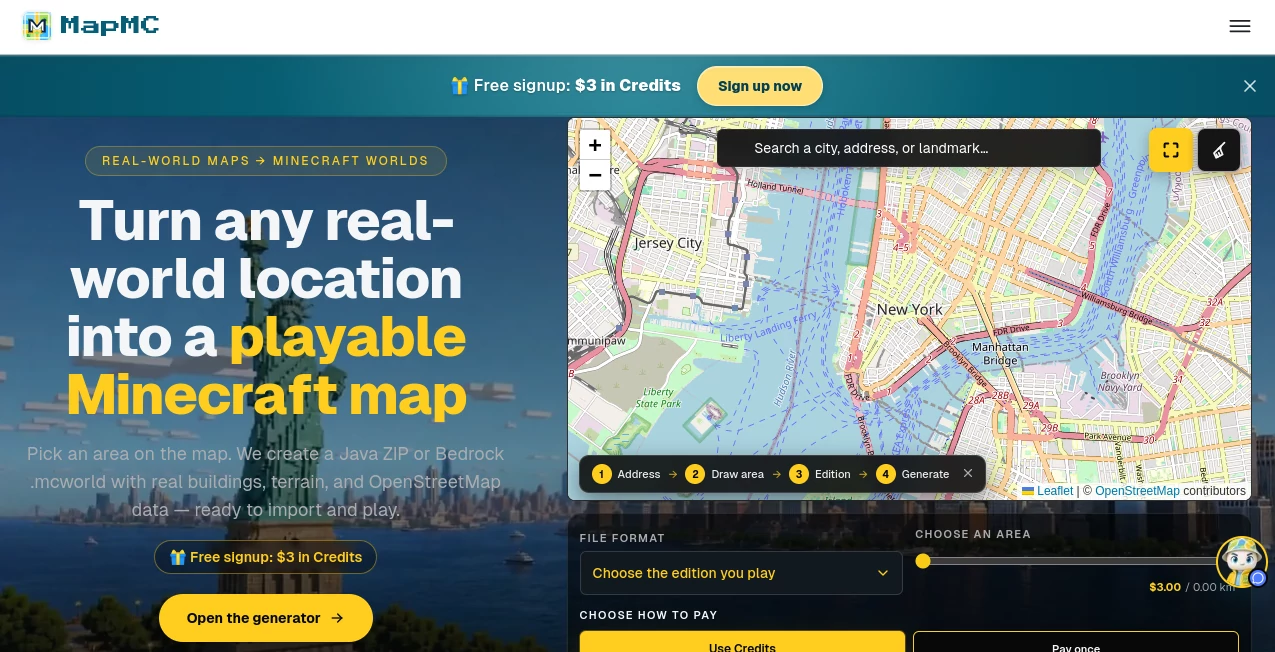
MapMC is an online tool that transforms real-world locations into playable Minecraft worlds. Instead of building a city, neighborhood, campus, or landmark from scratch, users can select an area on a map and generate a Minecraft world based on real geographic data. The result includes features such as roads, buildings, terrain, water, and land cover, giving players a practical starting point for exploration, creative projects, and location-based builds.
The process is particularly appealing because it happens directly in a browser. There is no desktop installation, command-line setup, or complicated conversion workflow. Users simply select a location, define an area, choose Java or Bedrock, and generate the world. The service currently supports areas of up to 22 km² per world, while larger areas may take considerably longer to process.
Key Features
- Convert real-world locations into playable Minecraft worlds.
- Use OpenStreetMap data for roads, buildings, waterways, terrain, land cover, and other mapped features.
- Generate worlds for both Minecraft Java Edition and Bedrock Edition.
- Choose an area directly on an interactive map.
- Adjust options such as terrain, roofs, interiors, and land cover.
- Download Bedrock worlds as .mcworld files or Java worlds as ZIP files.
- Explore supported generated worlds through browser-based 3D previews.
- Work entirely through a web browser without installing conversion software.
- Pay according to the selected geographic area rather than through a recurring subscription.
User Interface
The interface keeps the main workflow straightforward. Users can search for a city, address, or landmark, move around the map, and draw a rectangle around the area they want to recreate. The generator then presents the available configuration choices and updates the price as the selected area or settings change.
This approach is much easier to understand than a traditional desktop-based map conversion process. Someone who has never worked with geographic data can essentially follow a four-step path: find a place, select the area, choose an edition, and create the world.
Accuracy & Performance
The generated world is a geographic approximation rather than a manually constructed one-to-one replica. Its quality depends heavily on the amount and quality of OpenStreetMap information available for the selected location. Cities, recognizable neighborhoods, waterfronts, campuses, villages, and areas with detailed road networks tend to provide more interesting results.
Behind the conversion process, the service uses the open-source Arnis engine to translate geographic features into Minecraft blocks. Roads can become paths and streets, building footprints can become structures, waterways become water, and terrain information helps reproduce the shape of the landscape.
Small worlds can generally be ready within a few minutes. Larger areas can take longer, with the maximum 22 km² area potentially requiring around 10 to 20 minutes. This makes the service well suited to targeted locations rather than attempting to reproduce an entire city at once.
Capabilities
The biggest strength is the combination of geographic selection and playable output. A user can choose a familiar place and turn it into something they can actually explore inside Minecraft rather than receiving only a static map or image.
Both major Minecraft editions are supported. Bedrock users receive a .mcworld file, while Java users receive a world ZIP or folder suitable for importing into their game. The generator also provides settings for terrain, buildings, roofs, interiors, and surface details, giving users some control over how the final world is constructed.
There is also a browser-based 3D preview for supported Java worlds. This is useful when users want to inspect the generated environment before deciding how they want to use it in a project or gameplay session.
Security & Privacy
The service operates as an independent third-party Minecraft tool and is not affiliated with Mojang Studios or Microsoft. Generated files are kept for a limited period, so users who want permanent access should download their worlds and store them locally.
The platform also provides an account deletion process. Users can request account deletion through the support address associated with the service, with the site stating that user records and generated files are removed within the specified period.
Use Cases
There are plenty of interesting ways to use a real-world Minecraft generator. A student could recreate the area around a school or university for a geography project. A Minecraft creator could reproduce a recognizable neighborhood as the foundation for a video or role-playing map. Someone planning a virtual city could use real streets and building layouts as a starting point instead of drawing every road manually.
It can also be useful for fans who want to explore familiar locations in a completely different way. Imagine turning a hometown, a memorable vacation destination, a famous landmark, or a favorite waterfront into a block-based world that can be explored from inside Minecraft.
For larger creative projects, the tool is particularly helpful as a first draft. Builders can take the generated landscape and structures and then add their own details, interiors, decorations, roads, or gameplay mechanics.
Pros and Cons
Pros
- Turns real geographic locations into playable Minecraft worlds.
- Supports both Java and Bedrock editions.
- No desktop installation or command-line configuration is required.
- Uses real OpenStreetMap geographic information.
- Provides configurable generation options.
- Offers a free starting credit for new accounts.
- Uses pay-per-area pricing rather than a monthly subscription.
- Useful for cities, neighborhoods, landmarks, campuses, and creative projects.
Cons
- Results depend on the quality and completeness of OpenStreetMap coverage.
- Remote or poorly mapped locations may produce relatively simple worlds.
- The generated environment is an approximation rather than a perfect replica.
- Larger areas take longer to generate.
- The current maximum area is 22 km² per world.
Pricing Plans
The pricing model is based on the size of the area being generated. There is no recurring monthly subscription. New accounts receive a one-time $3 balance, which can be used to create a small world.
Users can also purchase credit packs. The available options include a $9.90 pack with 1,500 Credits, a $19 pack with 3,500 Credits, and a $49 Studio pack with 10,000 Credits. Unused credit does not expire according to the current pricing information.
Direct pay-as-you-go generation is also available, with example prices ranging from $3 for 0.5 km² to $15 for the maximum 22 km² area. This structure makes smaller personal projects relatively accessible while giving frequent users the option of purchasing credits in advance.
How to Use It
- Open the world generator in a web browser.
- Search for a city, address, landmark, or other real-world location.
- Move the map to find the exact area you want to recreate.
- Draw a rectangle around the selected region.
- Choose Minecraft Java or Bedrock Edition.
- Adjust available generation settings such as terrain, roofs, interiors, and land cover.
- Review the displayed area and price.
- Start the generation process.
- Wait for the world to finish processing.
- Download the resulting Java ZIP or Bedrock .mcworld file and import it into Minecraft.
Comparison with Similar Tools
Traditional real-world Minecraft conversion tools often require users to install software, configure dependencies, download geographic datasets, or run conversion commands locally. This browser-based approach removes much of that technical overhead.
Compared with simply viewing a map or using a map screenshot as a Minecraft reference, the generated result is a real Minecraft world that can be imported and explored. Compared with building a location manually, the automated conversion can save a substantial amount of initial construction time.
The trade-off is control. A professional Minecraft builder working manually can decide exactly how every building, road, and decorative element should look. Automated geographic conversion instead prioritizes speed and real-world layout, making it better suited to creating a strong foundation quickly.
Conclusion
For Minecraft players who have ever wondered what their hometown, favorite city, or a famous destination would look like as a playable block world, this tool offers a remarkably practical answer. Its strongest advantage is not simply generating a visual approximation of a location, but turning geographic information into an actual Minecraft world that can be downloaded and explored.
The combination of OpenStreetMap data, automated terrain and building conversion, Java and Bedrock support, and a browser-based workflow makes the process approachable even for users without technical experience. The results will naturally vary from place to place, but when the selected location has good map coverage, the generated layout can provide an impressive foundation for exploration and creative building.
Frequently Asked Questions (FAQ)
Can I convert any real-world location into Minecraft?
You can select locations from around the world, but the quality of the result depends on available OpenStreetMap coverage. Areas with detailed geographic data generally produce richer worlds than sparsely mapped locations.
Does it support Minecraft Java and Bedrock?
Yes. Java worlds are provided in a format suitable for importing into the Java edition, while Bedrock worlds are delivered as .mcworld files.
Do I need to install software?
No. The generation process runs through a web browser, so there is no need to install a desktop converter or configure a command-line environment.
Is it affiliated with Mojang or Microsoft?
No. It is an independent third-party service and is not affiliated with Mojang Studios or Microsoft.
How large can a generated area be?
The current maximum area is 22 km² for a single generated world.
How long does world generation take?
Many worlds are ready within a few minutes. Larger areas can take longer, with a 22 km² generation potentially taking around 10 to 20 minutes.
What happens if my selected area has little map information?
The resulting world may contain less detail. Since the generator relies on OpenStreetMap information, rural or poorly mapped regions can appear considerably simpler than dense urban areas.
Is there a monthly subscription?
No. The current pricing model uses one-time payments and credit packs. Purchased credit does not expire.
Can I use the generated worlds for videos or streams?
The generated world files belong to the user who created them, although Minecraft gameplay used in monetized content remains subject to Mojang's applicable brand and usage guidelines.
How long are generated files stored?
Generated files are currently kept for 30 days from creation. Users who want to retain a world permanently should download and save the file locally.
AI Game , AI Fun Tools , AI Maps Generator .
These classifications represent its core capabilities and areas of application. For related tools, explore the linked categories above.

MapMC Alternatives Product

Caricature A…
Project Genie

StarBattle O…

Lessgames

GoDices

Diss Track G…
ao3dle

Create a Car…

Plottie