
Matrix Coder
What is Matrix Coder?
I’ve lost count of how many times I’ve had a clear vision for a landing page or dashboard, only to get stuck translating it into code. The back-and-forth with prompts, the tweaking, the debugging — it used to kill the momentum. Then I started using this platform and the whole experience felt different. You describe what you want in plain, natural language, and it builds a live preview right there in the browser. No rigid templates, no steep learning curve, just “vibe coding” that actually understands what you mean. The first time I described a modern SaaS dashboard with dark mode and pricing tiers, I had something clickable and clean in under a minute. That kind of speed changes everything.
Introduction
Building websites and web apps has never been faster, but it can still feel technical and slow if you’re not a full-time coder. This platform removes most of that friction. It lets you talk to the AI in everyday language, see instant previews, iterate conversationally, and export clean, production-ready code — mostly React components ready for Next.js or Vite. What makes it stand out is the no-subscription model: you buy token packs when you need them, and they never expire. It’s built for indie hackers, designers who code a bit, small teams, and anyone who wants to move from idea to working prototype without getting buried in setup or recurring bills.
Key Features
User Interface
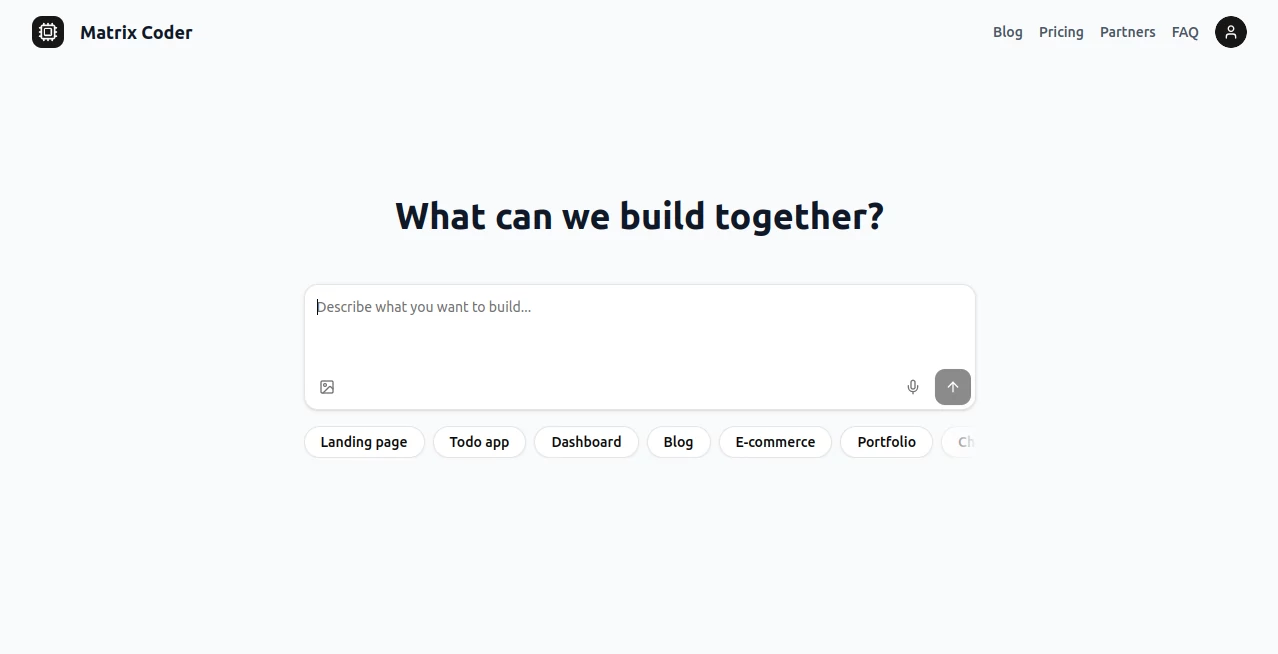
The workspace feels light and focused. You type your idea in a chat-like box, and the AI starts building a live preview on the right side. You can click around the preview, point out what you want changed, and keep the conversation going naturally. No complex panels or overwhelming options — just a clean canvas where your words turn into something you can see and interact with immediately. It’s the kind of interface that makes you want to keep building instead of fighting the tool.
Accuracy & Performance
It gets the initial prompt right more often than not, which is rare in this space. You describe the vibe — “modern SaaS landing page with testimonials, pricing tiers, and a dark mode toggle” — and it delivers something surprisingly close on the first try. Iterations are fast, and the generated code stays clean and well-structured. In practice, it saves hours compared to starting from scratch or wrestling with other AI tools that need heavy prompting just to understand basic requests.
Capabilities
You can build landing pages, dashboards, blogs, e-commerce stores, portfolios, chat apps, and more. It handles full web apps, React components, and multi-page flows. The AI supports conversational refinement, live previews, and clean code export. Because it’s focused on vibe-based development, you stay in creative flow instead of syntax mode. It’s especially strong for rapid prototyping and building MVPs without a big dev team.
Security & Privacy
Your projects stay private by default. The platform uses a pay-as-you-go token system with no forced subscriptions, and code generation happens in a way that respects your ownership. You control what you export and deploy. For indie builders and small teams, that sense of ownership and simplicity is refreshing.
Use Cases
A solo founder sketches a new SaaS idea over coffee and has a working landing page with pricing and dashboard mockup by lunchtime. A designer who codes a little uses it to quickly prototype client concepts and gather feedback before writing final code. A small agency builds internal tools and client portals faster by describing requirements in plain English. Even non-technical founders use it to create demos that impress investors without hiring expensive developers. It shines whenever speed and creative control matter more than writing every line manually.
Pros and Cons
Pros:
- Truly conversational “vibe coding” that understands natural language well.
- Fast live previews and clean, exportable React code.
- No subscription pressure — buy tokens only when you need them.
- Great for rapid prototyping and turning ideas into working demos quickly.
- Accessible for designers, founders, and developers who want to move faster.
Cons:
- Very complex or highly custom logic may still need manual refinement after export.
- Token system means heavy users will need to top up regularly.
Pricing Plans
It avoids the subscription trap completely. You purchase flexible token packs that never expire, so you only pay when you actually build. There are options for different usage levels, and you can even earn free tokens through partner offers. It’s one of the fairest models I’ve seen for AI coding tools — you stay in control of costs while getting serious building power.
How to Use Matrix Coder
Head to the workspace, start typing your idea in plain English (“Create a modern fitness app landing page with hero section, features grid, testimonials, and pricing cards”). Watch the live preview appear on the right. Click elements or continue the conversation to refine (“Make the navigation sticky and add a dark mode toggle”). When you’re happy, export the clean React code and take it wherever you need. The whole loop feels natural, like collaborating with a fast, talented developer who never gets tired.
Comparison with Similar Tools
Many AI coding assistants feel rigid or require heavy prompting to get decent results. This one stands out with its strong “vibe” understanding and smooth live preview workflow. While some tools lock you into subscriptions, the flexible token model here gives you real freedom. It’s especially strong for frontend and full web app prototyping, where speed and visual feedback matter most.
Conclusion
Building on the web should feel exciting, not exhausting. This platform brings that excitement back by letting you describe what you want and see it come alive quickly. Whether you’re a founder validating an idea, a designer prototyping, or a developer moving faster, it removes unnecessary friction and keeps you in creative flow. In 2026, this is how more and more great products will start — not with lines of code, but with a simple description and a powerful AI that actually gets it.
Frequently Asked Questions (FAQ)
Do I need coding experience?
Not really. You can build impressive things with plain English descriptions and light guidance.
How good is the generated code?
Clean, modern React that’s ready for production with minor tweaks in most cases.
Is there a subscription?
No — only flexible token packs that never expire.
Can I export the code?
Yes, clean React components and full projects are exportable.
What kinds of projects work best?
Landing pages, dashboards, SaaS tools, portfolios, e-commerce, and internal apps all turn out great.
AI Website Builder , AI No-Code & Low-Code , AI Code Generator , AI Developer Tools .
These classifications represent its core capabilities and areas of application. For related tools, explore the linked categories above.

Matrix Coder Alternatives Product

ChatFlowchart

Duct Tape AI…
Kimi K2.5

Xvibe

vivgrid

DevUtilX

DeepSeek

Discord Time…

Beacons