MelodyCraft
What is MelodyCraft?
There’s something incredibly satisfying about typing a few lines of lyrics or a simple idea and hearing a complete song come back — with real-sounding vocals, instruments, and production that actually feels polished. I’ve tried several music tools over the years, but this one stands out because it removes the usual barriers. No need to play an instrument, no complex software to learn — just your creativity and a few clicks. Friends I’ve shown it to often end up spending an entire evening generating track after track, laughing at how good some of them sound. It’s that kind of addictive fun mixed with real quality.
Introduction
Making music has always been one of the most joyful creative outlets, but it traditionally required years of practice or expensive equipment. MelodyCraft flips that reality. Whether you start with a vague prompt, your own lyrics, or even a voice recording, it generates full songs complete with melody, vocals, and backing tracks. It supports a huge range of genres and styles, and the results often feel surprisingly professional. What makes it special is how accessible it feels — perfect for beginners experimenting for fun and experienced creators looking for quick inspiration or royalty-free tracks for projects. It turns “I wish I could make a song about this” into reality in minutes.
Key Features
User Interface
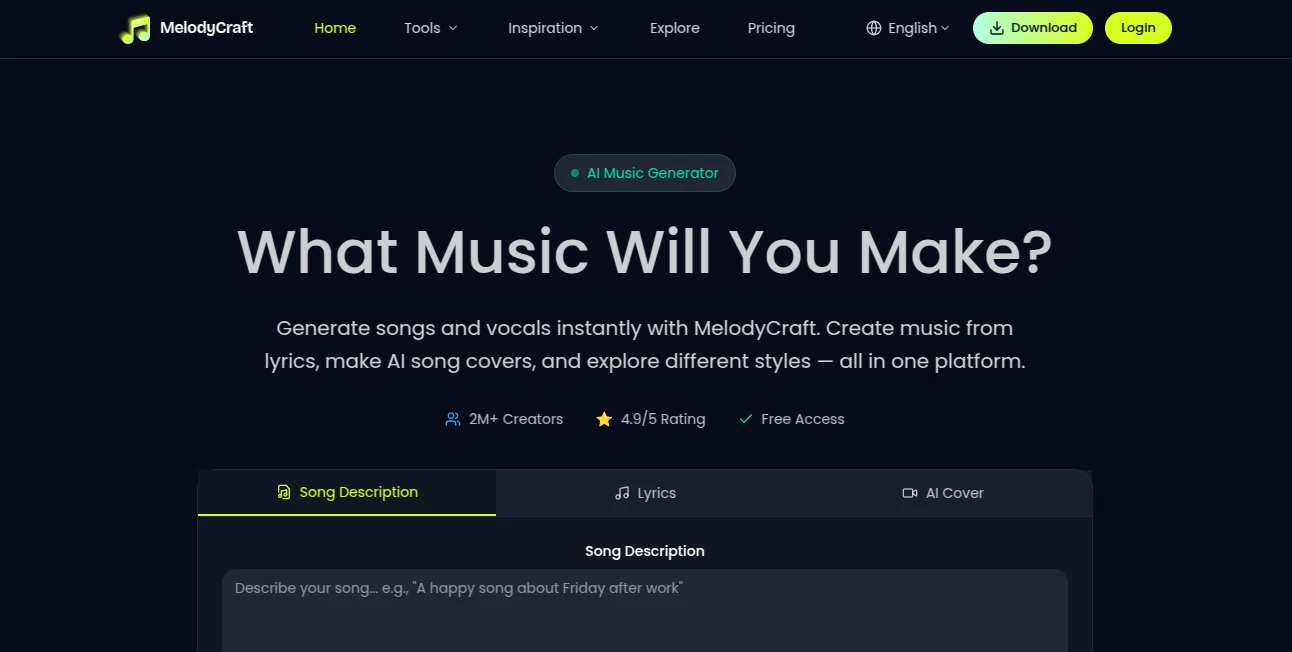
The design is clean and inviting, with a big prompt area where you can type lyrics, describe a vibe, or upload a voice clip. Style selectors and genre options sit nearby without overwhelming the screen. Generation happens quickly, and you get previews so you can tweak and regenerate easily. It never feels intimidating — even my non-musical friends jumped in and created their first track within a couple of minutes. The flow just makes sense.
Accuracy & Performance
The AI handles both the technical side (melody, structure, instrumentation) and the emotional side (tone, delivery, vibe) remarkably well. Vocals sound natural across different styles, and the music stays coherent even with longer or more complex prompts. Generation speed is impressive — most tracks finish in under a minute — so you can experiment freely without long waits. The consistency across genres is one of its strongest points.
Capabilities
You can generate songs from text prompts, turn your own lyrics into full tracks, create AI covers using voice recordings, and explore hundreds of genres and vocal styles. It supports song extension, custom mixing, and royalty-free downloads for personal or commercial use. Whether you want a heartfelt ballad, upbeat pop, rap verse, or something experimental, it adapts and delivers complete, ready-to-use songs.
Security & Privacy
Your creations and voice uploads stay private. The platform focuses on giving creators freedom without unnecessary data collection or sharing. Generated tracks are yours to keep and use, with clear royalty-free rights for most plans — giving peace of mind whether you’re making music for fun or for projects.
Use Cases
A songwriter struggling with a chorus uses it to generate multiple variations until one clicks perfectly. A content creator makes custom background music for videos in minutes instead of hunting for royalty-free tracks. A parent and child spend an afternoon turning silly ideas into funny family songs. A musician experiments with AI covers of their own voice in different genres for fun social content. It fits naturally into almost any creative routine.
Pros and Cons
Pros:
- Turns simple ideas or lyrics into surprisingly complete, high-quality songs.
- Excellent vocal quality and genre variety.
- Royalty-free output for most uses.
- Fast enough to support real creative flow and experimentation.
- Easy enough for complete beginners, powerful enough for experienced users.
Cons:
- Free tier has usage limits (as expected for high-quality generation).
- Very specific or unusual prompts sometimes need refining for best results.
Pricing Plans
It offers a generous free tier so you can try it and create real songs right away. Paid plans unlock higher limits, faster generation, more styles, and advanced features like longer tracks and priority processing. The pricing feels fair for the quality and speed you get — many users say even the basic paid plan pays for itself after creating just a few tracks for personal or commercial projects.
How to Use MelodyCraft
Go to the main generator page and choose your starting point: type a description, paste lyrics, or record/upload a voice clip. Select a genre or vibe, adjust any specific settings (tempo, mood, vocal style), and hit generate. Listen to the preview, regenerate or tweak the prompt if needed, then download the full track. The process is fast and forgiving, encouraging you to experiment until you get something you love.
Comparison with Similar Tools
While many AI music tools focus on either instrumentals or very short clips, this one delivers full songs with strong vocals and coherent structure. It balances ease of use with quality in a way that feels more complete than most competitors. The combination of lyrics-to-song, voice covers, and broad genre support gives it a practical edge for real creators who want usable results quickly.
Conclusion
Music creation should feel exciting, not intimidating. This platform brings that excitement back by making professional-sounding songs accessible to everyone. Whether you’re a complete beginner with a melody in your head, a lyricist looking for the right backing, or a creator needing quick tracks, it delivers results that often exceed expectations. In a world full of AI tools, this one stands out because it genuinely helps you make music you’re proud to share.
Frequently Asked Questions (FAQ)
Is the generated music royalty-free?
Yes — tracks are royalty-free for personal and commercial use (check specific plan terms for details).
Do I need music experience to use it?
Not at all. Just describe what you want or paste lyrics — the AI handles the rest.
How long are the generated songs?
Most tracks are full-length songs, with options for longer versions on paid plans.
Can I use my own voice?
Yes — the AI cover feature lets you record or upload vocals and generate new songs around them.
What genres does it support?
A wide variety including pop, rock, hip-hop, electronic, ballads, and many more — with the ability to mix styles.
AI Text to Music , AI Lyrics Generator , AI Music Generator , AI Voice & Audio Editing .
These classifications represent its core capabilities and areas of application. For related tools, explore the linked categories above.

MelodyCraft Alternatives Product
Mp3ToMidi
Musikalis AI…
Lyria3 AI

Voice To Ins…
gemini music

Krisp

TyTyAi
FluentDictat…

AIMusicFlow