


















MESA
What is MESA?
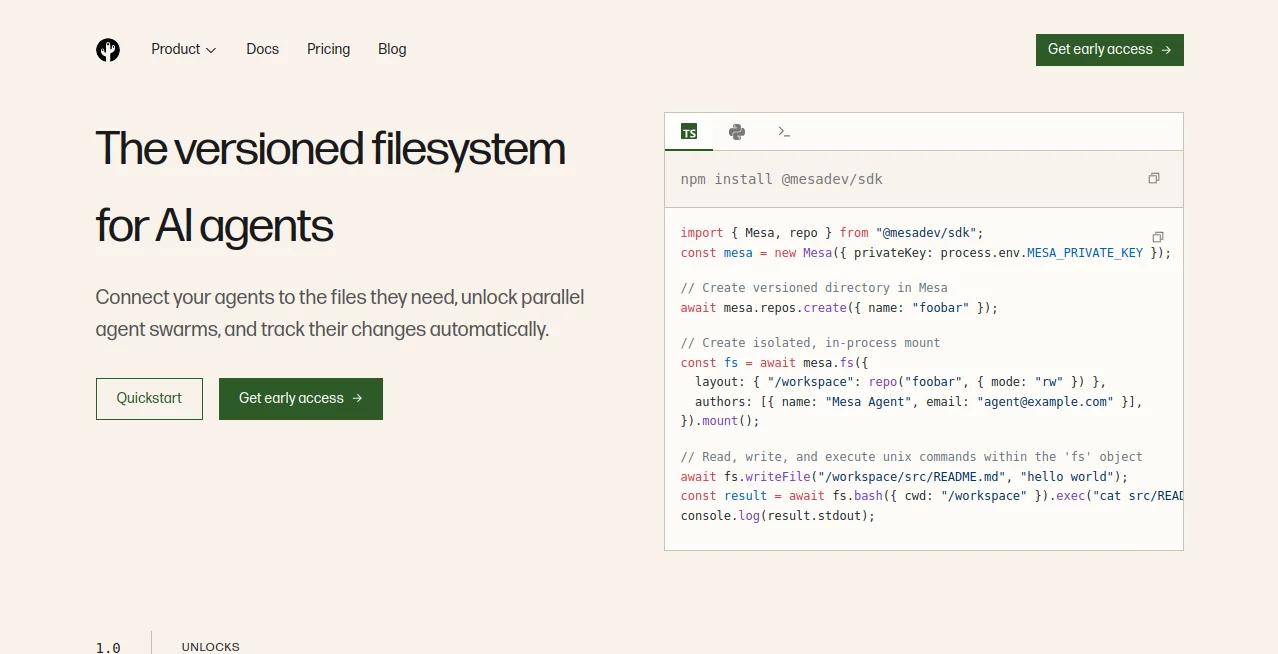
Mesa is built around a problem that becomes surprisingly difficult once AI agents start doing real work: keeping their files persistent, organized, versioned, and accessible across short-lived compute environments. Instead of treating agent files as temporary data, it provides a durable filesystem designed specifically for AI-native applications.
The idea is simple but powerful. Agents can read and write files using familiar filesystem operations while the underlying system automatically handles persistence, version history, branches, checkpoints, and access controls. That makes it particularly interesting for teams building coding agents, knowledge-work systems, data-analysis agents, and other applications where files need to survive beyond an individual session.
For developers, one of the biggest advantages is that there is no need to redesign every application around a specialized file API. A POSIX-compatible filesystem can be mounted at the operating-system level, while an SDK provides an in-process option for environments where FUSE or traditional mounts are not practical.
Key Features
- Versioned filesystem designed specifically for AI agents
- POSIX-compatible access for standard filesystem tools
- Automatic persistence and version history for file changes
- Branches and isolated workspaces for parallel agent execution
- Checkpoints and rollback capabilities
- Human-in-the-loop approval workflows
- Fine-grained access controls for repositories and agent permissions
- Support for code, documents, spreadsheets, images, datasets, models, media, and other file types
- Smart prefetching and local caching
- FUSE mounting for macOS and Linux environments
- SDK-based in-process filesystem access
- Large-file support with random-access reads
User Interface
The experience is primarily designed for developers rather than traditional end users. Instead of presenting a conventional consumer file manager, the platform fits into an agent's existing runtime through filesystem mounts and SDK interfaces.
This approach is particularly convenient for developers who already work with command-line tools, editors, build systems, or automated agents. A repository can appear as a normal directory, allowing familiar commands and applications to work without forcing developers to learn an entirely new workflow.
The SDK approach is useful when an application runs in a serverless or controlled backend environment. Developers can create isolated filesystem mounts programmatically and allow an agent to work with files directly from its execution environment.
Accuracy & Performance
Performance is one of the strongest parts of the platform's design. Files are materialized when they are needed rather than requiring an entire repository to be cloned before an agent can begin working. The website reports a time to first file read of around 50 milliseconds and highlights sub-50ms read and write performance through its filesystem layer.
Smart prefetching and local caching are also used to reduce repeated network access. This matters when an agent is navigating large repositories or working with sizeable datasets. Instead of downloading everything upfront, the system can retrieve files on demand and keep frequently accessed content available locally.
The result is a workflow that feels much closer to working with a local filesystem while retaining the durability and versioning expected from managed infrastructure.
Capabilities
The platform goes beyond basic file storage. Agents can create isolated branches, make changes independently, and later have those changes reviewed or merged. This is especially useful when several agents need to work on the same project without overwriting one another.
Checkpoints provide another practical layer of control. If an agent makes an unwanted change, a previous filesystem state can be restored rather than forcing developers to reconstruct the lost state manually.
It also supports large files without imposing a per-file size limit, making the underlying storage suitable for datasets, machine learning models, media files, source code, and business documents. The system can also synchronize with Git-based upstreams such as GitHub and GitLab.
Security & Privacy
Security is clearly aimed at enterprise AI workloads. The platform states that it is SOC 2 Type II audited and uses AES-256 encryption at rest and TLS 1.3 for data in transit. Access logging is also available for tracking activity.
Access can be restricted using short-lived tokens scoped to particular repositories and permissions. This is important for agent-based systems because not every automated worker should have unrestricted access to every document or workspace.
For organizations with stricter infrastructure requirements, the enterprise offering includes bring-your-own-cloud deployment, allowing the service to operate inside an organization's own AWS, GCP, or Azure environment.
Use Cases
Coding agents: Development agents can work with source code as if it were stored locally, while branches and version history provide a safer way to experiment with automated changes.
Knowledge-work agents: Teams can give agents access to contracts, reports, spreadsheets, research documents, and other long-lived files while maintaining a history of changes.
Parallel agent workflows: Multiple agents can work from isolated branches or workspaces. This makes it easier to compare different approaches before selecting a result.
Data analysis: Agents working with datasets can access large files without downloading an entire repository first, which can be valuable for data-heavy workflows.
Enterprise document workflows: Legal, healthcare, insurance, research, and business operations can benefit from durable files, controlled access, approvals, and audit-friendly version history.
AI development environments: Developers can integrate the filesystem into sandboxes, virtual machines, backend services, and other environments where agent workloads need persistent storage.
Pros and Cons
- Pros: Designed specifically for AI agent workloads
- Pros: Combines filesystem access with version-control concepts
- Pros: Supports parallel agent execution and isolated workspaces
- Pros: Automatic persistence, checkpoints, and rollback
- Pros: POSIX compatibility works with familiar development tools
- Pros: Supports large files and multiple file formats
- Pros: Strong enterprise security and access-control features
- Cons: The product is currently positioned toward developers and technical teams
- Cons: The service is in private beta, so availability may be limited
- Cons: Usage-based pricing can require monitoring as workloads grow
Pricing Plans
The pricing model is usage-based rather than built around traditional fixed subscriptions. Every account includes a free tier with 50 GB of repository storage, up to 1,000 repositories, 200 GB of monthly Git and REST API egress, and unlimited reads through the virtual filesystem.
Once the included allowance is exceeded, storage is priced at $0.20 per GB per month, while Git and REST API egress is charged at $0.11 per GB. Reads through the virtual filesystem are not metered for egress, which can make the model particularly attractive for workloads that primarily interact with files through the filesystem interface.
Enterprise customers can receive custom pricing, volume discounts, committed-use arrangements, self-hosted or bring-your-own-cloud deployments, dedicated support, and custom service agreements.
How to Use It
Getting started is aimed at developers who already have an AI agent or application they want to connect to persistent storage. The SDK can be installed through npm, after which developers can create repositories and mount them into an agent's working environment.
For environments that support filesystem mounting, the FUSE option can expose repositories as normal directories. Agents and ordinary command-line applications can then read, modify, search, and create files using familiar Unix operations.
For serverless or application-level environments, the SDK provides an alternative that works without a FUSE mount or traditional container filesystem. Developers can create an isolated workspace, assign the required permissions, and let the agent operate directly against it.
A practical workflow might look like this: create a repository, mount it into an agent session, allow the agent to make changes, create a checkpoint, send the result for human review, and either approve the changes or return to an earlier state.
Comparison with Similar Tools
Traditional Git hosting platforms are excellent for source-code collaboration, but they were not designed around high-volume autonomous agents or as a general-purpose filesystem for arbitrary documents. The approach here combines familiar version-control concepts with a filesystem that agents can access directly.
Cloud object storage such as S3 solves durable storage very well, but it does not naturally provide the branching, checkpointing, merging, and agent-oriented workflows needed when several automated workers are modifying the same collection of files.
The distinction becomes especially important for AI applications. An agent may need to inspect one file from a large repository, make several experimental changes, let another agent work in parallel, and then allow a human to review the result. Downloading an entire repository or building custom synchronization and locking logic for every workflow can quickly become cumbersome.
This filesystem-first approach is therefore most compelling for teams building sophisticated agents rather than applications that simply need somewhere to upload and download files.
Conclusion
AI agents are becoming capable of handling increasingly complex tasks, but their temporary execution environments create a fundamental storage problem. Files, decisions, intermediate work, and previous versions often need to survive long after a particular agent session has ended.
This platform addresses that gap by bringing together durable storage, filesystem compatibility, version control, branching, checkpoints, access control, and agent-oriented workflows. Its support for both operating-system mounts and application-level SDK integration also gives developers flexibility when designing their infrastructure.
For teams building coding agents, enterprise knowledge systems, document workflows, data-analysis agents, or multi-agent applications, it offers a thoughtful foundation for making persistent files a first-class part of the agent architecture. The private-beta status means it is still an early product, but the underlying concept is highly relevant to the direction of AI-native software.
Frequently Asked Questions (FAQ)
What is this platform designed for?
It provides a durable, versioned filesystem for AI agents and applications that need persistent access to files across ephemeral compute environments.
Is it compatible with standard filesystems?
Yes. The filesystem is POSIX compatible, allowing agents and applications to use familiar Unix commands and standard filesystem APIs.
Can multiple agents work on the same project?
Yes. Branches and isolated workspaces allow multiple agents to work in parallel without having to overwrite each other's changes.
Does it support large files?
Yes. The platform supports random-access reads for large files and is designed to handle datasets, models, media, code, and other sizeable files.
Can I roll back an agent's changes?
Yes. Automatic version history and checkpoints allow previous filesystem states to be restored when an agent makes an unwanted change.
Does it support human approval workflows?
Yes. Agent workflows can be paused for human review, with approval queues, change requests, and policy gates available for controlled automation.
Does it have a free plan?
Yes. The free tier includes 50 GB of storage, 1,000 repositories, 200 GB of monthly Git and REST API egress, and unlimited virtual filesystem reads.
Is the service available to everyone?
The product is currently in private beta, with early access available through its waitlist.
What security features are available?
The platform states that it is SOC 2 Type II audited and uses AES-256 encryption at rest, TLS 1.3 in transit, access logging, and short-lived access tokens with scoped permissions.
Can it work with GitHub or GitLab?
Yes. Built-in synchronization with Git-based upstreams such as GitHub and GitLab is supported, allowing existing repositories to be incorporated into agent workflows.
AI Knowledge Management , AI Code Assistant , AI Developer Tools , AI DevOps Assistant .
These classifications represent its core capabilities and areas of application. For related tools, explore the linked categories above.

MESA Alternatives Product

Odysseus AI

Prelight

Sourcetable

You.bot

LocalRAG!
RepoClip

ModelsLab

BootstrapKing
HostFinder
