MiniMax H3
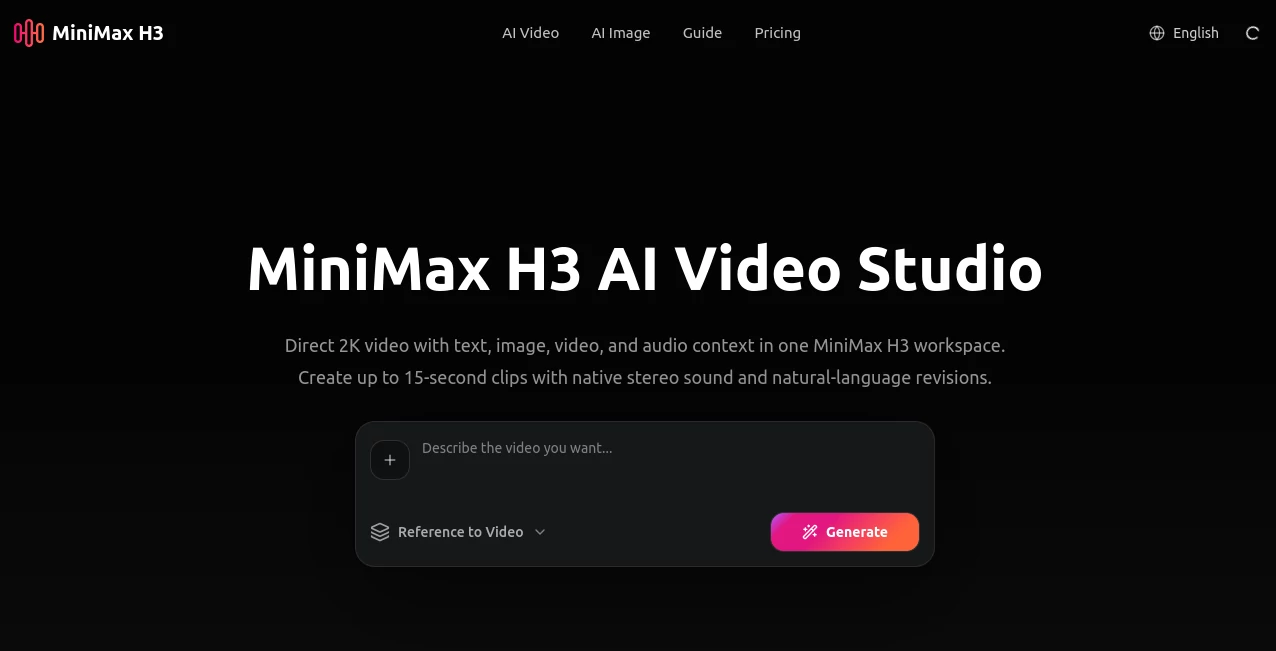
What is MiniMax H3?
Creating convincing AI video usually means juggling several separate tools for images, motion, sound, and editing. This AI video studio takes a different approach by bringing text, images, video references, and audio into a single creative workflow. It is designed for people who want to move from an idea to a polished short video without rebuilding the project every time they change direction.
The platform is built around a multimodal video model capable of producing clips up to 15 seconds in 2K resolution with native stereo sound. Instead of treating sound and visuals as completely separate jobs, the system can interpret them as part of the same creative context. That makes it particularly interesting for advertising concepts, product videos, social content, visual experiments, and early-stage film production.
One of its strongest qualities is the amount of control available through references. A creator can start with a written prompt, a still image, a video reference, or a combination of inputs and describe the desired result in natural language. For someone working on several variations of the same concept, that can save a surprising amount of time.
Key Features
- Text-to-video generation for creating scenes directly from written descriptions.
- Image-to-video workflows for turning still images into animated sequences.
- Reference-to-video generation using visual material to guide the final result.
- Multimodal understanding across text, images, video, and audio.
- Up to 2K video output.
- Video generation of up to 15 seconds.
- Native stereo audio generation.
- Video-to-video motion transfer for using movement references.
- Natural-language creative direction.
- Text and brand rendering for commercial-oriented scenes.
- Multiple video models available inside the same workspace.
- Version comparison and iterative generation.
- Watermark-free downloads on paid plans.
- Commercial usage rights on the listed paid plans.
User Interface
The interface is designed around a straightforward generation workflow rather than a complicated editing timeline. Users can begin with a prompt, still image, or reference clip and then choose the appropriate generation mode, resolution, and aspect ratio.
Another useful touch is the ability to work with several video models from the same environment. The model selection includes options from providers such as Google Veo, Hailuo, Seedance, Wan, Grok, Kling, and PixVerse. This makes the workspace more practical for creators who like to compare different generation approaches instead of committing to a single model.
The overall experience feels closer to a creative studio than a basic prompt box. You can generate different directions, compare results, change references, and continue refining a scene without starting the entire creative process from zero.
Accuracy & Performance
Performance is especially strong when the prompt contains clear information about subjects, camera movement, timing, and visual style. The system is designed to understand relationships between different types of references rather than simply reading a text description and producing an unrelated clip.
The underlying H3 model supports video generation at up to 2K resolution and 15 seconds, while native stereo audio is generated alongside the visuals. The model was introduced with an emphasis on instruction following, text and brand rendering, and video-to-video motion transfer, all of which are useful when a generated clip needs to follow a specific creative brief rather than just look attractive.
As with any generative video system, results can vary depending on the complexity of a prompt and the references provided. Very detailed scenes with numerous moving subjects may still require several attempts. The ability to quickly regenerate and compare versions helps make that process considerably less frustrating.
Capabilities
The platform covers several important stages of modern AI video production. Text-to-video is useful when starting from an idea, while image-to-video is better suited to creators who already have a product shot, character image, illustration, or other visual asset.
Reference-based generation adds another layer of control. A video can provide movement or camera inspiration, while other references can influence the subject, appearance, timing, or overall visual language. This makes the system useful for projects where consistency and direction matter more than simply generating a random clip.
Native audio is another notable capability. Dialogue, environmental sounds, effects, and music can be considered alongside the visual generation process, reducing the need to treat sound as an entirely separate production stage.
Security & Privacy
Because users may upload product images, reference videos, creative material, and other potentially sensitive assets, privacy should be considered before using the service for confidential production work. The platform provides dedicated privacy and terms pages, and users should review those policies to understand how submitted material and generated content are handled.
For commercial projects, it is also sensible to review the current usage terms before publishing generated material. The listed paid plans include commercial usage rights, but the exact rights and restrictions can depend on the type of content being created and the applicable policies.
Use Cases
Social Media Content: Short-form creators can produce concepts for TikTok, Reels, Shorts, and other vertical video platforms. Multiple variations can be generated quickly, making it easier to test different hooks, visual styles, and opening shots.
E-commerce Marketing: Product images can become short promotional videos with animated camera movements, seasonal concepts, product demonstrations, and advertising-style scenes. This is particularly useful for brands that have good product photography but limited video assets.
Advertising: Marketing teams can use the system to visualize campaign ideas before investing in a full production. A short generated clip can help demonstrate the intended mood, camera movement, product placement, or storytelling direction.
Film Pre-production: Directors and creative teams can experiment with scenes, camera movements, visual styles, and story beats before shooting physical footage. It works well as a visualization tool when an idea is still being developed.
Music Videos: Artists can experiment with surreal environments, performance sequences, cinematic transitions, and visual concepts that would otherwise require a substantial production budget.
Business Presentations: Short motion sequences can make presentations, sales decks, internal announcements, and training material more engaging without requiring a complete video production team.
Education: Teachers and educational creators can turn abstract ideas, visual explanations, or lesson concepts into short video sequences that are easier for students to understand.
Pros and Cons
Pros
- Supports text, image, video, and audio as part of one creative context.
- Generates video at up to 2K resolution.
- Supports clips of up to 15 seconds.
- Native stereo audio reduces the need for separate sound production.
- Reference-based workflows provide more creative control.
- Video-to-video motion transfer expands the range of possible workflows.
- Several video models can be accessed from the same workspace.
- Paid plans include watermark-free downloads and commercial usage rights.
- Useful for both marketing experiments and professional pre-production.
Cons
- Short clips may still require several generations for complex scenes.
- Higher-volume production requires a paid credit plan.
- Advanced creative control can take some experimentation to master.
- Generated video is not a replacement for a full professional editing suite.
- Users working with confidential material should review the privacy and usage policies before uploading assets.
Pricing Plans
The platform uses a credit-based subscription system with three main paid tiers. Pricing and included credits may change, so users should check the current plan information before subscribing.
Starter: The entry-level plan is listed at $9.90 per month during the current promotional pricing, with 1,600 credits issued monthly. It supports up to two concurrent video generations, standard processing, watermark-free downloads, email support, and commercial usage rights.
Pro: Listed at $24.90 per month during the current promotion, this plan provides 6,000 monthly credits and up to six concurrent video generations. It also includes priority processing, watermark-free downloads, priority email support, and commercial usage rights.
Max: Designed for teams and heavier production workloads, the Max plan is listed at $49.90 per month during the current promotion. It provides 15,000 monthly credits, up to ten concurrent generations, the highest processing priority, watermark-free downloads, priority support, and commercial usage rights.
Annual billing is also available, with the current pricing page advertising significant discounts compared with the standard monthly rates.
How to Use MiniMax H3 AI Video Studio
Start by deciding what you want the final shot to look like. A simple text description is enough for a text-to-video project, while a product image, character image, or existing visual can be used when you need stronger visual guidance.
Next, choose the appropriate workflow. Text-to-video is suitable for creating a scene from scratch, image-to-video works well when an existing still image should be animated, and reference-to-video provides additional control through visual references.
Write a specific prompt describing the subject, action, environment, camera movement, pacing, lighting, and audio when relevant. Instead of saying “make a cinematic car video,” for example, describe the road, camera position, movement of the car, lighting conditions, atmosphere, and desired sound.
Generate the first version and inspect the result. If the movement, framing, or subject behavior is not quite right, adjust the prompt or change the reference material. Creating several versions is often more effective than trying to make one enormous prompt perfect on the first attempt.
Once the strongest version is selected, it can be exported for use in a social campaign, presentation, product concept, creative project, or further editing workflow.
Comparison with Similar Tools
Compared with a traditional text-to-video generator, this platform places considerably more emphasis on multimodal references. Instead of relying only on written instructions, creators can combine text with images, video, and audio to establish the direction of a scene.
It is also more flexible than a single-model interface because the workspace provides access to multiple video generation models. This is useful when one model produces better results for a particular visual style while another performs better for a different type of scene.
Its native audio generation is another important distinction. Many AI video workflows still treat sound as a separate stage. Here, stereo audio is part of the generation process, which can make short clips feel more complete straight out of generation.
For professional users, the biggest advantage may be the combination of reference control, short-form generation, model selection, and rapid iteration. For someone who simply wants occasional AI clips, a simpler generator may be enough. For creators testing many concepts, the broader workflow can be much more valuable.
Conclusion
This AI video studio is a strong option for creators who want more control than a basic prompt-to-video experience can provide. Its combination of text, image, video, and audio understanding makes it suitable for projects where the relationship between references matters just as much as the final visual quality.
The ability to create 2K clips up to 15 seconds, generate native stereo sound, use motion references, and compare different creative directions gives the platform a practical place in modern video workflows. It is particularly compelling for advertising, e-commerce, social media, pre-production, and rapid creative experimentation.
For creators who regularly move between ideas, references, and different visual styles, having these capabilities in one workspace can make the process noticeably faster. It may not eliminate the need for conventional editing, but it can dramatically shorten the distance between a rough idea and a convincing first cut.
Frequently Asked Questions (FAQ)
What type of videos can be created?
You can create short-form advertising concepts, product videos, social media clips, storyboards, cinematic scenes, music video concepts, educational content, and presentation visuals.
Can it generate video from an image?
Yes. Image-to-video generation is supported, allowing users to provide a still image and describe the motion or scene they want to create from it.
Can video references be used?
Yes. Reference-to-video workflows can use video material to guide motion, timing, camera language, and other creative elements. Video-to-video motion transfer is also supported.
Does it generate sound?
Yes. The underlying multimodal model can generate native stereo audio alongside the video, allowing dialogue, ambience, effects, and music to be part of the generated result.
What is the maximum video resolution?
The platform supports video generation at up to 2K resolution, with individual clips reaching up to 15 seconds.
Is commercial use available?
The listed paid plans include commercial usage rights. However, creators should review the current terms and applicable usage policies before using generated material in commercial campaigns.
Can multiple AI video models be used?
Yes. The workspace provides access to multiple video models, allowing creators to compare different generation approaches without moving between completely separate interfaces.
Is it suitable for professional video production?
It is particularly useful for concept development, advertising, product visualization, social content, pre-production, and rapid creative testing. Longer or highly complex productions will still benefit from a conventional video editing workflow.
AI Video to Video , AI Image to Video , AI Video Generator .
These classifications represent its core capabilities and areas of application. For related tools, explore the linked categories above.

MiniMax H3 Alternatives Product

Nano Banana …

Grok Imagine…

Yevideo

See dance 2.…

Klyra AI

Seedance 3.0

Happy Horse:…
Subclip

Seedance 2 V…