MixTranslate
What is MixTranslate?
Finding the right translation is no longer just about converting words from one language to another. Modern businesses, content creators, researchers, and international teams need translations that preserve tone, context, and meaning. This platform approaches translation differently by allowing users to compare responses from multiple advanced AI models at the same time, making it much easier to choose the version that feels the most natural for every situation.
Instead of relying on a single translation engine, the service combines the capabilities of more than twenty leading AI models. Users can review different outputs side by side, evaluate quality, and select the translation that best matches their audience. Whether writing marketing copy, translating technical documents, or preparing multilingual customer support content, the experience is designed to reduce editing time while improving consistency. It supports over 150 languages and includes practical tools such as glossary management, OCR text extraction, and an intelligent agent mode that combines the strongest translation results automatically. :contentReference[oaicite:0]{index=0}
Key Features
User Interface
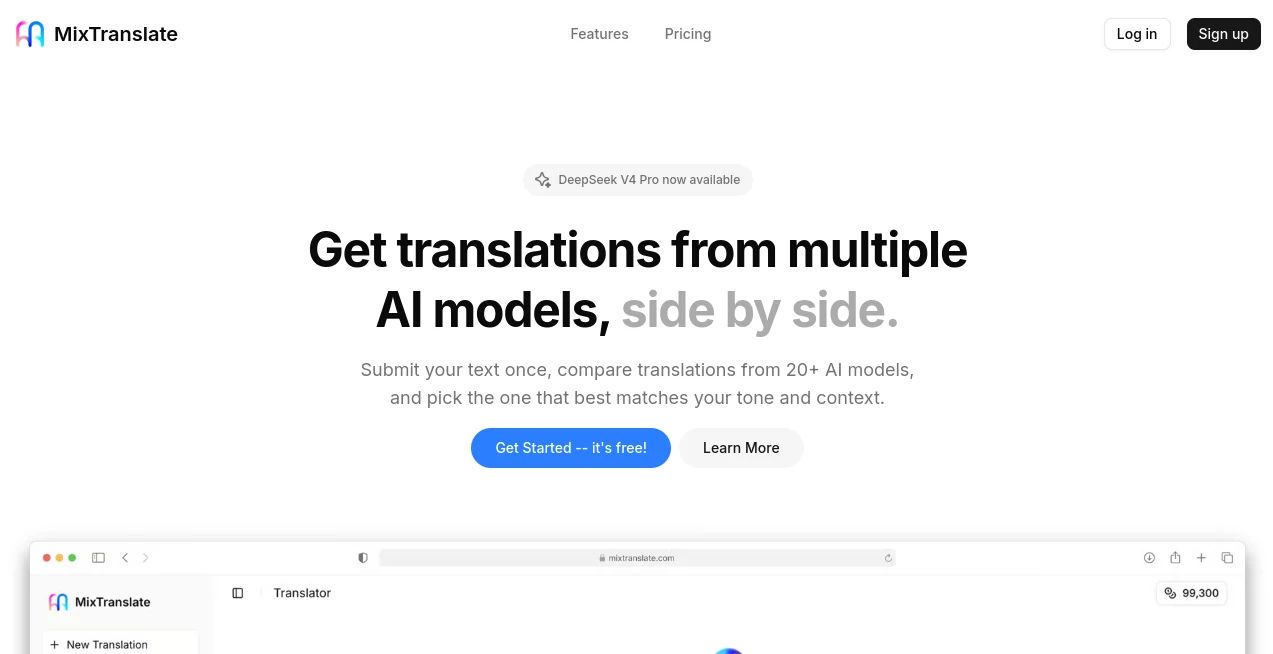
The interface is refreshingly simple. Users paste their content, select source and destination languages, choose preferred AI models, and receive multiple translations in a clean comparison layout. Everything is organized to help users evaluate results quickly without switching between different services.
The side-by-side comparison view is especially valuable for professionals who want to fine-tune wording instead of accepting the first generated result. It creates a smooth workflow that feels practical even for large translation projects.
Accuracy & Performance
Translation quality benefits from the ability to compare outputs from multiple large language models. Instead of trusting a single engine, users can examine different interpretations and select the version with the best fluency, terminology, and cultural context.
The built-in quality scoring system helps identify stronger translations, while the intelligent agent mode automatically combines the highest-quality responses to reduce manual editing. This approach is particularly useful for technical documents, business communication, and creative writing where wording matters. :contentReference[oaicite:1]{index=1}
Capabilities
- Translate content into more than 150 languages.
- Compare results from over 20 AI models simultaneously.
- Create custom glossaries for consistent terminology.
- Maintain brand voice with custom translation rules.
- Extract text from screenshots, scanned files, and images using OCR.
- Adjust writing style for formal, casual, marketing, or technical content.
- Automatically combine the strongest translations using Agent Mode.
- Support both short messages and large documents.
- Provide quality scores for easier decision making.
Security & Privacy
Privacy is an important consideration for organizations translating sensitive information. The platform includes dedicated privacy information and is designed to provide secure handling of user content while giving businesses greater control through custom rules and terminology management. Users working with confidential documents should still review the official privacy policy before uploading highly sensitive material. :contentReference[oaicite:2]{index=2}
Use Cases
- Localizing websites for international audiences.
- Translating product descriptions for e-commerce stores.
- Creating multilingual marketing campaigns.
- Preparing technical documentation.
- Supporting global customer service teams.
- Translating legal and business documents.
- Converting scanned documents into translated text.
- Maintaining consistent terminology across company projects.
- Helping students and researchers understand foreign-language resources.
- Producing multilingual blog articles and social media content.
Pros and Cons
Pros
- Comparison between multiple AI translation models.
- Support for more than 150 languages.
- Easy-to-use interface.
- OCR for translating text from images.
- Custom glossary improves terminology consistency.
- Agent Mode reduces manual editing.
- Free plan available.
- Useful for both individuals and professional teams.
Cons
- Premium plans are required for higher character limits.
- Advanced features may be unnecessary for occasional users.
- Translation quality still benefits from human review for highly specialized content.
Pricing Plans
The platform offers multiple pricing options to accommodate different workloads.
- Free – Includes monthly credits, limited character count per request, basic AI models, glossary support, and custom rules.
- Plus – Designed for professionals needing higher limits, additional AI models, and expanded glossary support.
- Pro – Built for agencies and teams handling large translation volumes with significantly higher limits and access to more simultaneous AI models. :contentReference[oaicite:3]{index=3}
How to Use MixTranslate
Start by entering or pasting the content you want to translate into the editor. Select the original language and choose the target language. Next, pick one or several AI models for comparison. After processing, review the translations displayed side by side, compare quality scores, and select the version that best fits your purpose. If consistency is important, create a glossary before translating so terminology remains uniform throughout your project. Finally, export or copy the preferred result for immediate use. :contentReference[oaicite:4]{index=4}
Comparison with Similar Tools
Many AI translation services generate only a single response, forcing users to accept one interpretation or manually try several different platforms. This solution eliminates that limitation by gathering translations from multiple leading AI models in one workspace.
The ability to compare outputs, combine the strongest responses automatically, customize terminology, and extract text from images creates a workflow that is especially valuable for businesses, localization teams, and professional translators. Rather than replacing human judgment, it gives users more information to make better translation decisions.
Conclusion
For anyone working across languages, having multiple AI perspectives available in a single interface can dramatically improve translation quality. The combination of multi-model comparison, glossary management, OCR support, intelligent automation, and extensive language coverage creates a practical solution for both personal and professional translation tasks.
Whether translating marketing materials, technical documentation, educational content, or customer communications, the platform offers an efficient workflow that saves time while helping users produce more natural and context-aware translations.
Frequently Asked Questions (FAQ)
Is there a free plan available?
Yes. A free plan is available with monthly credits and access to core translation features.
How many languages are supported?
The platform supports translation in more than 150 languages.
Can I compare different AI models?
Yes. One of its biggest advantages is the ability to compare translations from more than twenty leading AI models simultaneously.
Does it support image translation?
Yes. OCR technology extracts text from screenshots, scanned documents, and photos before translating the content.
Who is this platform best suited for?
It is suitable for freelancers, translators, global businesses, marketing teams, researchers, educators, agencies, and anyone who regularly works with multilingual content.
AI Translate , AI Content Generator , AI Productivity Tools , AI Writing Assistants .
These classifications represent its core capabilities and areas of application. For related tools, explore the linked categories above.

MixTranslate Alternatives Product

Caspian

Slackactivity

Nano Banana

Gemini Omni

Free AI Gene…

SalaryHow

LinkedIn Spe…

Productivity…
AiZolo