
MockItReal
What is MockItReal?
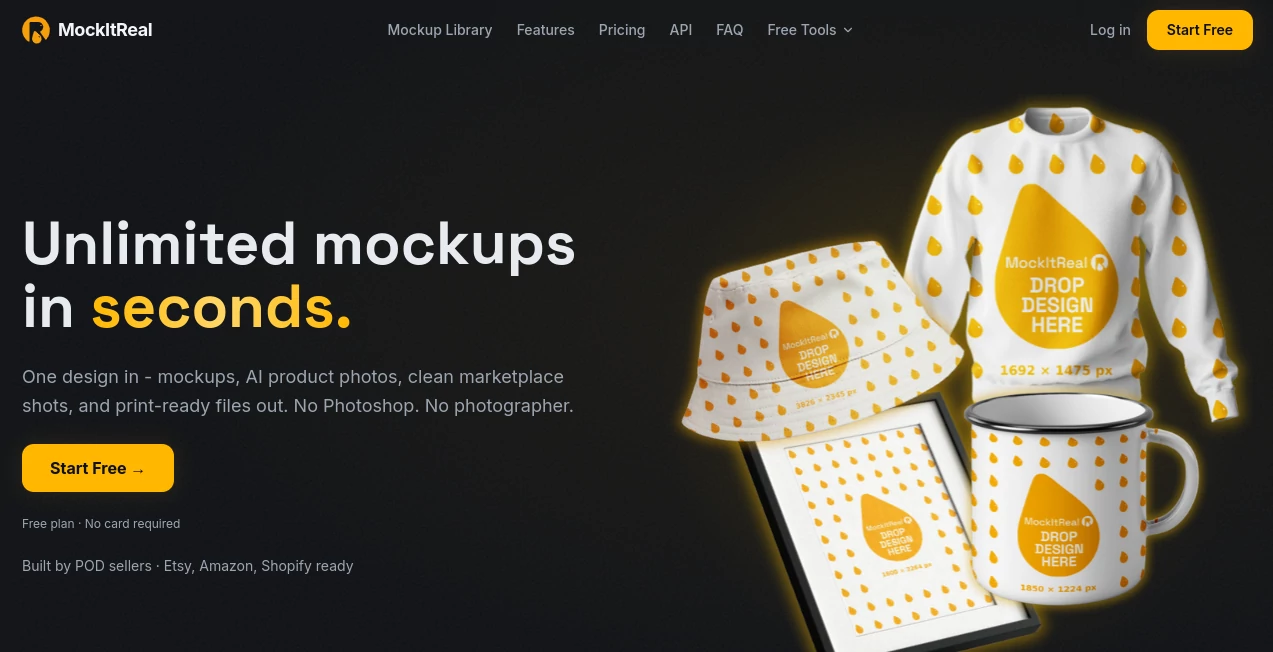
MockItReal is an AI-powered product mockup and image creation platform designed for creators, print-on-demand sellers, ecommerce brands, designers, and agencies that need professional product visuals without spending hours in Photoshop or arranging a photography session. The idea is refreshingly practical: upload a design, choose a suitable template, generate the mockup, and turn it into a polished image ready for a store or marketplace.
The platform goes beyond basic mockup generation. A single uploaded design can be turned into product mockups, lifestyle scenes, clean marketplace images, product bundles, color variations, and other sales-ready visuals. This makes it particularly useful for sellers who need dozens or hundreds of consistent images rather than just one attractive product picture.
It is also built with print-on-demand workflows in mind. Support for platforms such as Etsy, Amazon, Shopify, Printify, Printful, and TikTok Shop makes the workflow easier for sellers who need to prepare product listings quickly. For someone who has ever spent an afternoon replacing designs inside individual PSD files, the time savings can be substantial.
Key Features
- Generate product mockups directly in the browser.
- Create lifestyle scenes and product photography-style images with AI.
- Generate clean white-background product shots suitable for marketplaces.
- Upload custom PSD templates and automatically detect print areas.
- Bulk-generate up to 250 mockups in a batch, depending on the plan.
- Apply product colors and create different color variations.
- Wrap designs around mugs, caps, and curved product surfaces.
- Remove backgrounds and clean unwanted distractions from product images.
- Upscale images to 4K and improve lighting, sharpness, and shadows.
- Create product bundles, variant grids, before-and-after images, and size-reference visuals.
- Edit designs with layers, text, Google Fonts, color grading, and saved looks.
- Resize finished images for major ecommerce and social platforms.
- Export JPG, PNG, WebP, and print-ready PDF and TIFF files.
- Access a REST API on paid plans for automated workflows.
User Interface
The browser-based interface is designed around a straightforward upload-and-generate workflow. Users can begin with a design or product image, select a template, preview the result, and make adjustments without needing to open a separate desktop application.
The editor also provides more control for people who want to refine the final result. Layers, text tools, Google Fonts, color grading, saved looks, and multiple ready-made sizes make it possible to move beyond a simple generated mockup. Custom PSD templates are another useful addition for designers and businesses that already have an established visual style.
For everyday store owners, the biggest advantage is probably the reduced friction. Instead of moving between Photoshop, a mockup library, a background-removal service, an upscaler, and a resizing tool, much of the process can happen in one place.
Accuracy & Performance
Speed is one of the platform's strongest selling points. The service states that renders can be completed in seconds, including bulk jobs. This matters when a store has a large catalog and needs consistent images across many products.
Its handling of curved surfaces is particularly useful for products such as mugs and caps, where simply placing a flat image over a product photo can look unrealistic. Custom templates and automatic print-area detection also help preserve the intended placement of designs.
AI-assisted tools add another layer to the workflow by handling tasks such as background cleanup, lifestyle staging, image enhancement, relighting, and upscaling. Results will naturally depend on the source material and the requested transformation, but having these functions available alongside the mockup editor makes the overall production process considerably more efficient.
Capabilities
The platform is especially well suited to print-on-demand and ecommerce production. A seller can start with one design and create several product presentations from it, including apparel, mugs, accessories, lifestyle scenes, clean marketplace images, and product bundles.
Its automation features are useful for larger catalogs. Bulk creation can handle batches of up to 250 mockups on the highest plan, while the REST API allows paid users to connect rendering capabilities with their own systems. This opens the door to more automated product-listing workflows instead of manually preparing every image.
For designers, the combination of custom PSD templates, style presets, high-resolution exports, and print-ready files is also appealing. Files can be exported at 300 or 600 DPI with CMYK support and bleed marks, which makes the service relevant not only for online listings but also for certain professional print workflows.
Security & Privacy
According to the service's privacy information, uploaded designs and generated outputs belong to the user. The company states that customer content is stored to provide the service and is not used to train AI models. Users can also delete their content when they no longer need it.
The platform states that it is GDPR-compliant, which provides an additional privacy consideration for businesses handling customer or commercial design assets. As with any cloud-based creative service, businesses with strict internal requirements should still review the provider's current privacy and terms documentation before uploading sensitive material.
Use Cases
Print-on-demand sellers: Create product visuals for apparel, mugs, posters, caps, and other products without manually editing every design.
Ecommerce stores: Produce clean marketplace images, lifestyle shots, bundles, and multiple product variations for online listings.
Freelance designers: Present client designs on realistic products and quickly create multiple variations during revisions or presentations.
Agencies: Generate consistent visual assets for several clients and reduce repetitive production work through bulk rendering and automation.
Marketplace sellers: Resize and prepare images for destinations such as Amazon, Etsy, Shopify, Instagram, TikTok, and other supported channels.
Product launches: Build a collection of visuals from a single design before investing in a traditional photography session.
Pros and Cons
Pros
- Fast mockup generation directly in a browser.
- Paid plans provide unlimited editor mockups.
- Useful AI tools for lifestyle scenes and product photography.
- Custom PSD template support.
- Bulk generation for larger catalogs.
- REST API available across paid plans.
- Print-ready PDF and TIFF exports with high-resolution options.
- Useful resizing options for ecommerce and social platforms.
- Free plan available without requiring a credit card.
- Designs are not used to train AI models according to the company's stated policy.
Cons
- The free plan is limited to 10 mockups per month.
- Automation features such as bulk rendering, API usage, and AI assists are subject to plan quotas.
- Some advanced export and higher-resolution capabilities require a paid plan.
- Users who only need occasional simple mockups may find the wider feature set more than they need.
Pricing Plans
A free plan is available at $0 with no credit card required. It includes 10 mockups per month, clean watermark-free exports up to 1024px, 1 GB of storage, and 10 AI assists.
The Starter plan costs $19 per month when billed monthly, or $15 per month with annual billing. It provides unlimited editor mockups, downloads up to 2048px, 1,000 API and bulk renders per month, up to 25 items per bulk batch, 100 AI assists, and 25 GB of storage.
The Growth plan is priced at $39 per month monthly or $30 per month with annual billing. It increases the limits to 2,000 API and bulk renders, batches of up to 50, 200 AI assists, and 50 GB of storage, while supporting downloads up to 4096px and original resolution.
The Pro plan costs $79 per month monthly or $60 per month with annual billing. It includes 4,000 API and bulk renders, batches of up to 100, 400 AI assists, and 100 GB of storage.
The Agency plan costs $149 per month monthly or $120 per month with annual billing. It raises the automation allowance to 8,000 API and bulk renders per month, supports batches of up to 250, includes 800 AI assists, and provides 200 GB of storage.
Annual billing offers a 20% saving according to the current pricing information. The important distinction is that paid plans do not meter ordinary editor mockups; the metered areas are automation features such as API renders, bulk rendering, and AI assists.
How to Use It
Getting started is intentionally simple and does not require Photoshop experience.
- Sign up for an account and start with the free plan if you want to test the workflow.
- Upload your design or product image.
- Choose a suitable product or mockup template.
- Generate the mockup and review the result.
- Use the editing and AI tools when you need to adjust the background, lighting, colors, composition, or other details.
- Download the finished image or resize it for the marketplace where it will be published.
For larger catalogs, the same workflow can be extended through bulk generation. Designers with their own PSD templates can upload those templates, while businesses with technical teams can use the REST API to connect image generation to an existing workflow.
Comparison with Similar Tools
Many mockup services focus primarily on providing a large library of predefined templates. This approach works well when a seller wants a quick image, but it can become restrictive when a brand needs custom templates or wants to generate hundreds of variations.
This platform takes a broader approach by combining mockup creation, AI product photography, image cleanup, enhancement, editing, resizing, bulk generation, custom PSD templates, and API access. That makes it closer to a production workflow than a simple mockup library.
Another difference is its pricing philosophy. Paid users receive unlimited mockups inside the editor, while usage limits are applied to resource-intensive automation and AI features. For sellers producing a large number of ordinary mockups, this can be a more predictable arrangement than paying for every individual export.
Conclusion
For anyone selling products online, creating mockups can quickly become one of those repetitive jobs that consumes far more time than expected. This platform addresses that problem by bringing mockup creation, AI product imagery, editing, enhancement, resizing, and automation into a single browser-based workflow.
Its strongest appeal is not simply the ability to create one attractive product image. The real advantage appears when a seller or designer needs a complete catalog of consistent visuals. Bulk generation, custom PSD templates, high-resolution exports, marketplace resizing, and API access give the platform room to grow from a simple creative helper into a serious production tool.
The free plan makes it easy to test the workflow before committing, while the paid tiers are structured around creators, growing stores, teams, and agencies. If your current process involves jumping between several different tools just to turn a design into a finished product listing, consolidating that work into one platform could make a noticeable difference.
Frequently Asked Questions (FAQ)
Do I need Photoshop to create mockups?
No. The workflow runs in the browser, allowing users to upload a design, select a template, generate the mockup, and download the result without requiring Photoshop.
Is there a free plan?
Yes. The free plan costs nothing, requires no credit card, and includes 10 mockups per month, watermark-free exports up to 1024px, 1 GB of storage, and 10 AI assists.
Are mockups unlimited on paid plans?
Yes. Paid plans provide unlimited mockups created and downloaded through the editor. API renders, bulk rendering, and AI assists are subject to the quotas associated with each plan.
Can I upload my own PSD templates?
Yes. Custom PSD templates can be uploaded, with automatic detection of print areas. This is particularly useful for designers and brands that already have established mockup files.
Can it create lifestyle product images?
Yes. The AI tools can place products into lifestyle scenes, staging environments, and flat-lay compositions without requiring a traditional studio or physical photo shoot.
Can I remove product-photo backgrounds?
Yes. The image tools can remove backgrounds, clean distractions, and create clean white-background product shots suitable for ecommerce marketplaces.
Does it support bulk generation?
Yes. Bulk generation is available with plan-dependent limits, with the Agency plan supporting batches of up to 250 mockups.
Is an API available?
Yes. REST API access is included with paid plans, with a stated rate limit of 60 requests per minute.
Can I export print-ready files?
Yes. Print-ready PDF and TIFF exports are available at 300 and 600 DPI with CMYK color support and bleed marks.
Are uploaded designs used to train AI models?
The service states that customer designs and outputs are not used to train AI models. It also states that users own their designs and outputs and can delete their stored content.
AI Photo & Image Generator , Photo & Image Editor , AI Background Remover , AI Photography .
These classifications represent its core capabilities and areas of application. For related tools, explore the linked categories above.

MockItReal Alternatives Product

Flux Kontext…
Picsart
Circle Crop …

BananaPro

ModelsLab
picremake

AIImageEdit

X Grok Imagi…

Berrioo