
MoClaw
What is MoClaw?
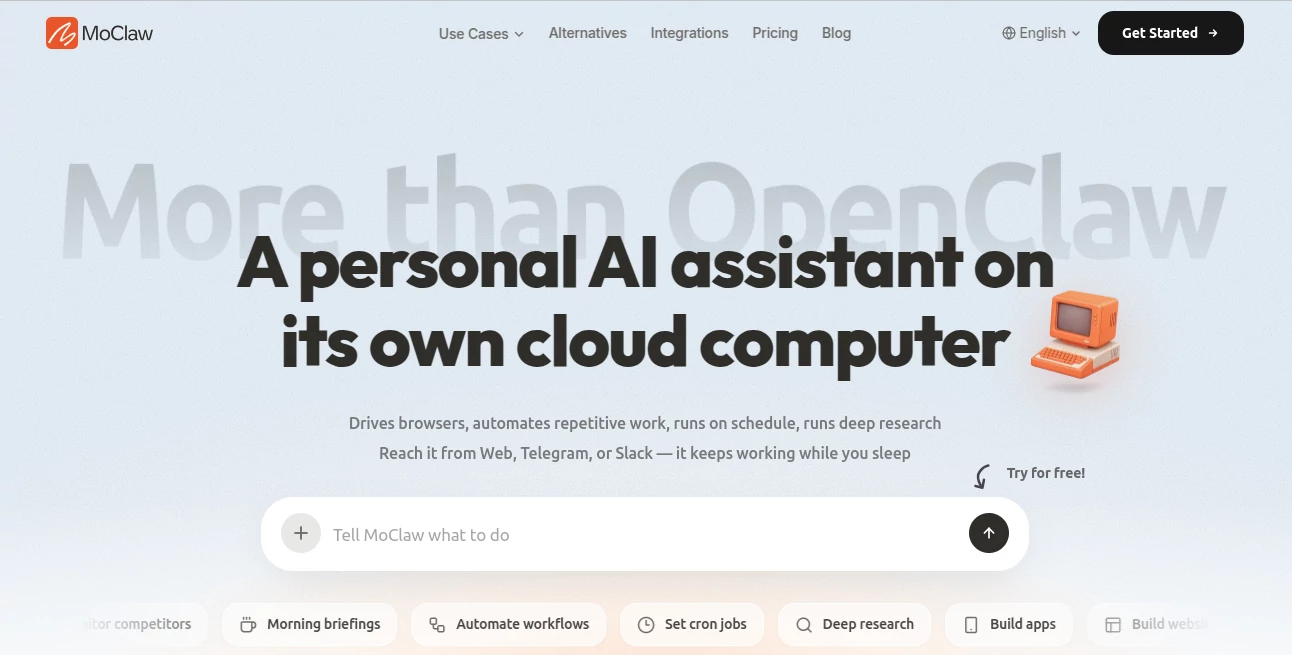
Imagine having an AI assistant that keeps working even after you close your laptop. Instead of waiting for your next prompt, it continues researching, automating repetitive tasks, monitoring websites, organizing information, and completing scheduled workflows in the background. That is the core idea behind this platform.
Unlike traditional AI chatbots that mainly provide answers, this solution operates on its own dedicated cloud computer. It can control browsers, work with documents, manage emails, analyze data, generate content, perform deep research, and automate recurring jobs without requiring users to keep their own devices online.
Another standout advantage is accessibility. Whether you prefer using a web interface, Telegram, or Slack, your assistant remains available wherever you work. This makes it especially useful for professionals, startups, marketers, developers, and researchers who need reliable automation that continues running around the clock.
Key Features
- Dedicated cloud computer for every user
- Browser automation for complex online workflows
- Deep research across multiple information sources
- Scheduled automation using recurring tasks
- Email management and document handling
- PDF editing and file organization
- Image generation capabilities
- Data analysis and web data collection
- Competitor monitoring and daily briefings
- Google Workspace integration
- GitHub and Slack connectivity
- Support for custom skills and scripts
- Persistent storage for files and workflows
- Runs independently even when your computer is offline
User Interface
The interface focuses on natural conversations rather than technical setup. Users simply describe what they need in plain English, and the assistant decides how to execute the task using its available tools. Navigation is clean, conversations remain organized, and switching between the web interface, Telegram, or Slack feels seamless. Even users without technical experience can start automating work within minutes.
Accuracy & Performance
Because tasks execute on a dedicated cloud environment instead of a local computer, long-running workflows remain active without interruption. Scheduled jobs, browser automation, document processing, and research continue independently. The platform also supports task isolation and automatic recovery, reducing the chance of failed workflows during extended operations.
Capabilities
The assistant goes far beyond answering questions. It can browse websites, collect market intelligence, summarize research, generate images, edit PDFs, organize documents, analyze datasets, monitor competitors, automate repetitive business processes, and produce scheduled reports. It also supports dozens of built-in skills while allowing advanced users to extend functionality with their own scripts and integrations.
Security & Privacy
Each user receives a dedicated private environment, helping separate personal data and workflows from other accounts. Files remain persistent inside the cloud workspace, and automation continues without relying on the user's personal computer. This architecture provides a practical balance between continuous automation and data isolation for professional workloads.
Use Cases
- Automating repetitive office tasks
- Running scheduled market research
- Monitoring competitors every day
- Collecting and organizing web data
- Generating daily business reports
- Managing email workflows
- Building websites and applications
- Creating AI-generated images
- Summarizing large collections of information
- Supporting startup operations with continuous automation
Pros and Cons
Pros
- Works continuously in the cloud without depending on your computer.
- Supports browser automation and long-running workflows.
- Accessible through Web, Telegram, and Slack.
- Includes numerous built-in automation capabilities.
- Dedicated environment improves workflow reliability.
- Easy to start without complex installation.
Cons
- Advanced automation may require some experimentation for new users.
- Heavy workloads can consume monthly credits.
- Some integrations depend on external services.
Pricing Plans
A free trial is available for new users. The primary paid plan starts at approximately $20 per month and includes a dedicated cloud computer, built-in AI models, browser automation, persistent storage, scheduled workflows, and monthly usage credits. Users can also connect their own API keys when additional flexibility is needed.
How to Use MoClaw
Create an account, open the chat interface, and describe your objective in natural language. Connect the services you use, such as Slack or Google Workspace, if needed. From there, assign research projects, schedule recurring automations, manage documents, or instruct the assistant to monitor websites and deliver updates automatically. Once configured, it continues working independently without requiring your device to stay online.
Comparison with Similar Tools
Many AI assistants focus primarily on conversation and instant responses. This platform places greater emphasis on autonomous execution. Instead of stopping when the conversation ends, it continues completing tasks on a dedicated cloud computer. The combination of browser automation, persistent storage, scheduling, deep research, and workflow execution makes it particularly attractive for users seeking continuous productivity rather than simple chat interactions.
Conclusion
This platform introduces a refreshing approach to AI productivity by combining conversational simplicity with genuine automation. Its cloud-based architecture allows work to continue long after users step away from their computers, making it valuable for professionals who rely on ongoing research, monitoring, reporting, and business automation. For individuals and teams looking to delegate repetitive digital work to an always-available assistant, it delivers a practical and modern solution.
Frequently Asked Questions (FAQ)
Can it continue working after I close my computer?
Yes. Tasks run on a dedicated cloud computer, allowing automation to continue independently.
Does it support scheduled automation?
Yes. Users can create recurring jobs for research, monitoring, reporting, and other automated workflows.
Which communication channels are supported?
The assistant can be accessed through the web interface, Telegram, and Slack.
Can it perform browser automation?
Yes. Browser control is one of its primary capabilities, enabling complex online workflows.
Is it suitable for business users?
Yes. Its automation, research, reporting, integrations, and scheduling features make it well suited for startups, marketers, researchers, and business teams.
AI Workflow Management , AI Productivity Tools , AI Research Tool , AI Team Collaboration .
These classifications represent its core capabilities and areas of application. For related tools, explore the linked categories above.

MoClaw Alternatives Product

Neurohelper

Lime Social

Zivy

AI Business …

Flyback.ai

eesel AI

gemini omni …

EasyVC

Claude and C…