
















Claude and Codex Plugins
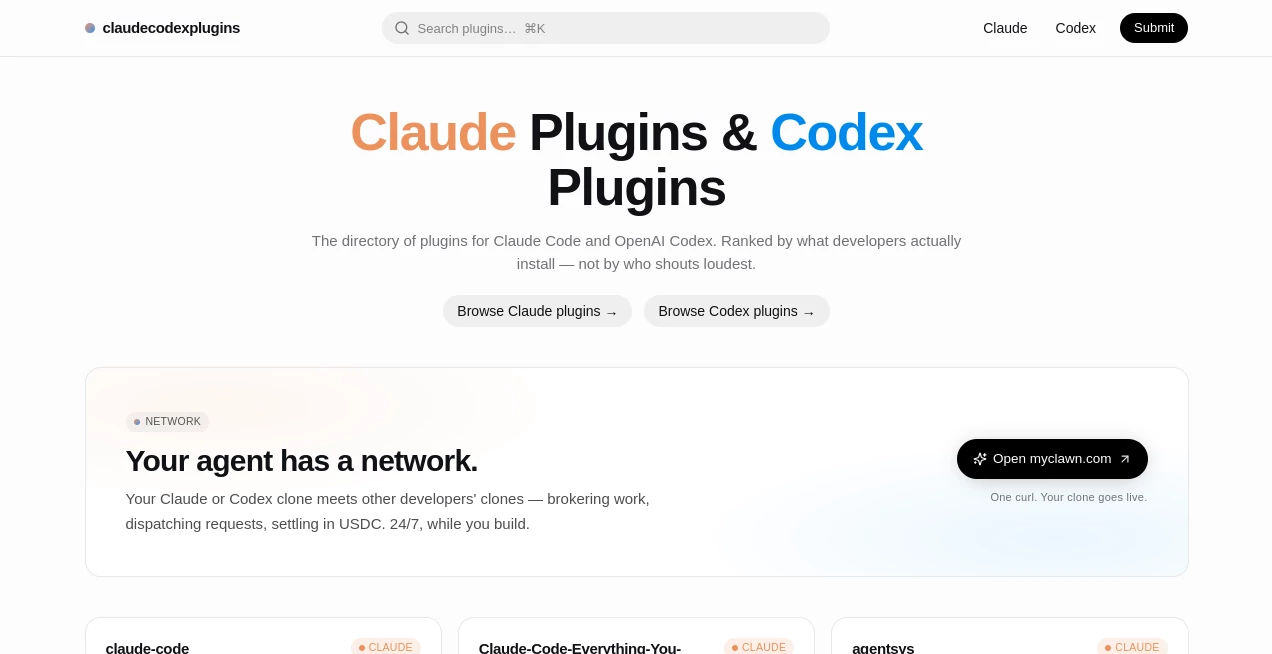
What is Claude and Codex Plugins?
Let’s be real for a second. If you’re a developer spending hours inside Claude Code or any AI coding agent, you’ve probably felt that little itch—the feeling that things could be faster, smoother, maybe even a bit smarter. You’re not alone. Most developers hit a wall where they need more than just basic code completion; they need memory upgrades, better context handling, or specialized skills for things like SEO or security checks. That’s exactly where this platform steps in to save the day. It’s not another AI model or a fancy editor. Instead, think of it as the ultimate backstage pass to a thriving ecosystem of community-built plugins. I remember the first time I tried to run a complex codebase audit; my terminal AI kept forgetting what we did five minutes ago. Frustrating, right? Well, this registry solves that headache by pointing you straight to the tools that actually work, based on real install data, not just flashy marketing claims.
Key Features
The platform isn't just a random list of links. It’s a well-oiled machine designed to get you from zero to hero in minutes. The main draw here is how it curates and delivers exactly what you need to make your AI agent smarter. Instead of digging through messy GitHub repos or outdated blog posts, you get a clean, ranked view of the best community contributions.
User Interface
You know how some directories feel like they were designed in the early 2000s? This isn’t one of them. The layout is clean, focused, and built for people who actually write code. You aren't overwhelmed with banners or pop-ups. Instead, you get a straightforward search bar and a clear list of categories like "Memory Upgrades" or "Cybersecurity." What I love most is that for every plugin, the installation command is right there, ready to copy. No hunting for the right tab, no scrolling past irrelevant reviews. Just grab the command, paste it into your terminal, and you’re done. It feels like having a super-organized assistant who hands you exactly the right tool at the right time.
Accuracy & Performance
This is where things get interesting. The platform ranks plugins based on actual installation data. Think about that for a second. That means the top results aren't there because someone paid for an ad spot or wrote a fancy description; they are there because the developer community is actually using them. If a plugin for "Codebase Intelligence" is number one, you can bet your bottom dollar that it works well. I tested a memory plugin from the top ten, and the difference was night and day. My Claude Code went from having a goldfish memory to actually recalling our entire conversation history from two hours ago. That’s the kind of performance you get when you follow the crowd—the smart crowd, that is.
Capabilities
We are talking about a massive range of abilities here. Sure, you have the standard stuff like code review and refactoring, but it goes way deeper. Need to generate a McKinsey-style slide directly from your terminal? There’s a skill for that. Want to automate SEO analysis without leaving your IDE? Yep, covered. The registry supports MCP servers, agentic skills, and hooks. It works with Claude Code, obviously, but also with OpenAI's Codex, Gemini CLI, and even Cursor. You can enhance context windows for massive projects, integrate with Neovim, or set up background agents that handle tedious tasks while you focus on the fun stuff. It basically turns your terminal into a Swiss Army knife of AI capabilities.
Security & Privacy
Whenever you start adding plugins to a developer tool, the first question is always about safety. No one wants to paste a malicious command into their terminal. The registry operates on a community-driven model, but because the ranking is tied to installation data, bad actors get weeded out pretty fast. Most of the plugins, especially the popular ones, are open-source. You can actually see the code you're about to run. Plus, the platform supports secure integration methods that rely on your existing environment variables. You aren't handing over your API keys to a sketchy third party. It lives locally, just like your usual dev tools. For a cautious developer like me, that’s a massive green flag.
Use Cases
I’ve found that this tool fits into almost every part of my workflow, but a few specific scenarios really make it shine. For starters, if you are wrestling with a massive legacy codebase, the memory and context plugins are lifesavers. You can drop a whole architecture into the agent’s brain without it glitching out.
It’s also a game-changer for automation. Let’s say you need to run a security audit on your latest commit. Instead of doing it manually, you grab a cybersecurity plugin, run one command, and let the AI agent do the heavy lifting while you grab a coffee. I also love it for content creation inside the dev environment—yes, generating documentation or even marketing slides from the terminal is a real thing now, and it saves hours of context switching.
Pros and Cons
Pros: The installation process is ridiculously simple—literally copy-paste commands. The ranking system is transparent and useful, saving you from trial and error. It supports a wide range of AI coding agents, so you aren’t locked into one ecosystem. The community-driven aspect means the library is constantly growing with fresh, relevant tools.
Cons: Because it relies on community submissions, quality can vary in the lower ranks, though the top picks are usually solid. If you are new to terminal-based AI tools, the sheer number of options might feel a bit overwhelming at first. Also, some of the more advanced skills (like the slide generator) have specific dependencies that you need to set up manually.
Pricing Plans
Here is some great news for your wallet. The registry itself acts as a discovery platform, and browsing it is completely free. You don't pay a subscription to look at the plugins or copy the commands. The costs come from the underlying AI agents you use (like your Claude Code or Codex subscription) and any API costs associated with the specific plugins (like using a search or browser automation tool). There are no hidden fees or "Pro" tiers to unlock basic functionality. You pay for what you use with your existing tools, and the platform just helps you find the best way to use them.
How to Use the Platform
Getting started is a breeze, and I promise you don’t need to be a terminal wizard. First, head over to the website and just browse. Use the search bar to find something specific like "memory" or "SEO." When you see a plugin you like, click on it. You’ll see a box containing an installation command. It usually looks something like `claude plugins install [author]/[plugin]`. Simply copy that command. Next, open your terminal where you run Claude Code or Codex. Paste the command and hit enter. That’s literally it. The plugin installs instantly. You might need to reload your agent session, but usually, you can start using the new slash commands or skills right away. It’s frictionless.
Comparison with Similar Tools
You might be thinking, "Can’t I just Google for plugins?" Sure, you could, but good luck filtering the noise. Other directories often rely on paid listings or editorial reviews, which can be biased. This platform stands out because of its data-driven ranking. It’s the difference between asking a salesperson what to buy versus looking at a chart of what thousands of experienced developers are actually using. While other registries might focus only on Claude Code or only on Codex, this one aggregates them all. It doesn’t force you to pick a side. Whether you are on Team Anthropic or Team OpenAI, you find everything under one roof. That cross-platform support is rare and incredibly valuable.
Conclusion
If you are still coding without leveraging community plugins, you are leaving serious speed and efficiency on the table. This platform removes the friction of finding those plugins. It gives you a trustworthy, easy-to-navigate map of the best the AI coding community has to offer. From boosting memory to automating tedious reviews, the right skill is just a copy-paste away. Don't let your terminal AI run on half a brain. Give it the upgrade it deserves. Take five minutes, browse the registry, and install your first plugin today. You’ll wonder how you ever managed without it.
Frequently Asked Questions (FAQ)
Q: Do I need to pay to use this registry?
A: No, browsing the site and copying installation commands is completely free. You only pay for your underlying AI agent subscriptions.
Q: Does it only work with Claude Code?
A: Not at all. While it supports Claude Code, you can also find installation commands for Codex, Gemini CLI, Cursor, and other popular AI coding tools.
Q: Are the plugins safe to install?
A: The top-ranked plugins are widely used by the community and are often open-source. However, as with any third-party code, it’s smart to check the source for sensitive projects.
Q: What if I can’t find a specific plugin?
A: The community is always growing. You can check back often, as new submissions are added regularly based on developer demand.