
MoniPix
What is MoniPix?
MoniPix is an AI-powered photo enhancement platform designed to improve image quality, upscale resolution, and restore blurry photos with advanced artificial intelligence technology. It helps users transform low-quality images into sharper, clearer, and more detailed visuals without requiring professional editing skills.
Whether you have old photos, compressed images, product pictures, or social media content that needs a quality boost, this tool provides a simple way to enhance visual details. Users can start improving their images for free without needing a credit card, making it accessible for anyone who wants better-looking photos quickly.
Key Features
- AI Photo Upscaling: Increase image resolution and enhance details while maintaining a natural appearance.
- 4K and 16K Enhancement: Convert smaller images into high-resolution visuals suitable for professional and creative projects.
- Blur Removal: Improve unclear and blurry photos by restoring missing details.
- Automatic Image Improvement: AI analyzes images and applies enhancements without complicated manual adjustments.
- Fast Processing: Quickly generate improved versions of images with minimal waiting time.
- No Credit Card Required: Start testing the service without payment information.
User Interface
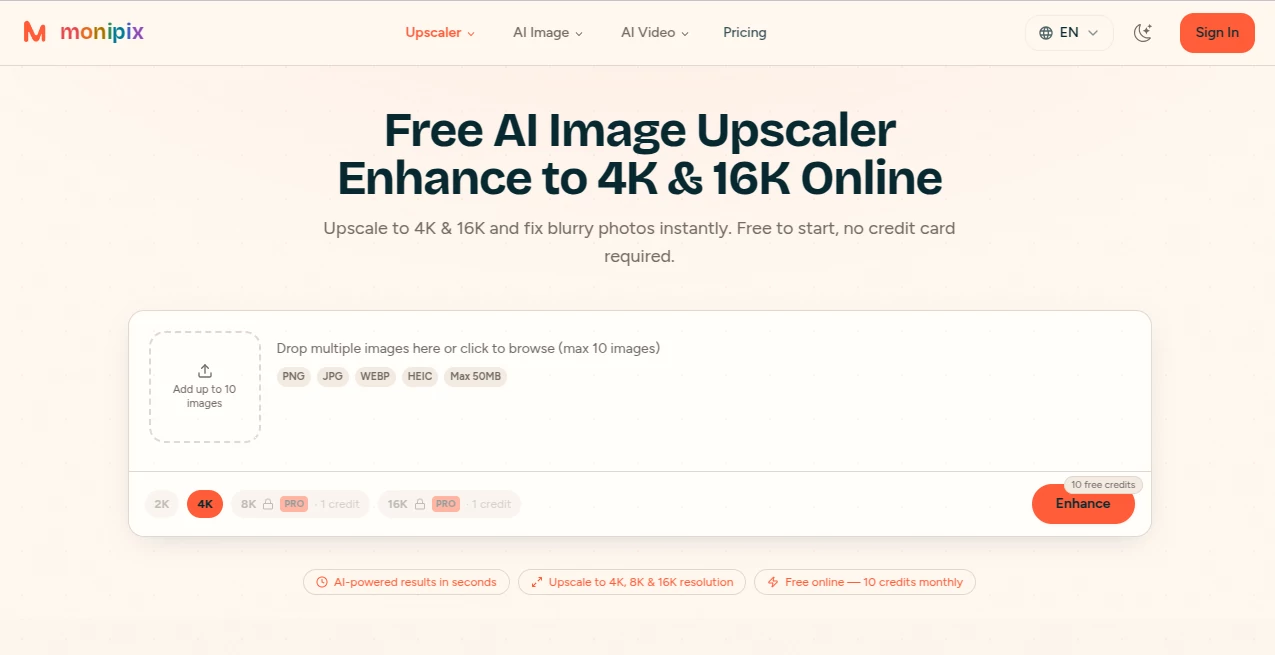
The platform focuses on simplicity, allowing users to upload an image and receive an enhanced version with only a few steps. The clean workflow makes it suitable for beginners who do not have experience with traditional photo editing software. The straightforward design helps users focus on improving their images rather than learning complex tools.
Accuracy & Performance
AI-based enhancement technology analyzes image patterns, edges, and visual details to produce sharper results. It is especially useful for improving images that appear pixelated, low-resolution, or slightly blurred. The system aims to preserve natural textures while adding more clarity and definition.
Capabilities
The tool can be used for different types of images, including personal photos, creative projects, online store images, marketing materials, and digital content. Its high-resolution enhancement options make it valuable for users who need images suitable for printing, websites, presentations, or social platforms.
Security & Privacy
Image privacy is an important consideration when using online enhancement services. The platform is designed to provide a simple and secure experience while allowing users to improve their images without unnecessary complexity.
Use Cases
- Restoring old family photos and improving their visual quality.
- Enhancing product images for online stores and marketplaces.
- Preparing high-resolution visuals for marketing campaigns.
- Improving social media images before publishing.
- Creating sharper images for presentations, websites, and creative projects.
- Enhancing photography collections with better resolution.
Pros and Cons
Pros
- Supports high-resolution image enhancement up to 4K and 16K.
- Easy-to-use interface suitable for beginners.
- Free starting option without requiring a credit card.
- Useful for personal, business, and creative image projects.
- Helps improve blurry and low-quality photos quickly.
Cons
- Advanced features may depend on available plans.
- Very low-quality images may have limited improvement potential.
Pricing Plans
Users can start with a free option to test the image enhancement features without entering payment information. Additional pricing options may be available for users who need more processing capacity, higher usage limits, or advanced capabilities.
How to Use MoniPix
- Upload the image you want to improve.
- Choose the desired enhancement or upscale option.
- Let the AI process and improve the image quality.
- Preview the enhanced result.
- Download and use the improved image for your project.
Comparison with Similar Tools
Many AI image enhancement platforms provide resolution improvement, but this tool focuses on delivering a simple experience with support for extremely high-resolution outputs. Compared with traditional editing software, it reduces the need for manual adjustments and allows users to enhance images faster. It is a practical choice for people who want quality improvements without spending time learning complicated editing techniques.
Conclusion
MoniPix provides an efficient solution for anyone looking to improve image quality, remove blur, and create higher-resolution visuals. With AI-powered enhancement, support for 4K and 16K outputs, and an easy workflow, it helps photographers, businesses, creators, and everyday users make their images look clearer and more professional.
Frequently Asked Questions (FAQ)
Can I enhance images for free?
Yes, users can start using the service for free without requiring a credit card.
Can it improve blurry photos?
Yes, the AI enhancement technology is designed to improve blurry and low-quality images by adding clarity and detail.
Does it support high-resolution images?
Yes, it supports image upscaling with options designed for 4K and 16K resolution improvements.
Is it suitable for professional images?
Yes, it can help improve product photos, marketing visuals, and creative projects that require better image quality.
Do I need photo editing experience?
No, the simple upload-and-enhance workflow makes it accessible for users with any level of experience.
AI Photo & Image Generator , Photo & Image Editor , AI Photo Enhancer , AI Photo Restoration .
These classifications represent its core capabilities and areas of application. For related tools, explore the linked categories above.

MoniPix Alternatives Product
Picavo

Ghibli Image…

Image2
Picsart

ds image
Kirkify Al

Professional…

AI Ease AI P…

Nano Banana …