
MonoDesk
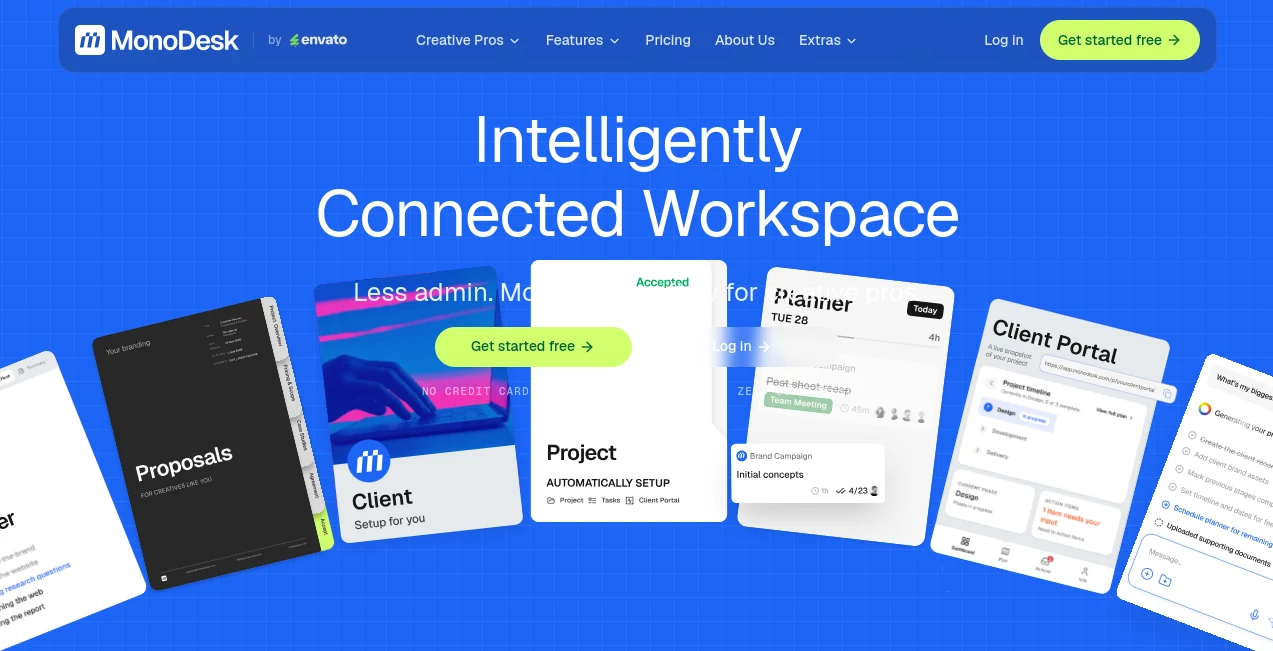
What is MonoDesk?
Running a freelance creative business involves far more than producing outstanding work. Client communication, project planning, proposals, revisions, deadlines, and administrative tasks can quickly consume valuable creative time. This platform was built to solve exactly that challenge by bringing every stage of a creative project into one organized workspace.
Instead of constantly switching between emails, spreadsheets, note-taking apps, project boards, and messaging tools, users can manage their entire workflow from a single environment. The integrated AI assistance helps reduce repetitive administrative work while keeping projects structured and easy to manage. The result is a smoother workflow that allows designers, developers, marketers, video creators, and other creative professionals to stay focused on delivering exceptional work instead of managing scattered information.
Key Features
User Interface
The interface is thoughtfully designed for independent professionals who prefer simplicity over clutter. Projects, clients, documents, tasks, proposals, and schedules remain connected throughout the entire workflow, making navigation intuitive even for users managing multiple clients simultaneously. The clean layout minimizes distractions and keeps important information easily accessible.
Accuracy & Performance
Its intelligent workspace helps organize project details with impressive consistency. Client information, project timelines, tasks, and documentation remain connected, reducing manual data entry and lowering the chances of missing deadlines or losing important project context. AI-powered assistance speeds up routine processes while allowing users to maintain full control over their work.
Capabilities
- AI-assisted project planning
- Client management in one workspace
- Proposal creation and sharing
- Weekly planning tools
- Task organization with contextual information
- Project documentation management
- Branded documents for professional presentation
- Integrated workflow from project brief to final delivery
- Centralized communication and project history
- Support for freelance creative workflows
Security & Privacy
The platform keeps project information centralized instead of scattering files and conversations across multiple services. Users maintain greater visibility over client communications, documents, and project history while reducing unnecessary duplication of information. Early access users can explore the complete workspace without requiring a credit card, making evaluation simple and risk-free.
Use Cases
- Managing multiple freelance clients simultaneously.
- Creating professional project proposals.
- Planning weekly creative workloads.
- Organizing website development projects.
- Managing branding and graphic design assignments.
- Handling illustration projects from concept to delivery.
- Coordinating video production workflows.
- Keeping client feedback organized in one location.
- Tracking revisions throughout long-term projects.
- Reducing administrative workload using AI assistance.
Pros and Cons
Pros
- Built specifically for freelance creative professionals.
- Combines project management with AI assistance.
- Clean and distraction-free interface.
- Keeps every project stage connected.
- Professional proposal and client management tools.
- Free beta access with core features included.
Cons
- Currently focused primarily on solo creatives rather than large teams.
- Some advanced capabilities may continue evolving during the beta period.
- Enterprise collaboration features are more limited than traditional corporate project management platforms.
Pricing Plans
The platform currently offers free early access during its beta phase. Users receive unlimited projects, client management, proposals, weekly planning, AI assistance, and other core productivity features without entering payment information. Future pricing is expected after the beta program, with early supporters receiving special lifetime offers.
How to Use MonoDesk
Getting started is straightforward. Create an account, add your clients, start a new project, and organize your deliverables. The AI assistant helps structure project plans, while proposals, documents, tasks, and communication remain connected throughout the project lifecycle. Weekly planning features help prioritize upcoming work, making it easier to stay productive without feeling overwhelmed by administrative responsibilities.
Comparison with Similar Tools
Many project management platforms are designed for corporate teams with complex organizational structures. This solution takes a different approach by focusing on the day-to-day reality of independent creative professionals. Instead of overwhelming users with enterprise features, it simplifies project administration while keeping client communication, planning, documentation, and AI assistance inside one connected workspace. For freelancers who value simplicity and creative focus, this specialized approach offers a refreshing alternative to traditional productivity software.
Conclusion
Creative professionals often spend almost as much time managing projects as creating them. By combining project management, client organization, proposals, planning, and intelligent assistance into a unified environment, this workspace removes much of that unnecessary complexity. Its thoughtful design, connected workflow, and AI-powered productivity tools make it an excellent choice for freelancers who want to spend less time on administration and more time producing outstanding creative work.
Frequently Asked Questions (FAQ)
Who is this platform designed for?
It is primarily built for freelance creative professionals such as designers, developers, illustrators, video creators, marketers, and other independent specialists.
Does it include AI features?
Yes. AI assistance helps organize projects, reduce administrative work, and improve workflow efficiency throughout the creative process.
Can multiple client projects be managed simultaneously?
Yes. Users can organize multiple clients, projects, documents, tasks, and communication within a single workspace.
Is there a free version?
Yes. Early beta access includes the core functionality without requiring a credit card.
Is it suitable for agencies?
While it can support small teams, its primary focus is helping solo creative professionals efficiently manage complete client projects.
AI Project Management , AI Productivity Tools , AI Task Management , AI Team Collaboration .
These classifications represent its core capabilities and areas of application. For related tools, explore the linked categories above.

MonoDesk Alternatives Product

Black Screen

Kaamfu

Audio Convert

FormRoyale

Sourcetable

Discord Time…

Skywork Supe…

Oasis

4ga Boards