
Motiofy
What is Motiofy?
Turning a still image into something that feels alive used to require video editing software, animation skills, stock footage, and plenty of time. This AI-powered image-to-video platform takes a much simpler approach: start with a photo, describe the movement you want, choose a suitable generation model, and let the system create the clip.
The workflow is especially appealing for creators who already have strong visual assets but want to get more mileage from them. A product photograph can become a short advertising clip, an illustration can gain subtle movement, and a portrait can be transformed into a more engaging piece of social content without setting up a camera.
New accounts receive 20 free credits, giving users a practical way to test the image-to-video workflow before committing to a paid plan. The service also brings multiple AI video models into one workspace, making it easier to experiment with different visual results without constantly moving between platforms.
Key Features
- Image-to-video generation from a single JPG, PNG, or WebP image
- Plain-English motion prompts for describing movement and camera direction
- Support for start-frame and end-frame workflows when supported by the selected model
- Multiple AI video models available from one workspace
- Model-aware controls that display relevant settings for each model
- Upfront credit estimates before generating a clip
- Creation history through the My Creations workspace
- Download and re-run options for generated clips
- Watermark-free HD downloads on paid plans
- Concurrent generations on higher-tier subscriptions
- Free credits for new accounts
- Browser-based generation without installing desktop editing software
User Interface
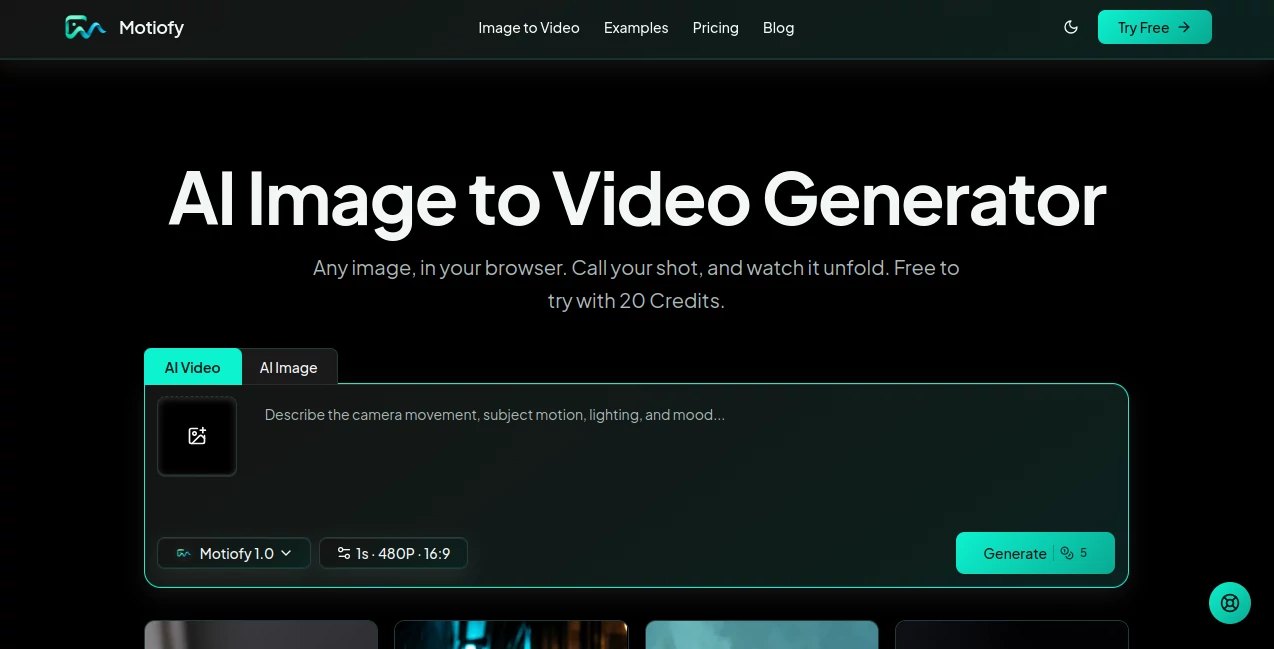
The interface is built around a straightforward three-step process. Users upload an image, describe the motion they want to see, and select an available model before generating the result. This keeps the creative process focused rather than filling the screen with complicated editing timelines.
Another useful touch is the model-aware control system. Instead of presenting every possible setting at once, the workspace shows controls relevant to the selected model. The estimated credit cost is also displayed before a generation is submitted, which makes experimentation easier to manage.
Generated clips are collected in My Creations, where users can review their work, download results, or create another version by adjusting the prompt. For someone producing several variations of the same visual, that simple history can save a surprising amount of time.
Accuracy & Performance
Image-to-video generation naturally depends on the selected AI model, the source image, the requested motion, duration, resolution, and provider queue. Rather than promising identical results for every input, the platform lets users choose among available models and provides model-specific controls.
The ability to describe movement in ordinary language makes the system approachable. A prompt such as a slow camera push toward a product, hair moving gently in the wind, or clouds drifting across a landscape gives the model a clear direction without requiring traditional animation terminology.
Performance also varies according to the selected model and generation settings. The platform notes that users can leave the page and later check generation status through their creation history, which is useful when working with longer or more demanding generations.
Capabilities
The strongest capability is its ability to transform existing visual material into short-form motion content. A single product photograph can be given camera movement and depth for an advertisement. Artwork can be animated while retaining the original composition as visual guidance. Portraits and other still images can also be given carefully directed movement.
For more controlled storytelling, supported models can work with both a starting frame and an ending frame. This opens the door to transitions, reveals, transformations, and before-and-after sequences rather than relying solely on free-form motion from one image.
Reference images can also be used to guide the visual direction. This is particularly useful when the appearance of a product, character, or overall visual style needs to remain closely connected to the source material.
Security & Privacy
The service states that uploaded images and prompts are processed to provide the requested generation and may be handled through third-party AI providers. It also states that user content is not used to train AI models.
Retention depends on the type of account and creation. Content generated with free credits is normally retained for up to 14 days, while retention information for active plans is displayed with individual creations. Users working with sensitive or commercially important assets should review the current privacy policy and terms before uploading confidential material.
Usage rights also depend on the account type. Content created through a paid subscription may be used commercially under the applicable terms, while outputs made with free trial credits are intended for personal, non-commercial use. Users remain responsible for having the necessary rights to any images they upload and for respecting applicable third-party rights.
Use Cases
- E-commerce: Turn existing catalog images into short product clips for listings, advertisements, and promotional campaigns.
- Social Media: Transform photographs into short-form visual content for platforms such as TikTok, Instagram Reels, and YouTube Shorts.
- Marketing: Create multiple motion concepts from a single product image to explore different advertising directions.
- Artists and Illustrators: Add movement to paintings, digital illustrations, and other artwork without rebuilding the original composition.
- Portrait Content: Give still portraits subtle camera or subject movement for more engaging visual posts.
- Creative Experiments: Test different models and motion prompts to discover unexpected ways of animating an existing image.
- Before-and-After Videos: Use supported start and end frame workflows to create transitions between two visual states.
Pros and Cons
Pros:
- Simple image-to-video workflow
- 20 free credits for new accounts
- Multiple AI video models in one workspace
- Clear credit estimates before generation
- Useful controls for motion and visual direction
- Start-frame and end-frame generation where supported
- Creation history makes iteration convenient
- Paid plans include watermark-free HD downloads
- Works directly from a web browser, including mobile browsers
Cons:
- Generation quality can vary between AI models
- Credit usage depends on the selected model and generation settings
- Advanced frame controls are only available when supported by the chosen model
- Free credits are limited and intended for non-commercial use
- Generation time can vary depending on model, resolution, duration, and provider queue
Pricing Plans
The platform uses a credit-based system. New users receive 20 free credits for trying the service, and additional generations can be purchased through credit packs or paid subscriptions.
- Starter: $20 per month, with 2,000 credits, access to additional image and video models, watermark-free HD downloads, fast generation, early access to new models and experimental features, and priority support.
- Creator: $40 per month, or $33.33 per month when billed annually, with 6,000 credits, access to all models, watermark-free HD downloads, up to three concurrent generations, and priority support.
- Pro: $100 per month, or $83.33 per month when billed annually, with 15,000 credits, access to all models, watermark-free HD downloads, up to ten concurrent generations, priority support, and priority consideration for feature requests.
Annual billing is currently advertised with a 17% saving on the paid plans. Because generation costs depend on the selected model and settings, checking the displayed credit estimate before each generation is useful when planning a larger production workflow.
How to Use It
- Open the image-to-video generator in your browser.
- Upload a JPG, PNG, or WebP image that you have the right to use.
- Describe the movement you want in plain English. Mention camera movement, subject motion, environmental effects, or the desired visual direction.
- Select an available AI video model based on the type of result you want.
- Review the estimated credit cost before starting the generation.
- Generate the video and wait for the task to complete.
- Open My Creations to review the result.
- Download the clip or adjust the prompt and generate another version.
A good starting prompt does not need to be complicated. For example, a product image could be described with a slow camera push-in while soft light moves around the product. For artwork, a user might request gentle movement in the background while keeping the main subject stable. Specific visual instructions generally give the generation process more direction than a vague request for an “amazing video.”
Comparison with Similar Tools
Traditional video production usually begins with footage, cameras, editing software, motion graphics, or stock material. An image-to-video workflow starts much earlier in the process: with a single image that already exists.
That difference makes this type of tool particularly useful for businesses and creators who have large collections of photographs but limited video resources. Instead of organizing a new shoot every time a product needs a social media variation, a team can experiment with motion concepts from existing assets.
The multi-model approach is another practical advantage. Rather than relying on a single generation model, users can compare available models inside the same workspace and select one according to the visual requirements of a project. This does not eliminate the need for experimentation, but it makes model testing considerably more convenient.
Conclusion
This image-to-video platform offers a focused answer to a common creative problem: how to get more value from still images without turning every project into a full video-production job. Its workflow is simple enough for beginners while providing useful controls for creators who want to experiment with motion, framing, references, and different AI models.
The combination of free trial credits, model selection, transparent credit estimates, creation history, and downloadable results makes it particularly attractive for product marketers, social media creators, artists, and small teams that need frequent visual variations.
It is not a replacement for every form of professional video production. However, when the starting point is a strong image and the goal is a short, engaging motion clip, this approach can dramatically reduce the amount of work between an idea and a finished visual.
Frequently Asked Questions (FAQ)
What is an AI image-to-video generator?
An AI image-to-video generator takes a still image and a written motion prompt and creates a moving video clip. The prompt can describe subject movement, camera direction, lighting, or environmental effects.
Can I create a video from one image?
Yes. A single supported image can be uploaded, followed by a motion prompt and an available image-to-video model. The system then generates a short video from the source image.
What image formats are supported?
JPG, PNG, and WebP images are supported. The upload interface displays the applicable size limit during the upload process.
Can I use generated videos commercially?
Videos created through a paid subscription may be used commercially under the applicable terms of service. Content generated with free credits is intended for personal, non-commercial use. Users should also have the appropriate rights to their source images.
Do I need video editing experience?
No. The basic workflow only requires an image and a written description of the desired movement. There is no traditional editing timeline or keyframe workflow required for standard image-to-video generation.
Can I use the generator on a phone?
Yes. The online generator works in a mobile browser, allowing users to create image-to-video content from compatible phones and tablets.
AI Image to Video , AI Video Generator , Video .
These classifications represent its core capabilities and areas of application. For related tools, explore the linked categories above.

Motiofy Alternatives Product

Overlap

Motion Contr…

Seedance 2.0

FastMoro AI

Aura AI

Seedance 2.0…

Seedance

sulphur 2

bridger west…