


















Motionflare
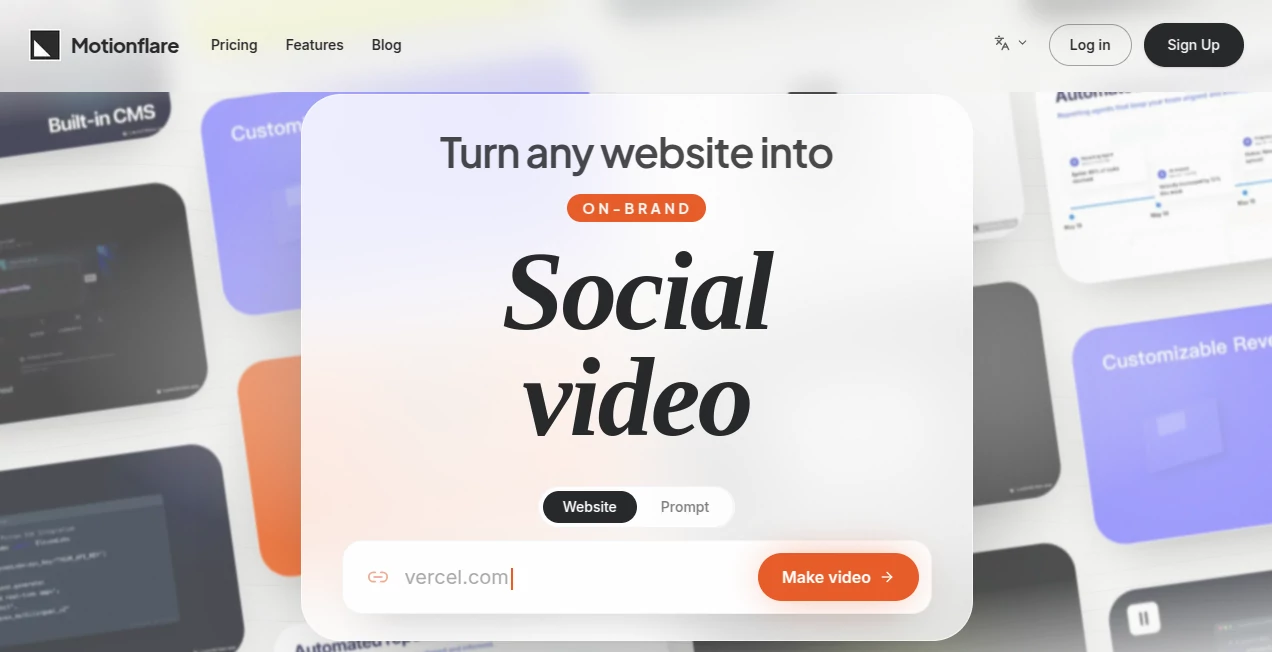
What is Motionflare?
Creating professional marketing videos has traditionally required expensive software, creative expertise, and hours of editing. This platform changes that experience by transforming a website or even a simple text prompt into a polished promotional video within minutes. Instead of starting with an empty timeline, users simply provide a URL or describe their product, and the system automatically builds an engaging video using real content, branding elements, screenshots, and messaging.
Designed with startups, SaaS companies, marketers, agencies, and founders in mind, the platform focuses on speed without sacrificing quality. It intelligently analyzes a website, extracts branding assets, generates a script, selects visuals, adds AI narration, and produces motion graphics that feel consistent with the original brand identity. The result is a professional marketing video ready for product launches, social media campaigns, advertisements, landing pages, and customer presentations. This streamlined workflow dramatically reduces production time while making high-quality video creation accessible to teams of every size.
Key Features
User Interface
The workspace is refreshingly simple and eliminates the complexity of traditional video editing software. Instead of navigating dozens of editing panels, users interact with a clean interface where a website URL or prompt becomes the starting point. Generated videos can be previewed directly in the browser, individual scenes can be refined through natural language instructions, and exports are completed without lengthy rendering queues.
Accuracy & Performance
One of the strongest aspects of the platform is its ability to understand an existing website. Rather than relying on generic templates, it reads page content, identifies logos, captures screenshots, recognizes branding colors, and generates a video that closely reflects the product itself. This automated understanding helps create promotional videos that feel authentic instead of generic.
Capabilities
- Generate marketing videos from any website URL.
- Create videos directly from a simple text prompt.
- Automatically extract branding assets and website content.
- Generate AI voice narration with multiple accent options.
- Add background music or upload custom audio.
- Edit scenes using conversational instructions.
- Preview videos instantly inside the browser.
- Export videos in both 1080p and 4K quality.
- Create public share links for clients and teammates.
- Support multilingual video generation for global audiences.
Security & Privacy
The platform processes publicly available website information provided by the user in order to generate marketing content. Projects remain accessible through user accounts, while sharing is controlled through optional public links. This workflow allows teams to collaborate efficiently while maintaining ownership over their generated marketing assets.
Use Cases
- Launching new SaaS products.
- Creating promotional videos for startups.
- Generating product demonstrations.
- Producing social media advertisements.
- Building engaging landing page videos.
- Creating videos for Product Hunt launches.
- Marketing software updates and feature releases.
- Supporting digital agencies with faster content production.
- Generating branded videos for client presentations.
- Creating multilingual marketing campaigns.
Pros and Cons
Pros
- Extremely fast video creation workflow.
- Automatically understands website branding.
- No traditional timeline editing required.
- Natural language editing simplifies revisions.
- Professional voice-over and music integration.
- High-quality 1080p and 4K exports.
- Ideal for product-focused marketing.
- Simple enough for non-designers.
Cons
- Primarily optimized for marketing and promotional videos.
- Advanced cinematic editing options are intentionally limited.
- Requires a well-structured website for the best automated results.
Pricing Plans
A free plan allows users to generate and preview complete videos before upgrading. Paid plans provide additional credits, watermark-free exports, higher-quality rendering, and expanded production capabilities for individuals and growing teams. Pricing is designed around credit usage, making it suitable for both occasional creators and frequent marketers.
How to Use Motionflare
Start by creating an account and opening a new project. Paste a website URL or describe the product you want to promote. The platform automatically analyzes the content, prepares scenes, generates narration, and creates a complete marketing video. Review the generated result, adjust scenes using simple chat-based instructions, choose music and voice preferences, preview everything in the browser, and export the final video in your preferred resolution for sharing across websites, social media, or presentations.
Comparison with Similar Tools
Unlike many AI video generators that depend entirely on written prompts, this solution focuses on understanding an existing website. By automatically reading branding elements, screenshots, logos, and product information, it significantly reduces manual preparation. Traditional video editors provide extensive creative freedom but require considerable experience, while this platform prioritizes speed, consistency, and ease of use. For startups and product teams that need polished promotional videos quickly, this workflow offers an efficient alternative without sacrificing professional presentation.
Conclusion
For businesses that regularly launch products, publish updates, or promote online services, this platform delivers a remarkably efficient way to create professional marketing videos. Its ability to transform a website into a fully branded promotional video removes many of the traditional barriers associated with motion design. The combination of intelligent website analysis, AI narration, browser-based editing, and high-resolution exports makes it an impressive solution for founders, marketers, agencies, and growing companies seeking faster content production without compromising visual quality.
Frequently Asked Questions (FAQ)
Can videos be created without a website?
Yes. Users can simply provide a text description, and the platform generates a complete marketing video based on the written prompt.
Does it support different voice options?
Yes. Multiple AI voice styles and accents are available, along with the option to customize background music.
Can videos be exported in high resolution?
Yes. Projects can be exported in Full HD (1080p) and 4K, depending on the selected plan.
Is it suitable for startups?
Absolutely. Its workflow is specifically designed for founders, SaaS companies, product launches, and marketing teams that need professional videos quickly.
Can generated videos be shared with clients?
Yes. Finished projects can be downloaded or shared through public links, making collaboration simple for agencies and distributed teams.
AI Marketing Plan Generator , AI Video Generator , AI Social Media Assistant , AI Advertising Assistant .
These classifications represent its core capabilities and areas of application. For related tools, explore the linked categories above.

Motionflare Alternatives Product

Viewra

Seedance2 Vi…

Muse AI

ScriptHook

Seedance 2 V…

Veo 4 AI
X Growth Eng…

gemini video
Wan 2.7
