


















MultipleChat AI
What is MultipleChat AI?
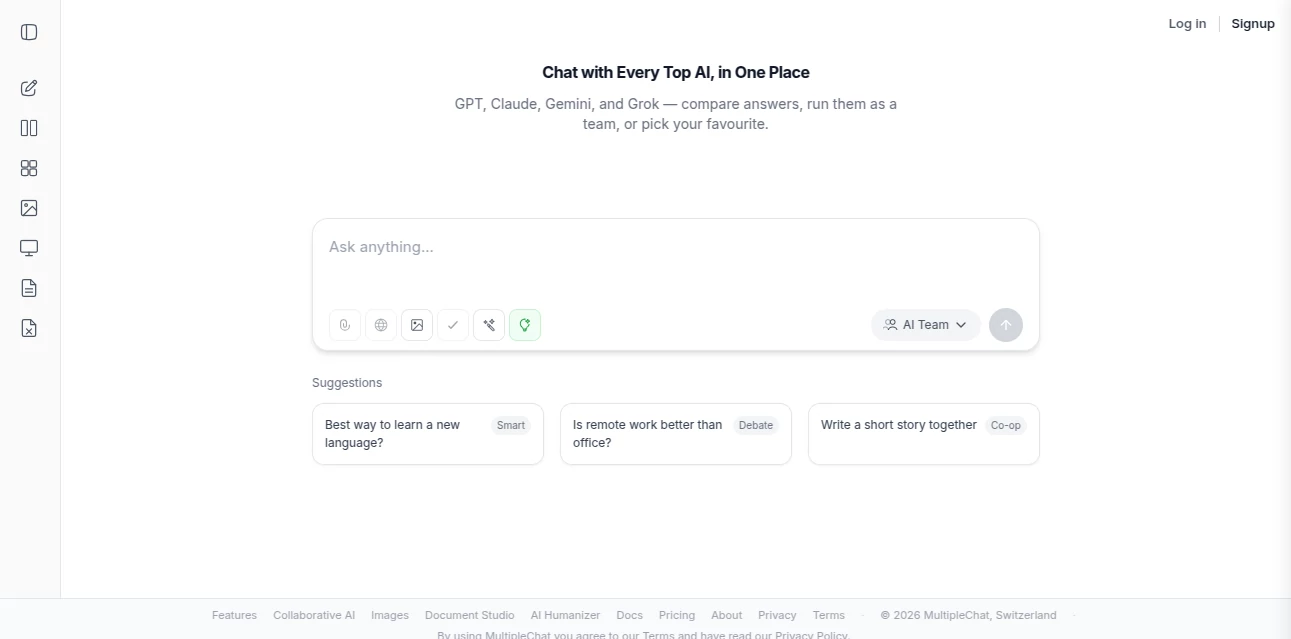
Sometimes one AI just isn’t enough. You want a second opinion, a different writing style, or a more technical answer alongside a creative one. This platform lets you talk to several top AI models in the same conversation, side by side, without constantly switching tabs or copying prompts. It feels like having a roundtable of brilliant minds available at once. I’ve used it when researching complex topics—getting fast answers from one model, deeper analysis from another, and creative angles from a third—all in one clean window. The experience is surprisingly smooth and genuinely useful for anyone who wants more than a single perspective.
Introduction
Most chat tools lock you into one model at a time. If you want to compare responses or combine strengths, you end up juggling windows and repeating yourself. MultipleChat solves this by bringing multiple powerful AIs together in a single workspace. You can chat with them simultaneously, compare answers instantly, and even let them build on each other’s responses. It’s become a favorite for researchers, writers, students, and professionals who value speed and depth. The best part? It doesn’t feel overwhelming — the interface stays clean while giving you serious flexibility.
Key Features
User Interface
The layout is thoughtful and intuitive. You see multiple chat windows arranged neatly on one screen, each clearly labeled with its model. You type once and the message goes to all selected AIs, or you can direct it to specific ones. Switching between models or starting new group chats is effortless. There’s no clutter or steep learning curve — it feels natural from the first use, like upgrading from a single notebook to a full discussion table.
Accuracy & Performance
Responses come back quickly, even when talking to three or four models at once. The platform handles context well across the group, so follow-up questions stay relevant for everyone. You get noticeably different strengths: one model might be more concise, another more creative, another better at code or analysis. This variety helps you cross-check facts and explore ideas from multiple angles without extra effort.
Capabilities
You can run multiple leading models together, create custom combinations, compare answers side by side, fork conversations, and save useful threads. It supports long context, file uploads, and different modes for research, brainstorming, writing, or coding. The ability to have several AIs collaborate in real time opens up possibilities that single-model chats simply can’t match.
Security & Privacy
Your conversations stay private by default. The platform doesn’t train on your chats, and you control what gets saved or shared. For professionals handling sensitive topics or students working on assignments, that respect for privacy adds real confidence to daily use.
Use Cases
Writers bounce ideas between models to find the perfect tone for an article. Researchers compare explanations of complex topics to build well-rounded understanding. Students get multiple explanations of difficult concepts and choose the one that clicks best. Developers debug code by getting feedback from different AIs in one place. Teams use it for brainstorming sessions where diverse thinking is valuable. It fits naturally into any workflow that benefits from multiple viewpoints.
Pros and Cons
Pros:
- Real side-by-side comparison saves enormous time.
- Combines the best strengths of different models effortlessly.
- Clean, fast interface that doesn’t slow you down.
- Great for learning, research, and creative work.
Cons:
- Free tier has usage limits during peak times.
- Some advanced model combinations require a paid plan.
Pricing Plans
The free plan gives you solid daily access to try the multi-model experience. Paid tiers unlock higher limits, priority access, more simultaneous models, and additional features like conversation history and exports. The pricing feels fair for the productivity boost many users report after making it part of their regular routine.
How to Use MultipleChat
Sign up (or start as a guest), choose the AI models you want to include, and start typing. Your message goes to all selected models at once. Read the responses side by side, reply to any of them individually, or continue the group conversation. Save useful threads, fork new directions, or export the best parts. The more you use it, the more natural it feels to get multiple perspectives as standard practice.
Comparison with Similar Tools
Single-model chats are fast but limited in perspective. Other multi-AI platforms can feel cluttered or slow. This one stands out for its clean design and genuine usefulness — it’s built for people who want practical value rather than just novelty. The balance of power and simplicity makes it a strong daily driver for serious users.
Conclusion
In a world with many strong AI models, being able to talk to several at once is a genuine advantage. MultipleChat makes that capability accessible, fast, and enjoyable. It turns what used to be a tedious process of switching tabs into a smooth, productive experience. Whether you’re researching, writing, learning, or solving problems, having multiple intelligent viewpoints available in one place feels like upgrading from a solo conversation to a thoughtful discussion. Once you try it, it’s hard to go back to using just one model.
Frequently Asked Questions (FAQ)
How many models can I use at once?
You can run several leading models simultaneously, with more options available on paid plans.
Is it free to start?
Yes, there’s a generous free tier to experience the multi-model workflow.
Can I save my conversations?
Yes, you can save, organize, and revisit important threads.
Does it support file uploads?
Yes, you can share documents and images with the models for better context.
Are my chats private?
Conversations are private by default and not used for training.
AI Documents Assistant , AI Productivity Tools , AI Chatbot , AI Notes Assistant .
These classifications represent its core capabilities and areas of application. For related tools, explore the linked categories above.
MultipleChat AI details
Website unavailable — View Alternatives
Pricing
- Free
Apps
- Web App
Categories

MultipleChat AI Alternatives Product

Klyra AI
Sauci.ai

Enji

Skywork Supe…

Techvorizon …

MachineTrans…

GameClick.io

Remove My Me…

Free Email V…
