
MUNDER DIFFLIN
What is MUNDER DIFFLIN?
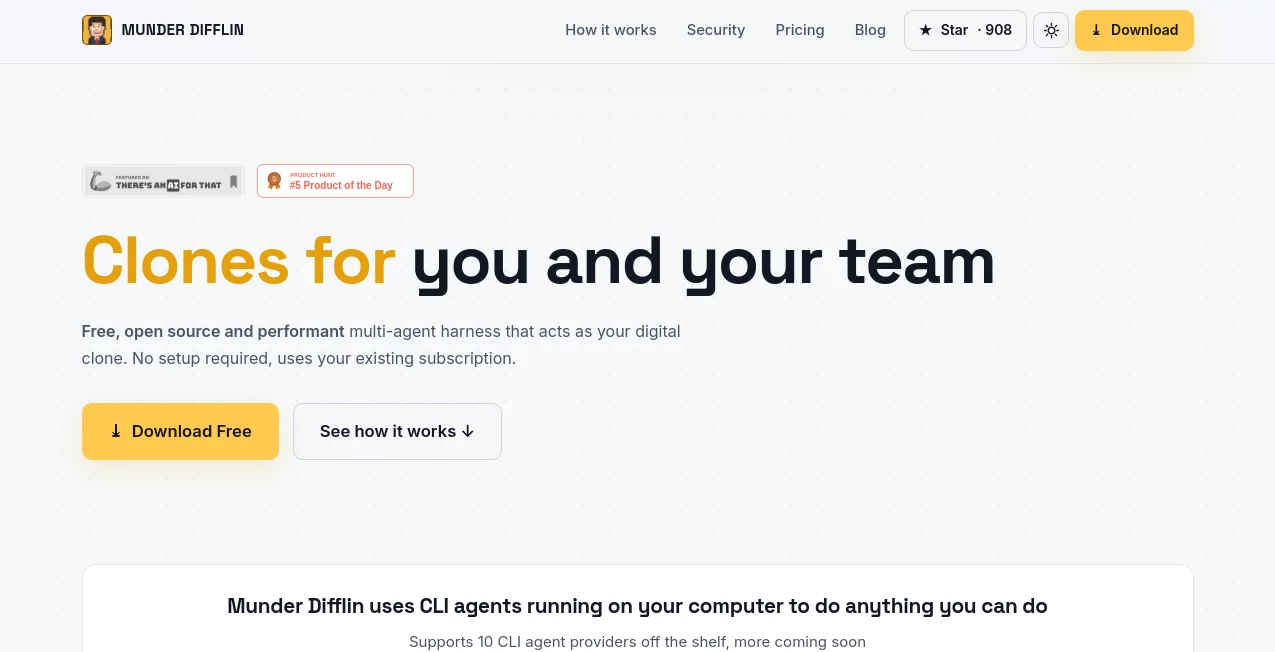
Munder Difflin is a free, open-source multi-agent harness that turns the AI coding agents you already use into persistent digital clones capable of working alongside you and your team. Instead of opening a terminal and handling every task manually, you can create an AI counterpart that understands your workflow, tools, knowledge, and responsibilities, then lets it continue working while you focus on higher-value decisions.
The idea is refreshingly practical. Rather than replacing the agent subscriptions you already have, the platform wraps CLI-based agents and gives them a structured environment where they can operate, communicate, share relevant context, and hand work to one another. It supports popular agents including Claude Code, Codex, Grok, Kimi Code, Antigravity, Qwen, OpenCode, Crush, Pi, and Copilot.
For an individual developer, this can feel like having an extra pair of hands. For a team, the concept becomes even more interesting: every person can have a clone, while shared organizational knowledge helps those clones coordinate work without turning everyone's private information into a single shared pool.
Key Features
- Free and open-source software released under the MIT license.
- Local-first operation with code, API keys, and personal context remaining on the user's machine by default.
- Support for multiple CLI agent providers, including Claude Code, Codex, Grok, Kimi Code, Antigravity, Qwen, OpenCode, Crush, Pi, and Copilot.
- Persistent personal workflows and memory for individual clones.
- Shared organizational knowledge for teams.
- Clone-to-clone communication with end-to-end encryption.
- Optional cloud infrastructure for running clones continuously when a computer is turned off.
- Team coordination designed around multiple autonomous AI workers rather than one shared chatbot.
- A visual office simulation for monitoring agents, alongside a cleaner fullscreen mode.
- Support for macOS, Windows, and Linux.
User Interface
One of the most distinctive parts of the experience is its office-inspired interface. Instead of presenting every activity as a wall of terminal output, agents can be represented as people working inside a virtual office. You can inspect individual clones, see their current state, and get a more intuitive sense of what the AI team is doing.
The visual simulation is more than decoration. It gives users a quick way to understand which agents are active and how a virtual team is progressing. There is also a fullscreen mode for people who prefer a cleaner working environment without the office simulation.
The interface strikes an unusual balance between technical control and approachability. Someone comfortable with terminals can work with the underlying agents directly, while the visual layer makes the overall multi-agent workflow easier to follow.
Accuracy & Performance
Performance depends partly on the underlying CLI agent and the subscriptions or API credentials connected to it, but the platform's role is to organize and orchestrate those agents rather than replace their core intelligence. This makes the setup flexible: users can bring the AI services they already trust instead of being locked into a proprietary model.
The local architecture can also reduce unnecessary overhead because the node runs directly in the user's environment. For developers, that means the clone can work with local repositories, command-line tools, tests, deployments, documents, and other resources available to the computer.
A particularly useful feature is the ability for clones to hand work to other clones. For example, a developer's clone can encounter a missing piece of product information, ask another teammate's clone for it, receive the required context, and continue without waiting for the human teammate to return.
Capabilities
The system is not limited to conventional code generation. Because the underlying agents can interact with command-line tools, the range of possible tasks is much broader.
A developer clone can review pull requests, investigate bugs, run tests, work on small features, monitor CI processes, and keep documentation synchronized. A designer clone can inspect screens, compare them with design systems, export assets, and prepare specifications. A product manager clone can organize issues, maintain documentation, prepare roadmaps, and summarize standups.
Sales and go-to-market workflows can also benefit. A clone can prepare outreach drafts, create call briefs, maintain CRM information, and handle follow-up preparation. For other roles, the same approach can be applied to reports, spreadsheets, files, scheduling, and repetitive tasks that can be automated through software.
The real strength is therefore not a single feature. It is the ability to give an AI agent a persistent role inside an existing workflow and allow that agent to continue operating instead of treating every interaction as a brand-new conversation.
Security & Privacy
Privacy is a major part of the architecture. Local operation is the default, with code, API keys, and personal context staying on the user's machine. The node runs locally, which gives users considerably more control over where sensitive development information is processed.
Communication between clones is designed around end-to-end encryption. Messages are encrypted on the sending node and decrypted only on the receiving node, preventing intermediaries from reading the contents.
Another useful distinction is made between organizational and personal context. Shared team knowledge can be made available to every clone, while personal repositories, notes, preferences, and individual context remain private to the corresponding node.
The project is also open source and MIT licensed. This matters for teams that want to inspect the implementation instead of relying entirely on a vendor's description of how its infrastructure works.
Use Cases
Software development is an obvious use case. A developer can delegate repetitive maintenance, pull-request reviews, testing, documentation updates, and small fixes while retaining control over decisions that require human judgment.
Small startups can use the approach to extend the capacity of a lean team. A product manager's clone might keep project information organized while an engineering clone handles routine development tasks. When one agent needs information from another role, the clones can communicate directly.
Design teams can use clones for repetitive production work such as checking screens against established design rules, preparing assets, or drafting specifications.
Sales teams can also automate repetitive preparation. A clone can help organize CRM records, prepare meeting briefs, draft follow-ups, and keep routine information up to date.
Another compelling scenario is overnight work. A team member can leave a task in progress, and the clone can continue handling available work while the person is away. With the cloud option, the clone can continue operating on a dedicated sandbox even when the user's laptop is closed.
Pros and Cons
Pros
- Free and open-source for individual local use.
- Works with several existing CLI AI agents.
- Local-first design provides strong control over private data.
- Supports persistent workflows and memory.
- Allows AI agents to communicate with one another.
- Useful for both developers and non-development roles.
- Available for macOS, Windows, and Linux.
- Optional cloud infrastructure enables continuous operation.
- MIT licensing makes the project accessible for inspection and customization.
Cons
- The quality of generated work still depends heavily on the underlying AI agent.
- Users need compatible agent subscriptions or API access for the services they choose to connect.
- Local operation requires the computer to remain available while the clone is working.
- Setting up sophisticated multi-agent workflows may take some experimentation.
- Team cloud and network capabilities are separate from the free local experience.
Pricing Plans
The core application is free and open source under the MIT license. Individuals can run a clone locally without paying for the software itself, although they remain responsible for the AI services they connect, such as an existing Claude, OpenAI, or Copilot subscription.
For users who need continuous operation, a cloud service is available. It provides a dedicated sandbox environment so a clone can keep working when the user's laptop is closed.
Team-oriented options add secure clone-to-clone communication and shared organizational knowledge. A higher-level option combines those networking capabilities with dedicated sandbox environments for each clone. Team plans are designed to scale across multiple seats, making the service more suitable for organizations than the free local setup.
There is also a one-time founding supporter option priced at $20, with the contribution helping keep the core project free.
How to Use It
- Download and install the application for macOS, Windows, or Linux.
- Connect one of the supported CLI agents that you already use.
- Create a clone and configure its role, workflow, and relevant context.
- Allow the clone to work with the tools and repositories available in its local environment.
- Use the office simulation or fullscreen interface to monitor activity.
- For team workflows, configure shared organizational knowledge and clone-to-clone communication.
- If continuous operation is required, use the cloud option to keep the clone running on a dedicated sandbox.
- Review the work produced by the clone and remain involved in decisions that require human approval or judgment.
Comparison with Similar Tools
Traditional AI coding assistants generally focus on a direct relationship between one developer and one AI assistant. That model is excellent for interactive programming, but it can become limiting when a project involves many repetitive tasks or several specialized responsibilities.
This approach takes a different route. Instead of presenting another standalone coding assistant, it acts as an orchestration layer around existing CLI agents. The emphasis is on persistent roles, memory, communication, and autonomous collaboration.
Compared with a conventional chatbot, the difference is even more pronounced. A chatbot waits for a prompt and usually treats each conversation as an isolated interaction. Here, the goal is to create an ongoing worker that can operate within a user's environment, maintain context, communicate with other workers, and continue progressing on assigned responsibilities.
For developers who already have subscriptions to capable coding agents, this can be particularly attractive because they do not necessarily need to abandon their existing tools. Instead, those tools become the engines behind a more organized multi-agent workspace.
Conclusion
The most interesting thing about this project is the shift in mindset it encourages. Instead of asking whether AI can answer a question or generate a piece of code, it asks what happens when an AI agent is given a persistent role, access to the right tools, useful memory, and teammates it can communicate with.
That makes the platform especially appealing to developers, startup teams, product managers, designers, and anyone dealing with a large amount of repeatable digital work. The local-first architecture is another strong point for users who care about keeping code and personal context under their control.
It is not a magic replacement for human expertise. The connected AI models still determine much of the quality of the actual work, and thoughtful supervision remains important. But as an orchestration layer for turning existing AI agents into a coordinated digital workforce, it offers a compelling and unusually practical direction.
Frequently Asked Questions (FAQ)
Is the software free?
Yes. The core local application is free and open source under the MIT license. Users may still need to pay for the AI agent subscriptions or API services they connect to it.
Which AI agents are supported?
The platform supports Claude Code, Codex, Grok, Kimi Code, Antigravity, Qwen, OpenCode, Crush, Pi, and Copilot, with additional providers expected over time.
Does my code leave my computer?
In the default local setup, code, API keys, and personal context remain on the user's machine. Clone-to-clone communication is encrypted end to end.
Can multiple AI clones work together?
Yes. Team configurations allow clones to communicate, exchange relevant information, coordinate tasks, and use shared organizational knowledge while keeping personal context separate.
Does my computer need to stay on?
For local operation, the computer needs to remain available while the clone is working. The cloud option provides a dedicated sandbox environment that can keep a clone running even when the laptop is closed.
Is it only useful for software developers?
No. Developers are an obvious audience, but the system can also support design, product management, sales, operations, documentation, reporting, scheduling, spreadsheets, and other tasks that can be controlled through software and command-line tools.
Can I inspect the source code?
Yes. The project is open source and released under the MIT license, allowing users to inspect the implementation and understand how the node, protocol, and security components work.
What makes the multi-agent approach useful?
Instead of relying on one general-purpose assistant for every task, different clones can maintain different responsibilities and communicate when collaboration is necessary. This can reduce repetitive handoffs and make long-running workflows easier to automate.
AI Workflow Management , AI Code Assistant , AI Team Collaboration , AI Developer Tools .
These classifications represent its core capabilities and areas of application. For related tools, explore the linked categories above.

MUNDER DIFFLIN Alternatives Product
AI text clea…

Nifty

Kaamfu

git-lrc

Workik

Project Mela

BillEasy Inc

Youfiliate

Project Genie