
















Youfiliate
What is Youfiliate?
Let's be honest for a second. You spend hours planning, filming, and editing your YouTube videos. You finally get views, people trust your recommendations, and they click your links. But here is the gut punch—a huge chunk of those clicks might be dying before they ever turn into a paycheck. Why? Because affiliate links break. Amazon listings change, products get discontinued, or YouTube messes up the formatting. Worse, if you have a global audience, you are sending someone in Germany to a US Amazon link. They either see a massive shipping fee or nothing at all. That commission is gone.
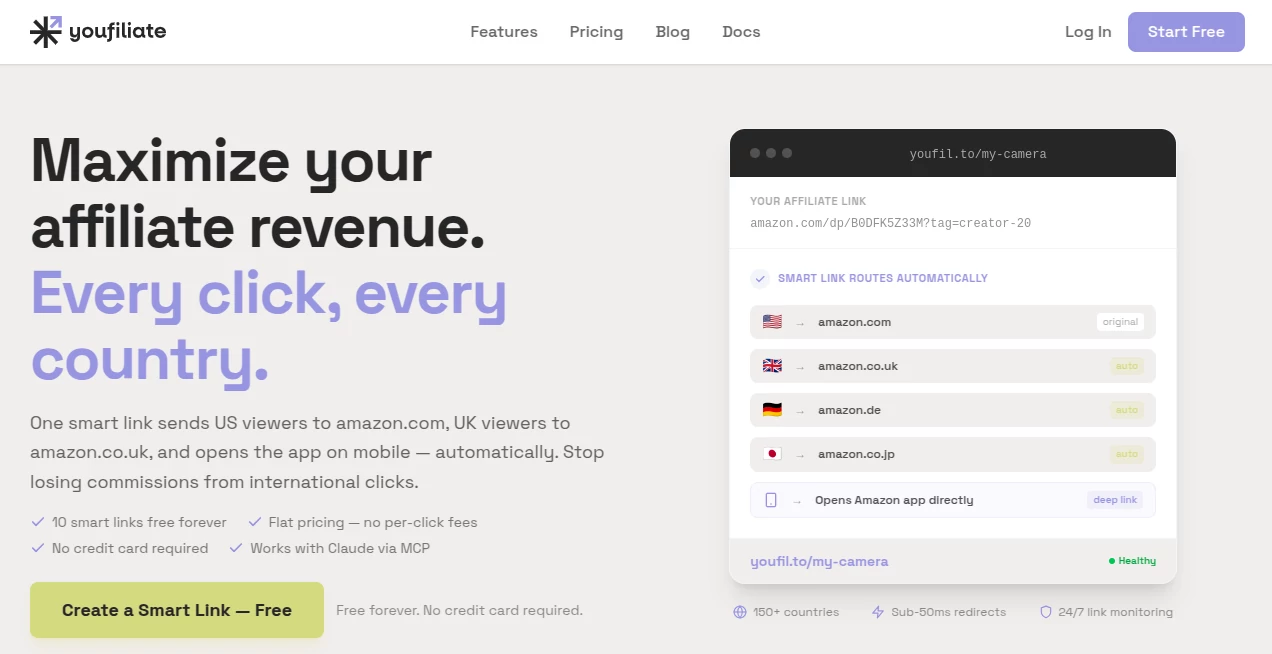
This is exactly the headache this platform was built to solve. It is not just another link shortener. Think of it as a command center for your affiliate revenue. It scans your entire channel, finds every broken link, and lets you fix them in minutes. Plus, it turns those boring old links into "smart links" that automatically send viewers to their local store and even open the Amazon app directly. It is a flat-rate tool built by a creator who got tired of leaving money on the table. If you are a YouTuber or a content creator using affiliate programs like Amazon, ShareASale, or Impact, this is about to become your new best friend.
Key Features
This tool packs a serious punch without overwhelming you with dozens of useless buttons. It focuses on three main things: fixing what is broken, making sure everyone lands in the right place, and saving you hours of manual work. Here is a closer look at what actually matters.
User Interface
You know how some affiliate tools look like they were built for a NASA engineer in 2005? This is the opposite. The dashboard is clean, simple, and actually makes sense. Once you log in, you are not hit with a wall of confusing graphs. You see your channel health immediately. There is a clear "scan" button to check your links, and the results are listed plainly. A green check means you are earning. A red flag means you are losing money. You can even manage everything through your AI assistant if you are into that, thanks to the MCP server setup. But honestly, the web interface is so straightforward that you will probably just use that .
Accuracy & Performance
This is where the platform shines. Forget guessing which links are dying. The system actually crawls your video descriptions and checks every single URL live. If a product page returns a 404 error or redirects to a dead page, the tool flags it immediately. It also tells you how many views that video gets. Why does that matter? Because you should prioritize fixing a link in a video with 100k views over one with 500 views. That is just smart business. Most creators have no idea this is happening until a viewer complains in the comments. Now you can catch it first .
Capabilities
Beyond just checking for dead ends, the real magic is geo-targeting. A regular Amazon link forces everyone to the US store. But if you have fans in the UK, Canada, or Australia, they get a bad experience. This tool creates a "smart link" that detects where the viewer is located. It sends them to their local Amazon or local store instantly. It also supports "deep linking," which means if someone watches on a mobile phone, the link forces the Amazon app to open directly instead of a clunky web browser. That speed bump removal often doubles conversion rates. You can even bulk update all your old video descriptions with these new smart links to fix years of lost revenue in one go .
Security & Privacy
Whenever you are messing with links and commissions, you want to know your data is safe. The platform uses API key authentication, meaning your account is locked down. You don't have to give away your main YouTube login credentials to third-party apps. Everything is handled via secure tokens. The tool simply reads your public descriptions to check the links inside; it doesn't touch your private messages or analytics without permission. For the creators who are worried about getting banned by Amazon for "link manipulation," smart links are actually standard practice—they just redirect traffic, not hide it. It is fully compliant .
Use Cases
This isn't a tool for everyone. But if you fit into one of these three buckets, you need to sign up right now.
YouTube Tech Reviewers: You post "Best Laptop 2024" videos. Your audience is global. A viewer in India clicks your US link and sees "does not ship." They leave. With this, they go to Amazon India. You get the sale. It is that simple.
Solopreneurs with "Best Of" Articles: Even if you are not on video, if you use affiliate links in long-form content, you need geo-redirection. Don't send a Canadian to a US Walmart link.
Busy Creators with Back Catalogs: You have 500 videos. You cannot check every link manually. Let the software scan everything in 10 seconds. Once you see that list of broken links, you will realize how much money was sitting on the table .
Pros and Cons
No tool is perfect, so here is the honest breakdown of what works great and what might annoy you.
Pros:
- Flat-Rate Pricing: You pay one price. Not a cut of your commissions. If you send $10,000 in sales, you keep $10,000 (minus the flat fee). That is huge compared to Geniuslink which takes a percentage.
- Free Tier Available: You can start for free with 10 smart links to test the waters. No credit card required immediately.
- Bulk YouTube Migration: Update every video description on your channel with one click. That alone saves about 20 hours of work.
- App Opening: Mobile conversions are usually terrible. Opening the native app fixes that .
Cons:
- YouTube Focused: While it works anywhere, the bulk migration features are heavily geared toward YouTube. If you are a TikToker, you might not use all the features.
- Learning Curve for MCP: The AI server stuff is cool for nerds like me, but the average user can just stick to the web dashboard and ignore the terminal commands .
Pricing Plans
Let's talk money. The old school way costs you 5% to 10% of your earnings just for routing links. That adds up fast.
This platform uses a flat-rate, freemium model. You can start on the Free Tier which gives you 10 smart links to play with. It is perfect for testing if the geo-targeting actually boosts your sales on a few key videos.
When you are ready to scale, you move to a premium plan. The exact pricing is standard for SaaS tools, but the value lies in the fact that there are no per-click fees. If a video goes viral and gets 1 million clicks, your hosting fee does not go up. For high-volume affiliates, this saves hundreds of dollars a month compared to percentage-based alternatives like Geniuslink .
How to Use Youfiliate
Getting started takes about five minutes. First, head to the website and create a free account. You will generate an API key from your settings dashboard—copy that somewhere safe.
Next, run your first scan. Paste your YouTube channel URL or a specific video link into the scanner. In a few seconds, it will generate a report showing every affiliate link in your descriptions and its status (working, broken, or risky).
To create a smart link, click "New Link," paste your standard Amazon product URL, choose your target regions, and save it. The system gives you a short, clean URL to paste back into your video description. Finally, use the bulk migration tool to replace all your old plain links with these new smart links instantly. That's it. Set it and forget it .
Comparison with Similar Tools
You might be thinking, "I already use Geniuslink or Bitly." Here is the difference. Geniuslink is powerful but expensive. They take a percentage of your sale, which hurts when you sell high-ticket items. Youfiliate keeps 100% of your commission and charges you a flat fee only. Bitly is just for tracking clicks; it doesn't do geo-targeting or link health monitoring. If a link breaks, Bitly doesn't care. Youfiliate alerts you.
This tool is also the only one on the market that offers bulk YouTube description rewriting. You would have to hire a virtual assistant for $500 to manually update 200 videos. This tool does it for the cost of a coffee. If you are a serious YouTube affiliate, the choice is obvious .
Conclusion
Look, affiliate marketing on YouTube is getting harder. Margins are tighter, and the algorithms are pickier. You cannot afford to leak 20% of your potential income to broken links or bad geographical routing. This is a tool that pays for itself literally on the first sale it saves.
The flat-rate pricing respects your hard work, the geo-targeting respects your viewers, and the link auditor respects your time. Stop manually checking your descriptions. Stop sending your viewers to the wrong store. Give the free scan a shot. I bet you find at least one dead link in your most popular video from three months ago. Fix that, and you have already won .
Frequently Asked Questions (FAQ)
Will this work with my Amazon Associates account?
Yes. It is fully compatible with Amazon and most major programs like ShareASale, Impact, and Rakuten. You just put your affiliate tag inside the smart link.
Do I need to be a tech expert to use the bulk migration?
Not at all. It is a one-click button on your dashboard. The tool connects to YouTube's API and updates the descriptions for you. Just double-check the first few to make sure the formatting is how you like it.
Does geo-targeting hurt my SEO?
No. Search engines see a regular redirect (302 or 307), which preserves your link juice. Viewers just get a faster experience.
What happens if I stop paying?
If you downgrade to free, your smart links usually stop redirecting or revert to a standard fallback link (like the original URL). You should always keep your account active if you have smart links in popular videos .