


















Musecut
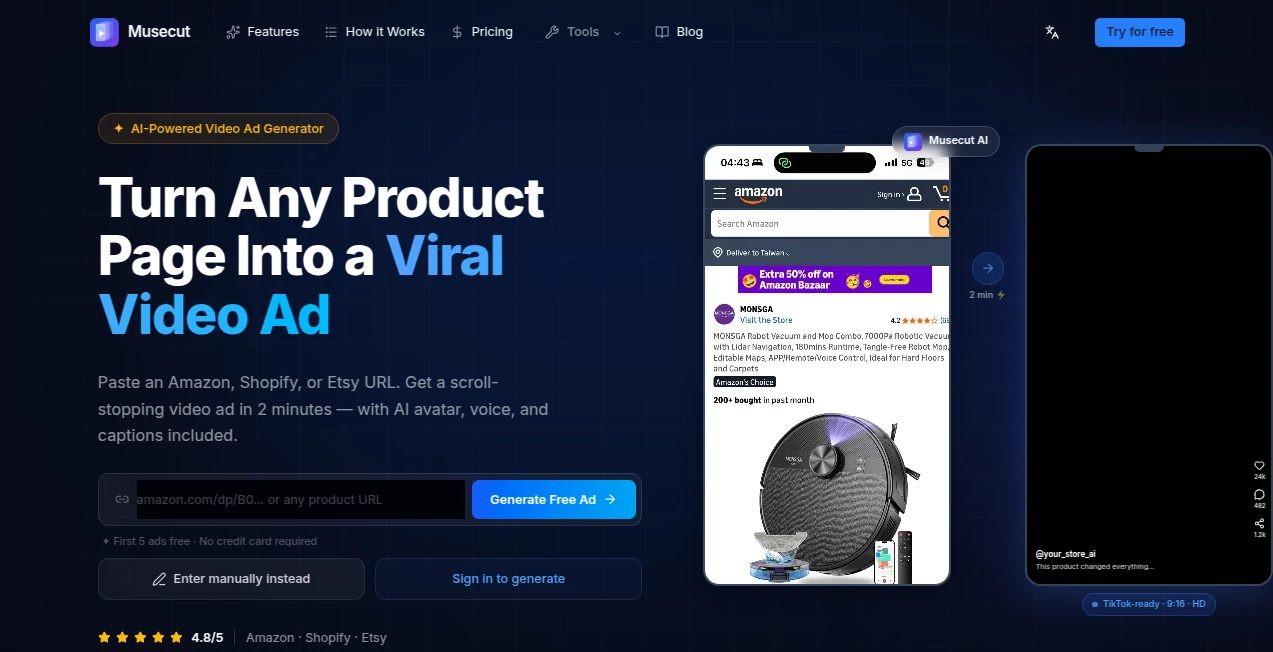
What is Musecut?
I remember the first time I pasted an Amazon link and got back a full video ad with a talking avatar, smooth transitions, and captions that actually matched the voiceover. It felt almost too easy. No hiring a videographer, no struggling with editing software, no spending hours on something that might not convert. This tool has become a secret weapon for many sellers because it takes the hardest part of selling online — creating compelling video content — and makes it ridiculously fast and effective.
Introduction
Video ads are no longer optional on platforms like TikTok, Instagram, and YouTube Shorts. But creating them consistently is painful for most store owners. Musecut changes that by letting you turn any product page (Amazon, Shopify, Etsy, or even manual entry) into a ready-to-post video ad in minutes. It handles script writing, avatar animation, voiceover, B-roll, and captions automatically while giving you full control to edit and refine. Sellers are reporting higher click-through rates and conversions compared to static images, and the best part is how professional the output looks without requiring any video skills.
Key Features
User Interface
The experience is delightfully simple. Paste a product URL, choose from five proven ad formats (Viral Hook, Problem→Solution, Unboxing, Flash Sale, or Tutorial), and the AI does the rest. You get a shot-by-shot script you can edit line by line, swap images, and adjust voice direction. The preview loads quickly so you can iterate without frustration. Everything stays in one clean workspace, with version history so you never lose a good take.
Accuracy & Performance
The AI pulls accurate product details from the URL — images, descriptions, pricing — and turns them into natural-sounding scripts. Avatars move realistically, lip-sync is solid, and transitions feel cinematic rather than robotic. Generation usually finishes in under two minutes, making it practical to create multiple variations for A/B testing. The output quality consistently surprises people who are used to lower-grade AI video tools.
Capabilities
It supports five battle-tested ad formats, realistic AI avatars, natural voiceovers in multiple languages, auto-generated captions, and cinematic B-roll. You can edit scripts shot-by-shot, regenerate only specific parts, and maintain full version history. Commercial licensing is included so you can use the videos for paid ads without worry. It works beautifully for beauty, tech gadgets, fashion, home goods, and many other categories.
Security & Privacy
Your product data and generated videos are handled securely. The platform focuses on delivering value to creators and sellers without unnecessary data collection or sharing. Commercial use rights come standard with paid plans, giving you peace of mind when running real campaigns.
Use Cases
An Amazon FBA seller generates 5–10 new video ads per week for different products and sees better organic reach on TikTok Shop. A Shopify store owner creates flash sale videos in minutes during peak seasons and drives urgent purchases. A dropshipper tests multiple hooks for the same product and quickly identifies what converts best. Content creators build consistent UGC-style videos without filming themselves every day. The common result is faster content production and stronger sales performance.
Pros and Cons
Pros:
- Turns product URLs into complete, ready-to-post video ads in minutes.
- Multiple proven templates engineered for different conversion goals.
- Realistic avatars and natural voiceovers save enormous production time.
- Full editing control and version history let you perfect every ad.
- Commercial rights included for running paid campaigns.
Cons:
- Free tier is limited — best results come with paid credits.
- Very niche or complex products may need manual script tweaks.
- Output quality depends on the strength of the original product page content.
Pricing Plans
It starts with a generous free trial (first 5 ads free, no credit card needed) so you can test real results on your own products. Paid plans offer credit packs and subscriptions that scale with your needs — perfect for solo sellers testing the waters or growing brands producing dozens of videos monthly. Many users say the return on ad spend more than covers the cost after just a few successful campaigns.
How to Use Musecut
Go to the generator, paste your Amazon, Shopify, or Etsy product URL (or enter details manually). Choose one of the five ad formats that best matches your goal. Review and edit the AI-generated script if you want. Hit generate and wait a couple minutes for the full video. Download or post directly. Create multiple variations by changing templates or tweaking lines, then pick the strongest performer. The whole process is fast enough that you can test several creatives in one sitting.
Comparison with Similar Tools
Many AI video tools require manual input of every element or produce generic results. This one stands out by intelligently extracting product details from URLs and using proven ad formats that actually drive sales. It gives you more creative control than fully automated tools while requiring far less effort than traditional video production. For e-commerce sellers who need consistent, high-converting video content, it hits a sweet spot that’s hard to beat.
Conclusion
Video is king for selling online, but creating it consistently used to be expensive and time-consuming. This tool removes those barriers and lets everyday sellers produce professional-looking ads that actually perform. It’s not magic — it’s smart, focused technology that respects your time and your products. If you’re tired of static images or struggling with video creation, this could be the edge your store has been waiting for.
Frequently Asked Questions (FAQ)
How long does it take to generate a video?
Usually 1–2 minutes per ad after script approval.
Can I use my own voice or avatar?
Current focus is on AI avatars and voices, but full custom options are expanding.
Do I keep commercial rights?
Yes — all generated videos come with commercial usage rights.
Which platforms work best?
TikTok, Instagram Reels, YouTube Shorts, and Facebook ads all perform well with the generated content.
What if the product page has limited info?
You can enter details manually or enhance with additional images for better results.
AI Ad Generator , AI Marketing Plan Generator , AI Video Generator , AI Text to Video .
These classifications represent its core capabilities and areas of application. For related tools, explore the linked categories above.

Musecut Alternatives Product

Husslix1.1

Medialyst

v04 ai

Omnigen Stud…

Veo 3.2
MiniMax H3 A…

KlingVideo

Seedance 2.0

Klyra AI
