Music3AI
What is Music3AI?
Music3AI takes a remarkably simple approach to AI music creation: describe what you want in a sentence, choose a style, and let the system turn the idea into a complete song. There is no need to understand music theory, arrange instruments manually, or prepare a polished lyric sheet before getting started. The platform is designed for people who have an idea for a song but do not necessarily have the technical skills to produce one from scratch.
The experience is especially appealing for quick creative work. A user can describe something as specific as a rainy-night breakup song or something broader such as an upbeat dance track, then choose from a wide selection of musical styles and vocal personalities. The result is a finished track with verses, chorus, vocals, and mixing rather than simply a short musical fragment.
For creators working on videos, podcasts, games, social media projects, personal songs, or early music concepts, this makes the process much more approachable. Three songs can also be generated for free without creating an account, which gives newcomers a practical way to test the workflow before paying for additional credits.
Key Features
- Generate complete songs of up to five minutes.
- Create a track from a simple one-sentence idea.
- Choose from a broad selection of musical genres and styles.
- Preview different vocal personalities before generating a song.
- Generate songs with verses, choruses, vocals, and a finished mix.
- Download generated music in WAV and MP3 formats.
- Start with three free songs without an account.
- Use a credit-based system instead of a recurring monthly subscription.
- Credits do not expire.
User Interface
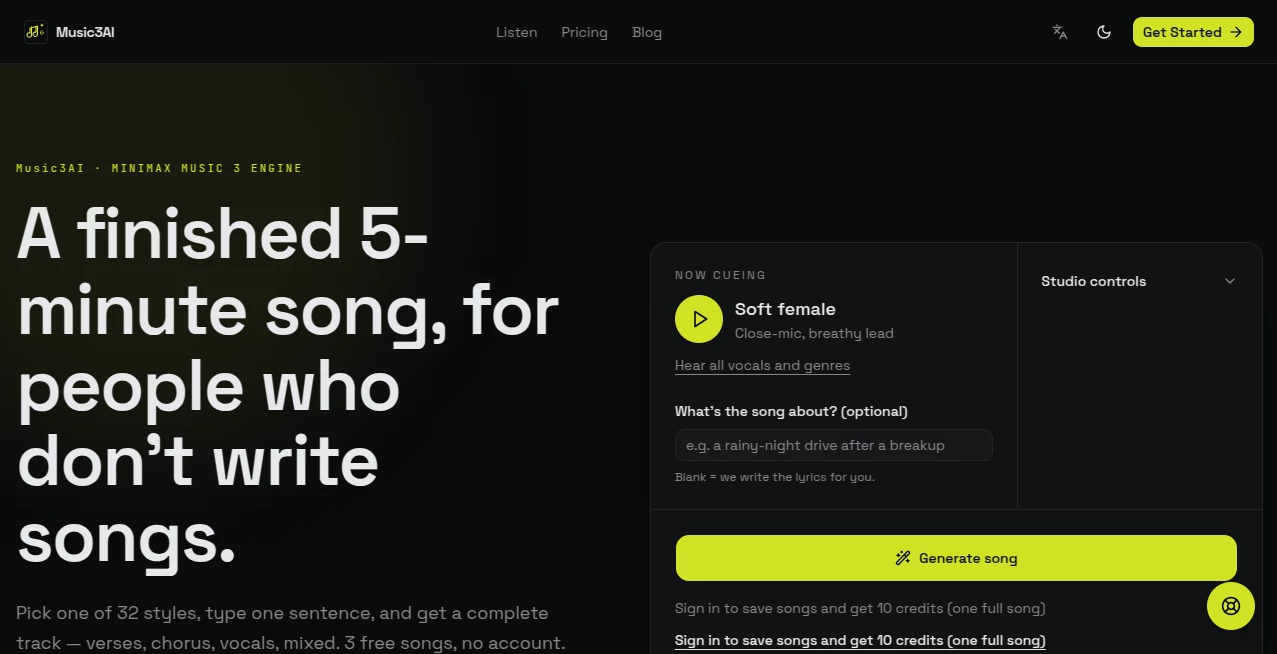
The interface keeps the creative process unusually straightforward. Instead of presenting users with a crowded collection of technical audio controls, the main workflow centers on the idea behind the song. You can describe the subject of the track, select a musical direction, preview vocal options, and start generation.
The vocal selector is a particularly useful touch. Rather than simply choosing between generic male and female settings, users can explore options such as soft female, powerful female, soft male, powerful male, raspy, choir, rap-sung, and airy voices. This gives the initial concept a much stronger sense of personality before the full track is created.
Accuracy & Performance
The platform is built around a complete-song generation workflow rather than producing isolated musical snippets. A typical generation is presented as a finished track, with the service stating that rendering generally takes around one to three minutes and can produce audio up to five minutes long.
Prompt simplicity is another strength. Users do not have to write a technically detailed production brief to get started. A single sentence can provide the initial concept, while the available style and vocal choices add more direction. For someone experimenting with songwriting for the first time, that balance can make the difference between spending an hour configuring settings and actually hearing an idea.
Capabilities
The platform covers a wide range of musical directions, including Pop, Dance Pop, Rock, Metal, Hip Hop, R&B, Soul, Funk, Blues, Jazz, Country, Folk, Bossa Nova, Urban, EDM, Lo-fi, Ambient, Cinematic, Reggae, Disco, Indie, Synthwave, Mandopop, and GuFeng.
The vocal options also make it possible to approach the same musical idea from very different angles. A soft vocal can suit an intimate song, while a powerful voice may work better for rock or dramatic pop. The choir option is useful when a wider vocal character is needed, while the rap-sung style can push a track toward a more rhythmic delivery.
For practical projects, the availability of WAV and MP3 downloads is important. MP3 can be convenient for quick sharing and everyday use, while WAV is better suited to workflows where higher-quality audio is preferred.
Security & Privacy
The website provides dedicated Privacy Policy and Terms of Service pages, giving users a place to review the rules governing the service and their use of generated content. As with any AI music platform, creators should review the current terms before using generated tracks in commercial releases, especially when a project involves paid distribution, client work, or monetized content.
It is also sensible to avoid submitting private or sensitive information as part of song descriptions. For commercial projects, keeping a record of the generation, selected plan, and applicable licensing terms can make later rights checks much easier.
Use Cases
Video creators: A creator working on a YouTube video, short film, advertisement, or social media clip can use the service to quickly create music that matches the intended mood instead of relying entirely on stock libraries.
Podcasters: Intro music, transitions, background tracks, and closing themes can be created around a particular tone or subject, giving a podcast a more recognizable audio identity.
Game developers: Indie developers can experiment with different musical directions for menus, environments, trailers, or prototype levels without first hiring a composer for every idea.
Songwriters: Someone with a lyrical concept but limited production experience can use generated tracks as a starting point for exploring melodies, vocal approaches, and arrangements.
Content marketers: Brands and creators can experiment with original background music for promotional videos, product presentations, campaigns, and short-form content.
Casual creators: Perhaps the simplest use case is also one of the most enjoyable: turning a personal story, joke, memory, relationship, or random idea into an actual song.
Pros and Cons
Pros
- Very simple workflow for beginners.
- Three free songs are available without requiring an account.
- Complete tracks can reach five minutes in length.
- Large selection of musical genres.
- Multiple distinct vocal styles.
- WAV and MP3 downloads are supported.
- Credits do not expire.
- No recurring subscription is required for the standard credit model.
Cons
- Users looking for detailed professional audio production controls may find the simplified workflow limiting.
- AI-generated music can still require multiple attempts before the result matches a very specific creative idea.
- Commercial usage should be checked against the current licensing terms and selected plan.
- Generation credits are required once the free songs have been used.
Pricing Plans
The pricing model is based on credits rather than a traditional monthly subscription. A complete song costs 10 credits, and unused credits do not expire. This approach can be attractive for occasional creators because there is no need to keep paying every month simply to maintain access.
- Basic – $5: 500 credits, equivalent to up to 50 full songs, WAV and MP3 downloads, and email support.
- Pro – $15: 2,000 credits, equivalent to up to 200 full songs, priority generation, priority support, and a commercial license.
- Ultra – $30: 5,000 credits, equivalent to up to 500 full songs, the highest generation priority, dedicated support, bulk export, and API access.
The Pro and Ultra plans make more sense for users producing music regularly, while the Basic option is easier to justify for casual experimentation. Since commercial licensing is specifically included with Pro, businesses and professional creators should pay particular attention to the plan they choose.
How to Use It
Getting started is intentionally uncomplicated. First, decide what kind of song you want to hear. You can describe the subject, atmosphere, story, or situation in a single sentence. For example, you might describe an energetic road-trip song about leaving a difficult relationship behind.
Next, select a musical style. Listening to the available previews can help narrow down the direction before spending credits. You can then choose the vocal personality that best fits the idea.
After that, start the generation and wait for the completed track. Once the song is ready, listen to the result and decide whether it works as-is or whether the idea needs another attempt. The generated audio can then be downloaded as WAV or MP3 for use in your workflow.
The best results will usually come from treating the first generation as a creative starting point rather than expecting every idea to be perfect immediately. A small change in the subject, genre, or vocal direction can produce a noticeably different result.
Comparison with Similar Tools
AI music generators such as Suno and Udio have helped popularize the idea of creating songs from text, but different platforms approach the experience in different ways. Some focus heavily on detailed creative controls, while others prioritize experimentation and rapid generation.
This platform stands out mainly because of its beginner-friendly workflow. The emphasis is on choosing a style, describing an idea, selecting a vocal character, and receiving a complete song. That makes it particularly suitable for people who want to get from a blank page to something listenable without learning a digital audio workstation first.
For experienced producers who want extensive editing, mixing, mastering, or arrangement controls, a conventional DAW combined with specialized music tools may still offer more flexibility. For someone whose main goal is to turn an idea into a finished-sounding song quickly, the simpler approach can be a genuine advantage.
Conclusion
Music3AI is an appealing option for anyone who has musical ideas but does not want the technical barrier that traditionally comes with producing a complete song. Its combination of simple prompts, genre presets, vocal choices, full-length generation, and downloadable WAV and MP3 files makes the experience easy to understand from the first attempt.
The three free songs are especially useful for newcomers because they provide enough room to experiment before spending money. More frequent creators can move to credit packages, while professionals may find the higher plans more suitable when commercial licensing, priority generation, or API access becomes important.
It will not replace every part of a professional music-production setup, but that is not really the point. Its strongest quality is accessibility: you bring an idea, choose a direction, and very quickly have something you can actually hear.
Frequently Asked Questions (FAQ)
Can I create a complete song without knowing music theory?
Yes. The platform is designed for users who may not have formal songwriting or music-production experience. A simple description can be enough to begin generating a track.
How long can generated songs be?
Generated tracks can be up to five minutes long, making the service suitable for more than short musical experiments.
Are vocals included?
Yes. The service can generate complete songs with vocals and provides several vocal styles, including soft, powerful, raspy, choir, rap-sung, and airy options.
Can I create different music genres?
Yes. Available styles include genres such as Pop, Rock, Metal, Hip Hop, R&B, Jazz, Country, EDM, Ambient, Cinematic, Indie, Synthwave, and several others.
Can I download the music?
Yes. Generated tracks can be downloaded in WAV and MP3 formats.
Is there a free option?
Yes. Three free songs can be generated without creating an account, allowing new users to test the experience before purchasing credits.
Do the credits expire?
No. The website states that purchased credits do not expire.
Can the generated music be used commercially?
Commercial usage depends on the applicable licensing terms and plan. The Pro plan specifically includes a commercial license, so professional users should review the current terms before publishing generated music commercially.
Does it require a monthly subscription?
No. The service uses a pay-per-song credit model rather than requiring a recurring monthly subscription.
Is it suitable for beginners?
Yes. Its strongest advantage is the straightforward workflow. Users can start with an idea in plain language instead of learning complicated music-production software first.
AI Text to Music , AI Singing Generator , AI Music Generator .
These classifications represent its core capabilities and areas of application. For related tools, explore the linked categories above.

Music3AI Alternatives Product

AI ASMR Gene…

SAM Audio

Lyria.run
AI Describe …

Soniq Chat

MusicGPT AI

LORY

AI Rap Gener…

AI Makes Song