MusicGPT
What is MusicGPT?
MusicGPT is an AI-powered music creation studio designed to turn a simple musical idea into a playable song or instrumental track. Instead of starting with a blank timeline, users can describe a scene, genre, mood, instrument, or even a small piece of lyrics and let the platform shape that idea into music.
The experience is particularly appealing to creators who need original audio quickly. A YouTube creator can create an intro or background track, a podcaster can develop a theme, and an independent musician can experiment with a new song direction without opening a traditional production environment.
One of the nicest parts of the experience is that users do not need to understand music production before getting started. The platform focuses on the creative idea first, while still giving users room to guide the result.
Key Features
- Text-to-music generation: Turn a written musical idea into an original audio track.
- AI song creation: Develop complete song concepts from descriptions, moods, genres, and lyrical ideas.
- Instrumental mode: Generate music without vocals when a background or purely instrumental track is needed.
- AI lyrics generation: Create lyrics from a description when you have an idea but have not written the words yet.
- Custom lyrics: Provide your own lyrics and use them as part of the song-generation process.
- Multiple musical directions: Users can describe genres, feelings, instruments, scenes, or other creative details to influence the result.
- Multilingual creation: The platform is designed to support musical ideas across different languages.
- Music library: Generated works and creative prompts can be kept together for future refinement and exploration.
- Commercial usage: The available plans include commercial licensing and unrestricted usage rights.
User Interface
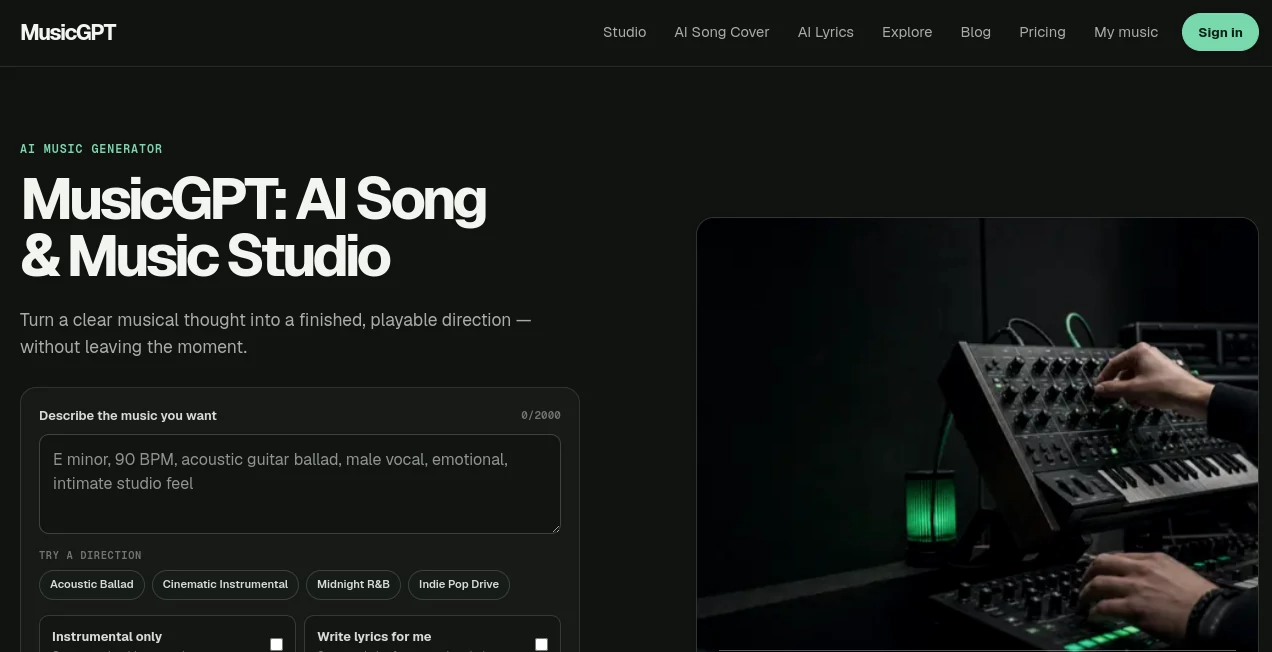
The interface keeps the main creative action remarkably straightforward. Users begin by describing the music they want, with space for a detailed prompt, and can choose whether they want vocals or an instrumental result.
There are also ready-made directions such as acoustic ballad, cinematic instrumental, midnight R&B, and indie pop. These examples are useful for anyone who understands the mood they want but is not sure how to phrase a detailed prompt.
The overall workflow follows a simple pattern: describe an idea, customize the direction when necessary, generate a track, and continue experimenting with what works.
Accuracy & Performance
For generative music, accuracy is less about reproducing a single correct answer and more about how well the generated track follows the creative direction. The platform is built around this idea, allowing users to provide context about genre, feeling, instruments, lyrics, or intended use.
Generation is designed to be fast enough for experimentation. That matters when working creatively because waiting too long between ideas can interrupt the flow. Being able to hear a result and immediately try another direction makes the process feel closer to sketching than traditional production.
Capabilities
The platform goes beyond a basic text-to-music generator. It can be used for full song concepts, instrumental compositions, background music, podcast themes, social media audio, commercial music directions, and other creator-focused projects.
Its lyric workflow is another useful addition. Someone might start with a story or mood, generate a lyric draft, and then turn that idea into a song. Alternatively, musicians who already have their lyrics can bring their own words into the process.
The combination of generation and iteration makes it useful for early-stage creative work. A creator does not necessarily need to know exactly what the final track should sound like before starting.
Security & Privacy
Privacy is supported through private generations on the available plans, allowing users to keep generated work away from public exploration. Cloud storage is also included, with the retention period depending on the selected plan.
Users should still review the current privacy policy and terms before uploading sensitive or confidential material. As with any online creative service, understanding how submitted content and generated works are handled is an important part of choosing the right workflow.
Use Cases
- YouTube creators: Produce original intros, background tracks, explainers, and other channel audio.
- Instagram creators: Develop short musical ideas for Reels, stories, promotional content, and social posts.
- Podcasters: Create recognizable themes, transitions, and background beds for episodes.
- Musicians: Explore melodies, genres, moods, and song directions before committing to a full production.
- Advertisers: Test branded music concepts during the early stages of a campaign.
- Indie creators: Generate original audio without maintaining a traditional recording setup.
- Content teams: Quickly experiment with multiple musical directions for different pieces of content.
Pros and Cons
Pros
- Simple text-based music creation workflow.
- Supports both songs and instrumental tracks.
- Includes an AI lyrics workflow.
- Useful for YouTube, Instagram, podcasts, and commercial projects.
- Commercial license and unrestricted usage rights are included in the listed plans.
- Free access is available without requiring a payment card.
- Paid plans provide priority generation and longer cloud storage.
Cons
- The free plan is limited to one song per day.
- Creators producing music frequently may need a paid plan.
- AI-generated results can still require experimentation to reach the desired artistic direction.
- Users looking for detailed traditional DAW-style production controls may prefer a conventional music-production environment.
Pricing Plans
The platform offers a free option as well as paid plans aimed at creators with higher monthly usage.
- Free: One high-quality song per day, 7-day cloud storage, private generations, priority generation, and commercial license and unrestricted usage rights.
- Creator: 25 songs per month with 100 monthly credits, 90-day cloud storage, private generations, priority generation, and commercial license and unrestricted usage rights. The displayed annual-billing price is $7.49 per month.
- Studio: 100 songs per month with 400 monthly credits, 180-day cloud storage, private generations, priority generation, and commercial license and unrestricted usage rights. The displayed annual-billing price is $22.49 per month.
Paid subscriptions allow unused monthly credits to roll over, which is a useful touch for creators whose workload changes from month to month. The service also states that subscriptions can be cancelled at any time.
How to Use It
- Start by describing the music you want to create.
- Mention useful details such as genre, mood, instruments, scene, purpose, or lyrical direction.
- Choose instrumental mode if you want a track without vocals.
- Generate lyrics from your idea or provide lyrics of your own when appropriate.
- Generate the track and listen to the result.
- Adjust the creative direction and experiment again if the first version is not quite right.
- Save useful creations and continue refining your strongest ideas.
Comparison with Similar Tools
Many AI music platforms focus primarily on generating a song from a prompt. This platform takes a broader creator-studio approach by combining text-to-music generation with lyric creation, instrumental generation, a growing music library, and workflows aimed at content creators.
Another distinction is its emphasis on practical use. The service specifically presents examples for YouTube, Instagram, commercials, and podcasts, making it easier to understand where generated music can fit into a real content workflow.
It is not necessarily a replacement for a professional digital audio workstation. Instead, it works particularly well at the idea and generation stage, where speed and experimentation are more important than manually controlling every element of a finished production.
Conclusion
For creators who regularly need original music but do not want every project to begin with a complicated production setup, this AI music studio offers a compelling shortcut from idea to sound. Its text-driven workflow makes experimentation accessible, while instrumental generation, lyrics, commercial usage rights, and creator-focused applications give it practical value beyond simple musical experimentation.
The free daily generation makes it easy to test the workflow before paying, while the Creator and Studio plans provide additional capacity for people who produce music more regularly. Whether the goal is a podcast theme, a social media track, a YouTube background, or the first sketch of a new song, the platform provides a straightforward place to turn a musical thought into something you can actually hear.
Frequently Asked Questions (FAQ)
What is this AI music generator?
It is an online AI music creation platform that turns written descriptions into songs, instrumental tracks, and other forms of generated audio.
Can I create instrumental music?
Yes. An instrumental-only option is available for creating music without vocals.
Can it generate lyrics?
Yes. Users can generate lyrics from a description or provide their own lyrics for song creation.
Can I use the generated music commercially?
The listed Free, Creator, and Studio plans include commercial licensing and unrestricted usage rights. Users should review the current terms for the exact conditions that apply to their account and content.
Is there a free plan?
Yes. The free plan provides one high-quality song per day and does not require a payment card.
How much does the Creator plan cost?
The displayed annual-billing price is $7.49 per month and includes 25 songs per month through 100 monthly credits.
How much does the Studio plan cost?
The displayed annual-billing price is $22.49 per month and includes 100 songs per month through 400 monthly credits.
Do I need music production experience?
No. The main workflow is based on describing the music you want, making it approachable for beginners as well as experienced creators.
Can I create music for YouTube and podcasts?
Yes. YouTube videos, podcasts, Instagram content, and commercial projects are among the use cases presented by the platform.
What categories does this tool belong to?
The most relevant categories are listed below.
AI Text to Music , AI Lyrics Generator , AI Music Generator .
These classifications represent its core capabilities and areas of application. For related tools, explore the linked categories above.

MusicGPT Alternatives Product
Lyria 3 AI M…

AI Music Gen…

Lyria3 AI

gemini music

Melodank

HypeClip
AI Music Gen…

AI Describe …

Omnesuite AL…