

















AISongsGenerator
What is AISongsGenerator?
AISongsGenerator is an AI-powered music creation platform designed to turn simple ideas, lyrics, moods, and musical references into complete songs. Instead of spending hours searching through stock music libraries or learning complicated production software, creators can describe what they want and let AI handle the composition, arrangement, vocals, and overall production.
The platform is particularly interesting for content creators, musicians, marketers, podcasters, video producers, and anyone who needs original music without a traditional studio setup. Users can start with a short description, provide their own lyrics, choose a musical direction, or even upload reference audio to guide the generation process.
What makes the experience practical is that music creation does not stop after the first generation. Users can work with different creation modes, adjust creative parameters, regenerate specific sections, separate vocals from instrumentals, master their tracks, and download the finished result for use in their projects.
Key Features
- AI music generation from natural-language prompts
- Text-to-music and lyrics-to-song creation
- Custom lyrics support
- Simple and Custom creation modes
- Multiple music genres and moods
- Reference audio and melody input
- AI lyrics generation
- Vocal and instrumental separation
- AI music mastering
- Multi-track editing and section regeneration
- MP3 and WAV downloads
- AI music video generation on supported plans
User Interface
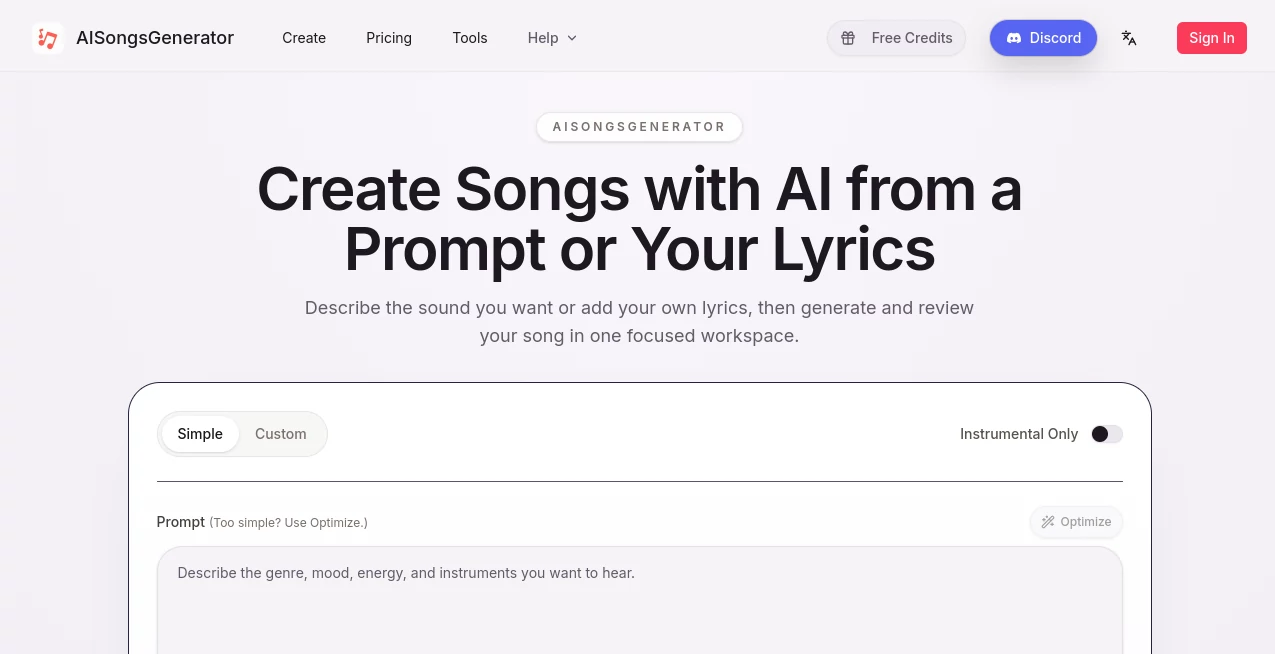
The interface is built around a straightforward creation workflow rather than a traditional digital audio workstation. Users can choose between Simple and Custom modes, enter a prompt, select styles or moods, and provide additional creative information when needed.
Preset tags such as rock, folk, classical, disco, emotional, romantic, nostalgic, soothing, and other moods make it easier to get started without knowing exactly how to describe a musical arrangement. For experienced users, the Custom mode provides more control over lyrics and creative parameters.
This approach makes the platform approachable for beginners while still leaving room for creators who want to experiment. Someone making a short video soundtrack, for example, can start with a simple description rather than having to understand tempo, harmony, instrumentation, and arrangement from the beginning.
Accuracy & Performance
Music generation quality depends heavily on the information provided by the user. Clear prompts that describe the desired genre, emotion, structure, instruments, vocals, or reference material generally provide a stronger starting point than vague requests.
The platform states that a typical three-minute pop song can take around 90 seconds to generate, although generation time varies according to the length and complexity of the requested track. Generated music can also be adjusted afterward, with the ability to regenerate particular sections rather than starting from scratch every time.
That iterative workflow is useful in practice. A creator might like the chorus but dislike the introduction, for example, and refine the relevant section instead of throwing away an otherwise promising song.
Capabilities
The platform goes beyond basic song generation by bringing several parts of the music-production process into one workflow. Users can create songs from text prompts or their own lyrics, experiment with different genres and moods, and generate music with vocals or instrumental-only arrangements.
Its AI Lyrics Generator can help turn an idea into verses, hooks, rap lyrics, or emotional songwriting concepts. The vocal-removal and stem-separation features can then be used to isolate vocals or instrumental elements for remixing, karaoke, sampling, or further editing.
Another useful addition is AI mastering. Instead of exporting an unfinished track and immediately moving to separate audio software, creators can use the mastering feature to improve balance, clarity, and overall presentation.
The workflow also supports MP3 and WAV downloads, while the broader platform includes an AI Music Video Generator for creators who want to pair their tracks with visual content.
Security & Privacy
Music creators should always review the platform's current Privacy Policy, Terms of Service, and licensing conditions before uploading private recordings, unreleased material, or commercially sensitive content. This is especially important when reference audio or original lyrics are involved.
Licensing also depends on the selected plan. The free plan is intended for personal, non-commercial testing, while paid plans include commercial-use rights subject to the platform's licensing terms. Checking the current terms before publishing or monetizing a track is a sensible step for professional projects.
Use Cases
One of the strongest aspects of AI music generation is how many different creative jobs it can handle. A YouTube creator can produce background music for a video without relying on a generic stock track. A podcaster can create an intro, outro, or transition theme that fits the identity of the show.
It can also be useful for advertising and e-commerce. Marketers can quickly test different musical directions for a campaign before investing in a full production. A product video might need something energetic and modern, while a luxury product could benefit from a slower and more atmospheric composition.
Personal projects are another natural fit. Someone creating a wedding video could generate a custom song based on a couple's story, while an indie game developer can experiment with different soundtracks for different scenes or levels.
Teachers and students can also use generated music as an interactive way to explore genres, songwriting, rhythm, and musical structure. Fitness creators can create tracks with different energy levels for warm-ups, workouts, and cooldowns.
Pros and Cons
Pros
- Easy starting point for people without music-production experience
- Supports both simple prompts and more detailed custom inputs
- Can work with custom lyrics and reference audio
- Offers multiple genres, moods, and creative directions
- Includes lyrics generation alongside music creation
- Provides vocal and instrumental separation tools
- Includes AI mastering for additional finishing work
- MP3 and WAV export options are available
- Free plan available for personal experimentation
- Paid plans include commercial licensing
Cons
- Generation results can vary depending on the quality of the prompt
- Users looking for highly precise professional production control may still prefer a traditional DAW
- Commercial usage requires attention to the licensing terms and selected plan
- Higher-volume music production requires a paid subscription
Pricing Plans
The platform offers a free plan as well as several paid subscriptions. The Free plan includes 2 songs per month and 1 music generation per month, together with AI music and lyrics generation and music downloads. It is intended for personal use and testing.
The Starter plan is listed at $14.99 per month, with a discounted yearly rate of $10.49 per month when billed annually. It includes 200 songs per month, 100 music generations, commercial licensing, AI music and lyrics generation, AI music video generation, and 1,000 downloads.
The Hobby plan costs $29.99 per month, or $20.99 per month with annual billing. It provides 500 songs per month, 250 music generations, commercial licensing, AI music video generation, unlimited downloads, and 24/7 email support.
The Professional plan is priced at $49.99 per month, or $34.99 per month with annual billing. It raises the allowance to 1,200 songs and 600 music generations per month while retaining commercial licensing, unlimited downloads, AI music video generation, and 24/7 email support.
How to Use the Tool
Start by choosing the creation mode that matches your workflow. Simple Mode is useful when you want to describe an idea quickly, while Custom Mode gives you more control over the creative direction and lyrics.
Next, describe the song you want. Mention useful details such as genre, mood, instruments, vocal style, rhythm, or intended purpose. You can also provide your own lyrics or reference audio when you need the result to follow a particular creative direction.
After submitting the request, let the AI generate the track. Listen to the result carefully rather than judging it only on the first few seconds. If the overall direction works but one section feels weak, use the available editing and regeneration options to refine the song.
Once the track is ready, you can use the additional audio tools to separate vocals and instruments or apply mastering. Finally, download the finished track in the available format and use it in your intended project according to the applicable license.
Comparison with Similar Tools
AI music generators can look very similar at first glance, but their workflows are not always the same. Some focus primarily on turning text into short instrumental tracks, while others concentrate on songwriting, vocals, or production.
This platform stands out by combining several stages of the process. A creator can move from lyrics and song ideas to full music generation, then continue with vocal separation, mastering, downloads, and music-video creation without immediately switching to another service.
For someone who simply needs a quick background track, a lightweight generator may be enough. For users who want a broader creative workspace that covers songwriting and post-generation tools, the wider feature set can be more useful.
Conclusion
AI music creation is becoming much more practical for everyday creative work, and this platform offers a particularly accessible way to explore it. The combination of prompt-based music generation, custom lyrics, multiple musical styles, audio separation, mastering, and export options gives creators more than a simple one-click song generator.
Its biggest advantage is the ability to move through several stages of music creation in one place. Beginners can start with a sentence describing an idea, while more experienced creators can experiment with lyrics, reference audio, styles, and iterative revisions.
Whether the goal is a soundtrack for a short video, a podcast theme, advertising music, a personal song, or an experimental music project, it provides a convenient starting point for turning an idea into something listeners can actually hear.
Frequently Asked Questions (FAQ)
Is the tool free to use?
Yes. A free plan is available for personal, non-commercial testing. The current free tier includes 2 songs per month and 1 music generation per month.
Can I create a song from my own lyrics?
Yes. Custom lyrics can be entered through the Custom creation mode, allowing users to build songs around their own words and ideas.
Can I download generated music?
Yes. The platform supports music downloads in MP3 and WAV formats, with download allowances depending on the selected plan.
Can generated music be used commercially?
Paid plans include commercial-use rights subject to the platform's licensing terms. The free plan is intended for personal, non-commercial testing, so creators should select an appropriate paid plan before using tracks commercially.
Can vocals and instruments be separated?
Yes. The platform includes vocal-removal and stem-separation functionality that can be used to isolate vocals or instrumental elements for remixes, karaoke, and other creative workflows.
How can I get better music-generation results?
Give the generator useful creative direction. Include the genre, mood, instruments, structure, vocal preference, and intended use when relevant. Reference audio can also help communicate the desired direction more clearly.