















Muzie
Verified Blue CheckMark
Verified Blue CheckMark products are featured above free or unverified listings.
This badge indicates authenticity and builds trust, giving your product higher visibility across the platform.
Upgrade to get verified
Verified Blue CheckMark products are featured above free or unverified listings. This badge indicates authenticity and builds trust, giving your product higher visibility across the platform.
Upgrade to get verified
What is Muzie?
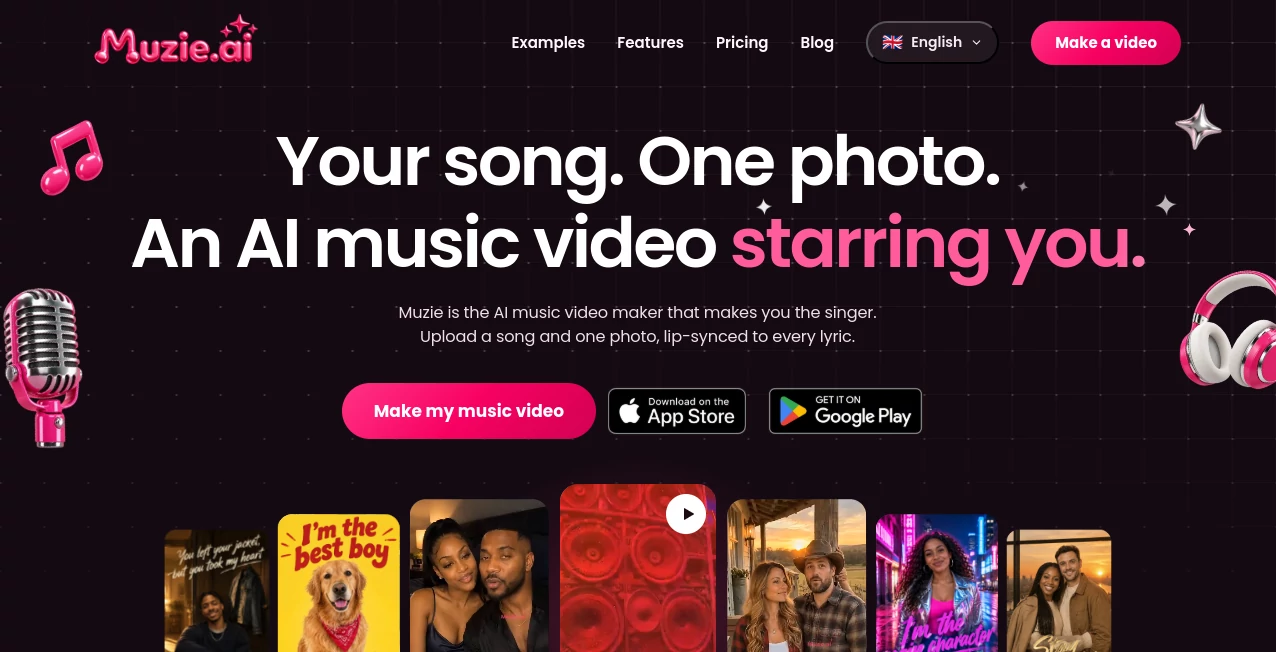
Creating a music video used to mean finding a camera crew, arranging a location, hiring performers, and spending hours in an editing studio. Today, a single photograph and a song can be enough to get started. Muzie brings this idea to life by turning ordinary photos into animated singers who perform along with real music.
The platform is designed for people who want something more personal than a collection of random visuals playing over a soundtrack. Upload a picture of yourself, a friend, a pet, or even an illustrated character, select a song, and the system creates a performance with synchronized lip movements. For a more complete result, it can build a sequence of cinematic scenes that follow the lyrics and rhythm of the track.
There is also no requirement to arrive with a finished song. Users can upload their own recordings, select music from the available library, or generate an original track with vocals. This makes the platform particularly interesting for independent musicians, content creators, and anyone who enjoys experimenting with music and visual storytelling.
Key Features
User Interface
The creation process is refreshingly straightforward. Rather than opening a complicated editing timeline and dealing with multiple layers, users start with a song and a photograph. They then choose the visual direction and let the platform organize the scenes.
The Studio provides a storyboard where individual shots can be reviewed and adjusted. If one scene does not match the original idea, users can request changes to that particular shot instead of rebuilding the entire video. This approach makes creative adjustments considerably easier, especially for people without previous video editing experience.
Accuracy & Performance
One of the most important parts of a singing video is convincing lip synchronization. The platform animates the selected face according to the actual audio, helping the result feel more like a musical performance than a photograph with simple movement.
Full music videos are also structured around the lyrics. Scenes are planned to match different parts of the song, while the singer remains the central character throughout the production. Short clips can be generated within minutes, although longer tracks and multi-scene productions naturally require more processing time.
Results will depend on the original photograph, audio quality, selected generation mode, and visual style. Users should review the final output before publishing, particularly when producing professional material.
Capabilities
The platform offers considerably more than basic photo animation. Its main capabilities include:
- Photo-to-singing videos: Transform a photograph into a performer who sings along with a selected track.
- Full AI music videos: Create multiple cinematic scenes featuring the same singer, with visual changes following the lyrics.
- Lip-sync videos: Produce a close-up performance using a single photograph and an audio recording.
- Original song generation: Describe a musical idea and generate a song with lyrics, vocals, and instruments.
- Music library: Choose from a collection of more than a thousand tracks.
- Custom visual styles: Explore realistic, anime, cartoon, comic book, claymation, pixel art, and cinematic looks.
- Storyboard editing: Regenerate individual scenes, change their descriptions, or replace images without starting over.
- Group performances: Animate multiple people in the same photograph so they appear to perform together.
- Social media formats: Create portrait videos suitable for TikTok, Instagram Reels, and YouTube Shorts.
Additional tools for musicians include audio key detection, BPM finding, pitch changing, chord progression generation, lyric writing, and converting MP3 audio into video.
Security & Privacy
Uploading personal photographs and music requires a reasonable level of trust. The platform's published privacy policy explains that uploaded photos, songs, lyrics, prompts, and generated media are processed to provide its creative services. It also states that personal information is not sold and that photographs are not used to identify individuals.
Users retain ownership of their uploaded songs and photographs. However, anyone planning to create videos featuring another person's face should obtain permission first. The same applies to copyrighted music: having access to a track does not automatically grant permission to use it in a published video.
There is also an important distinction between private and shared content. Music visualizers are initially unlisted, but anyone holding their viewing link may be able to access them. Users should review the privacy policy and sharing settings before uploading sensitive material.
Use Cases
The combination of music generation, photo animation, and scene-based video production opens up several practical and entertaining possibilities.
- Independent musicians: Artists can turn their latest single into a music video without organizing a traditional production. A short chorus can be a good starting point for testing different visual concepts.
- Social media creators: Influencers can produce original singing clips and personalized content for their audiences without appearing in front of a camera.
- Music promotion: Emerging artists can create visual material for new releases, promotional campaigns, and short-form social media posts.
- Personal celebrations: A photograph of a friend or family member can become the star of a humorous birthday song or anniversary video.
- Pet entertainment: A favorite photograph of a dog or cat can be transformed into a singing performance, making an entertaining piece of shareable content.
- Creative storytelling: Illustrations, fictional characters, and drawings can become performers in imaginative music videos.
- Video experimentation: Artists can compare realistic, animated, and cinematic approaches to find a visual identity that fits their music.
For example, an independent singer releasing a new pop track could upload a portrait, select the chorus, choose a cinematic style, and generate a short promotional video. If the initial result needs improvement, individual scenes can be revised before exporting the final version.
Pros and Cons
Like any creative platform, this tool has strengths as well as a few limitations worth considering before choosing a subscription.
Pros:
- A simple workflow that does not require traditional video editing skills.
- Turns personal photographs into singing performers.
- Supports uploaded songs as well as AI-generated music.
- Creates multi-scene videos rather than relying exclusively on one animated image.
- Offers several visual styles and custom creative directions.
- Allows users to edit individual scenes through a storyboard.
- Supports both portrait and landscape video formats.
- Free music visualizer tools are available without requiring tokens.
- Works across web, iOS, and Android devices.
Cons:
- Full music video generation uses tokens, so frequent production can become expensive.
- Longer tracks require more processing resources and tokens.
- Generated scenes may need additional adjustments to match a specific creative vision.
- Some advanced features and longer video durations require a paid subscription.
- Free exports may include a watermark and have more restrictive usage rights.
Pricing Plans
The pricing structure is based on monthly subscriptions and a token system. The number of tokens used depends on video duration, generation mode, and selected quality. This allows users to control their spending by producing shorter clips or testing ideas in draft quality before rendering a final version.
The available monthly plans include:
- Standard – $24.99/month: Includes 2,124 monthly tokens, priority generation, songs up to six minutes, and access to all visual styles. Exports include a static watermark.
- Premium – $49.99/month: Provides 4,721 monthly tokens, priority generation, longer songs, all visual styles, and watermark-free exports.
- Ultimate – $99.99/month: Includes 10,615 monthly tokens, priority generation, all visual styles, longer songs, and watermark-free exports. It is designed for users producing videos more frequently.
Additional token packs are available as one-time purchases for subscribers who need more generation capacity. The listed options include 2,248 tokens for $29.99, 3,599 tokens for $44.99, and 7,649 tokens for $89.99. Purchased tokens from these packs do not expire.
There is also a free way to explore the service. Music visualizers are available without tokens, and new accounts in many countries receive a small number of free tokens to experiment with music video generation. Annual billing offers a discount compared with monthly payments.
Prices and available features may change, so checking the current pricing page before subscribing is recommended. Users intending to monetize their creations should also review the licensing terms, since free accounts have personal-use rights while paid accounts receive a commercial licence under the published terms.
How to Use the Tool
Getting started does not require a background in music production or video editing. The process is built around a few simple decisions.
- Step 1 – Choose a song: Upload an existing audio recording, select a track from the music library, or describe an original song you would like to generate.
- Step 2 – Select the best section: Trim the recording to the chorus, hook, or another section you want to feature. Shorter clips generally use fewer tokens.
- Step 3 – Upload a photograph: Choose a clear picture of the person, pet, or character who should perform the song.
- Step 4 – Choose a visual style: Keep the realistic default look, select an animated style, or describe a custom visual direction.
- Step 5 – Generate the video: The system plans the scenes, animates the performer, synchronizes the performance with the music, and creates the video.
- Step 6 – Review and edit: Open the storyboard in Studio, adjust individual scenes, and regenerate shots that do not match your expectations.
- Step 7 – Export and share: Download the finished video or share it directly on your preferred social platform.
A useful tip is to start with a short section of the song rather than generating a full-length video immediately. It gives you a chance to test the photograph, visual style, and overall result before committing more tokens.
Comparison with Similar Tools
There are several ways to create music-related videos with artificial intelligence, but different platforms approach the process from different angles.
General AI video generators are useful for creating cinematic footage from text prompts or images. They provide considerable creative freedom, but users may need to generate several clips, arrange them manually, and synchronize the finished sequence with their music.
AI music generators focus primarily on composing songs, creating lyrics, and producing vocals. They are useful when the audio itself is the main priority, but they do not necessarily provide a complete visual performance featuring a chosen person.
Music visualizer platforms typically produce animated backgrounds, waveforms, or abstract scenes that react to a soundtrack. They are effective for presenting music visually, although they generally do not focus on making a particular person or character sing the lyrics.
The main distinction here is the combination of an identifiable performer, audio-driven lip synchronization, and a storyboard that follows the song. Rather than treating the soundtrack as background music, the platform makes the singer the central part of the video. It also provides a more guided workflow for people who want a finished music video without managing several separate editing tools.
The right choice ultimately depends on the project. Someone looking for complete control over individual video shots may prefer a general editing environment, while musicians who want their own photograph or character to perform a song may find this approach more convenient.
Conclusion
Turning a song into a memorable visual experience does not always require a professional studio or a complicated production process. By combining music generation, photo animation, lip synchronization, and scene-based storytelling, Muzie offers an approachable way to create personalized music videos.
Its strongest feature is the idea of putting an actual person, pet, or illustrated character at the center of a musical performance. The ability to use existing recordings, generate original songs, experiment with different visual styles, and make changes to individual scenes gives creators plenty of room to explore.
Independent musicians can use it to promote their releases, social media creators can produce entertaining short videos, and everyday users can turn personal photographs into something genuinely unexpected. While token costs and generation limitations are worth considering, the overall workflow makes music video creation more accessible to people who would otherwise never attempt it.
For anyone looking to give their music a face and a story, this is a creative option worth exploring.
Frequently Asked Questions (FAQ)
1. What does this platform do?
It is an AI-powered music video creation platform that transforms photographs into singing performers. Users can upload a song or generate original music and create videos with synchronized lip movements and cinematic scenes.
2. Can I use my own music?
Yes. You can upload your own audio recording, select an existing track from your library, or generate an original song with vocals and instruments.
3. Can I turn a photograph into a singing video?
Yes. Upload a photograph of a person, pet, or drawing and select an audio track. The platform animates the subject to perform the song.
4. Does it support full music videos?
Yes. The full music video mode creates multiple scenes based on the lyrics, with the performer appearing throughout the video. There is also a simpler lip-sync mode that uses a single close-up performance shot.
5. Can I choose the visual style?
Yes. Available styles include realistic visuals, anime, cartoon, comic book, claymation, pixel art, and cinematic film. You can also describe your own visual direction.
6. Is there a free version?
Yes. Music visualizers are free to use without tokens. New accounts in many countries may also receive a few free tokens for trying music video generation. Full music video creation otherwise uses tokens.
7. How long can the generated videos be?
Paid subscribers can create videos using songs up to six minutes long. Shorter videos are available on free accounts, and the token cost depends on the duration and generation settings.
8. Can I use the videos for commercial purposes?
Paid accounts receive a commercial licence under the published terms, while free accounts are limited to personal use. Users should also make sure they have the necessary rights to any music, photographs, and other material they upload.
9. Can I edit the generated scenes?
Yes. The Studio includes a storyboard editor where you can rewrite scene descriptions, regenerate individual shots, replace images, or render the video again.
10. Which devices are supported?
The service is available through a web browser and has mobile applications for iOS and Android. Your songs, projects, and videos can sync across supported devices.