NanoMaker
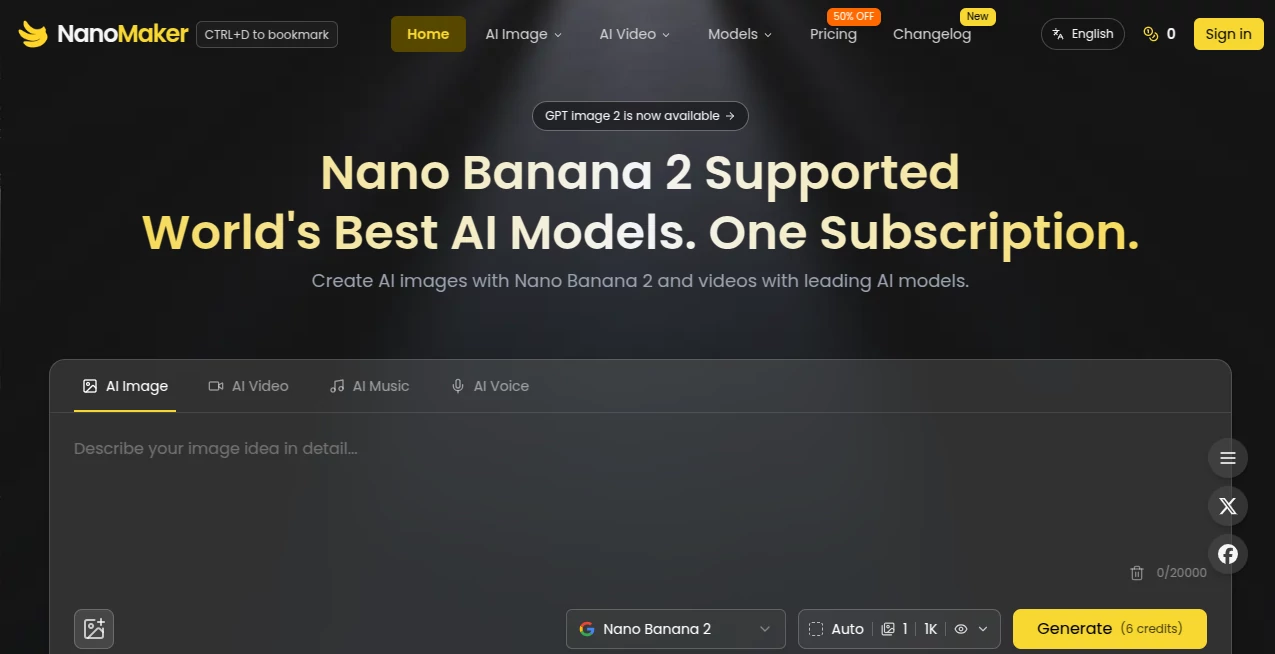
What is NanoMaker?
Creating high-quality digital content often means juggling multiple subscriptions, switching between different interfaces, and learning a new workflow for every creative task. This platform changes that experience by bringing advanced AI image generation, video creation, music production, and voice technologies together in one streamlined workspace. Instead of jumping between several services, creators can access leading AI models from a single dashboard designed for speed and simplicity.
Whether you're producing marketing assets, designing social media visuals, creating promotional videos, generating AI voices, or experimenting with creative ideas, the platform provides a flexible environment that helps both beginners and professionals work faster. The combination of multiple premium AI models under one subscription makes it especially appealing for creators who want professional results without managing several separate services. :contentReference[oaicite:0]{index=0}
Key Features
User Interface
The dashboard is clean, modern, and easy to navigate. Creative tools are organized by media type, allowing users to move from image generation to video production or audio creation without confusion. Even first-time visitors can quickly understand the workflow and begin creating within minutes.
The browser-based experience eliminates complicated installations while making every feature available from a single account. This unified approach saves valuable time during creative projects.
Accuracy & Performance
The platform combines several leading AI models to deliver impressive visual quality, realistic outputs, and efficient generation speeds. Rather than relying on a single engine, users can benefit from specialized models depending on whether they are producing images, videos, music, or speech.
Content creators working under deadlines will appreciate the responsive generation process and the ability to experiment with multiple creative directions without unnecessary delays. :contentReference[oaicite:1]{index=1}
Capabilities
- Create AI-generated images from text prompts.
- Generate professional-quality videos.
- Produce AI music for creative projects.
- Create realistic AI voices and speech.
- Convert text into natural-sounding speech.
- Access multiple premium AI models through one subscription.
- Support creative workflows for marketing, social media, design, and business content.
- Experiment with different AI models for various creative needs.
Security & Privacy
User sessions are protected through encrypted web connections, helping keep data secure during use. The platform operates through a standard web interface and provides account-based access for managing projects. Users should still avoid uploading confidential business information unless it aligns with their own privacy policies and organizational requirements. :contentReference[oaicite:2]{index=2}
Use Cases
- Design eye-catching social media graphics.
- Create promotional marketing videos.
- Generate AI voiceovers for YouTube content.
- Produce music for podcasts or short films.
- Create advertising creatives for online campaigns.
- Generate product visuals for e-commerce.
- Develop presentation media for business meetings.
- Build creative assets for startups and agencies.
Pros and Cons
- Pros
- Multiple AI media tools in one platform.
- Single subscription instead of several separate services.
- Simple and beginner-friendly interface.
- Supports image, video, music, and voice generation.
- Suitable for both individuals and creative teams.
- Access to premium AI models.
- Cons
- Some premium capabilities require a paid subscription.
- Generated content quality depends on prompt quality.
- Internet connection is required for all features.
Pricing Plans
The service offers a free starting option with limited credits so new users can explore its capabilities before upgrading. Paid subscription plans unlock broader access to premium AI models, higher usage limits, and additional creative features, making them suitable for professionals and businesses with ongoing content production needs. :contentReference[oaicite:3]{index=3}
How to Use NanoMaker
- Create an account.
- Select the type of content you want to generate.
- Choose the preferred AI model.
- Write a detailed prompt or upload any required assets.
- Generate the content.
- Review the results and refine the prompt if needed.
- Download and use the finished output.
Comparison with Similar Tools
Many AI creative platforms specialize in only one category, such as image generation, video production, or voice synthesis. This solution stands out by combining all of these capabilities into one ecosystem. Instead of paying for multiple subscriptions and learning different interfaces, users can manage their creative workflow from a single dashboard while accessing several leading AI technologies. That convenience makes it especially attractive for agencies, marketers, entrepreneurs, and content creators who regularly work across multiple media formats.
Conclusion
For creators looking to simplify AI-powered content production, this platform offers an impressive all-in-one solution. The combination of advanced image generation, professional video creation, AI music, realistic voice technology, and a unified workflow significantly reduces complexity while improving productivity. It is well suited for freelancers, digital marketers, designers, startups, educators, and businesses that want to create high-quality multimedia content without maintaining several different AI subscriptions.
Frequently Asked Questions (FAQ)
Is there a free version available?
Yes. New users can begin with free credits to explore the platform before choosing a subscription plan.
Can it generate both images and videos?
Yes. It supports AI image generation, video creation, music production, and AI voice capabilities from one interface.
Who is the platform designed for?
It works well for marketers, content creators, designers, agencies, entrepreneurs, educators, and businesses producing multimedia content.
Does it support AI voice generation?
Yes. Voice synthesis and text-to-speech features are included among its creative tools.
Do I need multiple subscriptions for different AI models?
No. One subscription provides access to multiple supported AI models through a unified platform.
AI Photo & Image Generator , AI Video Generator , AI Music Generator , AI Text to Speech .
These classifications represent its core capabilities and areas of application. For related tools, explore the linked categories above.

NanoMaker Alternatives Product

Nano Banana …
AI Gen

image to vid…
Video to GIF…

Muse Image

Seedance 2.0…
Wurt.app

Nano Banana …

Nano Banana …