Neura Market
What is Neura Market?
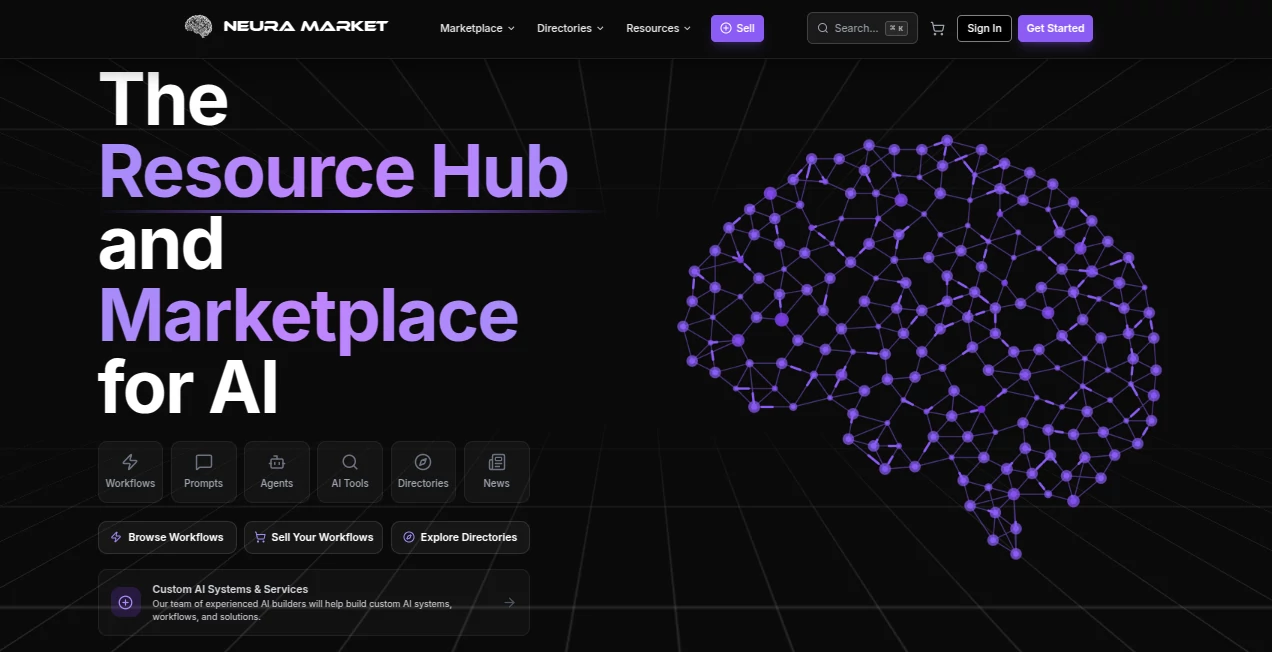
Neura Market brings AI workflows, prompts, agents, automation resources, and AI directories together in one place. Instead of starting an automation project from an empty canvas, users can browse ready-to-deploy workflows and import them into platforms such as n8n, Make, Zapier, Activepieces, and Pipedream.
The platform currently features more than 27,000 ready-to-deploy workflows and a large collection of AI resources spanning major platforms including ChatGPT, Claude, Gemini, Cursor, Grok, Perplexity, DeepSeek, Copilot, Stable Diffusion, and Midjourney. This makes it useful for both people looking for a shortcut and experienced builders who want reusable components for larger systems.
What makes the experience particularly practical is the mix of marketplace and resource hub. A user can discover an automation, explore AI agents and prompt packs, compare AI tools, and even sell their own workflows or agents without jumping between several different services.
Key Features
- More than 27,000 ready-to-deploy automation workflows.
- Support for n8n, Make, Zapier, Activepieces, and Pipedream workflows.
- Prompt packs and access to a large collection of AI prompts.
- Pre-built AI agents and agent bundles for research, marketing, sales, and operations.
- AI directories covering multiple major AI platforms.
- Workflow packs organized around practical business use cases.
- Custom AI systems, workflow development, integrations, and AI strategy services.
- Marketplace features for creators who want to sell workflows, prompts, and agents.
- API access for developers who need machine-readable marketplace data.
User Interface
The interface is organized around discovery. Workflows, prompts, agents, directories, resources, and marketplace products have their own sections, so users can move directly toward the type of resource they need.
The workflow catalog is especially useful because it can be explored by category and automation platform. Categories cover areas such as productivity, marketing, sales, customer support, finance, development, data, e-commerce, and many other business functions. For someone evaluating dozens of automation ideas, this structure saves considerable browsing time.
Accuracy & Performance
Performance depends on the individual workflow, connected services, AI model, and automation platform being used. The marketplace itself focuses on providing ready-to-import resources rather than pretending that every automation will behave identically in every environment.
The documentation encourages users to understand a workflow's dependencies, test changes with smaller datasets, and verify integrations before moving an automation into production. That is a sensible approach, particularly for workflows that connect business systems or process important data.
Capabilities
The platform goes beyond a simple workflow template library. Users can find automation packs designed around complete business processes, such as sales pipelines, meeting intelligence, customer support, social media operations, content production, finance, recruitment, and data analytics.
There is also an AI agent section for autonomous assistants and crew bundles. Developers can work with MCP connectors that allow AI clients to interact with external tools and data sources, while API access provides another route for applications that need programmatic access to marketplace information.
For businesses with requirements that cannot be solved by an existing template, custom AI systems and services are also available. These include bespoke automation, AI agents, integrations involving LLMs and RAG, and strategy or audit work.
Security & Privacy
The platform's privacy policy states that personal information is protected using technical and organizational security measures. These include encryption of sensitive data in transit and at rest, access controls, authentication measures, security assessments, and incident response procedures.
Payment information is processed through third-party payment processors, while users can exercise privacy rights such as accessing, correcting, deleting, or restricting the processing of applicable personal information. As with any automation marketplace, users should still review the permissions and credentials required by individual workflows before connecting them to production systems.
Use Cases
There are several practical ways to use the platform. A small business might start with a ready-made lead generation workflow instead of building one from scratch. A marketing team could assemble an email or social media automation system, while an operations team could use workflow packs for onboarding, document processing, scheduling, or project management.
Developers can use the marketplace differently. They may download an existing n8n or Make workflow, inspect its structure, replace an AI model, modify triggers, add filters, or connect another service. The availability of MCP connectors and API documentation also makes the platform relevant to more technical AI projects.
Creators have another use case: publishing their own workflows, prompts, and agents and turning reusable automation knowledge into marketplace products.
Pros and Cons
Pros
- Large collection of ready-to-use automation workflows.
- Supports several popular automation platforms.
- Combines workflows, prompts, AI agents, directories, and educational resources.
- Useful categories for business and technical workflows.
- Workflow packs can provide a more complete starting point than individual templates.
- Strong option for creators who want to monetize automation work.
- API and MCP resources add value for technical users.
Cons
- The quality and usefulness of individual marketplace resources can vary.
- Some workflows require accounts, API credentials, or paid third-party services.
- Advanced automation may require technical knowledge to customize correctly.
- Users should test workflows carefully before using them with production data.
Pricing Plans
The subscription structure is divided into several levels. The Starter plan is free and includes marketplace browsing, three free workflows per month, community access, and basic support.
The Pro plan costs $39 per month and adds premium workflows, blueprints, AI agents, email support, and API access. Team is priced at $119 per month and adds five seats, unlimited workflows and blueprints, more AI agents, team collaboration, priority support, and a larger API allowance.
Business costs $399 per month and includes features such as 20 seats, unlimited AI agents, dedicated customer success support, SSO, advanced analytics, and expanded API access. The Scale plan costs $799 per month and adds unlimited seats, white-labeling, custom integrations, 24/7 support, an SLA guarantee, and a higher API allowance.
Paid plans include a 14-day free trial with no credit card required. The platform also offers separate plans for its prompt marketplace, making it possible to choose access based on how heavily prompts are used.
How to Use It
- Create an account and explore the marketplace.
- Choose whether you need a workflow, prompt, AI agent, directory resource, or workflow pack.
- Filter the available workflows according to your preferred automation platform and use case.
- Review the workflow description, integrations, documentation, pricing, and requirements.
- Import the selected workflow into the appropriate automation platform.
- Connect the required services and credentials.
- Test the automation with a small amount of data before using it in production.
- Customize triggers, filters, outputs, AI models, or integrations when necessary.
Comparison with Similar Tools
Traditional automation platforms such as n8n, Make, and Zapier are primarily places where users build and run automations. This platform takes a different position by acting as a marketplace and resource layer around those platforms. Users can find pre-built workflows first and then bring them into the automation environment they already use.
It also differs from a conventional AI prompt library because prompts are only one part of the offering. AI agents, automation templates, workflow packs, platform directories, MCP connectors, developer resources, and custom AI services create a broader ecosystem.
For users who enjoy building everything themselves, a native automation platform may provide more control. For users who want a head start, reusable workflows and curated packs can dramatically reduce the amount of repetitive setup work.
Conclusion
Neura Market is a strong option for anyone who wants to move from experimenting with AI to actually putting automation into practice. Its biggest advantage is breadth: workflows, prompts, agents, directories, integrations, and business-oriented automation resources are gathered under one roof.
The extensive workflow catalog is the main attraction, especially for users working with n8n, Make, Zapier, Activepieces, or Pipedream. Developers also get useful API and MCP resources, while businesses can go beyond templates and request custom AI systems when their requirements are more specialized.
For a user who would rather begin with a working foundation than spend hours recreating a common automation from scratch, this marketplace offers a practical place to start.
Frequently Asked Questions (FAQ)
What is this platform used for?
It is used to discover, buy, build, customize, and sell AI workflows, prompts, AI agents, and related automation resources.
Which automation platforms are supported?
The workflow marketplace supports n8n, Make, Zapier, Activepieces, and Pipedream.
Can beginners use it?
Yes. Beginners can start with ready-made workflows and follow the documentation, while more experienced users can customize workflows and build their own automation products.
Are there free resources?
Yes. The Starter subscription includes free marketplace access and three free workflows per month. The marketplace also contains free workflows and other free AI resources.
Can I sell my own AI workflows?
Yes. Creators can sell workflows, prompts, and AI agents through the marketplace and earn a share of marketplace sales.
Does it provide API access?
Yes. API plans provide machine-readable access to marketplace data, with different request limits and monthly quotas depending on the selected plan.
Can workflows be customized?
Yes. Users can modify triggers, filters, outputs, AI models, integrations, and error handling. The documentation recommends testing modifications with small datasets before production use.
Are AI agents available?
Yes. The platform offers pre-built AI agents and agent bundles designed for areas including research, marketing, sales, and business operations.
AI Workflow Management , AI Productivity Tools , Prompt , AI Developer Tools .
These classifications represent its core capabilities and areas of application. For related tools, explore the linked categories above.
Neura Market details
Website unavailable — View Alternatives
Pricing
- Freemium
Apps
- Web App
Categories