
Nodlume
What is Nodlume?
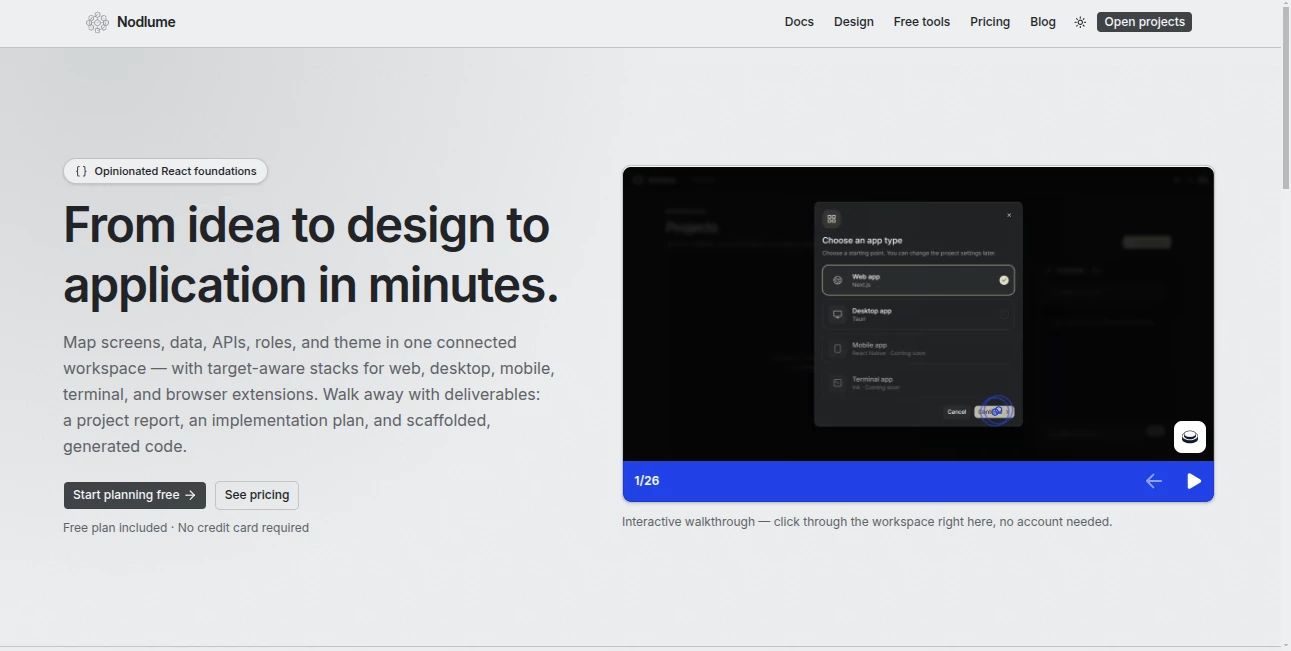
Building a modern application often becomes complicated long before the first line of code is written. Pages need to be mapped, data relationships defined, APIs planned, user roles considered, and the visual system kept consistent. Nodlume brings these decisions into one connected workspace designed around React application planning.
Instead of treating product planning, interface structure, data, backend logic, and implementation as separate tasks, the platform connects them together. Developers can visually shape an application, review the relationships between its parts, and then move toward a practical project structure and generated code. It supports target-aware workflows for web, desktop, mobile, terminal applications, and browser extensions.
Key Features
- Visual planning for React applications
- Connected workspace for screens, data, APIs, roles, and themes
- Support for Next.js, Tauri, Expo, Ink, and Manifest V3 conventions
- Visual route, component, state, and navigation planning
- Editable data models and ER diagrams
- API endpoint planning and CRUD generation
- Security and traceability reviews
- Theme generation with reusable design tokens
- Project scaffolding and AI-assisted code generation
- Exportable project files and reports
User Interface
The interface is built around a connected visual workspace rather than a long sequence of disconnected forms. Different tabs handle different parts of an application while keeping their relationships intact. The Structure area, for example, lets developers work with routes, reusable components, stores, and navigation on a shared graph.
This approach can be especially useful when an application starts growing beyond a handful of screens. A developer can see how a route relates to its components and state instead of keeping those relationships scattered across notes, diagrams, and source files.
Accuracy & Performance
The strength of the platform is less about producing a generic application from a short prompt and more about keeping planning decisions connected. Domain information can influence data modeling, backend suggestions, security, traceability, and eventually generated project files.
AI-assisted generation is also structured around the project plan. Generated files are created in an implementation order, allowing shared pieces to be prepared before the pages that depend on them. This makes the resulting starter code more closely tied to the application's defined structure.
Capabilities
The workspace covers a surprisingly broad part of the application planning process. Developers can describe a product and its roles, model entities and reusable types, design routes and navigation, define API endpoints, review access rules, establish traceability between features and implementation areas, and create a visual theme.
The Data section supports entities, fields, relationships, and reusable types. Backend planning can be done manually or generated as CRUD routes from existing entities. The Theme workspace handles colors, typography, spacing, radius, shadows, and motion tokens, giving the application a consistent visual foundation before implementation begins.
There are also standalone free browser tools covering areas such as UI design systems, ER diagrams, shadcn/ui themes, font pairings, modular scales, dark mode conversion, browser extension manifests, Tauri permissions, React Native permissions, Zod schemas, and several AI agent development workflows.
Security & Privacy
Security is treated as part of application planning rather than something to consider only after development. The Security workspace can review which roles have access to routes, data, and API surfaces, while Traceability helps identify whether planned features have corresponding implementation areas.
The platform also provides project privacy and access controls through its workspace and sharing features. Developers should still review the platform's current privacy and security documentation for details relevant to their particular project before placing sensitive information into a workspace.
Use Cases
This platform is particularly useful for developers who want to think through an application before jumping directly into a code editor. A solo developer could use it to turn an early product idea into a route structure, data model, API plan, and visual system before starting implementation.
It can also work well for small development teams. One person can establish the product structure while others review the architecture through a shareable workspace. Because the plan connects screens, components, data, APIs, roles, and themes, technical discussions can happen around a shared model instead of several unrelated documents.
Another practical use is rapid prototyping. Someone planning a SaaS dashboard, internal business application, mobile product, browser extension, or desktop application can establish the architecture first and then use the resulting scaffolding as a starting point for development.
Pros and Cons
- Pros: Connected visual application planning, strong React-oriented foundations, useful architecture tools, editable data modeling, API planning, security reviews, theme generation, AI-assisted code generation, and exportable project scaffolding.
- Pros: The free plan provides three documents, unlimited nodes per document, report generation, sharing, and a monthly AI credit allowance, making it possible to explore the workflow without immediately paying.
- Cons: The product is still relatively young, so developers looking for a mature enterprise development environment may find some areas less extensive than established development platforms.
- Cons: It is a planning and scaffolding environment rather than a replacement for a complete production development workflow. Developers still need to review, customize, test, and maintain the generated application.
Pricing Plans
The pricing structure is straightforward and built around AI credits. The Free plan costs $0 and includes three documents, unlimited nodes per document, report generation, shareable view-only links, one collaborator per document, and 50 AI credits each month.
The Starter plan costs $10 per month and adds unlimited documents, cloud-synced version history, up to three collaborators per document, and 500 AI credits each month.
The Plus plan costs $20 per month and is aimed at people and teams working on production applications. It includes everything in Starter, shared documents with unlimited collaborators, and 2,000 AI credits per month. Additional 200-credit packs are available for a one-time $5 payment, and purchased credits do not expire.
How to Use the Tool
- Create a project: Start by describing the product and establishing its basic context.
- Define the domain: Add roles, features, and important product constraints.
- Model the data: Create entities, fields, relationships, and reusable types.
- Plan the structure: Map routes, components, stores, and navigation visually.
- Define the backend: Add API endpoints manually or generate CRUD operations from the data model.
- Review security: Check which roles can access the application's different surfaces.
- Set the theme: Establish colors, typography, spacing, shadows, and other design tokens.
- Review and export: Check the connected plan, inspect the project structure, and generate scaffolding or starter code.
Comparison with Similar Tools
Traditional wireframing products tend to concentrate on the visual appearance of screens, while code generators often focus primarily on producing source files from prompts. This platform takes a different route by connecting the product model with the application's technical structure.
Its combination of domain planning, data modeling, route architecture, API design, security, traceability, theming, and scaffolding makes it particularly interesting for developers who want architectural clarity before implementation. It is less about producing a quick disposable mockup and more about creating a connected blueprint that can move toward a real application.
Conclusion
For developers who regularly find themselves rebuilding the same application foundations, a connected planning environment can save considerable time. The biggest appeal here is the relationship between the different parts of the project. Screens are not isolated from data, APIs are not isolated from roles, and visual decisions can become part of the same project foundation.
The result is a practical bridge between an early product idea and the first working version of an application. With React-focused conventions, visual architecture tools, AI-assisted generation, free development utilities, and accessible pricing, it is a compelling option for developers who prefer to understand the system before they start writing every file.
Frequently Asked Questions (FAQ)
What is this platform mainly used for?
It is designed for visually planning React applications, including their screens, data, APIs, roles, navigation, themes, and implementation structure.
Which application technologies are supported?
The platform provides foundations and target-aware workflows around technologies and conventions including Next.js, Tauri, Expo, Ink, and Manifest V3.
Can it generate code?
Yes. The export workflow can generate starter code for project files based on the application's defined plan. AI credits are charged for files that are actually generated.
Is there a free plan?
Yes. The Free plan costs $0 and includes three documents, unlimited nodes per document, reports, sharing, and 50 AI credits each month.
Can teams collaborate?
Yes. Collaboration is available across the paid plans, with the Plus plan allowing shared documents with unlimited collaborators.
Does it deploy applications?
The platform focuses on planning, scaffolding, and generated project files rather than acting as the application's hosting or deployment environment.
Do I need advanced programming knowledge?
A developer can get the most value from the platform, particularly when working with application architecture, React projects, APIs, and data models. However, its visual planning approach can also make technical decisions easier to understand before implementation.
What happens to generated files?
Generated files can be reviewed in the workspace and kept by downloading the project as a ZIP or pushing it to GitHub. The generated code is intended as a practical starting point rather than a finished replacement for development and testing.
AI Website Builder , AI No-Code & Low-Code , AI Code Generator , AI Developer Tools .
These classifications represent its core capabilities and areas of application. For related tools, explore the linked categories above.

Nodlume Alternatives Product

Firefox
Kimi K2.5

Vibe Coding …

AutoChangelog

Website Audi…

Ideavibes AI

AIQualityHQ

GLM 5

Bolt AI