
OminiGate
What is OminiGate?
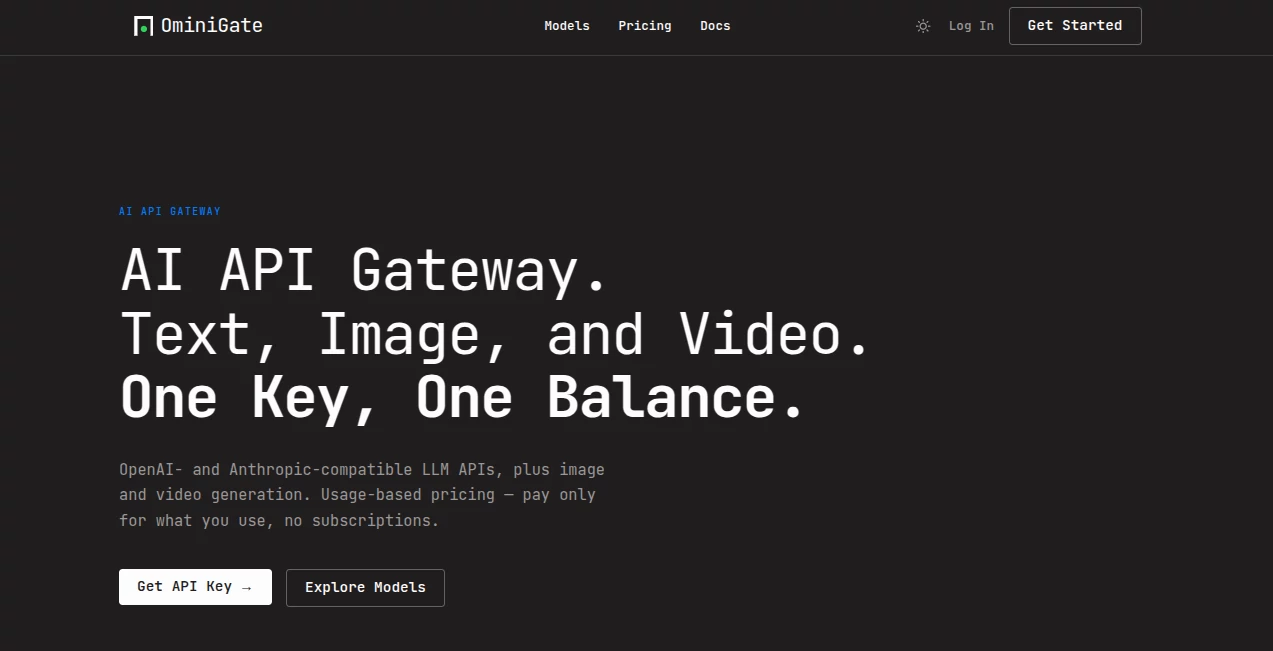
In today’s fast-moving AI ecosystem, developers and businesses often struggle with juggling multiple AI models, APIs, and integrations. This platform steps in as a unified gateway designed to simplify that complexity. Instead of switching between different providers and handling fragmented workflows, users can manage everything from a single, streamlined interface.
What makes it stand out is its focus on practicality. It is not just another AI wrapper; it aims to become the connective layer between applications and modern AI systems. Whether you're building SaaS products, automation workflows, or internal tools, it helps reduce integration overhead and speeds up development significantly.
Key Features
User Interface
The interface is clean, minimal, and developer-friendly. It is built to reduce friction, allowing users to quickly configure AI services without getting lost in technical complexity. Navigation feels intuitive even for those who are not deeply technical.
Accuracy & Performance
Performance is optimized for fast response times and reliable API handling. The system is designed to route requests efficiently, ensuring stable output even under heavy workloads or multiple simultaneous requests.
Capabilities
This platform supports integration with multiple AI models and services, enabling users to build flexible AI-powered workflows. From text generation to automation pipelines, it acts as a central hub for diverse AI operations.
Security & Privacy
Security is treated as a core priority. The architecture is designed to handle sensitive data responsibly, with standard encryption practices and controlled API access to ensure user information remains protected.
Use Cases
- Building AI-powered SaaS applications with multiple model support
- Creating automated workflows for business operations
- Managing AI requests in large-scale enterprise systems
- Developing developer tools that rely on AI integrations
Pros and Cons
Pros:
- Simplifies multi-model AI integration
- Developer-friendly architecture
- Fast and scalable performance
- Reduces infrastructure complexity
Cons:
- May require technical understanding for advanced setups
- Dependent on external AI providers for model availability
Pricing Plans
The platform typically follows a flexible pricing structure, often including tiered plans based on usage. This allows both small developers and larger enterprises to scale according to their needs without overpaying for unused capacity.
How to Use OminiGate.ai
Getting started is straightforward. After creating an account, users can generate API keys, connect their preferred AI services, and begin routing requests through a unified dashboard. The setup process is designed to be quick, even for first-time users.
Once configured, developers can integrate it into their applications using standard API calls, enabling seamless AI functionality without managing multiple providers separately.
Comparison with Similar Tools
Compared to traditional AI API management tools, this platform focuses more on unification and simplicity. While other solutions may require manual configuration for each AI provider, this system abstracts much of that complexity into a single layer. This makes it especially appealing for teams that want speed and efficiency over heavy customization.
Conclusion
For developers and businesses looking to simplify AI integration, this platform offers a practical and modern solution. It reduces fragmentation, improves workflow efficiency, and helps teams focus more on building features rather than managing infrastructure. While it may not replace deep customization tools for advanced users, it strikes a strong balance between usability and power.
Frequently Asked Questions (FAQ)
Is it suitable for beginners?
Yes, but having basic API knowledge will help you get started faster.
Does it support multiple AI models?
Yes, it is designed to work as a unified layer across different AI providers.
Can it be used for enterprise applications?
Yes, it is built to scale for both small projects and large systems.
Is coding required?
Some basic integration work is required, but the process is simplified through APIs.
AI Workflow Management , AI No-Code & Low-Code , AI API Design , AI Developer Tools .
These classifications represent its core capabilities and areas of application. For related tools, explore the linked categories above.

OminiGate Alternatives Product
TutuoAI

FigForm

NetlifyAPP

Prava Ai

AI Complianc…

vivgrid

Duct Tape AI…

Ito AI

BetterAntisp…