


















OmniRoom
What is OmniRoom?
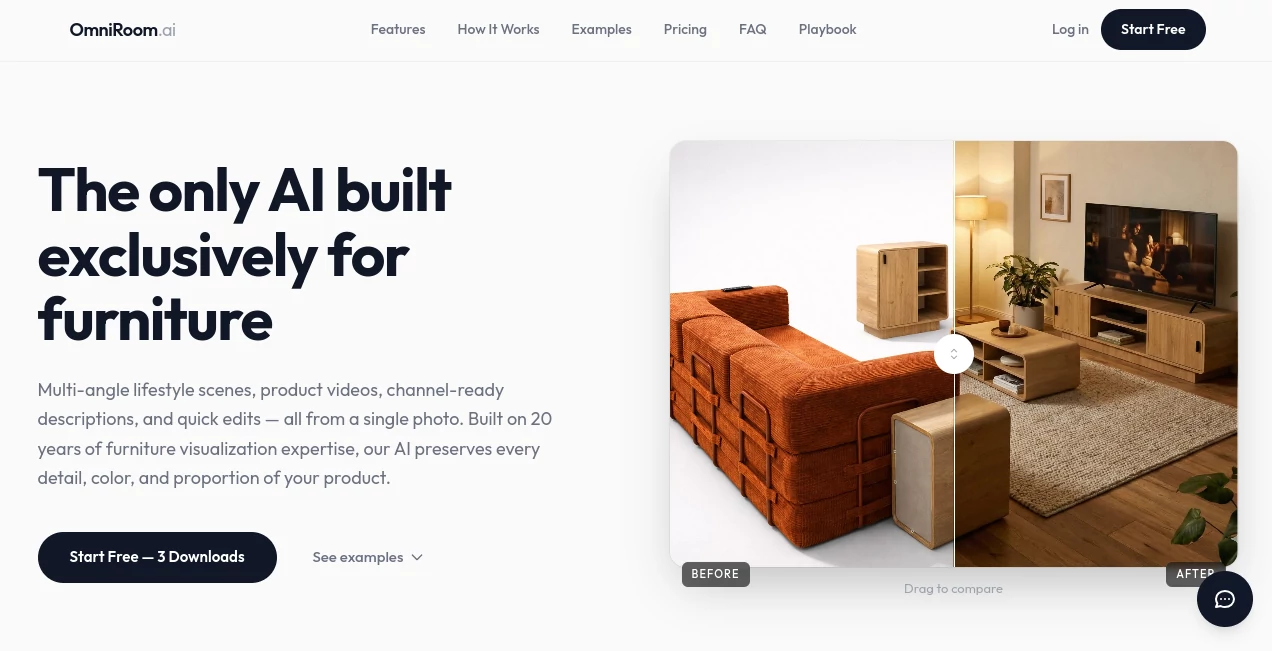
OmniRoom is an AI-powered product staging platform designed specifically for furniture businesses. It takes a single product photo and turns it into polished lifestyle scenes, catalog images, product videos, and other marketing assets without requiring a traditional photo studio or 3D production workflow.
For furniture retailers and manufacturers, creating attractive product imagery can become expensive and time-consuming very quickly. A single sofa, table, wardrobe, or outdoor furniture set may need several photoshoots before it is ready for an online catalog. This platform approaches the problem differently: start with the product image you already have, choose the visual direction you want, and generate the scenes digitally.
The focus on furniture is one of its strongest qualities. Rather than being a general image generator, the platform is built around preserving important product characteristics such as proportions, materials, colors, and textures. That makes it particularly interesting for businesses that need visual consistency across large product catalogs.
Key Features
- AI-generated lifestyle scenes for furniture products
- Multiple room styles from a single product image
- Professional white-background images from multiple angles
- Collection scenes combining several furniture products
- AI-generated product videos
- Motion templates with camera movement, transitions, and text overlays
- AI editing for lighting, shadows, and selected image areas
- True-to-size rendering based on real product measurements
- Project organization and team collaboration
- Marketplace-ready product imagery in 2K or 4K resolution
User Interface
The workflow is refreshingly straightforward. A user starts by uploading a furniture photograph, selects a room style, lighting setup, and camera direction, and then previews the generated results before deciding which images to download.
This approach is useful for teams that do not have a dedicated designer or 3D artist. The interface keeps the main workflow focused on visual choices rather than technical settings. Someone managing an online furniture catalog can experiment with several environments without having to learn complicated rendering software.
Accuracy & Performance
Performance is one of the more practical advantages. Room scenes can be generated in roughly 10 to 30 seconds, while product videos generally take longer. The platform also allows users to generate and preview variations before spending credits on downloads.
Accuracy matters even more than speed for furniture sellers. A beautiful room scene is not particularly useful if the sofa changes shape or the wood finish looks completely different from the actual product. The system is designed to preserve product proportions, colors, textures, and materials, while its true-to-size feature can use real measurements to maintain more reliable proportions in generated scenes.
Capabilities
The platform goes beyond simply placing a chair or sofa inside a virtual room. Users can create different lifestyle environments, produce multiple perspectives, generate clean catalog images, combine products into collection scenes, and create video content from staged imagery.
For example, a furniture retailer could upload one coffee table and create several scenes with different moods, such as modern, warm, minimalist, or Scandinavian. The same product can then be presented from different viewpoints, giving shoppers more visual context without arranging another physical shoot.
There are also tools for creating marketing assets such as product videos, motion-based presentations, advertising visuals, A+ content, and product descriptions. This makes the platform more useful as a product-content workflow rather than just an image-generation service.
Security & Privacy
Businesses using AI-generated product content should always consider how their product imagery and commercial assets are handled. The platform is designed around business workflows, including projects, SKU organization, team access, and role-based permissions on higher-level plans.
For companies with large catalogs, keeping projects organized is especially important. Instead of treating every generated image as an isolated file, teams can structure their work around products and SKUs, which makes ongoing catalog production easier to manage.
Use Cases
The strongest use cases are found in e-commerce and furniture marketing. A retailer can transform basic manufacturer images into lifestyle scenes suitable for product listings, advertisements, catalogs, and social media campaigns.
Manufacturers can also use the system to prepare visual assets for retailers and distribution partners without arranging separate photography sessions for every collection. This can be particularly valuable when a catalog contains hundreds of products or when new SKUs need to be published frequently.
Marketing agencies can use the workflow to create consistent visual content for multiple furniture clients. Interior designers can present the same furniture piece in several room styles, while online sellers can test different visual directions before deciding which images deserve a place on their listings.
Pros and Cons
Pros
- Built specifically around furniture visualization
- Works from a single existing product photograph
- Fast generation and free previews before downloading
- Supports lifestyle scenes, catalog imagery, and video content
- Useful for large product catalogs and multiple SKUs
- Includes team and project organization features
- Supports multiple room styles and perspectives
- No traditional 3D modeling workflow is required
- Credit packs do not expire
Cons
- The platform is highly specialized and is primarily aimed at furniture businesses
- Downloaded assets consume credits, even though generation and previews are free
- Businesses with very large catalogs may need a higher-tier plan for advanced team and API features
- AI-generated imagery may still require human review before being published commercially
Pricing Plans
The pricing model is based mainly on credits rather than a standard monthly subscription. New users can start with three free downloads, allowing them to evaluate the results before purchasing additional credits.
- Starter: $29.90 for 20 credits, equivalent to about $1.50 per image
- Growth: $49.90 for 35 credits, with a 5% bonus
- Pro: $89.90 for 75 credits, with a 25% bonus and two team seats
- Business: $199 for 169 credits, with a 27% bonus and two team seats
- Business+: $500 per month when billed annually, including 500 credits per month, 10 team seats, unlimited generation, and API access
One image download uses one credit, while a video uses three credits and an edit uses one credit. Generated previews do not consume credits. The credit-based approach is appealing for businesses that work in batches because unused credits can be kept for future projects, while the larger business plan is aimed at teams producing content at scale.
How to Use It
Getting started does not require design or 3D rendering experience. First, upload a photo of the furniture product. The source can be a catalog image, a regular photograph, or even an existing render.
Next, select the desired room environment and adjust the visual direction, such as the room style, lighting, or camera angle. Multiple variations can be generated so you can compare different looks before choosing the final assets.
Once the preferred result is ready, download it for use in an online store, marketplace listing, advertising campaign, catalog, or social media post. For businesses managing many products, projects and SKU organization can make the workflow easier to repeat across the entire catalog.
Comparison with Similar Tools
General-purpose AI image generators can produce impressive images, but furniture commerce introduces requirements that are easy to overlook. A generic generator may create an attractive room while changing the dimensions, materials, or appearance of the actual product.
Traditional 3D rendering provides greater control but normally requires models, materials, specialist knowledge, and significantly more production time. Professional photography delivers authentic results but can involve photographers, studios, locations, props, logistics, and repeated shoots whenever a product changes.
This platform sits between those approaches. It focuses on the specific needs of furniture sellers while keeping the production process considerably faster than conventional photography or 3D rendering. Its main advantage is not simply generating an attractive room; it is generating product-focused commercial imagery at a scale that would be difficult to achieve through physical photoshoots alone.
Conclusion
For furniture retailers, manufacturers, marketplace sellers, and agencies, creating enough high-quality product imagery can be one of the less visible costs of running an e-commerce catalog. The combination of AI staging, multiple perspectives, collection scenes, editing, video generation, and team workflows addresses that problem from several angles.
The most compelling part is the simple starting point: one product photograph can become a collection of usable visual assets. A small retailer can experiment with lifestyle imagery without hiring a photographer for every product, while a larger brand can use the same workflow across hundreds of SKUs.
It is not a universal AI design application, and that is actually part of its appeal. Its narrow focus allows the experience to concentrate on what furniture businesses care about most: keeping products recognizable while producing attractive, consistent, and commercially useful imagery quickly.
Frequently Asked Questions (FAQ)
What is this platform designed for?
It is designed specifically for furniture sellers, retailers, manufacturers, importers, marketplace sellers, and teams that need professional product imagery at scale.
Can I create room scenes from one furniture photo?
Yes. A single furniture photograph can be used to generate realistic lifestyle scenes in different room environments and visual styles.
Do I need a 3D model?
No. The workflow is designed to work from product photographs, so users do not need to prepare traditional CAD or 3D assets before generating scenes.
Can I generate several styles for the same product?
Yes. The platform supports multiple room styles and perspectives, allowing sellers to explore different visual presentations of the same furniture item.
Can it create product videos?
Yes. Product videos can be generated from staged imagery, and motion templates can add camera movements, transitions, and text overlays.
Is it suitable for Amazon, Wayfair, Etsy, and Shopify?
Yes. The platform states that its outputs are designed for major marketplaces and can be produced at 2K or 4K resolution and 300 DPI for commercial product-content workflows.
Does generating an image cost credits?
Generation and previewing are free. Credits are used when assets are downloaded. A standard image download costs one credit, while a video uses three credits.
Do the credits expire?
No. Purchased credits do not expire, so businesses can use them when they actually need additional product assets.
Is there a subscription requirement?
No. The standard plans use one-time credit purchases. A Business+ option is also available for larger teams that need monthly credits, API access, additional seats, and enterprise-oriented features.
Can teams work together?
Yes. Higher plans include team seats and project organization features, while the Business+ plan expands this to 10 team seats with role-based permissions and API access.
Can it replace traditional furniture photography?
For many e-commerce product-content workflows, it can significantly reduce the need for traditional photoshoots. However, businesses should still review generated assets carefully and use professional photography when authentic physical photography is specifically required.
AI Photo & Image Generator , AI Video Generator , AI E-commerce Assistant , AI Interior & Room Design .
These classifications represent its core capabilities and areas of application. For related tools, explore the linked categories above.

OmniRoom Alternatives Product

PostPlus AI

Nanosora

Faceless vid…

Video to GIF…

Nano Banana …

Seedance AI

GPT Image 1.5

Motion Contr…

Seedream 5.0
