

















Omphalis
Verified Blue CheckMark
Verified Blue CheckMark products are featured above free or unverified listings.
This badge indicates authenticity and builds trust, giving your product higher visibility across the platform.
Upgrade to get verified
Verified Blue CheckMark products are featured above free or unverified listings. This badge indicates authenticity and builds trust, giving your product higher visibility across the platform.
Upgrade to get verified
What is Omphalis?
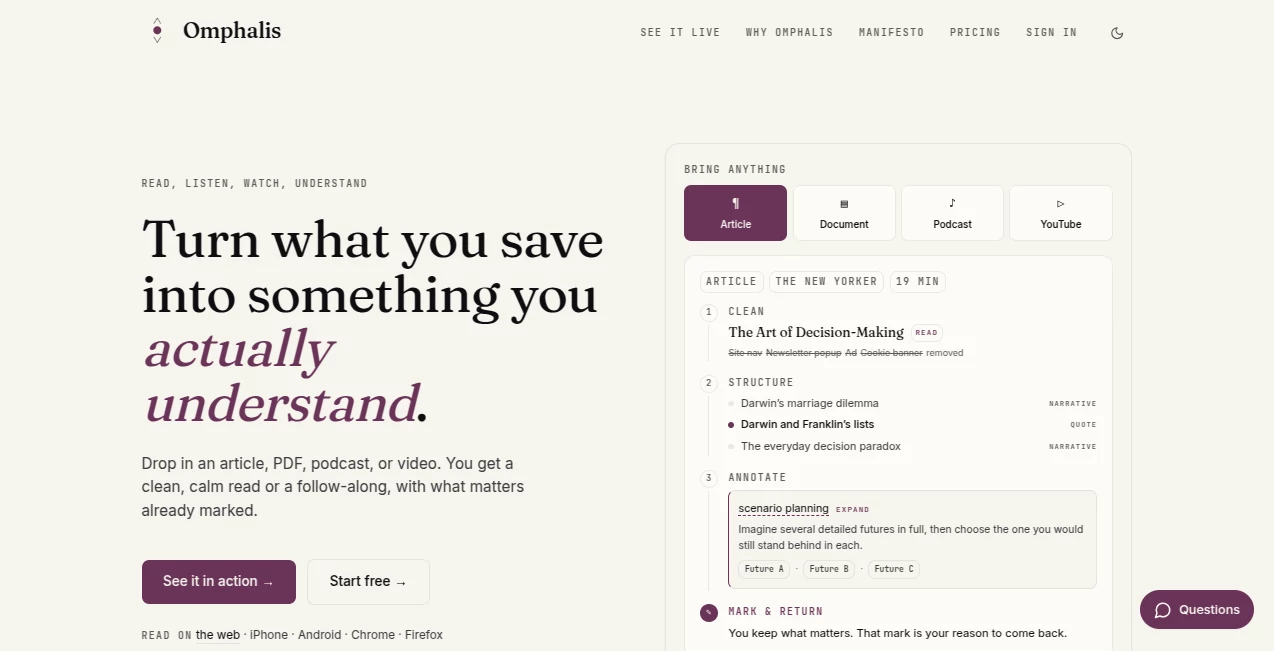
Omphalis is built around a simple but important idea: saving something is not the same as understanding it. Instead of turning an article, paper, podcast, or video into a short answer and sending you on your way, it helps you stay with the original material while making the difficult parts easier to navigate.
You can bring in articles, PDFs, EPUBs, Word documents, podcasts, YouTube videos, newsletters, notes, and voice recordings. The content is cleaned up first, then organized into a readable structure so you can see where the important ideas, arguments, evidence, and difficult sections are. The result feels closer to having a thoughtful reading companion than using another generic AI summarizer.
This approach is particularly useful for people who regularly deal with information they cannot afford to forget. A researcher working through papers, a student preparing for a difficult class, a writer collecting ideas, or a professional trying to make sense of long reports can all benefit from having important material structured and connected instead of buried in a growing folder of saved links.
Key Features
- Clean reading for articles, PDFs, EPUBs, Word documents, podcasts, and videos.
- Automatic structure that highlights key moments and the flow of longer content.
- Contextual explanations for complex terminology and difficult sections.
- Marks that preserve why a particular passage, timestamp, or idea mattered.
- Connections between important moments across different pieces of saved content.
- Natural-voice listening with position tracking.
- Spaces for keeping different areas of research and personal interests separate.
- Search based on meaning as well as traditional full-text search on supported plans.
- Browser extensions for saving and working with content directly from the web.
- Integration with ChatGPT and other clients through MCP.
User Interface
The interface is deliberately calm. Rather than surrounding a document with a collection of distracting controls, the experience focuses on the material itself. A long source can be cleaned up, its structure placed alongside the content, and useful explanations presented where they are relevant.
That matters when working with something such as a two-column academic paper. Instead of fighting with columns, footnotes, and fragmented reading order, you can work through a cleaner version while keeping the important context available.
The same philosophy carries into listening. A podcast or video can be followed through its cleaned transcript and important moments, making it easier to return to a specific idea later instead of scrubbing through an hour-long recording trying to remember where something was said.
Accuracy & Performance
The platform takes a source-first approach to AI assistance. Articles are stripped of unnecessary web clutter, PDF layouts are untangled, and audio and video content is transcribed before the system starts adding structure or explanations.
Its AI-generated annotations are intentionally presented as assistance rather than absolute authority. The goal is to help readers recognize difficult terms, important claims, dense passages, and useful points of return without pretending that an automated explanation should replace the original source.
For demanding research material, this distinction is valuable. A useful system should make a paper easier to enter without making the researcher believe that reading the paper is no longer necessary.
Capabilities
The platform handles several types of long-form material through dedicated processing pipelines. Articles can be cleaned and structured, academic PDFs can be reorganized into a more natural reading flow, and podcasts or videos can be converted into readable transcripts with important moments easier to locate.
One of its more interesting capabilities is the way it treats personal marks. Instead of considering every highlight equally, a mark represents something the reader deliberately wants to remember or revisit. Over time, those selected moments can become connected to ideas from other sources in the library.
There is also a course-building feature designed around real sources rather than simply asking an AI model to invent a curriculum from a prompt. Courses can be built from identified source material, with the available material considered before the learning path is created.
Security & Privacy
Privacy is treated as an important part of the product architecture. Each user's content is stored separately, with per-user database isolation. The service states that stored content and metadata are encrypted at rest.
The company also states that customer content is not used to train language models, including models provided by third parties in its processing pipeline. Users can inspect and remove the structured memory associated with their account, and the service provides full library export so users are not permanently locked into the platform.
Use Cases
Research and academic work: Dense papers become easier to approach when their sections, terminology, figures, references, and important passages are presented in a more usable reading order. Researchers can mark the parts that deserve attention and return to them later.
Students and lifelong learners: Instead of relying entirely on summaries, learners can work through the original material while receiving help around difficult terminology and concepts. Courses built from real sources can also provide a more structured route into unfamiliar subjects.
Writers: Writers often collect far more material than they eventually use. Keeping important marks connected to their original sources makes research easier to revisit when an idea resurfaces during drafting.
Professionals and decision-makers: Reports, interviews, articles, and presentations can be organized in a way that makes the important parts easier to find. This is particularly helpful when a decision depends on details that would disappear inside a conventional summary.
Podcast and video listeners: Long interviews and educational videos become easier to revisit when the important moments are identifiable rather than buried inside a timeline.
Pros and Cons
- Pros: Excellent approach to long-form content, strong support for research material, useful document cleanup, contextual explanations, meaningful annotations, cross-content connections, multiple input formats, browser extensions, and a genuine free tier.
- Pros: The product focuses on helping users understand and return to original sources rather than simply replacing them with generated answers.
- Pros: Data export, isolated storage, encryption at rest, and a stated no-training policy provide reassuring privacy features.
- Cons: The system is more useful when you actually want to engage with the source, so users looking only for instant summaries may prefer a simpler summarization tool.
- Cons: Advanced connections and higher-volume research workflows require paid plans.
- Cons: Processing is measured through comprehension units, meaning long PDFs and lengthy podcasts can consume more of the monthly allowance.
Pricing Plans
The service offers four main plans. The Free plan costs $0 and includes 100 comprehension units per month, 100 subscribed sources, 2 GB of storage, permanent library retention, Spaces, browser extensions, full-text search, and data export.
The Pro plan costs $9 per month or $90 per year. It increases the allowance to 300 comprehension units, provides 25 GB of storage and up to 1,000 subscribed sources, while adding features such as meaning-based discovery, lighter connections, and the ability to save items and add personal notes through supported assistant integrations.
The Premium plan costs $19 per month or $190 per year. It provides 600 comprehension units, 50 GB of storage, unlimited subscribed sources, full cross-content connections, and priority processing.
The Scholar plan costs $39 per month or $390 per year and is aimed at heavier research workloads. It provides 1,200 comprehension units, 100 GB of storage, unlimited assistant answers, and access to a library ingest API for custom scripts.
Annual subscriptions are listed at a 17% saving compared with monthly billing. Additional unit packs are also available, starting at $10 for 200 units.
How to Use It
- Create an account and begin with the free plan.
- Add an article, PDF, EPUB, Word document, podcast, YouTube video, newsletter, URL, RSS feed, note, or voice recording.
- Let the platform clean and process the source.
- Review the structured view to understand how the material is organized.
- Read or listen to the content while using contextual explanations when a section becomes difficult.
- Mark passages, ideas, or timestamps that are genuinely worth returning to.
- Organize material into separate Spaces when working across different subjects or projects.
- Return to your saved marks and explore connections between related sources as your library grows.
- Use the browser extension or supported integrations when you want to capture and revisit material directly from your normal workflow.
Comparison with Similar Tools
The main difference is its emphasis on comprehension rather than simply producing an output. A traditional summarizer tries to make a long source shorter. A general AI chatbot tries to answer questions about it. A note-taking application gives you a place to organize information yourself.
This approach sits somewhere earlier in the process. The source remains central. Its structure is exposed, difficult areas can be explained, and the reader decides what deserves to become a lasting mark.
Compared with tools such as Readwise, Pocket, or other read-later services, the emphasis goes beyond saving and resurfacing highlights. Compared with research assistants that turn uploaded sources into reports or audio summaries, the experience is designed around staying close to the original material. For users who want a personal knowledge system without having to manually construct every connection, that difference can be significant.
Conclusion
For anyone who feels surrounded by good information but struggles to turn that information into lasting understanding, this is a thoughtful alternative to the usual AI workflow. It does not ask the model to do all the thinking. Instead, it takes care of much of the mechanical work around reading, listening, organizing, explaining, and remembering while leaving judgment with the person using it.
The strongest part of the experience is the combination of clean source handling, visible structure, contextual assistance, deliberate marks, and connections that become more useful as the library grows. It is particularly compelling for researchers, students, writers, professionals, and serious readers who deal with long-form material regularly.
If your saved folder is full of articles you genuinely intended to understand someday, this kind of workflow offers a more practical way forward: bring the material in, see its shape, work through it, mark what matters, and make it possible to find that thinking again later.
Frequently Asked Questions (FAQ)
What types of content can I use?
You can work with articles, PDFs, EPUBs, Word documents, podcasts, YouTube videos, newsletters, personal notes, and voice notes. Content can be added through URLs, uploads, or RSS feeds.
Is there a free plan?
Yes. The Free plan costs $0 and includes a monthly allowance of comprehension units, storage, subscribed sources, Spaces, browser extensions, search, and permanent library access.
Does it replace reading the original source?
No. Its design is specifically centered on helping users stay with the original material. Structure, explanations, and summaries are intended to improve navigation and comprehension rather than encourage users to skip the source completely.
Can I use it for research papers?
Yes. Research papers are one of the strongest use cases. Two-column PDFs, figures, references, complex terminology, and dense sections can be processed into a more approachable reading experience.
Does it use my content to train AI models?
The service states that user content is not used to train language models. It also states that content is isolated per user and encrypted at rest.
Can I listen instead of reading?
Yes. Supported content can be narrated with natural voices, and the listening experience keeps your place so you can move between reading and listening more easily.
Does it work with ChatGPT?
Yes. Supported plans can use the library inside ChatGPT, and the platform also supports connections through MCP. Higher plans add the ability to save items and notes through supported assistant integrations.
Can I export my library?
Yes. The service states that users can export their saved content, marks, and notes and that the library is designed to remain portable rather than creating permanent lock-in.
Who is it best suited for?
It is particularly well suited to researchers, students, writers, teachers, professionals, and lifelong learners who regularly work with long-form information and want that knowledge to remain useful instead of disappearing into bookmarks and forgotten files.