
OpenHive
What is OpenHive?
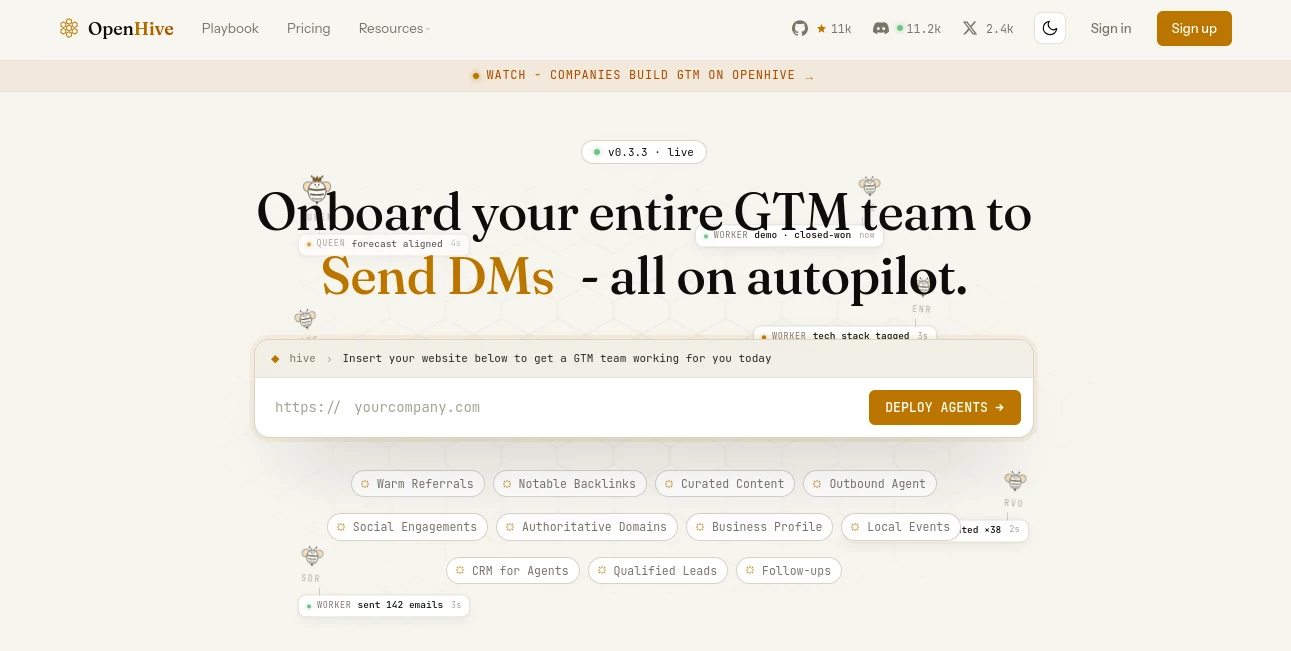
Open Hive takes a different approach to business automation. Instead of giving users another collection of isolated automation steps, it presents a digital team of AI agents that can work across the go-to-market process. The idea is simple: describe how you normally find prospects, build relationships, create outreach, or manage sales operations, and the system can turn that description into an agent-driven workflow.
This makes it particularly interesting for founders, sales teams, marketers, and small companies that have outgrown manual prospecting but do not want to spend their days connecting a long list of separate tools. The platform is designed around a Queen agent and a group of specialized workers, giving each worker a defined role, skill set, and scope.
Rather than behaving like a conventional chatbot, the platform is built to operate through a real browser and perform practical GTM tasks. Its website currently highlights lead discovery, referrals, backlink opportunities, content curation, outbound communication, CRM activity, social engagement, and follow-ups as areas where its agents can work.
Key Features
- AI agents for lead generation and GTM operations
- Automated ICP discovery and prospect research
- Market mapping and competitor intelligence
- Prospect list building and intent-signal research
- Personalized outbound email campaign preparation
- Referral, backlink, content, and social engagement workflows
- CRM synchronization and follow-up automation
- Browser-based execution for real-world web tasks
- Agent identities with configurable skills, experience, and roles
- Execution monitoring with replayable steps and cost controls
User Interface
The interface is built around the concept of a digital organization rather than a traditional automation dashboard. Users can think in terms of a Queen coordinating a group of workers, with each worker responsible for a particular part of the operation.
This structure is useful when a task involves several stages. For example, one worker can research prospects, another can enrich the information, another can prepare outreach, and another can synchronize results with a CRM. The visual organization makes the underlying automation easier to understand than a long chain of disconnected triggers and actions.
The platform also provides visibility into individual agent activity. Instead of simply seeing that an automation finished, users can inspect what happened during execution.
Accuracy & Performance
Performance is one of the more ambitious parts of the platform. The website reports 5x faster ramp-up from setup to qualified leads, 3x higher open rates through intelligent filtering and intent detection, and 5–7x better conversion with lower spam compared with template-based outbound approaches.
These figures are platform-reported rather than independent benchmarks, so they are best viewed as indicators of the intended performance rather than guaranteed results for every campaign.
The underlying infrastructure is also designed for unattended workloads. The company describes dedicated Hive cells using KVM and Firecracker, pinned CPU and memory, warm-pool scheduling, and sub-second cold starts. The site currently displays a 99.98% runtime uptime figure.
Capabilities
The strongest capability is the ability to turn a plain-language description of a GTM process into an operational agent team. Instead of manually constructing every condition and action, a user can explain how they identify potential customers and let the system organize the work.
Available playbooks cover tasks such as ICP discovery, market mapping, competitor monitoring, prospect list building, intent-signal scraping, and personalized email sequences. This gives teams a useful starting point instead of forcing them to build every workflow from scratch.
The agent model is also designed to scale beyond a single task. A colony can contain multiple workers with different responsibilities, while the Queen coordinates the broader objective.
Security & Privacy
Security is presented as part of the production infrastructure rather than an afterthought. The website lists SOC 2, GDPR, HIPAA, CCPA, and ISO 27001 alongside its security and privacy resources.
Another useful feature is execution observability. Users can replay steps, inspect decisions, compare changes, and apply spending limits at the colony, Queen, or task level. This is especially valuable for autonomous systems because understanding what an agent did can be just as important as getting the final result.
Use Cases
Sales teams can use the platform to discover prospects, research accounts, identify buying signals, prepare personalized outreach, and maintain follow-up processes. A founder who normally spends several hours each week searching LinkedIn, reviewing company websites, and writing introductory emails could delegate much of that research and preparation to a coordinated agent team.
Marketing teams can use it for competitor monitoring, market research, content curation, backlink discovery, and business-profile activities. The newsroom component can also generate company-focused coverage based on information available on an organization's website, creating another potential channel for visibility and authority building.
It can also be useful for businesses that already have a CRM but struggle to keep it updated. Agents can perform research and synchronize relevant information, reducing the amount of repetitive administrative work left for salespeople.
Pros and Cons
Pros
- Approaches automation as a digital team rather than a simple sequence of triggers.
- Strong focus on practical GTM activities such as prospecting, research, and outreach.
- Plain-language workflow creation can reduce the amount of manual automation setup.
- Detailed agent observability makes autonomous activity easier to inspect.
- Specialized workers can be assigned different responsibilities.
- Production infrastructure is designed for continuous and unattended execution.
- A free Community plan makes experimentation accessible.
Cons
- The platform can feel more sophisticated than a simple automation tool, particularly for first-time users.
- Results from outbound campaigns will still depend heavily on targeting, data quality, messaging, and the underlying market.
- Reported performance figures are company-provided and should not be treated as universal guarantees.
- Higher-volume operations require paid credits or custom business arrangements.
- Autonomous browser activity deserves careful review before being used for sensitive or high-impact workflows.
Pricing Plans
The Community plan is available for free and is positioned for prototyping and testing. It provides 20 credits per day and does not require a credit card.
The Pro plan starts at $20 per month and is designed for live business workflows. Available usage levels include 500 credits for $20, 1,000 credits for $30, 2,000 credits for $50, 5,000 credits for $100, 10,000 credits for $150, and 20,000 credits for $200.
For larger operations, the Business plan uses custom pricing and custom volume. Business customers can also connect their own API keys and bypass the standard credit system, according to the published pricing information.
How to Use It
- Create an account and start with the available workspace.
- Describe the GTM task or process you want the agent team to handle.
- Choose an existing playbook when one matches your objective.
- Configure the Queen and worker responsibilities around the desired outcome.
- Review the planned activity before allowing agents to execute important actions.
- Monitor execution, inspect individual steps, and review the resulting leads or business activity.
- Refine the agents, targeting, and instructions as your workflow develops.
Comparison with Similar Tools
Traditional automation platforms are excellent when a business already knows exactly which trigger should start an action and which application should receive the result. That approach can become cumbersome when the work requires research, judgment, browsing, personalization, and several connected steps.
This platform takes a more agent-oriented route. Instead of asking users to construct every step manually, it gives them a team structure with specialized workers and a coordinating Queen. The distinction becomes particularly noticeable in GTM processes where the path is not always identical for every prospect.
For a simple notification or straightforward data transfer, conventional automation may remain the easier choice. For multi-stage prospecting and revenue workflows, an autonomous agent approach can be considerably more flexible.
Conclusion
Open Hive is an ambitious option for businesses that want to move beyond basic workflow automation and experiment with AI agents performing real GTM work. Its combination of a coordinating Queen, specialized workers, browser-based execution, production infrastructure, and detailed observability gives the platform a distinctive personality.
The most compelling part is not any single feature. It is the attempt to turn an entire collection of repetitive sales and marketing responsibilities into a digital team. For founders and lean teams that spend too much time researching prospects, preparing outreach, updating systems, and chasing follow-ups, that approach could free up meaningful working hours.
At the same time, autonomous systems work best when their goals, permissions, and spending limits are clearly defined. Used thoughtfully, this can be a powerful addition to a modern GTM operation rather than simply another automation subscription.
Frequently Asked Questions (FAQ)
What is this platform designed for?
It is designed primarily for go-to-market operations, including lead generation, prospect research, outbound communication, referrals, content activities, CRM work, and follow-ups.
Can it find potential customers?
Yes. Its published playbooks include ICP discovery, prospect list building, market mapping, and research based on web and professional-network signals.
Can the agents work through a browser?
Yes. The platform describes an execution model in which agents can operate a real browser and work through pages in a way similar to a human user.
Is there a free plan?
Yes. The Community plan is free and includes 20 credits per day for prototyping and testing.
Can businesses use their own API keys?
According to the published pricing information, custom model-provider API keys are available to Business users.
Can I monitor what the agents do?
Yes. Execution observability allows users to inspect activity, replay steps, review decisions, and control costs at different levels of the agent organization.
Is it suitable for a small business?
It can be. The free plan provides a low-risk way to experiment, while the agent structure can be expanded when a company has more complex GTM requirements.
AI Lead Generation , AI Sales Assistant , AI CRM Assistant , AI Workflow Management .
These classifications represent its core capabilities and areas of application. For related tools, explore the linked categories above.

OpenHive Alternatives Product
GTM API

Recruit CRM

AILeadz.io

Chatzy AI

LSGRO

Duct Tape 3

Weekly Brief

Emergent

Distro