


















OpenBudget
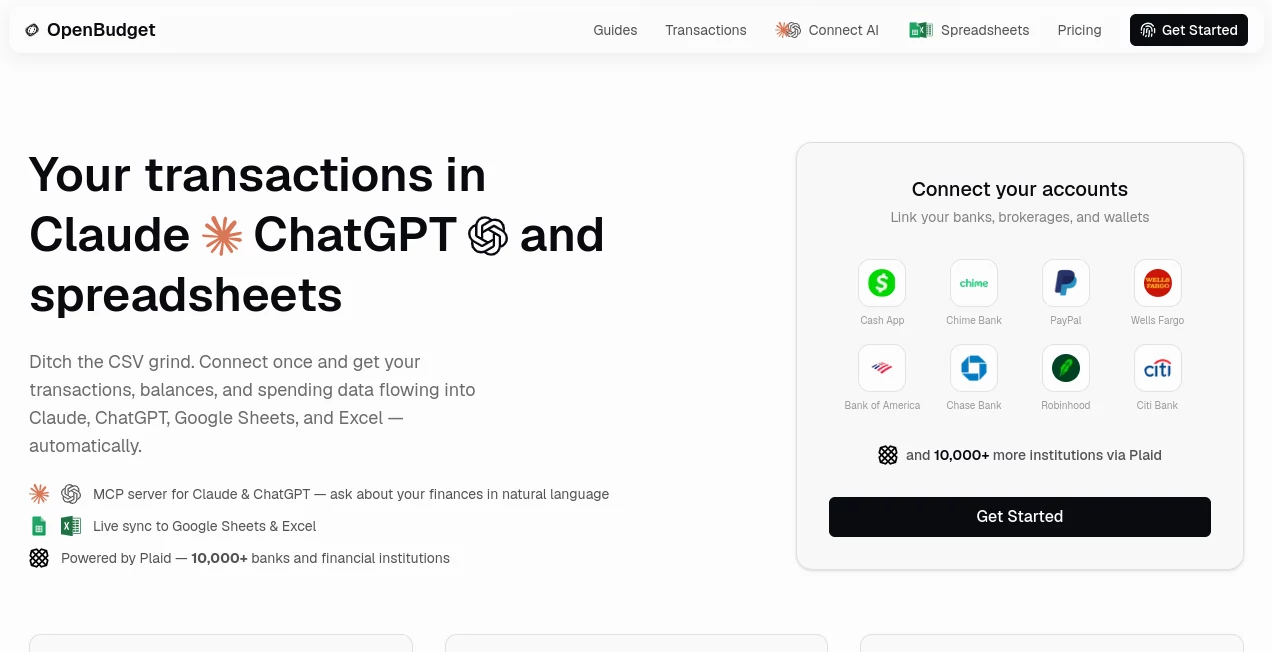
What is OpenBudget?
I used to dread monthly budgeting. Downloading CSVs, cleaning them up, pasting into spreadsheets, then trying to ask ChatGPT questions about my spending only to realize it had no idea what my actual numbers were. Then I found this tool and everything clicked into place. You connect your accounts once through Plaid, and suddenly your transactions, balances, and spending data flow automatically into Claude, ChatGPT, Google Sheets, and Excel. No more manual exports. No more copy-paste torture. Just clean, live data ready for AI to analyze or for you to build whatever reports you want.
Introduction
Personal finance should feel empowering, not exhausting. This platform bridges the gap between your real bank accounts and the tools you already love using. Powered by Plaid, it securely connects to over 10,000 financial institutions and pushes your transaction data straight into AI assistants via MCP and into your favorite spreadsheets. The result is personal finance that actually talks back — you can ask natural questions about your spending habits and get thoughtful answers grounded in your real numbers. It’s the kind of simple but powerful idea that makes you wonder why it didn’t exist sooner.
Key Features
User Interface
The setup is delightfully straightforward. Connect your accounts through Plaid, choose where you want the data to go (Claude, ChatGPT, Sheets, Excel), and you’re done. The dashboard stays clean and focused, showing recent activity and connection status without clutter. Everything feels designed for real people who just want their finances to work in the background while they focus on life.
Accuracy & Performance
Transactions sync reliably and are automatically categorized. The live connection means your AI assistants always have up-to-date information, leading to far more accurate insights than uploading old CSVs. In practice, it handles everything from daily coffee runs to large transfers without missing a beat, and the data flows smoothly into spreadsheets with custom columns and formulas intact.
Capabilities
You get an MCP server for seamless Claude and ChatGPT integration, automatic live sync to Google Sheets and Excel, smart auto-categorization of transactions, and the ability to ask conversational questions about your budget and trends. Build any report you can imagine — spending breakdowns, monthly comparisons, category deep-dives — all powered by your actual live data. It’s flexible enough to match how you personally think about money.
Security & Privacy
Security is taken seriously with Plaid handling bank connections and strong encryption throughout. You control exactly what data flows where, and the platform doesn’t store unnecessary information. For anyone nervous about sharing financial data, the transparent and controlled approach provides real peace of mind.
Use Cases
A freelancer connects all accounts and asks Claude “How much did I spend on software subscriptions this quarter?” getting an instant, accurate answer with breakdowns. A couple building their first joint budget syncs everything to a shared Google Sheet that updates automatically every day. Someone trying to get serious about saving uses ChatGPT to analyze trends and suggest realistic cuts based on real spending patterns. It works beautifully for anyone tired of disconnected financial tools and wants everything talking to each other intelligently.
Pros and Cons
Pros:
- Eliminates the painful CSV export and import dance completely.
- Live, accurate data makes AI insights actually useful.
- Works with tools you already use — Claude, ChatGPT, Sheets, Excel.
- Smart auto-categorization saves hours of manual tagging.
- Simple, transparent pricing with no long-term lock-in.
Cons:
- Relies on Plaid-supported banks (though coverage is excellent in supported countries).
- Advanced custom reporting still benefits from some spreadsheet knowledge.
Pricing Plans
It offers a straightforward, fair model that scales with your needs. The free tier lets you test the waters with limited connections, while paid plans unlock unlimited accounts, full AI integration, and higher sync frequency. Many users find it pays for itself quickly through time saved and better financial decisions enabled by accurate, always-available data.
How to Use OpenBudget
Sign up, connect your bank accounts securely through Plaid, choose your destinations (AI assistants and/or spreadsheets), and let the sync begin. Once connected, ask your favorite AI natural questions about your spending or open your spreadsheet to see fresh data flowing in. You can adjust categories, build custom views, or simply let the system run quietly in the background. The whole setup takes minutes and then mostly stays out of your way.
Comparison with Similar Tools
Traditional budgeting apps often force you into rigid categories and dashboards. Manual CSV workflows are time-consuming and error-prone. This platform stands out by staying flexible and connecting directly to the AI and spreadsheet tools you already trust. It’s less about replacing your workflow and more about supercharging it with live, intelligent data connections that actually make financial life easier.
Conclusion
Managing money shouldn’t feel like a second job. This tool removes the friction between your real financial life and the tools you use to understand it. By bringing live transaction data into AI conversations and spreadsheets, it turns abstract numbers into actionable insights and real conversations. For anyone serious about getting a clearer picture of their finances without the usual hassle, it’s one of the most practical and satisfying solutions available right now.
Frequently Asked Questions (FAQ)
How secure is the bank connection?
Extremely secure — it uses Plaid, the same trusted infrastructure many major apps rely on.
Do I need to keep my computer open for syncs?
No — syncs happen automatically in the cloud.
Can I use it with multiple bank accounts?
Yes, you can connect checking, savings, credit cards, and investment accounts.
Is the AI analysis private?
Your data only goes to the AI tools you explicitly connect, and you control the access.
What if I want to stop using it?
You can disconnect accounts and delete data at any time — no long-term lock-in.
Other , AI Productivity Tools , AI Research Tool , AI Notes Assistant .
These classifications represent its core capabilities and areas of application. For related tools, explore the linked categories above.

OpenBudget Alternatives Product

Flyback.ai

Linkflare

Resyfy AI

Roipad

Metal

SalaryHow

Omphalis

InPage AI

Speech Notes
