


















Opolyo
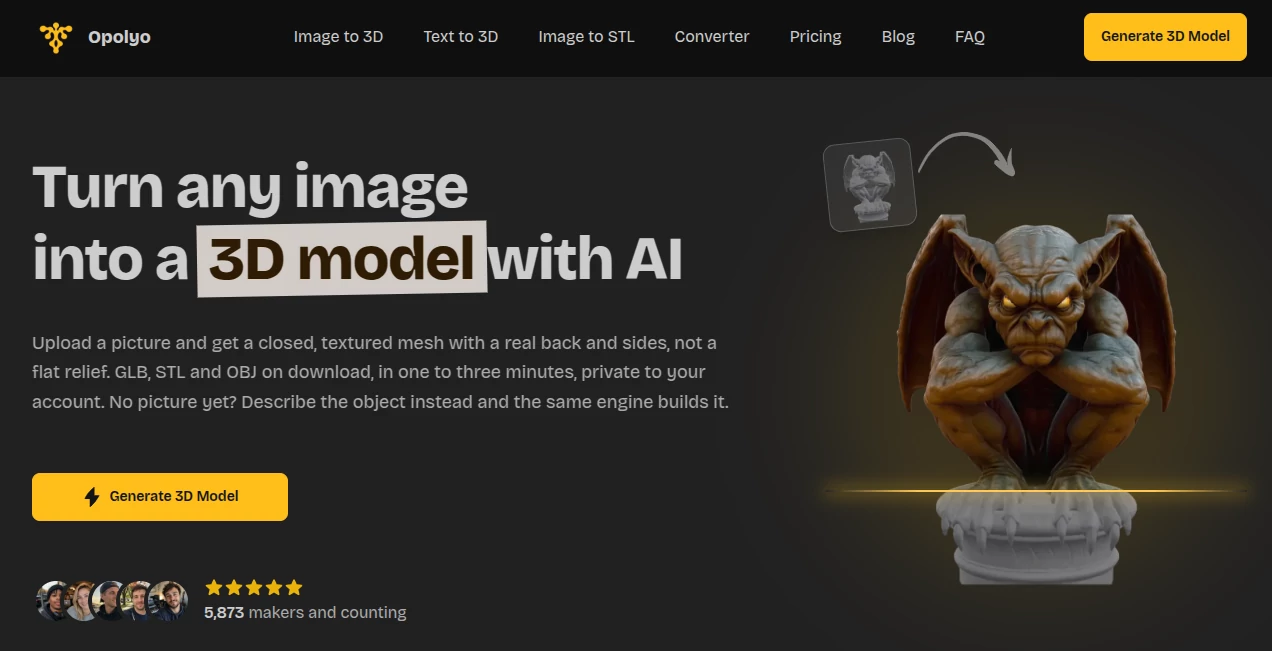
What is Opolyo?
Turning a photograph into a usable 3D asset usually means spending hours on modeling, texturing, cleanup, or outsourcing the job. Opolyo takes a much shorter route: upload an image and generate a textured 3D model directly in the browser. It can also work from a written description when there is no reference image to start with.
The platform is built around practical 3D output rather than simply creating something that looks good in a preview. Generated models can include real depth, a back and sides, while users can control texture quality, topology and polygon limits before generation. The result can then be downloaded in formats suited to 3D printing, games, design work and other production workflows.
For someone who has a product photo, character reference, figurine, prop or concept that needs to become a 3D asset, this approach can remove a large amount of repetitive modeling work. Generation typically takes around one to three minutes, depending on the selected settings.
Key Features
- AI image-to-3D model generation from JPG, PNG and WEBP images.
- Text-to-3D generation for objects that do not have a reference image.
- Closed meshes with back, sides and depth instead of simple flat reliefs.
- Standard and Ultra texture quality options.
- Shaded and PBR texture materials.
- Triangle or quad topology selection.
- Polygon budgets ranging from 500 to 2,000,000 faces.
- GLB output with baked-in PBR textures.
- STL and OBJ conversion directly in the browser.
- Additional conversion to formats including FBX, glTF, USDZ and 3MF.
- Commercial licensing on paid plans and credit packs.
- Automatic credit refunds when a generation fails.
User Interface
The interface keeps the workflow focused on the task rather than surrounding the user with unnecessary controls. You can upload an image, select the generation settings and see the credit cost before starting. The workspace also provides a live viewport while the model is being generated, which makes it easier to understand what is happening instead of waiting without feedback.
Image uploads can be up to 10 MB, with JPG, PNG and WEBP supported. A clear subject against a simple background is recommended for the best results. There is also a text-based route for users who want to create something from an idea rather than an existing photograph.
Accuracy & Performance
One of the more useful aspects of the platform is that it attempts to reconstruct the complete object rather than simply projecting a photograph onto a shallow surface. This matters when the model needs to be rotated, imported into another application or prepared for printing.
Users can set a polygon budget between 500 and 2,000,000 faces, giving them more control over the balance between detail and model complexity. Triangle topology works well for many general uses, while quad topology is more appropriate when the model will later be edited or animated.
Generation generally takes about one to three minutes. Higher polygon counts and more demanding texture settings can increase the processing time, so the ability to choose those settings before generation is particularly useful for managing both output quality and credit usage.
Capabilities
The platform covers several stages of a typical 3D workflow. A single image can become a textured model, while a written prompt can be used when the desired object exists only as an idea. Text generation also supports negative prompts, which can help prevent unwanted elements from repeatedly appearing in the result.
The output is flexible enough for different workflows. GLB files are produced with PBR textures baked in, while STL and OBJ can be converted in the browser during download. The separate converter can also handle formats such as FBX, glTF, USDZ and 3MF.
For game development, quad topology, adjustable face limits and PBR maps can make the generated assets easier to prepare for an existing pipeline. FBX conversion is available for workflows involving Unity or Unreal, while USDZ is useful for Apple-oriented AR projects.
Security & Privacy
Privacy is handled in a straightforward way. Generated models are private to the user's account by default, and there is no public gallery that requires an opt-out. The service also states that it does not claim ownership of uploaded images or generated models.
Paid plans and credit packs include a commercial license, including client work and products that users sell. This makes the service more suitable for freelancers, studios and small businesses than a tool intended only for casual experimentation.
Use Cases
There are many practical situations where converting an image into a 3D asset can save considerable time. A game developer can turn reference images into props, characters or environmental objects and then refine the result inside a traditional 3D application.
3D printing is another natural use case. A photograph of a figurine, product or physical object can provide the starting point for a closed mesh that can be exported as binary STL and checked in a slicer before printing.
Designers can also use generated models during product development, interior concepts and visual exploration. Instead of modeling every reference object from scratch, they can create a rough asset quickly and spend their time refining the details that actually matter.
For creators, the text-to-3D workflow opens another possibility. A fictional creature, prop or character that does not exist in the real world can be described and turned into a starting model. The result may still need artistic cleanup, but it can provide a useful foundation within minutes.
Pros and Cons
Pros:
- Creates complete 3D meshes rather than simple image reliefs.
- Supports both image-based and text-based generation.
- Offers unusually broad control over polygon count.
- Provides both triangle and quad topology options.
- Supports PBR textures and several useful export formats.
- Models generated through paid options include commercial licensing.
- Failed generations automatically return the spent credits.
- Works directly in the browser without requiring modeling software to generate the initial asset.
Cons:
- There is no free tier or free trial.
- Complex models may still require manual cleanup after generation.
- Image quality and composition can strongly affect the final result.
- Higher-detail generations consume more credits.
- Text-based generation is less precise than starting from a clear photograph of a specific object.
Pricing Plans
The pricing structure is credit-based, with monthly subscriptions designed for different levels of usage. There is currently no free version or trial, but the workspace shows the cost of the selected generation settings before the user commits credits.
The Start plan costs $19.99 per month and includes 160 credits, equivalent to up to 16 standard generations. It includes Standard and Ultra PBR textures, GLB, STL and OBJ export, the built-in format converter, automatic refunds for failed generations, a commercial license and email support.
The Build plan costs $39.99 per month and provides 360 credits, equivalent to up to 36 standard generations. It keeps the same core features while offering substantially more monthly generation capacity.
The Scale plan costs $89.99 per month and includes 900 credits, or up to 90 standard generations. It is aimed more at studios and print farms, with the lowest cost per credit and priority email support with a stated 24-hour response time.
Subscription credits reset at the end of each billing month. One-off credit packs, where available, remain valid for 365 days, and the system uses credits closest to expiration first.
How to Use Opolyo
Start by choosing whether you want to work from an image or a text description. For an existing object, an image is generally the better choice because it gives the system a specific silhouette and visual reference.
Upload a JPG, PNG or WEBP image of up to 10 MB. A single clear subject filling most of the frame and placed against a relatively plain background will usually provide a better starting point than a busy photograph containing several objects.
Before generation, choose the texture quality, material, topology and polygon budget. The workspace displays the credit cost for the selected configuration before you start, allowing you to adjust the settings according to the project rather than discovering the cost afterward.
Once generation begins, the model is built in the browser workspace. After roughly one to three minutes, depending on the settings, you can inspect the result and download the model. GLB is available directly from the generator, while STL and OBJ are converted in the browser at download time.
If you are starting from an idea instead of a photograph, enter a focused description of one object, including its shape, material and style. Negative prompts can also be used to tell the generator which unwanted elements should be avoided.
Comparison with Similar Tools
AI 3D generation tools often look similar at first glance because many of them promise to transform a picture or prompt into a model. The practical difference is usually found in the amount of control available after the initial generation.
This platform stands out by combining image-to-3D and text-to-3D workflows with adjustable topology and polygon limits. That makes it more interesting for users who intend to do something with the model afterward rather than simply viewing a generated object.
The export options are another advantage for production workflows. A creator working on a game, a designer preparing an asset, or someone making a physical print can choose a format that fits the next stage of the process. It is still important to inspect and potentially refine AI-generated geometry before using it in a demanding professional project, but having control over topology, polygon count and materials gives users a useful starting point.
Conclusion
AI-generated 3D assets are becoming much more practical when the technology is paired with controls that designers actually need. This platform takes that approach by combining quick generation with choices around textures, topology, polygon count and export formats.
Its strongest use case is probably the creator who already has a reference image and wants a workable 3D starting point without building the entire object manually. The text-based workflow is useful as well, particularly for concepts and objects that do not exist yet.
It is not a replacement for experienced 3D artists in every situation. Detailed commercial assets may still benefit from manual modeling, retopology and cleanup. But for prototypes, game props, 3D printing projects, visual concepts and rapid asset creation, the ability to go from a picture or sentence to a usable mesh in minutes can be a significant time saver.
Frequently Asked Questions (FAQ)
Is there a free version?
No. The service currently does not offer a free tier or free trial because each generation requires GPU processing. Instead, the workspace shows the credit cost before generation.
How many credits does one generation use?
A standard-texture generation costs 10 credits whether it starts from an image or a text prompt. Higher texture quality, quad topology, larger polygon budgets and other options can increase the credit cost.
Can the generated models be used commercially?
Yes. Models created through paid plans or credit packs come with a commercial license, including client projects and products that users sell.
Who owns the generated models?
The service states that users retain ownership of their generated models and uploaded images and that it does not claim ownership of them.
Are generated models private?
Yes. Generations are private to the user's account by default, and there is no public gallery that users need to opt out of.
What file formats are supported?
GLB is produced directly with baked-in PBR textures. STL and OBJ are converted in the browser, while the converter supports additional formats including FBX, glTF, USDZ and 3MF.
Can I use the models for 3D printing?
Yes. Generated models are created as closed meshes and can be exported as binary STL. It is still recommended to preview the model in your preferred slicer before starting a long print.
Can I control the polygon count?
Yes. The polygon budget can be set from 500 up to 2,000,000 faces. This gives users more control over the balance between detail and file complexity.
Is text-to-3D available?
Yes. You can describe an object in text and generate a 3D model without having a reference photograph. The text workflow also supports negative prompts and fixed seeds for repeatable results.
How long does generation take?
Most generations take approximately one to three minutes. Processing time varies according to polygon count and texture quality.
What type of image produces the best result?
A clear image containing one main subject, filling much of the frame and placed against a simple background, is generally recommended. Product photographs, concept art and clean line drawings can all be used.
AI 3D Model Generator , AI Text to 3D , AI Image to 3D Model .
These classifications represent its core capabilities and areas of application. For related tools, explore the linked categories above.

Opolyo Alternatives Product
Project Genie

Pixal3D

genie3
text to 3d w…

ModelsLab

Image to STL

insMind

Image to Thr…
volume shader
