
OralSlides
What is OralSlides?
Creating a presentation is only one part of effective communication. Many teams spend hours preparing slides but struggle to turn those slides into engaging content that people can watch anytime. OralSlides helps solve this challenge by transforming existing PowerPoint presentations into professionally narrated videos without requiring users to rebuild their decks from scratch.
The platform uses AI to understand slide content, create narration scripts, add natural voiceovers, and export the final result as a shareable MP4 video. It is designed for professionals, educators, sales teams, trainers, and anyone who wants to make presentations easier to consume asynchronously.
Instead of replacing your original presentation, the tool keeps your existing slides intact and adds a storytelling layer on top. This makes it especially useful for teams that already have valuable PowerPoint resources but want a faster way to distribute knowledge through video.
Key Features
User Interface
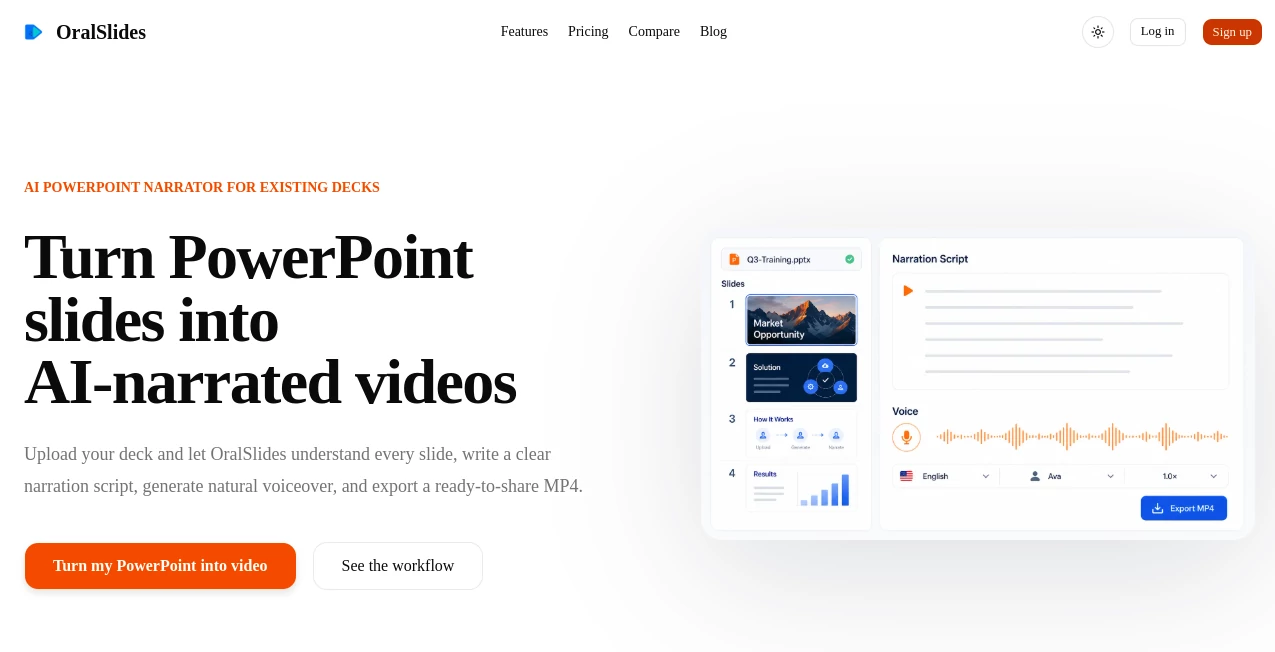
The interface focuses on simplicity and a straightforward workflow. Users can upload a PowerPoint file, review the generated narration, adjust details when needed, select a preferred voice, and export the completed video.
The slide-first approach makes the experience familiar for anyone who already works with presentations. There is no complicated video timeline or advanced editing process to learn, allowing users to move from a static deck to a narrated video quickly.
Accuracy & Performance
The platform uses multimodal AI technology to analyze presentation elements including text, charts, images, layouts, and the overall structure of slides. This allows the generated narration to follow the context of the presentation instead of simply reading visible text.
The system is designed to maintain the original message and flow of the presentation while creating a more natural viewing experience. Users can review scripts before exporting, giving them control over the final result.
Capabilities
- Convert PowerPoint presentations into narrated MP4 videos
- Generate AI-written narration scripts based on slide content
- Create voice narration with multiple voice options
- Support subtitle generation for easier accessibility
- Preserve original slide designs and branding
- Export videos in high-quality formats
- Support multiple narration languages
- Allow users to update individual slides without rebuilding the entire video
Security & Privacy
Protecting presentation content is important for businesses and organizations. The platform is designed around a workflow where users maintain control over their uploaded materials and can review generated content before sharing the final video.
This approach is useful for companies working with internal training materials, sales presentations, educational content, and confidential business updates.
Use Cases
The tool can support a wide range of professional and educational scenarios where presentations need to become more engaging and accessible.
- Sales Teams: Convert product decks into follow-up videos that customers can watch after meetings.
- Employee Training: Transform onboarding presentations into reusable learning materials.
- Education: Turn classroom slides into narrated lessons for remote learners.
- Marketing: Create presentation-based videos for campaigns, product explanations, and announcements.
- Business Updates: Share company reports and internal presentations without scheduling additional meetings.
- Startup Founders: Present investor materials through polished narrated videos.
Pros and Cons
Pros
- Works directly with existing PowerPoint presentations
- Saves time compared with manual video production
- Keeps original slide designs and structure
- Generates narration automatically
- Useful for teams that need asynchronous communication
- Simple workflow with minimal learning curve
Cons
- Best results depend on the quality of the original presentation
- Users may still want to edit scripts for highly specialized topics
- Advanced video editing features are not the main focus
Pricing Plans
The platform offers different plans designed for users with different presentation needs.
- Free Plan: Includes limited page credits, watermark branding, 720p MP4 export, and a default voice option.
- Starter Plan: Provides more monthly credits, removes watermark, supports 1080p export, offers additional voices, and includes subtitle options.
- Plus Plan: Designed for heavier usage with higher monthly page limits and the same professional export capabilities.
A free option allows users to test the workflow before upgrading to a paid subscription.
How to Use OralSlides
Creating a narrated presentation video requires only a few simple steps:
- Upload a PowerPoint presentation.
- Let the AI analyze the slides and create a narration script.
- Review and adjust the generated script if needed.
- Select a preferred voice and language.
- Generate and export the final MP4 video.
The process is designed to help users move from presentation file to finished video without dealing with traditional recording equipment or editing software.
Comparison with Similar Tools
Many AI presentation tools focus on creating new slides from text prompts. This platform takes a different approach by focusing on existing PowerPoint content and enhancing it with narration.
For teams that already have professional decks, this workflow can be more practical than rebuilding presentations inside another platform. It fills the gap between traditional slides and modern video communication by adding voice, timing, and storytelling while keeping the original design.
Conclusion
OralSlides provides a practical solution for anyone who wants to get more value from existing presentations. By combining AI-generated scripts, voice narration, and simple video export, it helps businesses, educators, and creators turn static slides into content that is easier to watch and share.
For organizations looking to improve training, sales communication, or internal knowledge sharing, this approach offers a faster alternative to recording presentations manually. It is a useful addition for anyone who believes a good presentation should continue working even after the meeting ends.
Frequently Asked Questions (FAQ)
What type of files can be used?
The platform is designed primarily for PowerPoint presentations, allowing users to transform existing PPTX files into narrated videos.
Can I edit the generated narration?
Yes. Users can review and refine the generated script before creating the final video.
Does it create a new presentation design?
No. The main purpose is to preserve the original slides and add narration, timing, and video capabilities.
Can I create videos in different languages?
Yes. The platform supports multiple narration languages and voice options.
Who can benefit from this tool?
Sales professionals, trainers, educators, marketers, founders, and remote teams can use it to convert presentations into reusable video content.
AI Video Generator , AI Text to Speech , AI Presentation Generator , AI Productivity Tools .
These classifications represent its core capabilities and areas of application. For related tools, explore the linked categories above.

OralSlides Alternatives Product

Veo 3 Flow

Nifty

Seedance 2.0

lyric video …

Seedance 2.0…

Hairstyle An…

Qwen3 TTS

Resyfy AI

Veo