OrbitMeet
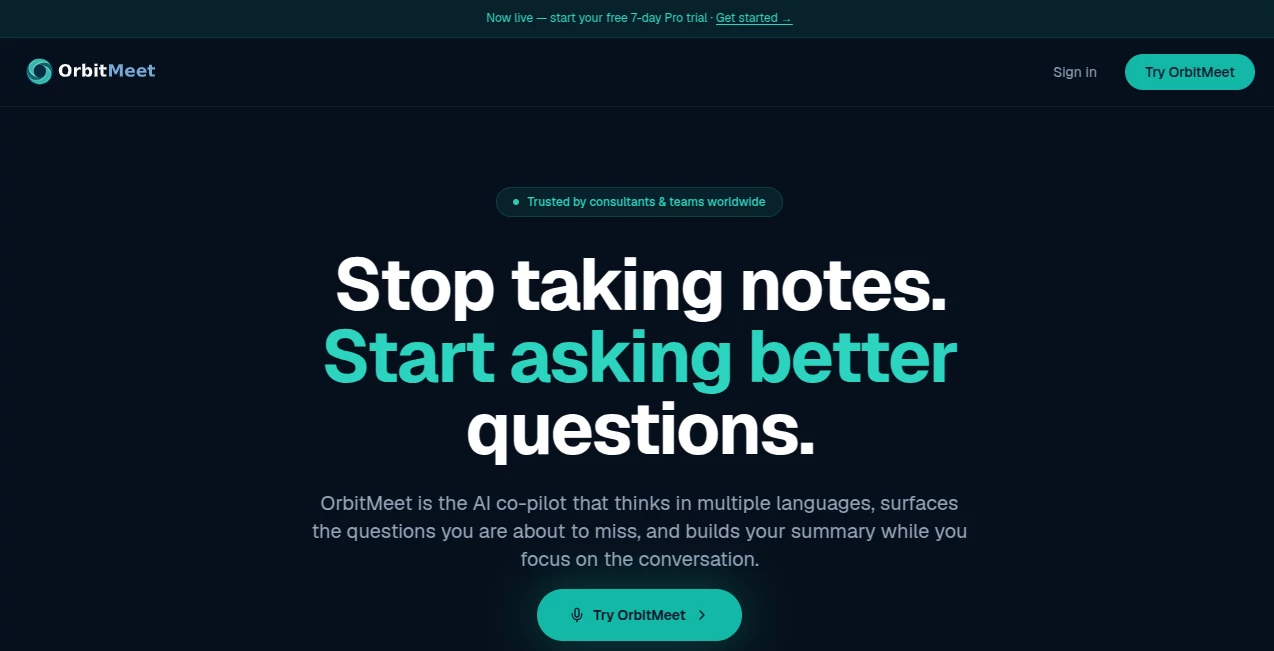
What is OrbitMeet?
Modern meetings move fast, especially when multiple people, languages, and action items are involved. Keeping up with every discussion while taking detailed notes often means missing valuable insights. This intelligent meeting assistant changes that experience by listening in real time, organizing conversations, highlighting important moments, and helping professionals stay fully engaged without worrying about documentation.
Designed for consultants, founders, remote teams, and multilingual professionals, the platform works directly in a web browser without requiring plugins or complicated installation. Whether conversations happen in Zoom, Microsoft Teams, Google Meet, or even face-to-face meetings, it captures discussions, creates structured summaries, identifies action items, and helps users leave every meeting with clear next steps instead of scattered notes.
One feature that truly stands out is its ability to provide live coaching during conversations. Rather than acting as a passive transcription tool, it actively suggests meaningful questions that may help uncover overlooked details, making discussions more productive and thoughtful. Combined with multilingual understanding and automatic meeting documentation, it offers a refreshing approach to business communication that feels practical from the very first meeting. These capabilities are described on the official product website and focus on improving meeting quality rather than simply recording conversations. :contentReference[oaicite:0]{index=0}
Key Features
User Interface
The browser-based interface keeps everything simple. Starting a session requires only a single click, allowing users to focus on the conversation instead of software configuration. Live transcripts, AI suggestions, summaries, and detected action items are presented in an organized layout that remains easy to follow even during lengthy meetings. Since nothing needs to be installed, onboarding is remarkably quick for both individuals and teams.
Accuracy & Performance
Real-time transcription is combined with automatic speaker tracking, meeting summaries, and action item detection to reduce manual work. The platform continuously analyzes conversations while generating useful follow-up information before the meeting even ends. Its multilingual capabilities also allow conversations to switch naturally between supported languages without requiring manual adjustments, making it especially useful for international teams. :contentReference[oaicite:1]{index=1}
Capabilities
The platform goes well beyond transcription. It automatically creates meeting summaries, identifies commitments, drafts follow-up documents, highlights risks, detects decisions, and generates actionable task lists. Context documents can also be uploaded before meetings so the assistant understands the background and produces more relevant suggestions throughout the discussion.
Security & Privacy
Because everything operates directly within the browser without additional meeting bots or complicated installations, the workflow remains straightforward and less disruptive for participants. Users maintain access to searchable meeting history while exported summaries and documents can be shared in familiar formats such as Word or PDF. :contentReference[oaicite:2]{index=2}
Use Cases
Independent consultants can confidently manage client meetings while ensuring no commitment is forgotten. Startup founders benefit from automatically tracking investor discussions and partnership negotiations. Distributed teams gain a searchable knowledge base that preserves important decisions across every meeting.
Project managers can reduce administrative work after recurring meetings, while multilingual professionals can comfortably switch between English, French, and Spanish without interrupting the conversation. Customer success teams, agencies, recruiters, educators, and business leaders can all save valuable time by replacing manual note-taking with automated documentation.
Pros and Cons
Pros
- Works directly in the browser with no installation required.
- Real-time AI coaching improves meeting quality.
- Excellent multilingual meeting support.
- Automatically generates summaries and follow-up documents.
- Detects action items and important decisions.
- Compatible with major meeting platforms and in-person conversations.
- Searchable meeting history improves long-term knowledge management.
Cons
- Internet connectivity is required.
- Transcript quality depends on audio clarity.
- Advanced capabilities are reserved for paid plans.
Pricing Plans
A free plan is available and includes up to five meetings each month, multilingual support, AI coaching, transcripts, and post-meeting documentation. Users can also begin with a seven-day Pro trial without providing a credit card.
The Pro subscription is priced at approximately CAD $20.50 per month and unlocks unlimited meeting minutes, unlimited summaries, searchable history, context document uploads, Word and PDF exports, and priority customer support. :contentReference[oaicite:3]{index=3}
How to Use OrbitMeet
Open the platform in your preferred browser and begin a new meeting session. Optionally upload background documents to provide context before the conversation starts. During the meeting, review live transcripts, AI-generated suggestions, and automatically detected action items while remaining focused on participants.
After the discussion ends, review the generated summary, verify tasks and decisions, then export professional documentation for clients, teammates, or stakeholders. The searchable meeting archive also makes it easy to revisit previous conversations whenever necessary.
Comparison with Similar Tools
Many meeting assistants concentrate almost entirely on transcription and post-meeting summaries. This platform distinguishes itself by combining live coaching, multilingual intelligence, automatic question suggestions, browser-based accessibility, and real-time action item detection into a single workflow. The ability to work across multiple meeting platforms without plugins also lowers the barrier to adoption for organizations that use different communication tools.
Conclusion
For professionals who spend a significant portion of their week in meetings, having an assistant that captures conversations while encouraging better discussions can dramatically improve productivity. Instead of simply producing transcripts, the platform helps users think more clearly during conversations, identify missed opportunities, and finish meetings with structured documentation already prepared.
Its combination of multilingual support, browser-based simplicity, AI coaching, automatic summaries, and practical follow-up generation makes it a compelling solution for consultants, business teams, founders, and organizations that value efficient collaboration. Rather than becoming another recording tool, it becomes an active participant that helps meetings produce better outcomes.
Frequently Asked Questions (FAQ)
Does it require software installation?
No. Everything runs directly inside a web browser without installing plugins or desktop applications.
Can it work with popular meeting platforms?
Yes. It supports meetings held through Zoom, Microsoft Teams, Google Meet, as well as in-person conversations.
Does it support multiple languages?
Yes. It is designed for multilingual meetings and can understand supported languages during the same conversation.
Can meeting summaries be exported?
Yes. Users can export summaries and related meeting documents in formats such as Word and PDF.
Who benefits most from this platform?
Consultants, founders, project managers, distributed teams, customer-facing professionals, and anyone who regularly participates in meetings can gain significant productivity benefits.
AI Meeting Assistant , AI Productivity Tools , AI Team Collaboration , AI Speech to Text .
These classifications represent its core capabilities and areas of application. For related tools, explore the linked categories above.

OrbitMeet Alternatives Product

Oasis

AnyToURL

VisualGPT

Maestra

PDF Inspector

Nifty

Calculadora …

Productivity…

Voza Transcr…